1. Introduction
This manual provides essential information for the safe and effective operation of your Line 6 Spider V 120 MKII 120-Watt Combo Guitar Amplifier. Please read this manual thoroughly before using the product and retain it for future reference.
The Spider V 120 MKII amplifier offers a versatile platform for guitarists, providing a wide array of tones and effects suitable for various musical demands. It features advanced modeling technology to deliver authentic amplifier sounds and a comprehensive suite of tools for practice and performance.
2. Key Features
- Classic Speaker Mode: Provides an organic sound and feel, emulating traditional amplifier characteristics.
- Extensive Tone Library: Over 200 amps, cabs, and effects, including new artist, iconic song, and classic amp presets.
- Integrated Practice Tools: Built-in tuner, metronome, jam-along drum loops, and a 60-second looper.
- Wireless Receiver: Built-in receiver compatible with Line 6 Relay transmitters for cable-free performance (transmitter sold separately).
- USB Audio Interface: Connects directly to a computer for recording and tone editing.
- FBV Foot Controller Support: Optimized for use with FBV 3 foot controllers for hands-free control.
3. Setup
3.1 Basic Connections
Before powering on the amplifier, ensure all connections are secure.
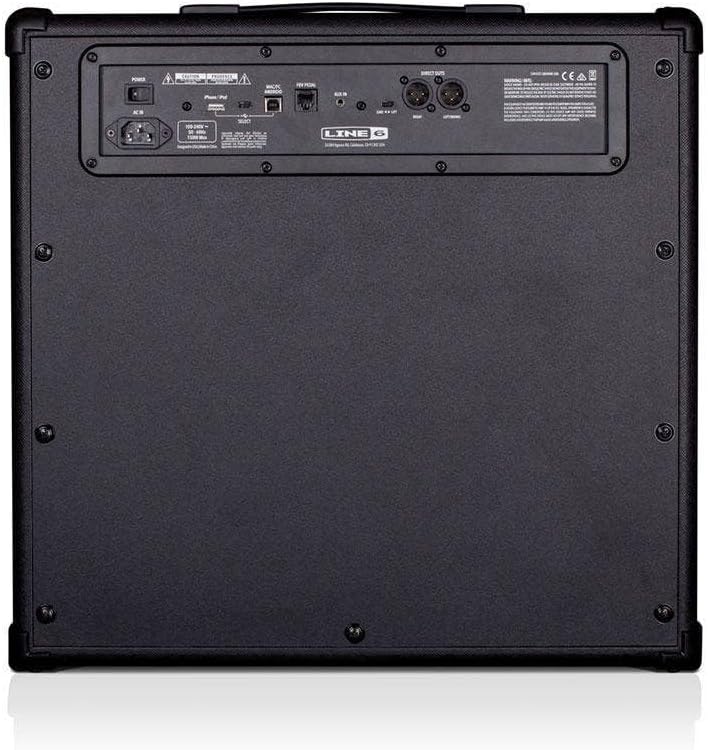
- Power Connection: Connect the supplied power cord to the AC IN port on the rear of the amplifier and then to a suitable power outlet.
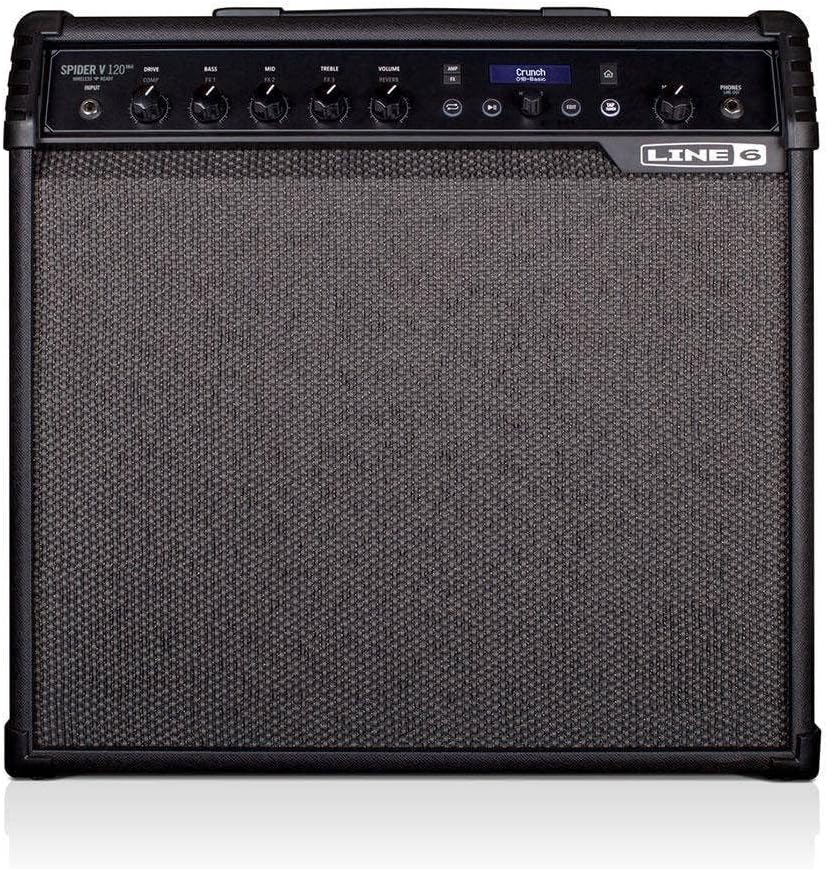
- Guitar Input: Plug your electric guitar into the 1/4-inch INPUT jack on the front panel of the amplifier.
- Optional Connections:
- Auxiliary Input: For connecting external audio devices (e.g., MP3 player), use the AUX IN jack on the rear panel.
- Headphones/Recording Output: For silent practice or direct recording, use the PHONES/REC OUT jack on the rear panel.
- USB Connection: Connect a USB cable from the amplifier's USB port to your computer for recording or tone editing.
- Foot Control: Connect a compatible Line 6 FBV foot controller to the FBV PEDAL port on the rear panel.
3.2 Power On/Off
To power on the amplifier, flip the POWER switch located on the top right of the control panel to the 'ON' position. To power off, flip the switch back to 'OFF'.
4. Operating the Amplifier
4.1 Controls and Interface
The top panel of the Spider V 120 MKII features various knobs and buttons for tone shaping and effect control.
- Amp Type: Selects from a wide range of amplifier models.
- Gain: Adjusts the input sensitivity and distortion level.
- Volume: Controls the overall output volume of the selected preset.
- Equalization (Bass, Mid, Treble): Shapes the tonal characteristics of your sound.
- Effects: Access various built-in effects such as modulation, delay, and reverb.
- Master Volume: Controls the overall output volume of the amplifier.
- Power Control: Adjusts the amplifier's output wattage for different playing environments.

4.2 Speaker Modes
The Spider V MKII series offers two distinct speaker modes:
- Classic Speaker Mode: Provides the organic sound and feel of a traditional guitar amplifier, ideal for electric guitar tones.
- Full Range Speaker Mode: Creates a broader, more produced sound, optimized for acoustic guitar presets and full-range audio playback.
4.3 Built-in Tools
The amplifier includes several tools to aid in practice and songwriting:
- Tuner: A chromatic tuner for accurate instrument tuning.
- Metronome: Provides a steady beat for rhythm practice.
- Jam-Along Drum Loops: Offers various drum patterns to play along with.
- 60-Second Looper: Allows you to record and layer short audio phrases.

4.4 Wireless Connectivity
The Spider V 120 MKII features a built-in wireless receiver. To use this function, simply plug a compatible Line 6 Relay G10T transmitter (sold separately) into your guitar. The amplifier will automatically detect and connect to the transmitter, providing a cable-free playing experience.

4.5 USB Audio Interface
Connect the amplifier to your computer via USB to use it as an audio interface. This allows for direct recording of your guitar tones into a Digital Audio Workstation (DAW) and provides access to the Spider V Remote app for advanced tone editing and management.

4.6 FBV Foot Controller Support
For hands-free control over presets, effects, and the looper, connect a Line 6 FBV foot controller (sold separately) to the dedicated FBV PEDAL port. This allows for seamless switching between tones and activation of effects during live performance.

4.7 Spider V Remote App
The Spider V Remote app (available for Mac, PC, iOS, and Android) provides a graphical interface for deep editing of amplifier parameters, effects, and cabinet models. It also allows access to the Line 6 Cloud, where you can download and share custom tones with a global community of guitarists.
5. Maintenance
To ensure the longevity and optimal performance of your amplifier, follow these maintenance guidelines:
- Cleaning: Use a soft, dry cloth to clean the exterior of the amplifier. Avoid using abrasive cleaners or solvents.
- Storage: Store the amplifier in a cool, dry place away from direct sunlight, extreme temperatures, and excessive humidity.
- Ventilation: Ensure proper ventilation around the amplifier to prevent overheating. Do not block any ventilation openings.
- Transportation: When transporting the amplifier, use the integrated handle and ensure it is securely placed to prevent damage.
6. Troubleshooting
If you encounter any issues with your Line 6 Spider V 120 MKII amplifier, refer to the following common troubleshooting steps:
- No Sound:
- Check if the amplifier is powered on and the master volume is turned up.
- Ensure your guitar is properly plugged into the INPUT jack.
- Verify that the guitar's volume knob is turned up.
- If using a wireless transmitter, ensure it is charged and properly paired.
- Distorted/Unwanted Sound:
- Check the Gain and Volume settings; excessive gain can lead to unwanted distortion.
- Review the selected Amp Type and Effects settings.
- Ensure your guitar cable is not faulty.
- Connectivity Issues (USB/FBV):
- Ensure cables are securely connected.
- For USB, check your computer's audio settings and DAW preferences to ensure the amplifier is selected as the input/output device.
- For FBV, ensure the foot controller is compatible and connected correctly.
If the problem persists after attempting these steps, please contact Line 6 customer support for further assistance.
7. Specifications
| Feature | Detail |
|---|---|
| Model Number | V 120 MKII |
| Output Wattage | 120 Watts |
| Item Weight | 37 pounds |
| Product Dimensions | 10.7 x 20.1 x 19.3 inches |
| Color | Black |
| Material | Metal |
| Speaker Amplification Type | Active |
| Connector Types | XLR, 6.35mm Jack, USB |
8. Warranty and Support
For warranty information and detailed support, please refer to the official Line 6 website or the documentation included with your purchase. You can also visit the Line 6 Store on Amazon for additional product resources.


