
1. Introduction
Thank you for choosing the FEZIBO Electric Height Adjustable Standing Desk Frame. This manual provides essential information for the safe assembly, operation, and maintenance of your new desk frame. Please read it thoroughly before use and retain it for future reference.
This electric desk frame is designed to support a desktop, allowing users to easily switch between sitting and standing positions throughout the workday. This promotes a healthier and more dynamic work environment.

Figure 1: FEZIBO Electric Standing Desk Frame in a typical office setup.
2. Safety Information
- Ensure all connections are secure before operating the desk.
- Keep children and pets away from the desk during operation.
- Do not place hands or other objects near moving parts to prevent injury.
- Do not overload the desk. Refer to the specifications for maximum weight capacity.
- Avoid placing liquids directly on the control panel or near electrical components.
- The desk features anti-collision technology. If an obstruction is detected, the desk will stop and reverse slightly. However, always be aware of your surroundings.
3. Package Contents
Verify that all components are present before beginning assembly. All necessary tools for assembly are included.
- Desk Legs (2)
- Crossbar (1)
- Side Brackets (2)
- Feet Pads (2)
- Control Box (1)
- Handset/Control Panel (1)
- Power Adapter (1)
- Cable Management Rack (1)
- Hardware Pack (screws, Allen wrenches)
4. Assembly Instructions
Follow these steps carefully to assemble your desk frame. It is recommended to assemble the desk on a soft, clean surface to prevent scratches.
- Attach Feet Pads: Securely attach the adjustable feet pads to the bottom of each desk leg.
- Connect Crossbar: Connect the two desk legs using the crossbar. Ensure all screws are tightened.
- Install Side Brackets: Attach the side brackets to the top of the desk legs. These will support your desktop.
- Mount Control Box and Handset: Mount the control box and handset (control panel) to the underside of the desk frame using the provided screws.
- Connect Cables: Connect the motor cables from the legs to the control box. Connect the handset cable to the control box. Finally, connect the power adapter to the control box and then to a power outlet.
- Attach Desktop (Sold Separately): Carefully place your chosen desktop onto the assembled frame. Align it and secure it using appropriate screws (ensure screws are not too long to penetrate the desktop surface).
- Cable Management: Use the included cable management rack to organize and secure all cables, preventing them from snagging during height adjustments.

Figure 2: The desk frame is compatible with desktops ranging from 43.4 to 59.1 inches in length.
5. Operating Instructions
5.1. Basic Height Adjustment
Use the Up (▲) and Down (▼) arrow buttons on the control panel to adjust the desk height. Press and hold the button until the desired height is reached. The current height will be displayed on the LCD screen.
5.2. Setting Memory Presets
The control panel allows you to save up to four preferred height settings:
- Adjust the desk to your desired height using the Up/Down buttons.
- Press the "M" button. The display will show "S-".
- Immediately press one of the numbered memory buttons (M1, M2, M3, or M4). The display will show "S-1", "S-2", etc., indicating the height has been saved.
- To recall a saved height, simply press the corresponding memory button (M1, M2, M3, or M4). The desk will automatically move to that preset height.
5.3. USB Charging Port
The control panel includes a USB charging port to conveniently charge your devices.
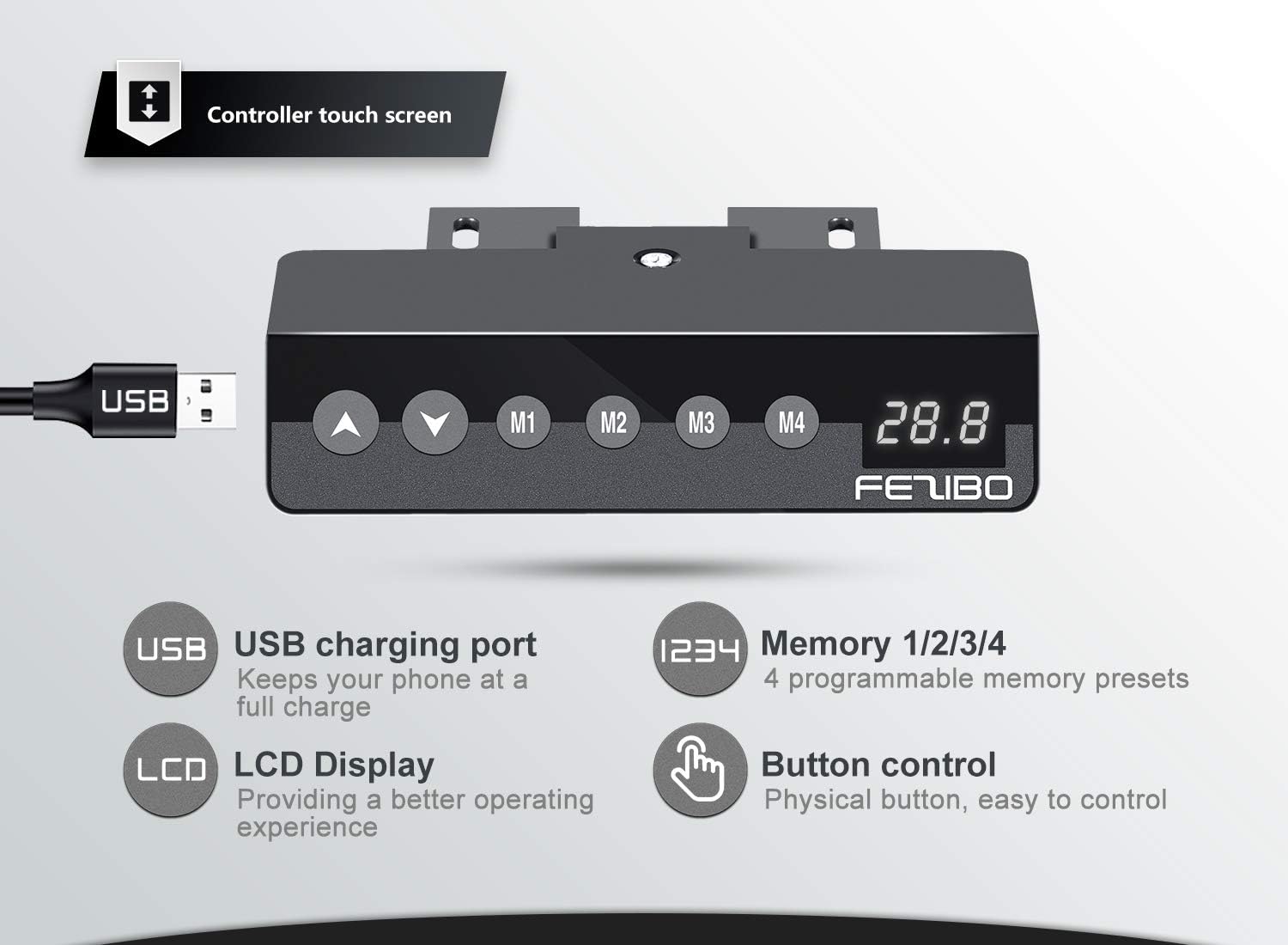
Figure 3: Programmable touch control panel with memory presets and USB charging.
Video 1: Official product video demonstrating the features and operation of the FEZIBO Electric Standing Desk Frame, including height adjustment, programmable touchpad, and compatibility with accessories.
6. Features
- Electric Lift System: Smooth and quiet height adjustment from sitting to standing positions with a single motor.
- Touch Control: Intuitive control panel with an LCD display, up/down buttons, and four programmable memory presets for customized heights.
- Durable Construction: Built with commercial-grade heavy-duty steel, ensuring stability and a load capacity of 176 lbs.
- Anti-Collision Technology: Automatically stops and reverses if an obstruction is detected during movement, enhancing safety.
- Wide Compatibility: Accommodates tabletops with lengths from 44.1" to 71.7", widths from 23.7" to 31.5", and a thickness of 3/4" or greater.
- Adjustable Feet Pads: Ensures stability on uneven surfaces.
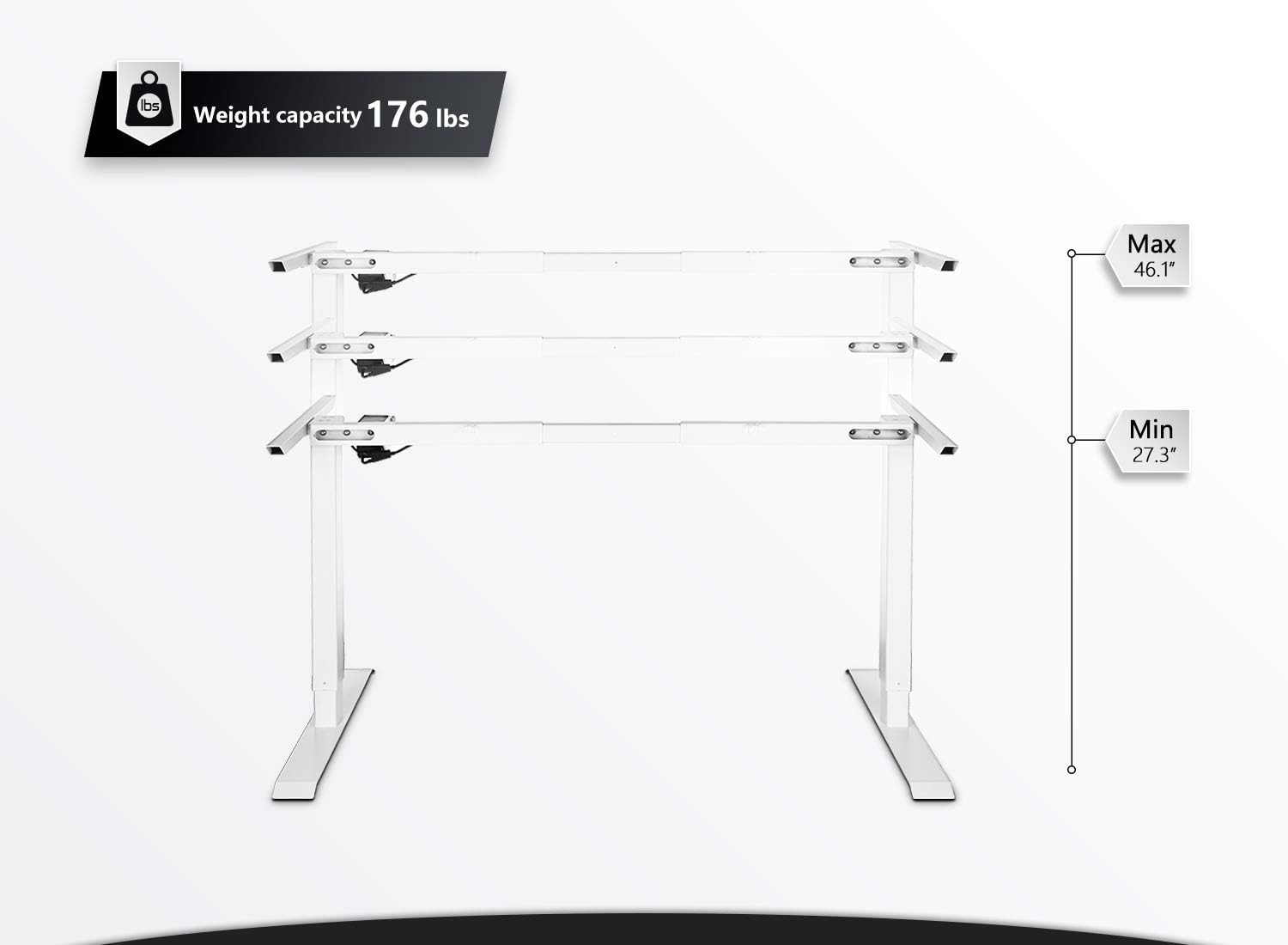
Figure 4: The desk frame supports up to 176 lbs and adjusts from 27.3 to 46.1 inches in height.

Figure 5: A comfortable workstation can be created with the FEZIBO desk frame, optionally paired with an anti-fatigue mat.
7. Specifications
| Attribute | Value |
|---|---|
| Brand | FEZIBO |
| Model Number | SDF-HEZ01W-FZ |
| Color | White |
| Base Material | Alloy Steel |
| Product Dimensions (D x W x H) | 37.4"D x 19"W x 6.7"H |
| Item Weight | 10 Kilograms |
| Height Adjustment Range | 27.36" - 46.06" |
| Load Capacity | 176 lbs |
| Motor Type | Single Motor |
| Special Feature | Electric, Anti-Collision Technology |
| Required Assembly | Yes |
8. Maintenance
- Cleaning: Wipe the desk frame with a soft, damp cloth. Avoid harsh chemicals or abrasive cleaners.
- Cable Management: Periodically check that all cables are securely managed and not interfering with the desk's movement.
- Fastener Check: Occasionally check all screws and fasteners to ensure they remain tight. Retighten if necessary.
- Obstruction Check: Regularly inspect the area around and under the desk for any potential obstructions that could interfere with height adjustment.
9. Troubleshooting
| Problem | Possible Cause | Solution |
|---|---|---|
| Desk does not move / No power | Power cable disconnected, power outlet issue, control box malfunction. | Check power cable connection to the wall and control box. Test the outlet with another device. Ensure all motor cables are properly connected to the control box. |
| Desk moves unevenly or makes unusual noise | Uneven load, loose fasteners, obstruction. | Ensure weight is evenly distributed on the desktop. Check and tighten all assembly fasteners. Remove any obstructions. |
| Anti-collision feature frequently triggers | Obstruction in the path of movement. | Clear the area around and under the desk. Ensure cables are not dangling or getting caught. |
| Memory presets not working | Presets not saved correctly. | Re-follow the instructions for setting memory presets (Section 5.2). |
If you encounter issues not listed here or if the problem persists after attempting the solutions, please contact customer support.
10. Warranty and Support
The FEZIBO Electric Height Adjustable Standing Desk Frame is backed by a 5-year warranty for the desk frame and a 3-year warranty for the motor. This warranty covers manufacturing defects and ensures reliable performance under normal use.
For technical support, warranty claims, or any questions regarding your product, please refer to the contact information provided with your purchase or visit the official FEZIBO website. Our friendly tech support team is available to assist you.


