1. Introduction
Welcome to the world of Pictionary, the classic game of quick sketches and hilarious guesses! This manual provides comprehensive instructions for setting up, playing, and maintaining your Mattel Games Pictionary board game. Designed for family game nights and gatherings, Pictionary encourages creativity and communication as teams race to identify words and phrases through drawings.

Image 1.1: The Pictionary game box, highlighting the erasable markers and boards.
2. Components
Your Pictionary game set includes the following items:
- 1 Gameboard: The path for movers to advance.
- 222 Clue Cards: Cards containing words and phrases to be drawn.
- 2 Category Cards: Reference for clue categories.
- 2 Card Boxes: Holders for the clue cards.
- 2 Erasable Markers: For drawing on the boards.
- 2 Erasable Boards: Reusable surfaces for sketching.
- 2 Movers: Pencil-shaped tokens for each team.
- 1 Sand Timer: Used to time drawing turns.
- 1 Die: Used to determine movement on the gameboard.
- Rules: This instruction manual.

Image 2.1: A complete overview of all Pictionary game components.
3. Setup
Follow these steps to prepare your Pictionary game for play:
- Assemble the Gameboard: Unfold the gameboard and place it on a flat playing surface.
- Prepare Clue Cards: Separate the 222 Clue Cards into their respective Category Cards and place them into the two Card Boxes. Ensure easy access for all players.
- Form Teams: Divide players into at least two teams. Each team should have a minimum of two players.
- Assign Components: Each team receives one erasable board, one erasable marker, and one mover. Place the movers on the "Start" square of the gameboard.
- Place Timer and Die: Keep the sand timer and die within reach of all players.
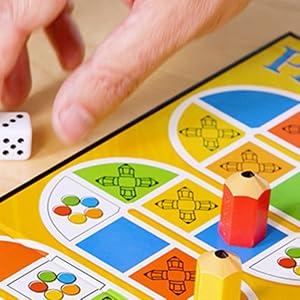
Image 3.1: Rolling the die to begin play on the Pictionary game board.
4. Operating (How to Play)
Pictionary is played in rounds, with teams taking turns to draw and guess words. The objective is to be the first team to reach the Finish square and correctly guess a final sketch.
4.1 Game Flow
- Determine First Team: The team with the highest die roll starts the game. Play proceeds to the left.
- Select a Picturist: For each turn, one player from the active team is designated as the "Picturist."
- Draw a Clue: The Picturist draws a clue card and secretly looks at the word corresponding to the color of their team's current square on the gameboard. They then have one minute (timed by the sand timer) to sketch the word on their erasable board.
- Guessing: Teammates attempt to guess the word being drawn. The Picturist cannot speak, gesture, or use any sounds to give clues.
- Advancing: If the team guesses correctly within the time limit, they roll the die and move their mover forward the indicated number of spaces. They then take another turn. If they do not guess correctly, their turn ends, and play passes to the next team.
4.2 Categories
Each clue card features six categories, color-coded to match the squares on the gameboard:
- Yellow (Object): Things that can be seen or touched.
- Blue (Person/Place/Animal): Names are included.
- Orange (Action): Things that can be performed.
- Green (Difficult): Challenging words.
- Red (Pop Culture): Movies, TV, celebrities, and more.
- Purple (Catch-All): A mix of anything and everything.
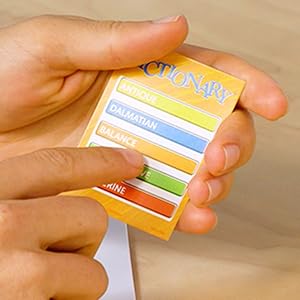
Image 4.1: A Pictionary clue card displaying various categories.
4.3 Special Squares & All Play Rounds
Certain squares on the gameboard trigger special rules:
- All Play Squares: When a team lands on an "All Play" square, all teams participate simultaneously. Each team chooses a Picturist, and all Picturists sketch the same word. The first team to guess correctly rolls the die and moves. If no one guesses, no one moves, and the turn passes.
- Stop Squares: If you land on a "Stop" square, your turn immediately ends, even if your roll would have taken you past it. Treat this as an "All Play" square for the next round.
- Wild Squares: On a "Wild" square, the Picturist can choose to sketch any word on their card.
Video 4.2: An official demonstration of Pictionary gameplay, including sketching and guessing.
4.4 Winning the Game
To win, your team must be the first to reach the "Finish" square on the gameboard and then correctly guess one final sketch. If your team fails to guess the final sketch, the turn passes to the next team, and you must wait for your next turn to attempt the final sketch again.
5. Maintenance
Proper care of your Pictionary game components will ensure longevity and continued enjoyment.
- Erasable Boards: After each use, wipe the erasable boards clean with a soft, damp cloth. Avoid using abrasive cleaners or materials that could scratch the surface.
- Erasable Markers: Always recap the markers tightly after use to prevent them from drying out. Store them horizontally if possible. If a marker appears dry, try drawing on a scrap piece of paper or gently shaking it to reactivate the ink.
- Storage: Store all game components in their original box in a cool, dry place away from direct sunlight.
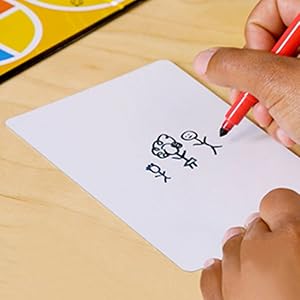
Image 5.1: A Picturist sketching on an erasable board during gameplay.
6. Troubleshooting
Here are solutions to common issues you might encounter:
- Marker Not Writing: Ensure the cap is removed. If the marker is dry, try reactivating it as described in the Maintenance section. If it remains dry, replacement dry-erase markers can be purchased separately.
- Board Stains: For stubborn marks on erasable boards, a small amount of rubbing alcohol on a soft cloth can often remove them. Test on an inconspicuous area first.
- Missing Components: If any components are missing from your new game set, please contact Mattel Games customer support.
7. Specifications
| Feature | Detail |
|---|---|
| Product Dimensions | 2 x 9.75 x 10.5 inches |
| Item Weight | 1 pound |
| Item Model Number | GMT97 |
| Manufacturer Recommended Age | 8 years and up |
| Release Date | October 15, 2019 |
| Manufacturer | Mattel |
8. Warranty and Support
For warranty information, product support, or to inquire about replacement parts, please visit the official Mattel Games website or contact their customer service department. Keep your proof of purchase for any warranty claims.


