
Introduction
Thank you for choosing Noma Solar Post Lights. These lights are designed to provide ambient illumination for your outdoor spaces, such as gardens, yards, walkways, and decks. Featuring automatic dusk-to-dawn operation and solar charging, they offer a convenient and energy-efficient lighting solution. This manual provides essential information for the proper installation, operation, and maintenance of your solar post lights.

Image: An 8-pack of Noma Solar Post Lights, showcasing their design and quantity.
Product Features
- Automatic Dusk-to-Dawn Sensor: Lights automatically turn on at dusk and off at dawn.
- 100% Solar Powered: Equipped with monocrystalline solar panels for efficient charging.
- Extended Operation: Provides over 8 hours of continuous light when fully charged.
- Weather Resistant: Constructed from durable plastic to withstand rain, snow, wind, and frost.
- Cool White LED: Emits a cool white light for clear illumination.
- Easy Installation: Designed for simple mounting on 4x4 wooden posts.
- Multi-Purpose Lighting: Suitable for various outdoor applications including gardens, walkways, and decks.
Package Contents
Your Noma Solar Post Lights package includes:
- 8 x Noma Solar Post Lights (Bronze finish)
- 8 x Rechargeable AA Ni-CD Batteries (pre-installed or included)
- Mounting Screws
Setup and Installation
Follow these steps to properly install your Noma Solar Post Lights:
- Unpack and Inspect: Carefully remove all components from the packaging. Inspect each light for any damage.
- Activate Battery: Locate the battery compartment, usually on the underside of the light unit. Remove any protective pull tab from the battery to activate it. Ensure the battery is securely seated.
- Choose Location: Select a location for your post lights that receives direct sunlight for at least 6-8 hours daily to ensure optimal charging.
- Prepare Post: These lights are designed to fit standard 4x4 wooden posts. Ensure the top surface of your post is clean and level.
- Mount the Light: Place the solar post light on top of the 4x4 wooden post. Use the provided mounting screws to secure the light to the post. Simply add a screw to both sides of the mounting bracket at the base of the light.

Image: Detail of the installation process, showing a screw being inserted to secure the light to a 4x4 wooden post.
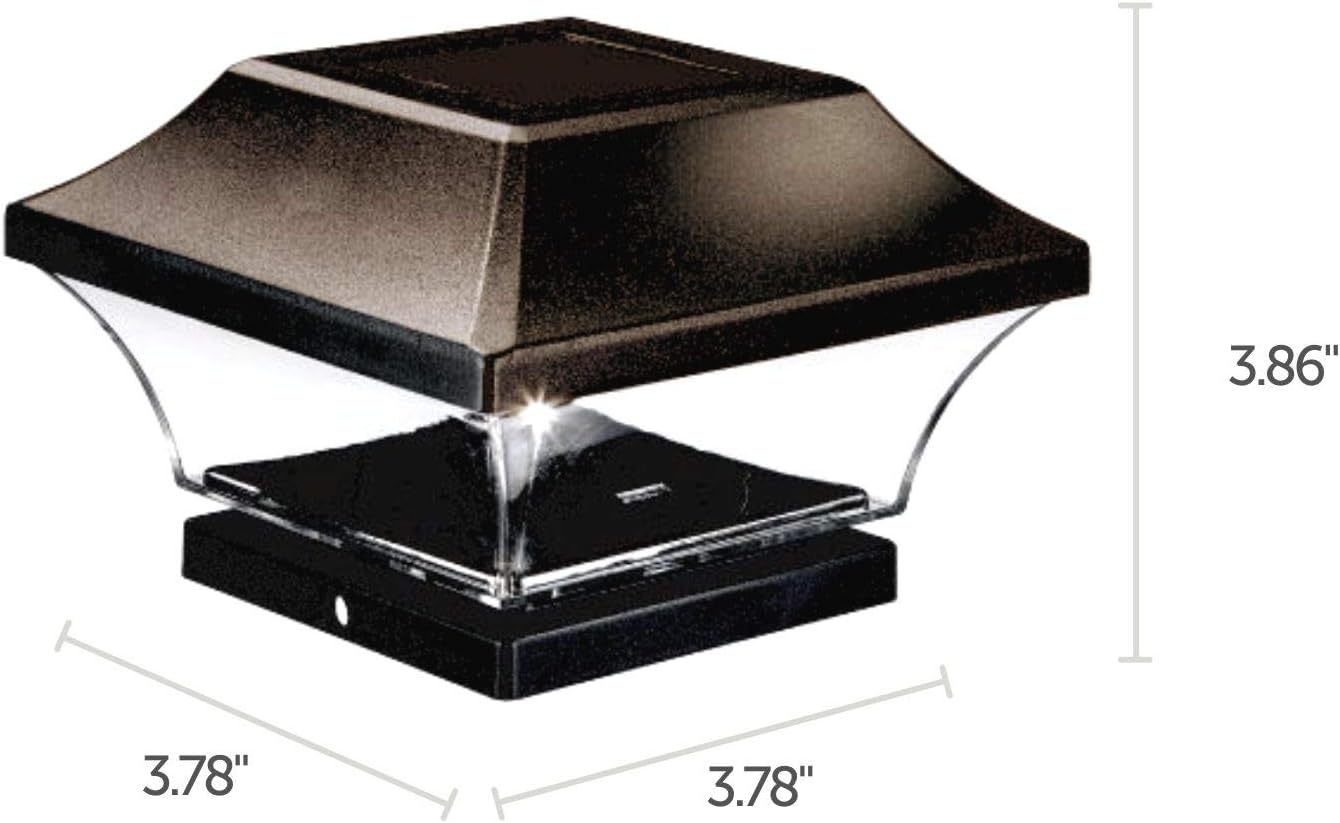
Image: A diagram illustrating the precise dimensions of the solar post light, including length, width, and height.
Operation
Your Noma Solar Post Lights are designed for simple, automatic operation:
- Solar Charging: During daylight hours, the integrated monocrystalline solar panel absorbs sunlight and converts it into electrical energy, which is stored in the rechargeable AA Ni-CD battery.
- Automatic Illumination: As dusk approaches and ambient light levels decrease, the automatic sensor will detect the change and turn the LED light on.
- Automatic Shut-off: At dawn, when sufficient natural light returns, the sensor will turn the LED light off, and the charging cycle will resume.

Image: Visual representation of the automatic dusk-to-dawn sensor, showing the light active at night and inactive during the day.

Image: A solar post light installed in a garden, highlighting its solar-powered nature and monocrystalline panel.
Maintenance
To ensure the longevity and optimal performance of your solar post lights, consider the following maintenance tips:
- Cleaning the Solar Panel: Periodically wipe the solar panel with a soft, damp cloth to remove dust, dirt, or debris. A clean panel ensures maximum sunlight absorption and charging efficiency.
- Battery Replacement: The included rechargeable AA Ni-CD batteries have a limited lifespan. If the light duration significantly decreases over time, it may be time to replace the battery. Use only rechargeable AA Ni-CD batteries of the same voltage and capacity.
- Weather Resistance: The lights are designed to be weather resistant. However, during extreme weather conditions (e.g., severe storms, heavy snow accumulation), it is advisable to inspect them for any potential damage or blockages.

Image: A close-up of the solar post light demonstrating its weather-resistant design with water droplets on its surface.
Troubleshooting
If your Noma Solar Post Lights are not functioning as expected, refer to the following common issues and solutions:
- Light Does Not Turn On at Night:
- Ensure the battery pull tab has been removed.
- Verify the light is placed in a location that receives at least 6-8 hours of direct sunlight daily.
- Check if the solar panel is clean and free from obstructions (e.g., leaves, dirt).
- The battery may be depleted or at the end of its lifespan. Try replacing the rechargeable AA Ni-CD battery.
- Ensure there are no strong artificial light sources (e.g., streetlights, floodlights) near the solar light at night, as this can trigger the sensor to keep the light off.
- Light Duration is Short or Dim:
- The solar panel may not be receiving enough direct sunlight for a full charge. Relocate the light or clear any obstructions.
- The solar panel may be dirty. Clean it thoroughly.
- The rechargeable battery may be old or faulty and needs replacement.
- Weather conditions (e.g., prolonged cloudy days) can affect charging efficiency.
- Light Appears Damaged or Loose:
- Inspect the light for any physical damage.
- Ensure the mounting screws are securely fastened to the post.
Specifications
| Brand | Noma |
| Model Number | 840623113981 |
| Color | Bronze |
| Material | Plastic |
| Product Dimensions | 3.75"L x 3.75"W x 3.86"H |
| Power Source | Solar Powered |
| Light Source Type | LED |
| Light Color | Cool White |
| Color Temperature | 5000 Kelvin |
| Voltage | 1.2 Volts |
| Wattage | 1 Watt |
| Battery Type | Rechargeable AA Ni-CD (included) |
| Water Resistance Level | Waterproof |
| Number of Items | 8 Count |
Warranty and Support
Noma Solar Post Lights come with a 1-year limited warranty. For warranty claims or technical support, please refer to the contact information provided with your purchase documentation or visit the official Noma website.