
1. Introduction
This manual provides essential information for the safe and effective use of your Corpco 6 x AA Battery Holder, Model BH363. Please read these instructions carefully before installation and operation. This battery holder is designed to provide a stable power source for various electronic projects and as a replacement for compatible units.
2. Safety Information
- Always insert batteries with correct polarity (+/-) as indicated inside the holder. Incorrect insertion can damage the holder or connected device.
- Do not mix old and new batteries, or different types of batteries (e.g., alkaline and rechargeable) in the same holder.
- Remove batteries from the holder if it will not be used for an extended period to prevent leakage and corrosion.
- Dispose of used batteries responsibly according to local regulations.
- Keep the battery holder away from moisture, extreme temperatures, and direct sunlight.
- This product is not a toy. Keep out of reach of children.
3. Product Overview
The Corpco BH363 is a durable battery holder designed to accommodate six AA-sized batteries. It features a standard snap connector for easy integration into electronic circuits. The holder is constructed from ABS plastic with nickel-plated springs to ensure secure battery contact and longevity.
Key Features:
- Holds 6 x 1.5V AA batteries.
- Provides 9V output when using alkaline AA batteries.
- Provides 7.2V output when using rechargeable AA batteries.
- Equipped with a standard snap connector.
- Constructed from durable ABS plastic with nickel-plated springs.
- Dimensions: Approximately 58.03mm x 47.33mm x 29.87mm (2.5 x 1.17 x 1.7 inches).
Product Components:
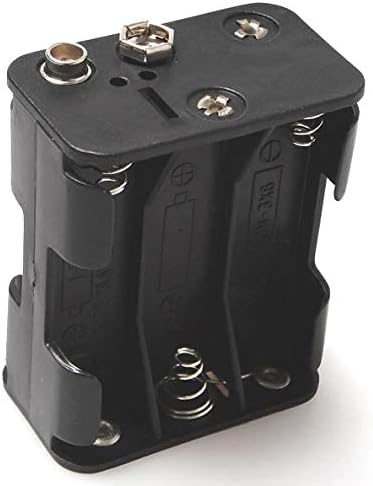
Figure 1: Top-front view of the Corpco 6 AA Battery Holder, showing the snap connector terminals and battery compartments.

Figure 2: Interior view of the Corpco 6 AA Battery Holder, illustrating the nickel-plated spring contacts for battery insertion.
4. Setup and Installation
- Prepare Batteries: Obtain six fresh AA batteries. Ensure they are all of the same type (e.g., all alkaline or all rechargeable NiMH).
- Insert Batteries: Carefully insert each AA battery into its designated slot within the holder. Observe the polarity markings (+ and -) molded into the plastic of the holder and on the batteries. The positive (+) end of the battery should align with the positive terminal in the holder, and the negative (-) end with the negative terminal.
- Verify Insertion: Ensure all six batteries are securely seated and make proper contact with the springs and terminals.
- Connect to Device: Attach the standard snap connector from the battery holder to the corresponding connector on your electronic device or project. Ensure a firm connection.
Once connected, the battery holder will supply power to your device. With alkaline AA batteries, the output will be approximately 9V. With rechargeable AA batteries (typically 1.2V each), the output will be approximately 7.2V.
5. Operation
The Corpco BH363 battery holder functions as a passive power source. Once batteries are correctly installed and the snap connector is attached to a compatible device, it will provide the specified voltage. There are no user-adjustable controls on the battery holder itself.
6. Maintenance
- Cleaning: Periodically inspect the battery holder for dust or debris. Clean with a dry, soft cloth. Do not use liquids or abrasive cleaners.
- Corrosion Check: If batteries are left in the holder for extended periods, check for any signs of corrosion on the battery terminals or springs. If corrosion is present, carefully clean it with a cotton swab and a small amount of isopropyl alcohol, or replace the holder if corrosion is severe.
- Storage: When not in use, store the battery holder in a cool, dry place, ideally with batteries removed to prevent potential leakage.
7. Troubleshooting
No Power Output:
- Check Battery Polarity: Ensure all batteries are inserted with the correct positive (+) and negative (-) orientation.
- Check Battery Charge: Verify that the batteries are fully charged or are new. Replace if necessary.
- Check Connections: Ensure the snap connector is firmly attached to your device. Inspect the wires for any damage.
- Inspect for Corrosion: Look for any corrosion on the battery contacts or the snap connector. Clean if found.
Intermittent Power:
- Ensure batteries are seated tightly within the holder. Gently press on each battery to confirm contact.
- Check for loose connections at the snap connector.
8. Specifications
| Feature | Specification |
|---|---|
| Model Number | BH363 |
| Battery Type | AA (x6) |
| Output Voltage (Alkaline) | 9V |
| Output Voltage (Rechargeable) | 7.2V |
| Connector Type | Standard Snap Connector |
| Material | ABS Plastic, Nickel-plated Springs |
| Dimensions (L x W x H) | 58.03 x 47.33 x 29.87 mm (2.5 x 1.17 x 1.7 inches) |
| Weight | Approximately 0.81 ounces |
9. Warranty and Support
For warranty information or technical support regarding your Corpco 6 x AA Battery Holder BH363, please contact Corporate Computer customer service. Refer to your purchase documentation for specific contact details or visit the official Corporate Computer website.