
1. Introduction
The WiMiUS H7 Trail Game Camera is designed for outdoor wildlife observation, security monitoring, and hunting applications. It features 16MP still image capture, 1080P video recording, night vision capabilities, and motion activation. This manual provides detailed instructions for setting up, operating, and maintaining your camera to ensure optimal performance.
2. Product Overview
Familiarize yourself with the main components of your WiMiUS H7 Trail Game Camera.
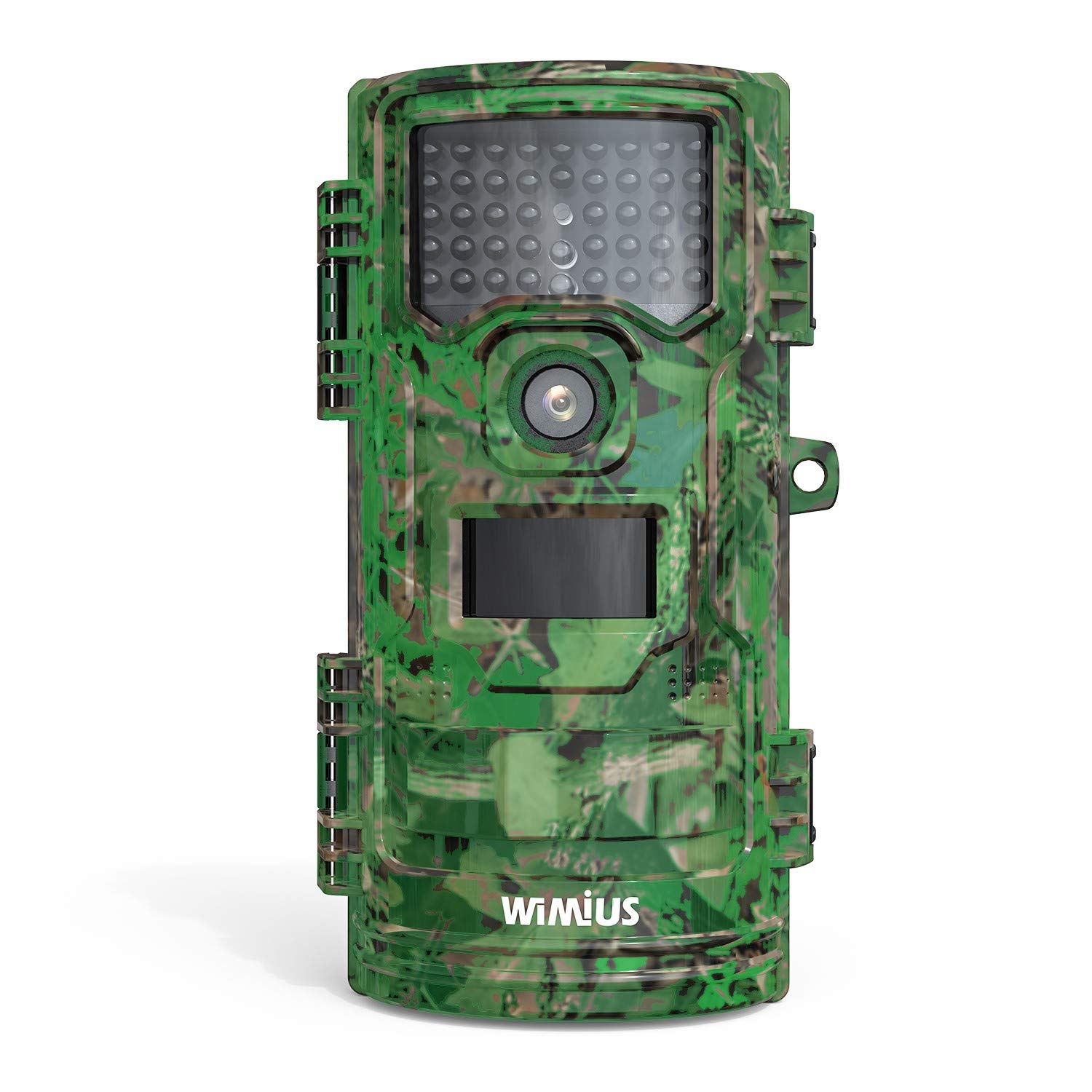
Figure 1: Front view of the WiMiUS H7 Trail Game Camera. This image displays the front of the WiMiUS H7 Trail Game Camera, featuring a camouflage design. Visible components include the main camera lens, the Passive Infrared (PIR) motion sensor, and the array of infrared LEDs for night vision. The camera's robust casing is designed for outdoor use.
Key Components:
- Main Lens: Captures photos and videos.
- PIR Motion Sensor: Detects movement to trigger recording.
- IR LEDs: Provide illumination for night vision without visible light.
- 2.4-inch LCD Screen: For menu navigation, settings adjustment, and playback.
- Control Buttons: Menu, Up, Down, OK for navigation.
- Battery Compartment: Holds 8 AA batteries.
- Micro SD Card Slot: For storage of captured media.
- Mounting Points: For strap, tripod, or wall mount.
3. Setup
3.1 Battery Installation
- Open the camera's front cover latches.
- Locate the battery compartment on the back of the camera.
- Insert 8 new AA batteries (not included), ensuring correct polarity (+/-).
- Securely close the battery compartment cover.
3.2 Micro SD Card Installation
- With the camera open, locate the Micro SD card slot.
- Insert a Micro SD card (up to 32GB, not included) into the slot until it clicks into place.
- It is recommended to format the Micro SD card before first use (see Section 3.4).
3.3 Mounting the Camera
The camera offers several mounting options:
- Strap: Use the included strap to attach the camera to a tree or post.
- Tripod: The camera has a standard tripod screw mount on the bottom.
- Wall Mount: Utilize the provided mount for fixed installations.
3.4 Initial Settings (Test Mode)
Slide the power switch from "Off" to "Test" to access the camera's menu and settings on the LCD screen.
- Language: Select your preferred language (e.g., English).
- Date & Time: Set the current date and time.
- Mode: Choose between Photo, Video, or Photo+Video.
- PIR Interval: Adjust the delay between motion detections (e.g., 5 sec, 10 sec, 30 sec, 1 min).
- PIR Level: Set motion sensor sensitivity (Low, Middle, High).
- Capture Num: Number of photos taken per trigger (1, 2, 3).
- Video Length: Duration of video recording per trigger (e.g., 10 sec, 30 sec, 1 min).
- Video Size: Select video resolution (e.g., 1080P 30fps, 720P 30fps).
- Photo Size: Select photo resolution (e.g., 16M, 12M, 8M).
- Standby Mode: Normal or Super.
- IR LED: Adjust infrared LED power (High, Middle, Low).
- Audio Recording: Enable or disable audio capture with videos.
- Time Lapse: Set intervals for time-lapse photography.
- Timer Setting: Define specific operational hours for the camera.
- Security Code: Set a password to protect camera access.
- Format: Select "Yes" to format the Micro SD card. This will erase all data on the card.
- Default: Restore camera settings to factory defaults.
4. Operating the Camera
4.1 Activating Recording
- After configuring settings in "Test" mode, slide the power switch to the "On" position.
- A red LED will flash, indicating a 15-second countdown. This allows you to close the camera and position it without triggering immediate recording.
- Once the countdown finishes, the camera enters active monitoring mode. It will automatically capture photos or videos based on your settings when motion is detected.
4.2 Viewing Recordings
You can view captured media directly on the camera or on a computer.
- On Camera: Switch the camera to "Test" mode. Use the navigation buttons to browse and play back photos and videos on the LCD screen.
- On Computer: Remove the Micro SD card from the camera and insert it into a computer's card reader. The media files can then be accessed and viewed.
5. Maintenance
- Cleaning: Gently clean the camera lens, PIR sensor, and IR LEDs with a soft, dry cloth. Avoid abrasive materials or harsh chemicals.
- Battery Check: Regularly check battery levels, especially before extended deployment. Replace all batteries simultaneously to ensure consistent power.
- SD Card Management: Periodically format the Micro SD card to maintain optimal performance and prevent data corruption. Back up important files before formatting.
- Waterproof Seals: Ensure the rubber seals around the battery compartment and camera housing are clean and properly seated to maintain waterproof integrity.
- Storage: When not in use, store the camera in a cool, dry place, away from direct sunlight and extreme temperatures. Remove batteries for long-term storage.
6. Troubleshooting
Common Issues and Solutions:
- Camera Not Turning On:
Solution: Check if batteries are inserted correctly with proper polarity. Ensure batteries have sufficient charge. Try new batteries. - No Photos/Videos Captured:
Solution: Verify the Micro SD card is inserted correctly and has available space. Format the SD card. Check PIR sensor sensitivity and interval settings. Ensure the camera is in "On" mode, not "Test" or "Off". - Poor Image/Video Quality:
Solution: Clean the camera lens. Adjust photo/video resolution settings. Ensure the camera is stable and not subject to excessive movement. For night images, ensure IR LEDs are not obstructed. - Excessive Battery Drain:
Solution: Use high-quality alkaline or rechargeable AA batteries. Reduce PIR sensitivity or increase PIR interval. Ensure the camera is not constantly triggered by environmental factors (e.g., swaying branches). - Incorrect Date/Time Stamp:
Solution: Re-enter the correct date and time in the settings menu.
7. Specifications
| Effective Still Resolution | 16 MP (Maximum 20 MP) |
| Video Capture Resolution | 1080p |
| Screen Size | 2.4 Inches |
| Water Resistance Level | Waterproof (IP54) |
| Power Source | 8 AA Batteries (4 AA minimum required) |
| Flash Memory Type | Micro SD (up to 32GB) |
| Special Features | Motion Sensor, Night Vision |
| Operating Temperature | Up to 60 Degrees Celsius |
| Connectivity Technology | Wireless (Wi-Fi) |
| Item Model Number | CEX107 |
8. Warranty and Support
8.1 Warranty Information
Your WiMiUS H7 Trail Game Camera is covered by a limited warranty against defects in materials and workmanship. Please refer to the warranty card included with your purchase or visit the official WiMiUS website for specific terms and conditions.
8.2 Customer Support
For technical assistance, troubleshooting, or warranty claims, please contact WiMiUS customer support through their official website or the contact information provided with your product packaging. When contacting support, please have your model number (H7 or CEX107) and purchase details ready.
