
chiphy SF214-107(A)
Chiphy Dimmable 64-inch Floor Lamp (Model SF214-107(A)) Instruction Manual
Brand: Chiphy
1. General Information
This instruction manual provides essential information for the safe and efficient use of your Chiphy Dimmable 64-inch Floor Lamp. This lamp is designed to provide soft, warm ambient lighting with adjustable brightness levels, suitable for various indoor environments.

Image 1.1: Overview of Chiphy LED Floor Lamp features including adjustable brightness, eye-caring light, energy efficiency, and foot switch operation.
2. Safety Instructions
- Always unplug the lamp from the power outlet before cleaning, maintenance, or bulb replacement.
- This lamp is designed for indoor use only. Do not expose to water or high humidity.
- Ensure the power cord is not pinched or damaged. Do not operate the lamp with a damaged cord or plug.
- Use only the specified bulb type and wattage to prevent overheating.
- Keep the lamp away from flammable materials.
- Do not attempt to modify or disassemble the lamp beyond the instructions provided.
3. Package Contents
Verify that all components are present before beginning assembly:
- 1 x Lampshade (Dupont Tyvek)
- Metal Frame Components (Rods, Base)
- 2 x 12W LED Bulbs (E26 base)
- 1 x Foot Switch Power Cord
- 1 x Installation Manual
- Small Parts (Screws, Connectors)

Image 3.1: All components included in the package.
4. Setup and Assembly
Follow these steps to assemble your Chiphy Floor Lamp:
- Unpack Components: Carefully remove all items from the packaging. Lay them out on a clean, flat surface.
- Assemble the Frame: Connect the metal rods to form the vertical frame of the lamp. Ensure all connections are secure.
- Attach the Base: Securely attach the assembled frame to the lamp base using the provided screws.
- Install Bulbs: Screw the two 12W LED bulbs into the sockets located within the lamp frame.
- Position the Lampshade: Carefully stretch the Dupont Tyvek lampshade over the assembled frame. The material is designed to smooth out as it is stretched.
- Connect Power: Plug the foot switch power cord into the lamp and then into a standard electrical outlet.

Image 4.1: Visual guide for lamp assembly.

Image 4.2: The assembled Chiphy Floor Lamp.
Assembly Video
Video 4.1: This video demonstrates the assembly process and highlights key features of the Chiphy Dimmable Floor Lamp with a white lampshade.
5. Operating Instructions
Your Chiphy Floor Lamp features a convenient foot switch for easy operation and adjustable brightness settings.
- Power On/Off: Press the foot switch once to turn the lamp on. Press it again to turn the lamp off.
- Adjust Brightness: The lamp offers 3 levels of brightness. With the lamp on, press the foot switch repeatedly to cycle through the brightness settings: 100% (full brightness), 50% (medium brightness), and 10% (low brightness).
- Smart Plug Compatibility: The lamp is compatible with smart plugs (not included) for integration with smart home systems, allowing control via apps or voice commands.
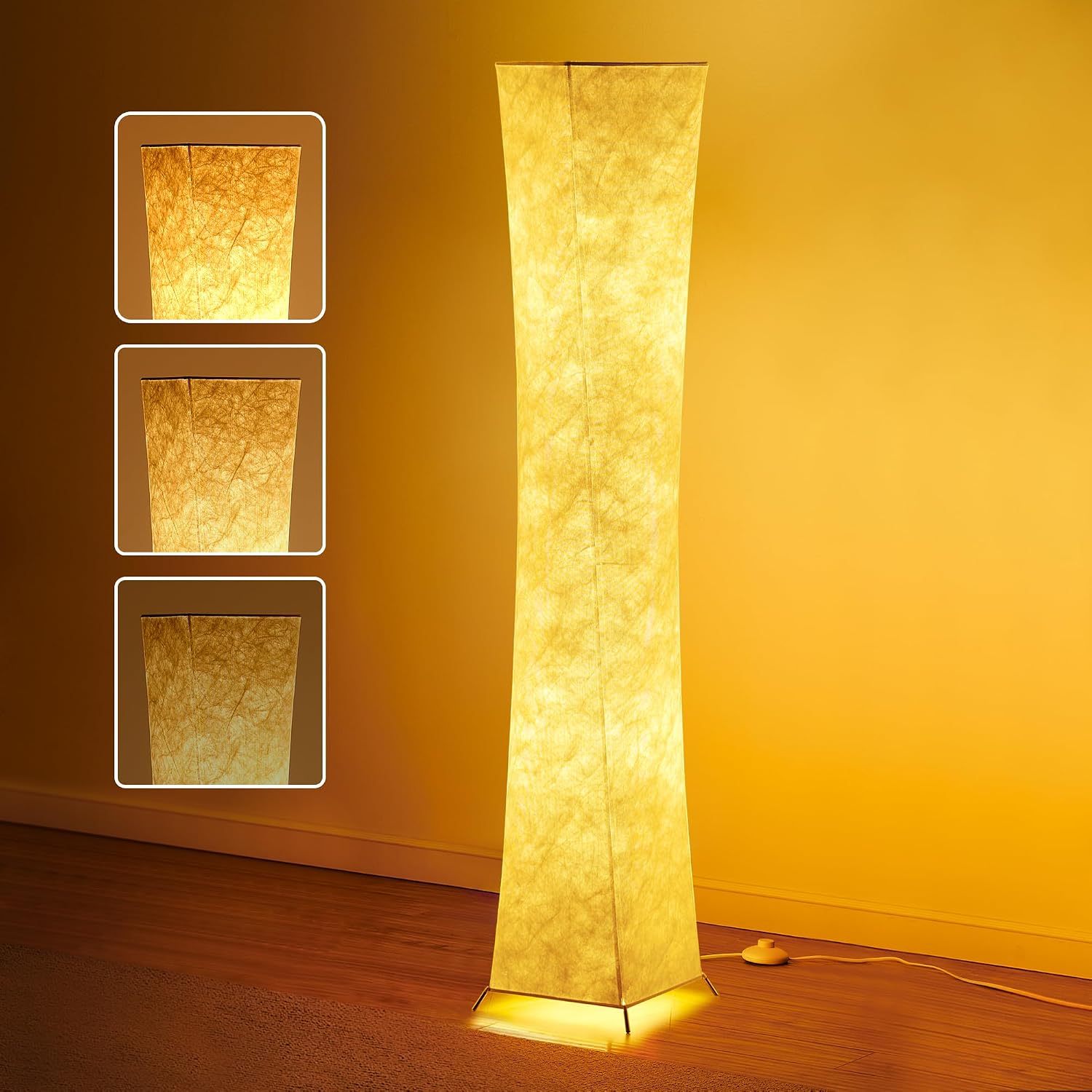
Image 5.1: The lamp's three adjustable brightness levels.

Image 5.2: The convenient foot switch for power and brightness control.
Operation Video
Video 5.1: This video demonstrates the foot switch operation and dimming capabilities of the Chiphy Floor Lamp.
6. Maintenance
- Cleaning the Lampshade: The Dupont Tyvek lampshade is waterproof and stain-proof. To clean, gently wipe with a damp cloth. Avoid harsh chemicals or abrasive cleaners.
- Bulb Replacement: The included LED bulbs have a long lifespan (up to 50,000 hours). If replacement is needed, ensure the lamp is unplugged. Unscrew the old bulb and replace it with a new E26 base LED bulb of appropriate wattage (max 12W per bulb).

Image 6.1: The durable and easy-to-clean Dupont Tyvek lampshade material.
7. Troubleshooting
- Lamp does not light up:
- Ensure the power cord is securely plugged into both the lamp and the wall outlet.
- Check if the wall outlet is functional by plugging in another device.
- Verify that the LED bulbs are screwed in correctly and are not faulty.
- Lampshade appears wrinkled:
- The lampshade material is designed to stretch and smooth out during assembly. Ensure it is properly fitted and stretched over the frame. Minor wrinkles typically disappear over time.
- Dimming function is inconsistent:
- Ensure you are using the recommended LED bulbs.
- Press the foot switch firmly and consistently to cycle through brightness levels.
8. Specifications
| Model Number | SF214-107(A) |
| Dimensions | 10"D x 10"W x 64"H |
| Item Weight | 4 Pounds |
| Bulb Type | LED (2x 12W included) |
| Bulb Base | E26 |
| Brightness | Up to 2400 Lumens |
| Color Temperature | 2700K (Warm White) |
| Material | Dupont Tyvek, Stainless Steel |
| Switch Type | Foot Switch (3-level dimmable) |
| Power Source | Corded Electric |
| Indoor/Outdoor Usage | Indoor Use Only |

Image 8.1: Product dimensions.
9. Warranty and Support
Your Chiphy Floor Lamp comes with a standard warranty and lifetime support. For any questions, concerns, or assistance, please refer to the contact information provided in your product packaging or visit the official Chiphy Lighting website.
Extended protection plans may be available for purchase separately. Please check with your retailer for details.
Ask a question about this manual
Ask about setup, troubleshooting, compatibility, parts, safety, or missing instructions. Manuals+ will review the question and use this page’s manual context to help answer it.