1. Introduction
The YONGNUO YN360 III is an upgraded LED video light designed for handheld photography, offering a versatile lighting solution for various creative needs. This ice light features a bi-color temperature range of 3200K-5600K, full RGB color capabilities, and adjustable settings via a touch pad remote and mobile application. With a high Color Rendering Index (CRI) of 95+, it ensures accurate color reproduction. Its extended lamp panel length of 40cm provides a wide illumination angle, making it suitable for stereo and wide-angle light supplementation. The YN360 III also includes 10 special scene supplementary lighting modes to simulate various environmental effects.

Image 1.1: The YONGNUO YN360 III LED Video Light, a versatile tool for professional photography and videography.
2. What's in the Box
Upon unboxing your YONGNUO YN360 III LED Video Light, please verify that all the following components are included:
- 1 * YN360III LED Video Light 3200K-5600K
- 1 * CT Filter
- 1 * Remote Controller
- 1 * Sling
- 1 * Storage Bag
- 1 * User Manual (English & Chinese)

Image 2.1: All components included in the YN360 III package, including the light, remote, filter, and accessories.
3. Key Features
- High CRI 95+ and Wide Illumination Angle: The YN360 III incorporates 360 high-quality lamp beads with a large luminous chip, ensuring a Color Rendering Index (CRI) of 95 or higher. This allows for accurate and true-to-life color reproduction. The lamp panel's length of 40cm significantly broadens the light angle, making it ideal for comprehensive and wide-area lighting.
- Intuitive Touch Adjusting Mode: Control the YN360 III effortlessly with its dedicated remote controller featuring a touch pad. This allows for easy adjustment of lighting modes and brightness. The touch-sensitive signal ensures precise and reliable dimming, enabling users to achieve desired lighting effects with ease.

Image 3.1: The touch-sensitive remote control and the mobile application interface for adjusting light settings.
- 10 Special Scene Supplementary Lighting Modes: Enhance your creative projects with 10 pre-programmed special lighting modes. These modes can simulate various scenarios such as lightning, sunrise, and flashing police vehicle lights, providing dynamic and engaging lighting effects to meet diverse user demands.
- Dual Mode and Full RGB Color: The YN360 III offers a dual-mode operation, combining 180 lamp beads for 3200K and 180 lamp beads for 5600K, alongside 60 RGB SMD LEDs. This provides full RGB color capabilities. Users can select various colors via the remote control's touch pad or precisely choose unique colors using the color palette within the mobile application.
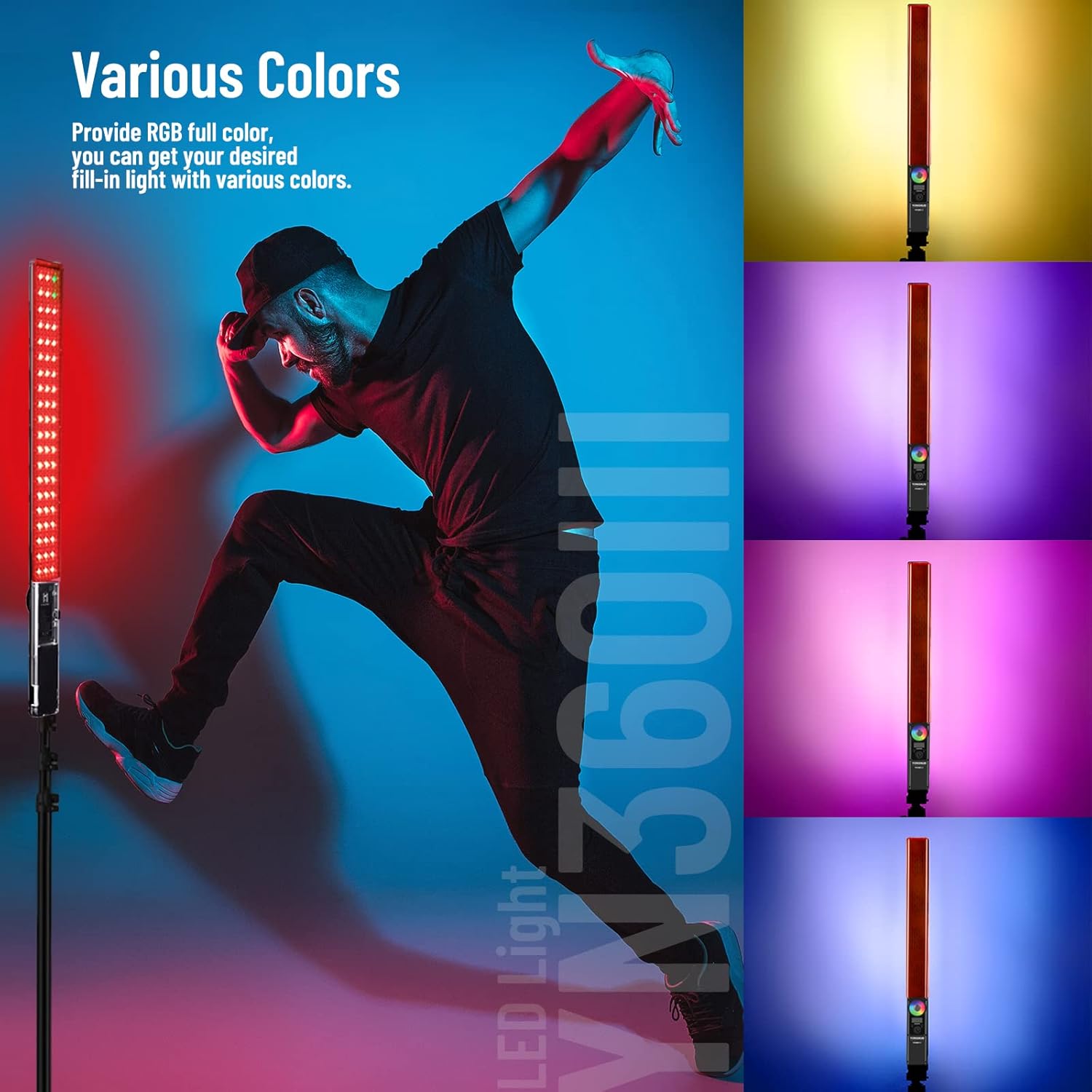
Image 3.2: The YN360 III light stick illuminating a subject with vibrant RGB colors, demonstrating its full color spectrum capabilities.
- Versatile Power Supply Options: The YN360 III supports two power supply methods for flexibility in various shooting environments:
- NP-F series lithium battery (not included)
- External 12V2A AC Adapter (not included)
- Magnetic Design with Orange Color Filter: The light features a magnetic design, allowing for easy attachment of the included orange CT filter. This filter can be used to create warm, moody tones.

Image 3.3: Detailed view of the YN360 III showing its magnetic filter attachment, large heat emission holes, intelligent battery display on the remote, and concealed power switch.
- Efficient Heat Dissipation: Designed with large area heat emission holes, the YN360 III ensures effective heat dissipation, contributing to stable performance and extended lifespan of the LED beads.
- Intelligent Battery Display: The remote controller features an intelligent display that shows the current battery level, allowing users to monitor power status conveniently.
- Concealed Switch: The power switch is discreetly located to prevent accidental touching and unintended power changes during operation.
- 2.4G Wireless Remote System: The YN360 III supports YONGNUO's LED wireless control system, enabling communication and synchronous control with other compatible YONGNUO LED lights. The remote control range is up to 15 meters.
- Mobile App Control: In addition to the remote, the light can be controlled via a mobile application, offering a comprehensive color palette for precise color selection and adjustment.
4. Setup Guide
4.1 Powering the Device
The YN360 III does not include a battery or AC adapter. You will need to acquire one of the following power sources:
- NP-F Series Lithium Battery: Insert a fully charged NP-F series lithium battery into the battery compartment at the base of the light. Ensure it clicks securely into place.
- External 12V2A AC Adapter: Connect a compatible 12V2A AC adapter to the power input port on the light. Plug the adapter into a standard electrical outlet.
4.2 Attaching the CT Filter
To apply a warm tone to your lighting, attach the included orange CT filter. The filter features a magnetic design, allowing it to snap easily onto the front of the light panel.
4.3 Remote Control Pairing (Initial Use)
The remote control is typically pre-paired with the light. If the remote does not respond, ensure both the light and remote have power. If issues persist, refer to the "Troubleshooting" section or the detailed user manual for specific pairing instructions.
5. Operating Instructions
5.1 Power On/Off
Locate the concealed power switch on the light. Slide the switch to the "ON" position to power on the device. Slide it to "OFF" to power off.
5.2 Adjusting Brightness and Color Temperature (Bi-Color Mode)
In bi-color mode (3200K-5600K), use the remote control's touch pad to adjust the brightness and color temperature. Slide your finger across the touch pad to increase or decrease intensity and to shift between warm (3200K) and cool (5600K) tones.
5.3 Selecting RGB Colors (Full Color Mode)
To access the full RGB color spectrum:
- Using the Remote Control: The remote's touch pad allows you to select various RGB colors. Rotate your finger on the color wheel displayed on the touch pad to cycle through colors.
- Using the Mobile Application: Download the official YONGNUO mobile app. Connect the light via Bluetooth. The app provides a detailed color palette, allowing for precise selection of any desired RGB color.
5.4 Utilizing Special Scene Modes
The YN360 III features 10 special scene supplementary lighting modes. Access these modes via the remote control or mobile app. Cycle through the modes to select effects such as lightning, sunrise, or police car flashing lights, depending on your creative requirements.
5.5 Monitoring Battery Life
The remote control's intelligent display shows the current battery level of the light. Monitor this display to ensure sufficient power for your shooting sessions.
6. Maintenance
6.1 Cleaning
To maintain the performance and appearance of your YN360 III, follow these cleaning guidelines:
- Ensure the device is powered off and disconnected from any power source before cleaning.
- Use a soft, dry, lint-free cloth to wipe the exterior of the light and the remote control.
- For stubborn smudges, slightly dampen the cloth with water. Avoid using harsh chemicals, solvents, or abrasive cleaners, as these can damage the surface.
- Keep the heat emission holes clear of dust and debris to ensure proper ventilation.
6.2 Storage
When not in use for extended periods, store the YN360 III in its provided storage bag in a cool, dry place, away from direct sunlight and extreme temperatures. If using a battery, it is recommended to remove the battery for long-term storage to prevent discharge or damage.
7. Troubleshooting
| Problem | Possible Cause | Solution |
|---|---|---|
| Light does not turn on. | No power, battery depleted, or AC adapter not connected/faulty. | Ensure battery is charged and correctly inserted, or AC adapter is properly connected and functional. Check the concealed power switch is in the "ON" position. |
| Remote control is unresponsive. | Remote battery depleted, out of range, or interference. | Replace the remote control's battery. Ensure you are within the 15-meter operating range. Minimize potential interference from other 2.4G devices. |
| Colors are not displaying correctly (e.g., missing colors, incorrect tones). | Software glitch, LED malfunction, or incorrect mode selection. | Restart the light. Ensure you are in the correct RGB or bi-color mode. If the issue persists, contact customer support. |
| Light flickers or dims unexpectedly. | Low battery, unstable power supply, or overheating. | Charge or replace the battery. Ensure the AC adapter provides stable 12V2A power. Check that heat emission holes are not blocked and the light is operating in a well-ventilated area. |
8. Specifications
| Feature | Detail |
|---|---|
| Model Number | YN360 III |
| Product Dimensions | 25.2 x 2.87 x 2.87 inches |
| Item Weight | 1.76 pounds |
| Color Temperature | 3200K-5600K (Bi-Color), RGB Full Color |
| Color Rendering Index (CRI) | ≥ 95 |
| Control Method | Touch Pad Remote Control, Mobile App (Bluetooth) |
| Wireless Control System | 2.4G Wireless (Remote Distance < 15 Meters) |
| Power Supply Modes | NP-F series lithium battery (not included), External 12V2A AC Adapter (not included) |
| Battery Life (Approx.) | 6 Hours (with compatible battery, not included) |
| Manufacturer | HK YONGNUO LIMITED |
| UPC | 698813004980 |
9. Warranty and Support
9.1 Warranty Information
Specific warranty terms and conditions for the YONGNUO YN360 III LED Video Light are typically provided with the product packaging or can be found on the official YONGNUO website. Please retain your proof of purchase for warranty claims.
9.2 Customer Support
For technical assistance, troubleshooting beyond this manual, or warranty inquiries, please contact YONGNUO customer support through their official website or the contact information provided in your product documentation. You can also visit the YONGNUO store on Amazon for additional resources and product information:


