
Introduction
This manual provides essential information for the safe and efficient operation of your Smartpond 800 GPH Pond and Water Feature Pump. This submersible pump is designed to circulate water in ponds and water features up to 800 gallons, ensuring constant water movement and contributing to a healthy aquatic environment. It features an adjustable flow control and is suitable for various applications including ponds, custom water features, and hydroponics systems.
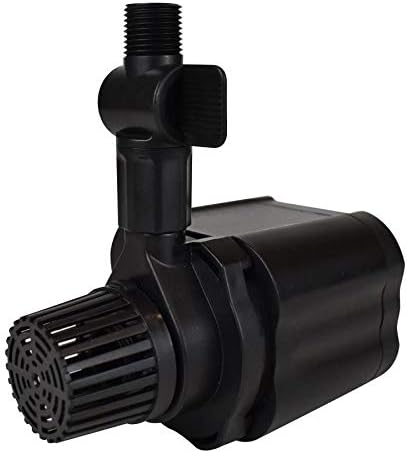
Figure 1: Smartpond 800 GPH Pond and Water Feature Pump
This image displays the Smartpond 800 GPH submersible pump, showing its compact black body, the threaded outlet for tubing connection, and the intake screen at the bottom.
Safety Information
Please read and understand all safety instructions before installing or operating the pump. Failure to follow these instructions may result in electric shock, fire, or serious injury.
- Always disconnect the pump from the power supply before performing any maintenance or cleaning.
- Do not operate the pump if the power cord is damaged.
- Ensure the pump is fully submerged in water during operation to prevent overheating.
- Do not use the pump for purposes other than those specified in this manual.
- Keep children and pets away from the pump and water feature during operation.
- Install the pump on a stable, level surface within the pond or water feature.
- Ensure the electrical outlet is a grounded, GFCI (Ground Fault Circuit Interrupter) protected outlet.
Package Contents
Verify that all items are present in the package:
- Smartpond 800 GPH Submersible Pump
- 3/4 inch ID Tubing Adapter
Setup
Placement: Position the pump in the deepest part of your pond or water feature, ensuring it is fully submerged. The pump is designed for submersible use only.
Tubing Connection: Attach the appropriate tubing (3/4 inch ID recommended) to the pump's outlet using the included adapter. Ensure a secure connection to prevent leaks.
Electrical Connection: Route the 16 ft. power cord to a grounded, GFCI-protected electrical outlet. Avoid kinks or damage to the cord. Do not plug in the pump until it is fully submerged.

Figure 2: Example of pump in a pond setting
This image illustrates a pond with a water fountain feature, demonstrating how the pump circulates water to create an aesthetic display. The pump itself is submerged and not visible.
Operating Instructions
Initial Start-up: Once the pump is fully submerged and all connections are secure, plug the power cord into the GFCI-protected outlet. The pump should begin circulating water immediately.
Adjusting Flow: The Smartpond 800 GPH pump features an adjustable flow control. Locate the flow control lever or dial on the pump's outlet. Rotate or slide it to increase or decrease the water flow to your desired level.
Continuous Operation: This pump is designed for continuous operation in ponds up to 800 gallons. Ensure the water level remains adequate to keep the pump fully submerged.

Figure 3: Water feature example
This image shows a beautifully designed pond with a cascading waterfall, illustrating another application for the Smartpond pump in creating dynamic water features.
Maintenance
Regular maintenance ensures optimal performance and longevity of your pump.
Cleaning the Intake Screen: Periodically check and clean the pump's intake screen to remove debris such as leaves, algae, or sediment. A clogged screen can reduce flow and strain the motor. Disconnect power before cleaning.
Impeller Cleaning: If flow significantly decreases, the impeller may be clogged. Disconnect power, remove the pump from the water, and carefully open the pump housing (refer to diagrams if available on product packaging) to access and clean the impeller and its chamber.
Winterization: In freezing climates, remove the pump from the pond before the first hard freeze. Clean it thoroughly and store it in a frost-free location, submerged in a bucket of water to keep seals moist, or completely dry if recommended by manufacturer.
Troubleshooting
| Problem | Possible Cause | Solution |
|---|---|---|
| Pump does not run | No power; GFCI tripped; Clogged impeller; Damaged motor. | Check power connection and outlet; Reset GFCI; Clean impeller; Contact customer support if motor is damaged. |
| Reduced water flow | Clogged intake screen; Clogged impeller; Kinked tubing; Flow control set too low. | Clean intake screen; Clean impeller; Straighten tubing; Adjust flow control. |
| Pump is noisy | Debris in impeller; Not fully submerged; Pump vibrating against hard surface. | Clean impeller; Ensure pump is fully submerged; Reposition pump to avoid contact with hard surfaces. |
Specifications
| Feature | Detail |
|---|---|
| Model Number | 71142 |
| Maximum Flow Rate | 800 GPH (Gallons Per Hour) |
| Recommended Pond Size | Up to 800 Gallons |
| Power Source | Corded Electric |
| Power Cord Length | 16 ft. |
| Tubing Compatibility | 3/4 inch ID (Internal Diameter) |
| Item Weight | 3.65 pounds |
| Package Dimensions | 11 x 5.7 x 4 inches |
| Country of Origin | Mexico |
Warranty and Support
Smartpond offers a 3-year manufacturer's warranty for this pump (2 years standard + 1 year with online registration). This warranty covers defects in materials and workmanship under normal use.
For warranty claims, technical support, or replacement parts, please contact Smartpond customer service. Refer to the product packaging or Smartpond's official website for the most current contact information.
Note: Keep your purchase receipt as proof of purchase for warranty purposes. Online registration is recommended to extend your warranty coverage.


