
1. Introduction
Thank you for choosing the BLACK+DECKER BES610-QS Jigsaw. This manual provides essential information for the safe and effective operation, maintenance, and troubleshooting of your new tool. Please read this manual thoroughly before use and keep it for future reference.
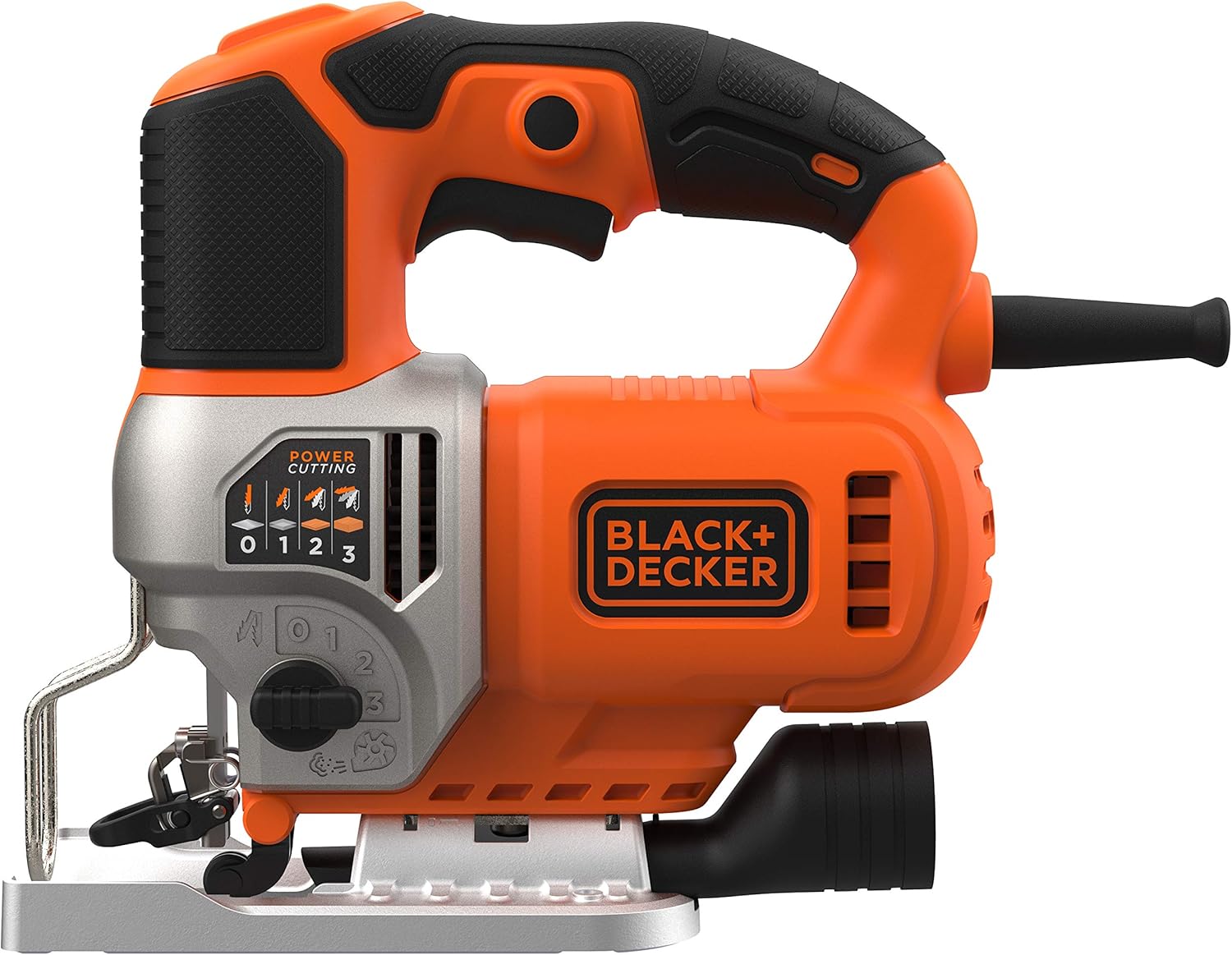
Figure 1: Overview of the Black+Decker BES610-QS Jigsaw.
2. Safety Instructions
Always follow basic safety precautions to reduce the risk of fire, electric shock, and personal injury. Keep this manual handy for quick reference.
- Work Area Safety: Keep the work area clean and well-lit. Cluttered or dark areas invite accidents. Do not operate power tools in explosive atmospheres, such as in the presence of flammable liquids, gases, or dust.
- Electrical Safety: Power tool plugs must match the outlet. Never modify the plug in any way. Avoid body contact with earthed or grounded surfaces. Do not expose power tools to rain or wet conditions.
- Personal Safety: Always wear eye protection. Use hearing protection when operating for extended periods. Dress properly; avoid loose clothing or jewelry. Secure long hair.
- Tool Use and Care: Do not force the power tool. Use the correct power tool for your application. Disconnect the plug from the power source before making any adjustments, changing accessories, or storing power tools.
- Maintenance: Have your power tool serviced by a qualified repair person using only identical replacement parts. This will ensure that the safety of the power tool is maintained.
3. Product Features
The BLACK+DECKER BES610-QS Jigsaw is designed for efficient and precise cutting across various materials. Key features include:
- Powerful 650W Motor: Provides ample power for demanding cutting tasks.
- Ergonomic Design: Features a slim handle for optimal grip and user comfort during extended use.
- 3 Pendulum Modes: Adjustable pendulum action for faster cutting in different materials.
- Adjustable Bevel Angles: Allows for angled cuts with preset positions for common angles.
- Dust Extraction Port: A detachable adapter facilitates easy connection to a vacuum cleaner for a cleaner work environment.
- Tool-Free Blade Replacement: Quick and easy blade changes without the need for additional tools.
- Integrated LED Light: Illuminates the cutting line for improved visibility and accuracy.
- Built-in Blower: Keeps the cutting line clear of sawdust for continuous visibility.
- Variable Speed Control: Adjust cutting speed from 0 to 3100 RPM to match the material and application.
4. Components Overview
Familiarize yourself with the main parts of your jigsaw:

Figure 2: Key components of the BES610-QS Jigsaw. (Note: Specific labels are not visible in this image, refer to your physical manual for detailed part identification.)
- On/Off Switch
- Speed Control Dial
- Pendulum Action Selector
- Blade Clamp Lever (for tool-free blade change)
- Base Plate / Shoe
- Bevel Adjustment Screws
- Dust Extraction Port
- LED Work Light
- Blade Guide
5. Setup
5.1 Blade Installation and Removal
Your jigsaw features a tool-free blade change system.
- To Install a Blade: Ensure the tool is unplugged. Lift the blade clamp lever. Insert the blade into the blade holder with the teeth facing forward. Release the lever to secure the blade. Pull on the blade to ensure it is firmly seated.
- To Remove a Blade: Ensure the tool is unplugged. Lift the blade clamp lever. The blade will release. Exercise caution as the blade may be hot after use.

Figure 3: Tool-free blade installation.
5.2 Dust Extraction Connection
For a cleaner work area, connect a vacuum cleaner to the dust extraction port.
- Locate the dust extraction port at the rear of the jigsaw.
- Attach the detachable adapter (if not already installed).
- Connect a suitable vacuum cleaner hose to the adapter.
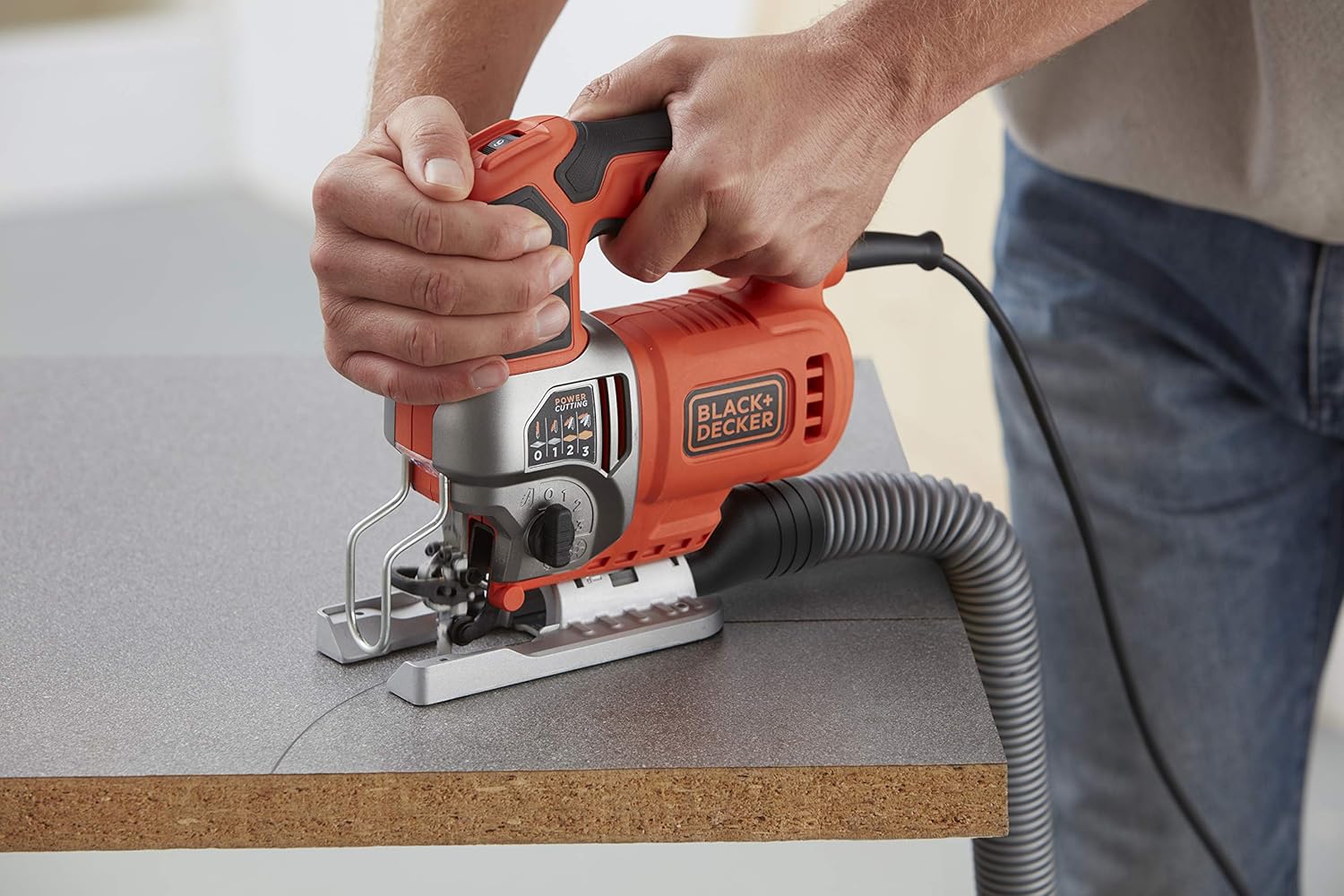
Figure 4: Jigsaw connected to a dust extraction system.
6. Operation
6.1 Powering On/Off
To start the jigsaw, press the ON/OFF switch. To stop, release the switch. For continuous operation, some models may have a lock-on button (refer to your specific tool for this feature).
6.2 Adjusting Pendulum Action
The pendulum action allows the blade to move in an orbital motion, which can speed up cutting, especially in softer materials. There are 3 pendulum modes (0, 1, 2, 3) plus a straight cut setting (0).
- Setting 0 (Straight Cut): No pendulum action, for fine cuts in wood, metal, and plastic.
- Settings 1-3 (Pendulum Action): Increasing aggressiveness for faster cutting in wood and softer materials. Use lower settings for harder materials or finer cuts.
Rotate the pendulum selector knob to choose the desired setting.

Figure 5: Adjusting the pendulum action.
6.3 Adjusting Bevel Angle
The base plate can be tilted to make bevel cuts up to 45 degrees. Your tool may have preset angles.
- Unplug the tool.
- Loosen the bevel adjustment screws located on the underside of the base plate.
- Tilt the base plate to the desired angle. Use a protractor for precise angles if needed.
- Tighten the screws firmly to secure the base plate.

Figure 6: Adjusting the base plate for bevel cuts.
6.4 Speed Control
The variable speed control dial allows you to match the cutting speed to the material and blade type. Higher speeds are generally for softer materials like wood, while lower speeds are for harder materials like metal or plastic.

Figure 7: Speed control dial.
6.5 Cutting Techniques
- Straight Cuts: Guide the jigsaw along a marked line, keeping the base plate flat on the workpiece.
- Curved Cuts: Use a narrow blade and a slower speed. Guide the tool carefully along the curve.
- Plunge Cuts: For internal cuts without a pilot hole, tilt the tool forward so the front edge of the base plate rests on the workpiece. Start the tool, then slowly lower the blade into the material. This technique requires practice and caution.

Figure 8: Jigsaw in operation on wood.

Figure 9: Precision cutting with the jigsaw.
6.6 Material Suitability
The BES610-QS Jigsaw is suitable for cutting various materials:
- Wood: Up to 90 mm thickness. Use wood-specific blades and appropriate pendulum settings.
- Aluminum: Up to 15 mm thickness. Use metal-specific blades and lower speeds.
- Metal: Up to 8 mm thickness. Use metal-specific blades and lower speeds.
- Plastic: Use appropriate blades and adjust speed to prevent melting.

Figure 10: Cutting a metal sheet.

Figure 11: Cutting a metal pipe.

Figure 12: Cutting corrugated plastic.
7. Maintenance
Regular maintenance ensures the longevity and optimal performance of your jigsaw.
- Cleaning: Always unplug the tool before cleaning. Use a soft brush or compressed air to clean dust and debris from ventilation openings. Do not use water or chemical cleaners.
- Blade Care: Inspect blades before each use. Replace dull or damaged blades immediately. Store blades properly to prevent damage.
- Cord Inspection: Regularly check the power cord for damage. If damaged, have it replaced by a qualified service technician.
- Storage: Store the tool in a dry, secure place out of reach of children.
8. Troubleshooting
If you encounter issues with your jigsaw, refer to the following common problems and solutions:
| Problem | Possible Cause | Solution |
|---|---|---|
| Tool does not start | No power supply; Damaged cord/plug; Faulty switch | Check power outlet and connections; Inspect cord for damage; Contact service center if switch is faulty. |
| Blade not cutting efficiently | Dull or incorrect blade; Incorrect speed/pendulum setting | Replace blade; Ensure correct blade type for material; Adjust speed and pendulum setting. |
| Excessive vibration | Loose blade; Damaged blade; Worn internal components | Ensure blade is securely clamped; Replace damaged blade; Contact service center for inspection. |
| Dust accumulation on cut line | Blower blocked; Dust extraction not connected/effective | Clear blower nozzle; Connect or check vacuum cleaner connection. |
If the problem persists, contact BLACK+DECKER customer support or an authorized service center.
9. Specifications
Technical specifications for the BLACK+DECKER BES610-QS Jigsaw:
| Feature | Specification |
|---|---|
| Manufacturer | BLACK+DECKER |
| Model Number | BES610-QS |
| Power Source | Corded Electric |
| Voltage | 230 Volt |
| Wattage | 650 Watts |
| Speed | 0-3100 RPM |
| Max. Cutting Depth (Wood) | 90 mm |
| Max. Cutting Depth (Aluminum) | 15 mm |
| Max. Cutting Depth (Metal) | 8 mm |
| Product Dimensions (L x W x H) | 29.4 x 8.5 x 21.6 cm |
| Item Weight | 1.55 Kilogram |
| Handle Material | Plastic or Rubber |
| Blade Material | High-speed steel |
| Certification | CE |
| Included Components | Pendulum Jigsaw, Wood Saw Blade |
10. Warranty and Support
BLACK+DECKER products are manufactured to high-quality standards and are guaranteed against manufacturing defects. For specific warranty terms and conditions, please refer to the warranty card included with your product or visit the official BLACK+DECKER website.
For technical assistance, spare parts, or service, please contact your local BLACK+DECKER service center or customer support. Contact information can typically be found on the product packaging or the official website.
Online Resources: For additional information, tutorials, and product registration, visit www.blackanddecker.com.


