
1. Introduction
Thank you for choosing the AIRSEE Professional Rechargeable 30000 RPM Nail Drill Machine, Model E6. This portable e-file is designed for efficient and precise nail care, suitable for both personal and professional use. It features variable speed control, low vibration, low noise, and low heat operation, making it ideal for grinding, cutting, carving, and removing gel polish and cuticles. Please read this manual thoroughly before operation to ensure safe and effective use.
2. Safety Information
- Avoid contact with the rotating bit.
- Always use eye protection during operation.
- Operate the device in a well-ventilated area to prevent dust inhalation.
- Keep out of reach of children.
- Do not disassemble or modify the device.
- Ensure the power adapter is compatible with your local voltage.
3. Package Contents
The AIRSEE Professional Rechargeable Nail Drill Machine E6 package includes the following items:
- 1 x Rechargeable Nail Drill Control Unit
- 1 x UL Certificated Power Adapter
- 1 x Handpiece
- 1 x Handpiece Holder
- 6 x Nail Drill Bits
- 6 x Sanding Bands
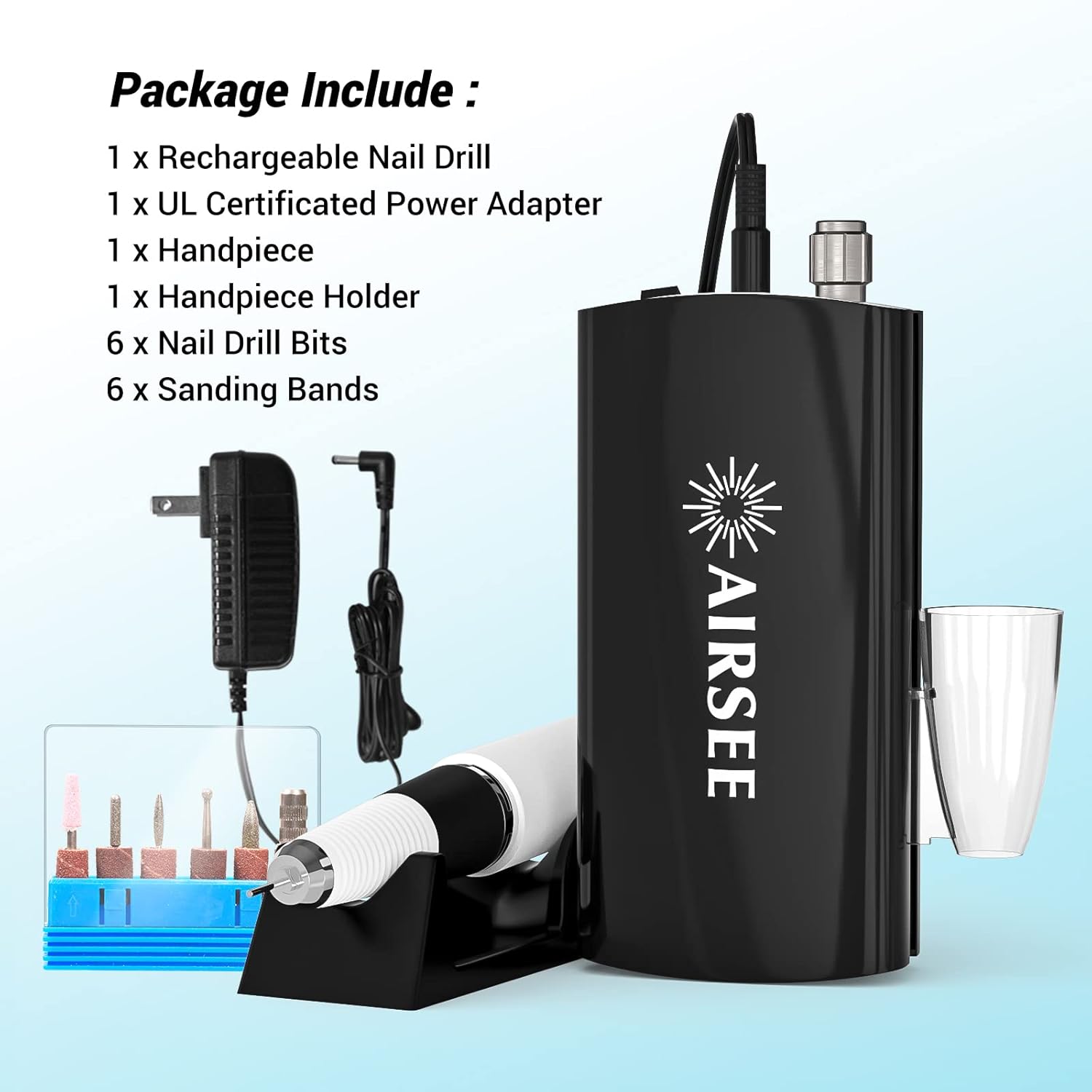
Figure 3.1: Package Contents
4. Product Overview
The AIRSEE E6 Nail Drill Machine is a compact and powerful tool designed for various nail applications. Its key features include:
- Rechargeable and Cordless: Offers up to 6-10 hours of continuous operation after a 2-hour charge.
- Variable Speed Control: Adjustable from 0-30,000 RPM for diverse tasks.
- Low Vibration, Noise, and Heat: Engineered for user comfort and durability.
- Portable Design: Lightweight with a convenient hook for easy carrying.
- Easy Bit Operation: Simple mechanism for changing 3/32 inch shank bits.

Figure 4.1: AIRSEE E6 Nail Drill Machine

Figure 4.2: Portable Hook for Convenient Use

Figure 4.3: Handpiece Features for Quiet, Low Heat, and Low Vibration Operation
5. Setup
- Charge the Device: Connect the UL Certificated Power Adapter to the control unit and a power outlet. The charging indicator will illuminate. A full charge takes approximately 2 hours.
- Connect Handpiece: Plug the handpiece cable securely into the 'OUTPUT' port on the control unit.
- Insert/Remove Drill Bit:
- Turn the center barrel of the handpiece to the 'R' (Release) position.
- Insert the desired 3/32 inch shank nail drill bit into the chuck.
- Turn the center barrel back to the 'S' (Secure) position to lock the bit in place. Ensure the bit is firmly secured before operation.
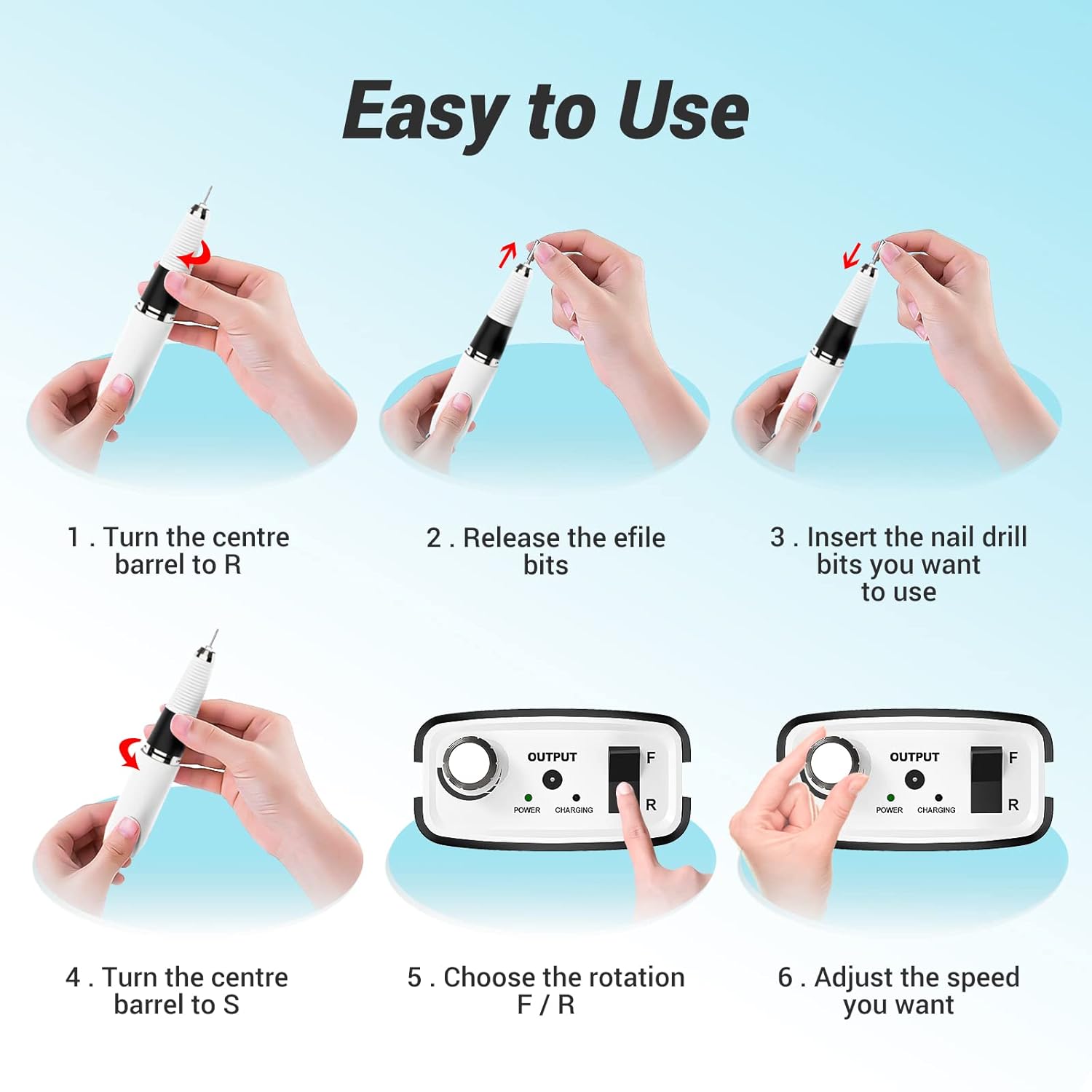
Figure 5.1: Bit Insertion and Basic Controls
6. Operating Instructions
- Power On: Turn the power knob on the control unit clockwise to power on the device. The 'POWER' indicator will light up.
- Adjust Speed: Rotate the power knob clockwise to increase the speed (up to 30,000 RPM) and counter-clockwise to decrease it. Start with a low speed and gradually increase as needed for your task.
- Select Rotation Direction: Use the F/R (Forward/Reverse) button to change the rotation direction of the drill bit. Press once for forward, press again for reverse. This feature accommodates both right-handed and left-handed users.
- Begin Operation: Gently apply the rotating drill bit to the nail surface. Avoid excessive pressure to prevent damage to the nail or the device.
- Power Off: Turn the power knob counter-clockwise until it clicks off.
7. Maintenance
- Cleaning: After each use, gently wipe the handpiece and control unit with a soft, dry cloth. Remove any dust or debris from the chuck and ventilation holes using a small brush or compressed air.
- Storage: Store the device in a cool, dry place away from direct sunlight and moisture. Keep all components, especially drill bits, in their designated storage to prevent damage or loss.
- Bit Care: Regularly inspect drill bits for wear and tear. Replace dull or damaged bits to maintain optimal performance and prevent injury.
8. Troubleshooting
| Problem | Possible Cause | Solution |
|---|---|---|
| Device does not turn on | Low battery; Power switch off; Loose connection | Charge the device; Turn on the power switch; Ensure all cables are securely connected |
| Handpiece not rotating | Handpiece not connected; Bit not properly secured; Internal issue | Check handpiece connection; Re-insert and secure bit; Contact customer service if problem persists |
| Excessive vibration or noise | Loose bit; Damaged bit; Debris in handpiece | Secure bit firmly; Replace bit; Clean handpiece thoroughly |
| Overheating | Prolonged use at high speed; Blocked ventilation | Allow device to cool down; Ensure ventilation holes are clear |
9. Specifications
- Brand: AIRSEE
- Model Name: E6 Black
- Item Model Number: NS-0801
- Material: Aluminum
- Power Source: Battery Powered
- Battery Life: Up to 8 Hours (continuous operation)
- Max RPM: 30,000 RPM
- Package Dimensions: 9.76 x 6.06 x 2.72 inches
- Item Weight: 1.68 Pounds
10. Warranty and Support
AIRSEE is committed to providing high-quality products and customer satisfaction. If you encounter any issues with your AIRSEE Professional Rechargeable Nail Drill Machine E6, please contact our customer service team. We offer 24-hour customer service to assist you with any product-related concerns.
For support, please refer to the contact information provided with your product packaging or visit the official AIRSEE website.


