1. Product Overview
This Electropan replacement parts kit is designed to maintain the optimal performance of your Ecovacs DEEBOT N79 series robotic vacuum cleaner. Regular replacement of wear-and-tear components ensures efficient cleaning and extends the lifespan of your device.

Image 1.1: Complete Electropan replacement parts kit, including main brush, side brushes, HEPA filters, and cleaning tool.
2. Compatible Models
This replacement kit is compatible with the following robotic vacuum cleaner models:
- ECOVACS DEEBOT N79
- ECOVACS DEEBOT N79S
- ECOVACS DEEBOT N79SE
- ECOVACS DEEBOT N79W
- ECOVACS DEEBOT N79W+
- ECOVACS DEEBOT 500
- ECOVACS DEEBOT DN622
- ECOVACS DEEBOT DN622.11
- ECOVACS DEEBOT DN622.31
- Yeedi K600
- Yeedi K700

Image 2.1: Visual representation of compatible DEEBOT and Yeedi models.
3. Package Contents
Your Electropan replacement kit typically includes:
- Main Brush (1 unit)
- Side Brushes (multiple pairs)
- HEPA Filters (multiple units)
- Sponge Filters (multiple units)
- Cleaning Tool (1 unit)
Image 3.1: An example of the items included in the replacement parts kit.
4. Installation Instructions
Before beginning any installation or maintenance, ensure your robotic vacuum cleaner is powered off and disconnected from its charging base.
4.1. Main Brush Replacement
- Turn the robot over to access the main brush cover.
- Press the release tabs on the main brush cover and lift it off.
- Remove the old main brush.
- Clean any hair or debris from the brush compartment.
- Insert the new Electropan main brush, ensuring the square ends align with the slots.
- Replace the main brush cover and press down until it clicks into place.

Image 4.1.1: Detailed view of the main brush, showing its structure.

Image 4.1.2: The main brush alongside the included cleaning tool for maintenance.
4.2. Side Brush Replacement
- Turn the robot over.
- Using a screwdriver (often included in the kit or a small Phillips head), unscrew the center screw holding each side brush.
- Remove the old side brush.
- Align the new Electropan side brush with the post and press it down.
- Secure the new side brush with the screw.

Image 4.2.1: Detailed view of a side brush, highlighting its three-arm design.

Image 4.2.2: Illustrates the connection point for the side brush on the vacuum.
4.3. Filter Replacement
- Open the dustbin cover on your robot.
- Remove the dustbin from the robot.
- Open the dustbin to access the filter compartment.
- Remove the old HEPA filter and sponge filter.
- Insert the new Electropan HEPA filter, followed by the new sponge filter, ensuring they are seated correctly.
- Close the dustbin cover and reinsert the dustbin into the robot.
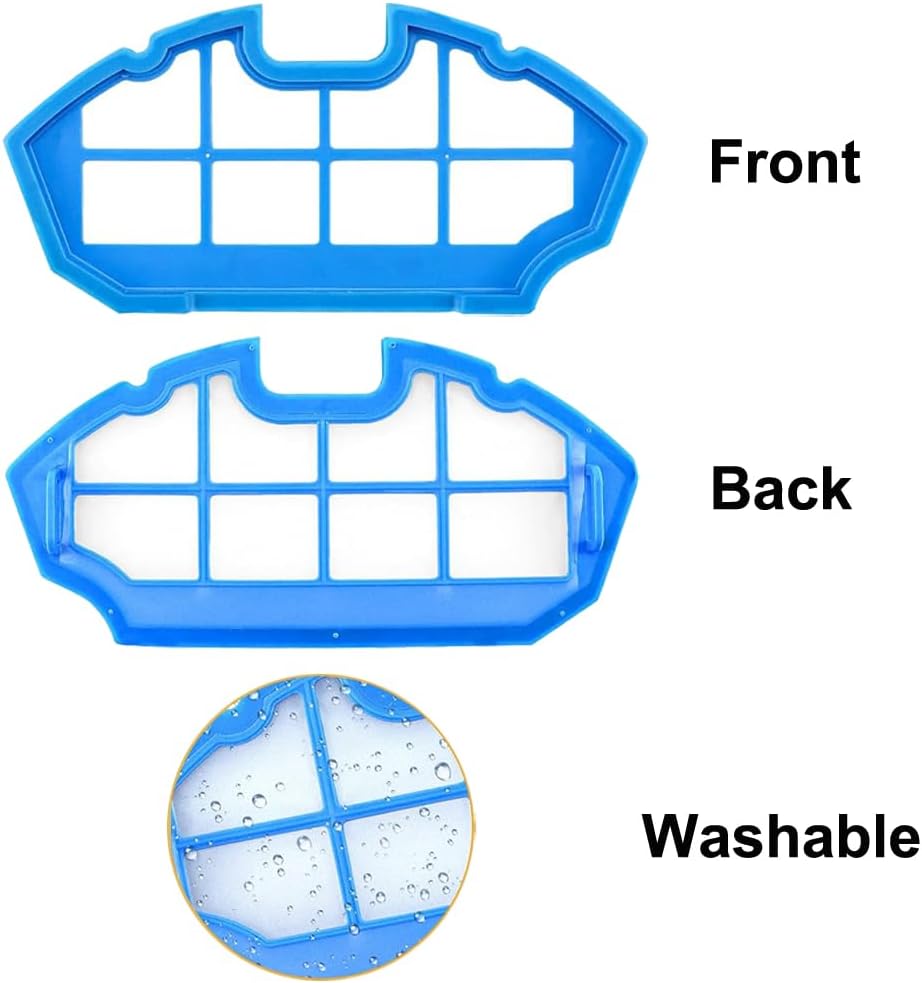
Image 4.3.1: Shows the front and back of the filter, indicating it is washable.

Image 4.3.2: Separate views of the HEPA filter and the accompanying black sponge filter.

Image 4.3.3: Illustrates the multi-layered structure of the filtration system.
5. Maintenance
To ensure your DEEBOT operates at peak performance, regular cleaning and timely replacement of parts are crucial.
5.1. Cleaning Frequency
- Main Brush: Clean weekly, removing tangled hair and debris using the provided cleaning tool.
- Side Brushes: Clean monthly, removing hair and debris. Check for damage.
- Filters: Tap out dust from the HEPA filter weekly. The sponge filter can be rinsed with water and air-dried completely before reinstallation.
5.2. Replacement Schedule
The lifespan of replacement parts depends on usage frequency and environment. As a general guideline:
- Main Brush: Replace every 6-12 months.
- Side Brushes: Replace every 3-6 months, or when visibly worn or bent.
- Filters (HEPA & Sponge): Replace every 2-3 months to maintain filtration efficiency.
6. Troubleshooting
If you experience issues after replacing parts, consider the following:
- Reduced Suction: Ensure filters are clean and correctly installed. Check for blockages in the main brush area or dustbin.
- Robot Not Moving Straight/Cleaning Unevenly: Check side brushes for tangles or damage. Ensure they are securely attached.
- Unusual Noises: Inspect the main brush and side brushes for tangled hair or foreign objects. Ensure all parts are installed correctly and securely.
- Parts Not Fitting: Double-check that your vacuum model is listed in the compatible models section (Section 2).
7. Specifications
| Brand | Electropan |
| Compatible Devices | ECOVACS DEEBOT N79, N79S, DN622, DN622.11, 500, N79w, N79se, DN622.31, N79W+, Yeedi K600, K700 |
| Material Type | Hepa (for filters) |
| Reusability | Reusable (sponge filter) |
| Item Weight (approx.) | 8 ounces (entire kit) |
| Product Dimensions (packaging) | 4.33 x 1.97 x 4.33 inches |

Image 7.1: Illustrative dimensions for various components of the replacement kit.
8. Warranty and Support
Electropan offers a 30-day warranty for these replacement parts, providing a full money-back guarantee or free replacement for any manufacturing defects or compatibility issues within this period.
For further assistance, technical support, or warranty claims, please contact the seller directly through your purchase platform. Provide your order details and a clear description of the issue for prompt service.