
1. Introduction
This document provides comprehensive instructions for the Easytry123 Replacement Remote Control. This remote is designed to function as a substitute for the original remote controls of various ONKYO Home Theater System models. Please review this manual to ensure proper setup and operation.
While this replacement remote is designed for broad compatibility, some advanced or specific functions present on your original remote may not be fully supported. Refer to the original ONKYO system manual for detailed functions of your specific home theater unit.
2. Compatible Models
This Easytry123 Replacement Remote Control is compatible with the following ONKYO Home Theater System models:
- ONKYO HT-R670
- ONKYO HT-S6200
- ONKYO HT-R570
- ONKYO HT-S5200
- ONKYO HT-S5200S
- ONKYO HT-S7100
- ONKYO HT-R960
- ONKYO HT-S9100THX
- ONKYO HT-R560
- ONKYO HT-R667
If your specific ONKYO model is not listed above, this replacement remote may not be fully compatible.
3. Setup
3.1 Battery Installation
- Locate the battery compartment on the back of the remote control.
- Slide the battery compartment cover downwards or outwards to open it.
- Insert two (2) AAA batteries (not included), ensuring the positive (+) and negative (-) terminals align correctly with the markings inside the compartment.
- Replace the battery compartment cover by sliding it back into position until it clicks securely.
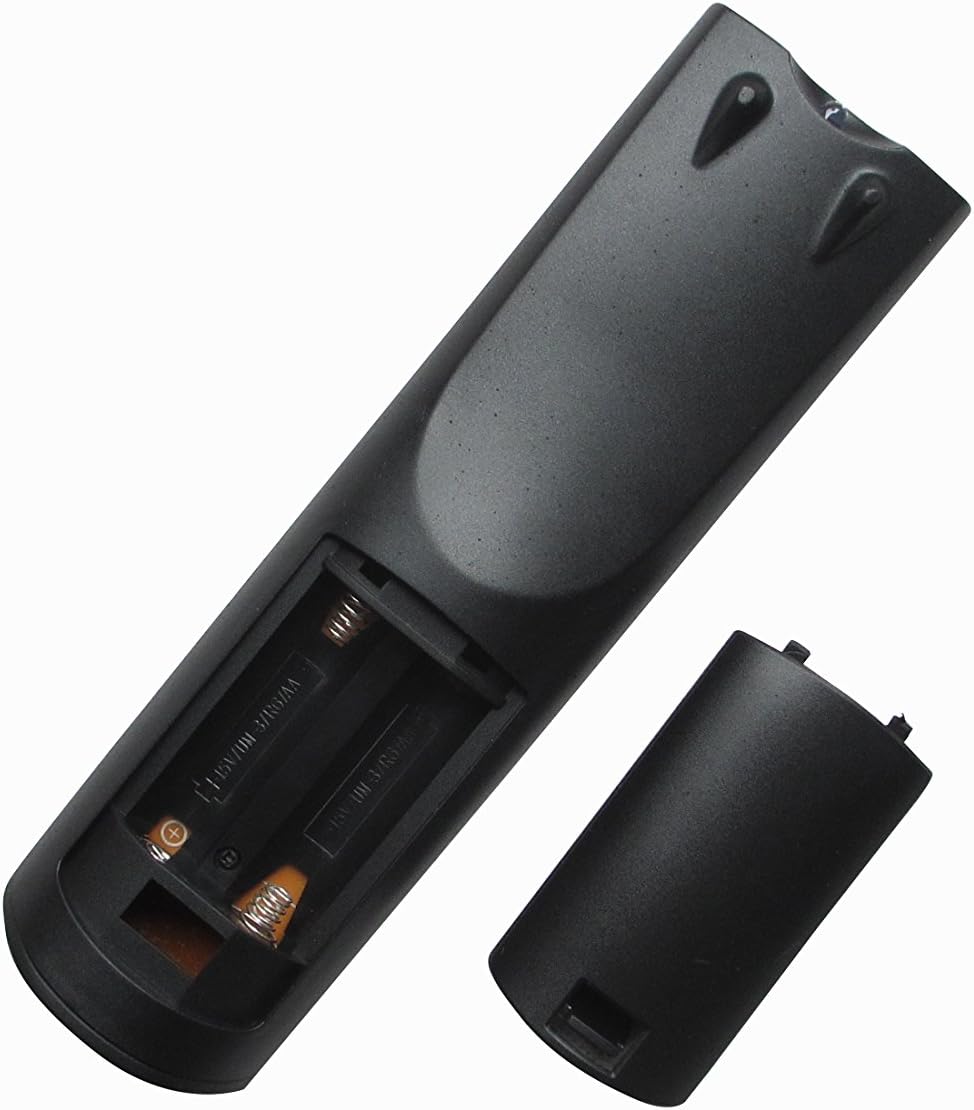
Figure 1: Back view of the remote control with the battery compartment open, illustrating the correct orientation for AAA battery insertion.
The remote control does not require any programming. Once batteries are installed, it is ready for use with compatible ONKYO Home Theater Systems.
4. Operating Instructions
4.1 Remote Control Layout

Figure 2: Front view of the Easytry123 replacement remote control, displaying the arrangement and labeling of all operational buttons.
4.2 Basic Functions
Point the remote control directly at the infrared receiver on your ONKYO Home Theater System. Ensure there are no obstructions between the remote and the system.
- ON/STANDBY: Powers the system on or puts it into standby mode.
- INPUT SELECTOR (e.g., DVD, CD, TUNER, AUX): Selects the desired audio/video input source.
- VOL +/-: Adjusts the master volume level.
- MUTE: Toggles the audio mute function.
- NAVIGATION (Up, Down, Left, Right, ENTER): Used to navigate menus and confirm selections.
- RETURN: Returns to the previous menu or screen.
- PLAY/PAUSE, STOP, SKIP (<<, >>): Controls media playback functions.
- NUMBER BUTTONS (0-9): Used for direct track selection, radio station tuning, or inputting numerical values.
- DISPLAY: Changes the information displayed on the system's screen.
- REMOTE MODE: Switches the remote's operating mode for controlling different components (e.g., TV, DVD). Note that full functionality for external devices may vary.
5. Maintenance
- Cleaning: To clean the remote, gently wipe it with a soft, dry cloth. Do not use liquid cleaners, solvents, or abrasive materials, as these can damage the remote's surface or internal components.
- Battery Replacement: Replace batteries when the remote's response becomes sluggish or stops functioning. Always replace both batteries simultaneously with new AAA batteries. Do not mix old and new batteries, or different types of batteries.
- Storage: If the remote will not be used for an extended period, remove the batteries to prevent leakage and potential damage. Store the remote in a cool, dry place away from direct sunlight.
6. Troubleshooting
- Remote not responding:
- Check if the batteries are inserted correctly with the correct polarity (+/-).
- Replace the batteries with fresh ones.
- Ensure there are no obstructions between the remote and the ONKYO system's infrared receiver.
- Confirm you are within the effective range and pointing the remote directly at the system.
- Limited functionality:
- This is a replacement remote; some advanced or specific functions of your original ONKYO remote may not be replicated.
- Ensure the remote is in the correct 'REMOTE MODE' if applicable for controlling different devices.
- Verify your ONKYO system model is listed in the 'Compatible Models' section of this manual.
- Buttons are sticky or unresponsive:
- This may indicate internal damage or dirt. Do not attempt to disassemble the remote.
- Ensure the remote is kept clean and dry.
7. Specifications
| Feature | Description |
|---|---|
| Brand | Easytry123 |
| Connectivity Technology | Infrared (IR) |
| Compatible Devices | ONKYO Home Theater Systems (specific models listed in Section 2) |
| Max Number of Supported Devices | 1 (controls the primary ONKYO system) |
| Special Feature | Ergonomic design |
| Power Source | 2 x AAA Batteries (not included) |
8. Warranty and Support
Specific warranty information for this Easytry123 replacement remote control is not provided in the product details. For any warranty claims, technical support, or further inquiries, please contact the seller directly through your purchase platform.
Please retain your proof of purchase for any support requests.