
Introduction
This manual provides comprehensive instructions for the setup, operation, and maintenance of your new Easytry123 replacement remote control. This remote is designed to be compatible with various ONKYO Home Theater Systems, including models HT-R592, HT-RC330, HT-S5400, HT-S3500, HT-S5500, HT-R391, HT-R590, HT-R591, HT-S7805, and HT-S3800.
Please note that as a replacement unit, some advanced or specific functions of your original remote may not be fully supported. Ensure your ONKYO system model is listed above for optimal compatibility.
Product Overview
The Easytry123 replacement remote control features an ergonomic design for comfortable handling and intuitive button layout for ease of use. It operates using infrared (IR) technology to communicate with your ONKYO Home Theater System.
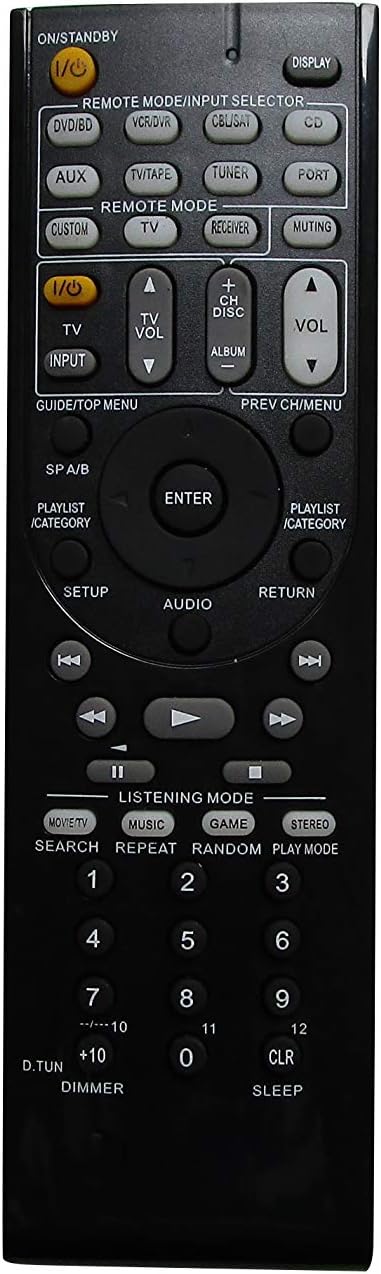
Figure 1: Front view of the remote control, displaying the power button, input selectors, volume controls, navigation, and various function buttons.

Figure 2: Back view of the remote control, highlighting the battery compartment located at the bottom.
Setup
Battery Installation
The remote control requires two AAA batteries (not included). Follow these steps to install them:
- Locate the battery compartment on the back of the remote control (refer to Figure 2).
- Slide the battery compartment cover downwards and remove it.
- Insert two AAA batteries, ensuring the positive (+) and negative (-) terminals align correctly with the markings inside the compartment.
- Replace the battery compartment cover by sliding it back into place until it clicks securely.
Important: Always use fresh batteries and replace both batteries at the same time. Do not mix old and new batteries or different types of batteries.
Operating Instructions
This section details the basic functions and operation of your replacement remote control.
Basic Functions
- Power (I/O STANDBY): Press this button to turn your ONKYO system on or off (standby mode).
- Volume (+/-): Adjusts the master volume level of your ONKYO system.
- Muting: Mutes or unmutes the audio output.
- Input Selector (DVD/BD, VCR/DVR, CBL/SAT, CD, AUX, TV/TAPE, TUNER, PORT): Selects the desired input source connected to your ONKYO system.
- Navigation Buttons (Up, Down, Left, Right, ENTER): Used to navigate menus and confirm selections on your ONKYO system's display.
- RETURN: Returns to the previous menu or screen.
- DISPLAY: Toggles display information on your ONKYO system.
Remote Mode Selection
The remote features dedicated buttons to switch between different control modes:
- REMOTE MODE/INPUT SELECTOR: These buttons (e.g., DVD/BD, TV, CD, TUNER) function as both input selectors and remote mode activators. Pressing one will switch the remote to control that specific device type, if programmed or compatible.
- RECEIVER: Activates the remote to control the ONKYO receiver functions.
- TV: Activates the remote to control basic TV functions (e.g., power, volume, channel), if compatible and programmed.
Audio/Video Control
- PLAY, PAUSE, STOP, FAST FORWARD, REWIND, SKIP: Standard playback control buttons for compatible media devices connected to your ONKYO system.
- LISTENING MODE (MOVIE/TV, MUSIC, GAME, STEREO): Selects different audio listening modes for optimized sound experience.
- SETUP: Accesses the setup menu of your ONKYO system.
- AUDIO: Cycles through audio settings or modes.
Maintenance
To ensure the longevity and proper functioning of your remote control, follow these maintenance guidelines:
- Cleaning: Wipe the remote control regularly with a soft, dry cloth. Do not use liquid cleaners, abrasive pads, or chemical solvents, as these can damage the surface or internal components.
- Battery Replacement: Replace batteries promptly when the remote's performance degrades. Remove batteries if the remote will not be used for an extended period to prevent leakage.
- Storage: Store the remote in a cool, dry place away from direct sunlight, extreme temperatures, and high humidity.
- Handling: Avoid dropping the remote control or subjecting it to strong impacts, which can damage internal circuitry.
Troubleshooting
If you experience issues with your remote control, refer to the following common problems and solutions:
- Remote is not responding:
- Check if the batteries are inserted correctly with the correct polarity (+/-).
- Replace the batteries with new ones.
- Ensure there are no obstructions between the remote control and the ONKYO system's infrared sensor.
- Confirm you are within the effective operating range and pointing the remote directly at the system.
- Certain functions do not work:
- Verify that the remote is in the correct mode (e.g., RECEIVER mode for receiver functions, TV mode for TV functions).
- As a replacement remote, some specific or advanced functions of the original ONKYO remote may not be supported. Refer to your ONKYO system's original manual for specific function compatibility.
- Remote works intermittently:
- This often indicates low battery power. Replace the batteries.
- Ensure the remote's infrared emitter is clean and free from dust or debris.
Specifications
| Brand | Easytry123 |
| Compatible Devices | ONKYO Home Theater Systems (HT-R592, HT-RC330, HT-S5400, HT-S3500, HT-S5500, HT-R391, HT-R590, HT-R591, HT-S7805, HT-S3800) |
| Connectivity Technology | Infrared (IR) |
| Controller Type | Button Control |
| Special Feature | Ergonomic Design |
| Power Source | 2 x AAA Batteries (not included) |
| Manufacturer | Easytry123 |
Warranty and Support
Specific warranty information for this Easytry123 replacement remote control is not provided in the product details. For any support inquiries or further assistance, please contact the seller directly through your purchase platform.