
Easytry123 Easytry7607
Easytry123 Replacement Remote Control User Manual
Model: Easytry7607 for Integra A/V Receivers
Introduction
This manual provides instructions for the Easytry123 Replacement Remote Control, Model Easytry7607. This remote is designed as a replacement for various Integra A/V Receiver models, including DTR-40.4, DTR-40.3, DTR-30.7, DTR-20.7, DTR-30.4, DHC-80.3, and DTR-50.3, and their corresponding original remote models like RC-833M, RC-899M, RC-838M, and RC-811M. Please read this manual carefully before use to ensure proper operation.
Setup
1. Battery Installation
The remote control requires two AAA batteries (not included). Follow these steps to install them:
- Locate the battery compartment on the back of the remote control.
- Press down on the tab and slide the battery cover downwards to open it.
- Insert two AAA batteries, ensuring the positive (+) and negative (-) terminals align correctly with the markings inside the compartment.
- Slide the battery cover back into place until it clicks securely.
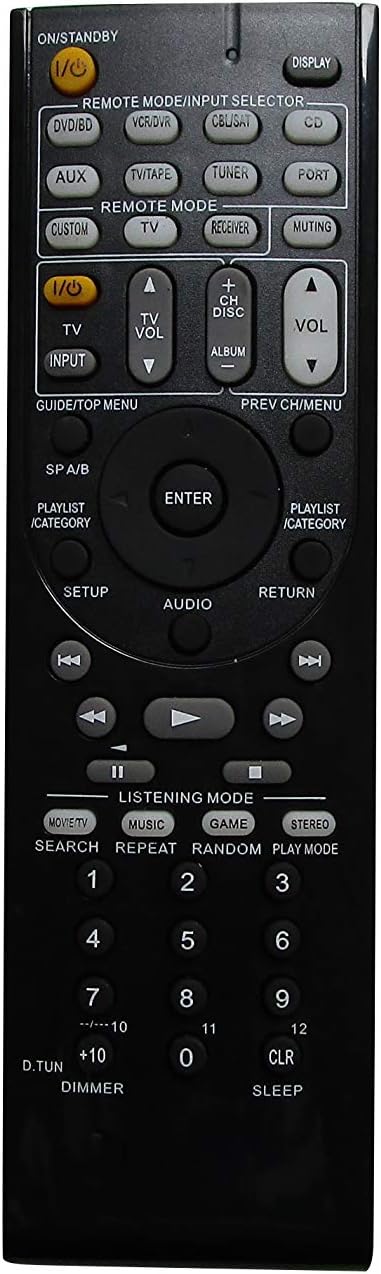
Image 1: Back of the remote control with the battery cover removed, illustrating the battery insertion process. Note the polarity markings inside the compartment.
Important: Ensure batteries are inserted with correct polarity. Incorrect installation can damage the remote control. Do not mix old and new batteries, or different types of batteries.
Operation
Basic Functions
This replacement remote control operates using infrared (IR) technology. Point the remote directly at your Integra A/V Receiver. Ensure there are no obstructions between the remote and the receiver's IR sensor.

Image 2: Front view of the remote control, showing the layout of all buttons for various functions.
The remote features standard buttons for power, volume control, input selection, and navigation. Refer to Image 2 for the button layout. Press the corresponding button for the desired function.
Compatibility Notes
- This remote is a replacement and may not offer all the exact same features or button functions as your original Integra remote.
- It does not support programming or learning functions. Remote codes cannot be entered or modified.
- Functionality is dependent on the specific Integra A/V Receiver model. While designed for compatibility, some advanced or model-specific functions may not be supported.
Maintenance
Cleaning
To clean the remote control, gently wipe it with a soft, dry cloth. Do not use liquid cleaners, sprays, or abrasive materials, as these can damage the remote's surface or internal components.
Battery Replacement
Replace batteries when the remote's response becomes sluggish or stops working. Follow the battery installation steps outlined in the Setup section. Always replace both batteries at the same time with new AAA alkaline batteries.
Troubleshooting
- Remote not responding:
- Check if the batteries are inserted correctly with the right polarity.
- Replace old batteries with new AAA alkaline batteries.
- Ensure there is a clear line of sight between the remote control and the A/V receiver's IR sensor. Remove any obstructions.
- Verify that the remote is pointed directly at the receiver.
- Some functions do not work:
- This is a replacement remote and may not support all functions of your original Integra remote. Refer to the Compatibility Notes in the Operation section.
- The remote does not support programming or learning functions.
- Remote feels loose or rattles:
- Ensure the battery cover is securely closed.
- If internal components feel loose, contact the seller for assistance.
Specifications
| Brand | Easytry123 |
| Model Number | Easytry7607 |
| Compatible Devices | Integra A/V Receivers (DTR-40.4, DTR-40.3, DTR-30.7, DTR-20.7, DTR-30.4, DHC-80.3, DTR-50.3, etc.) |
| Connectivity Technology | Infrared (IR) |
| Controller Type | Button Control |
| Battery Type | 2 x AAA Alkaline Batteries (not included) |
| Color | Black |
| Special Feature | Ergonomic design |
Warranty Information
Specific warranty details for this product are provided by the seller, Easytry123. Please refer to your purchase documentation or contact the seller directly for information regarding warranty coverage and terms.
Customer Support
For any questions, concerns, or technical assistance not covered in this manual, please contact the seller, Easytry123, through the platform where the purchase was made. Provide your order number and a detailed description of the issue for prompt support.
Ask a question about this manual
Ask about setup, troubleshooting, compatibility, parts, safety, or missing instructions. Manuals+ will review the question and use this page’s manual context to help answer it.