Introduction
This manual provides detailed instructions for the setup, operation, and maintenance of your DIGIQUEST Universal Easy Plus Remote Control. Designed for simplicity and ease of use, this remote features large, intuitive buttons, making it suitable for all users, including those in hotel or hospital environments. Please read this manual carefully before using the product.
Product Features
- Simple Configuration
- Large, Intuitive Buttons for enhanced visibility
- Bright LED indicator
- Dedicated Teletext Button
- Equipped exclusively with main functions to avoid complexity
- Compatible with all TV brands
Package Contents
- 1 x DIGIQUEST Universal Easy Plus Remote Control
- 1 x User Manual (this document)
Setup
1. Battery Installation
The DIGIQUEST Universal Easy Plus remote control requires 2 x 1.5V LR03 - AAA batteries (not included).
- Locate the battery compartment on the back of the remote control.
- Slide open the battery cover.
- Insert two AAA batteries, ensuring the correct polarity (+ and -) as indicated inside the compartment.
- Close the battery cover securely.
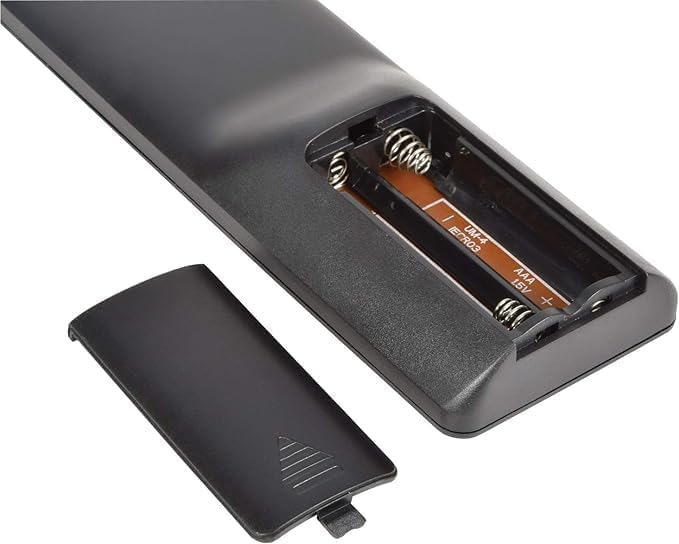
Image: The open battery compartment of the remote control, showing slots for two AAA batteries.
2. Programming the Remote Control
The remote offers four simple methods to configure it quickly with your TV. Choose the method that best suits your needs.
- Direct Code Entry:
Enter the corresponding code for your TV brand directly. A list of over 10,000 available codes is typically provided in the included code booklet (if applicable) or can be found online on the DIGIQUEST support website.
- Automatic Search:
The remote can automatically search for the correct code for your TV. Follow the instructions in the code booklet for initiating an automatic search. This process typically involves holding down a specific button until the TV responds.
- Manual Search:
If automatic search is unsuccessful, you can perform a manual search. This involves cycling through codes one by one until your TV responds. Refer to the code booklet for detailed steps.
- Learning Function (from original remote):
If you have your original TV remote control, the Easy Plus remote can learn functions directly from it. This method allows you to customize button assignments. Place the two remotes face-to-face and follow the learning procedure outlined in the code booklet.

Image: Front view of the DIGIQUEST Universal Easy Plus remote control, showcasing its large buttons.
Operating Instructions
Once programmed, the remote control is ready for use. Below is a description of the main buttons and their functions:

Image: A close-up view of the large, clearly labeled buttons on the remote control.
| Button | Function |
|---|---|
| Power (Red Button) | Turns the TV On or Off. |
| TV | Selects the TV input source. |
| Mute (Speaker with X) | Mutes or unmutes the TV sound. |
| TEXT | Activates or deactivates Teletext mode. |
| Volume Up (+) | Increases the TV volume. |
| Volume Down (-) | Decreases the TV volume. |
| Channel Up (P^) | Changes to the next channel. |
| Channel Down (Pv) | Changes to the previous channel. |
| Number Buttons (0-9) | Directly select TV channels. |
| INFO | Displays program information (if available). |
| AV | Switches between available audio/video input sources. |
Maintenance
Cleaning
To clean the remote control, use a soft, dry cloth. Do not use abrasive cleaners, solvents, or alcohol, as these may damage the surface or internal components.
Battery Replacement
Replace batteries when the remote control's response becomes sluggish or stops working. Always replace both batteries at the same time with new AAA batteries. Do not mix old and new batteries, or different types of batteries.
Troubleshooting
- Remote not working:
- Check if the batteries are inserted correctly with the correct polarity.
- Replace old batteries with new ones.
- Ensure there are no obstructions between the remote control and the TV's infrared receiver.
- Re-program the remote control using one of the methods described in the "Programming the Remote Control" section.
- Some buttons not working:
- The remote might not be fully compatible with all functions of your specific TV model. Try the learning function if available.
- Ensure the remote is correctly programmed for your TV. Try re-programming with a different code if available for your TV brand.
- Remote range is poor:
- Replace the batteries.
- Ensure you are within the maximum operating range (up to 10 meters) and have a clear line of sight to the TV.
Specifications
| Feature | Detail |
|---|---|
| Brand | DIGIQUEST |
| Model Name | Easy Plus |
| Color | Black |
| Connectivity Technology | Infrared |
| Special Feature | Universal compatibility |
| Compatible Devices | Television |
| Maximum Number of Supported Devices | 1 |
| Controller Type | Button control |
| Maximum Range | 10 Meters |
| Power Source | 2 x AAA 1.5V batteries (not included) |
| Manufacturer | DIGIQUEST |
| Country of Origin | China |

Image: Side view of the remote control, illustrating its dimensions and ergonomic design.
Warranty and Support
Information regarding product warranty and customer support is not available in the provided product details. Please refer to the product packaging or the official DIGIQUEST website for the most up-to-date warranty information and support contacts.
For further assistance, you may visit the DIGIQUEST Brand Store.


