
Introduction
Thank you for choosing the muvit iO Luxe Electro Smartwatch. This device is designed to assist you in monitoring your daily activity and health metrics. This manual provides essential information for the proper setup, operation, and maintenance of your smartwatch. Please read it thoroughly before use.
Package Contents
- muvit iO Luxe Electro Smartwatch
- Aluminum Strap
- Silicone Strap
- Charging Cable
- User Manual
Product Overview
Familiarize yourself with the components of your muvit iO Luxe Electro Smartwatch.
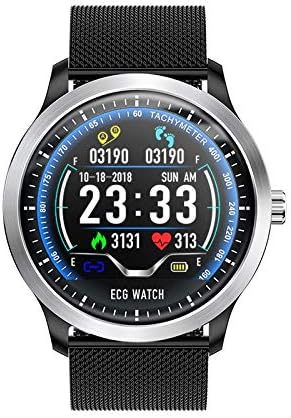
Image: Front view of the muvit iO Luxe Electro Smartwatch displaying the digital watch face and a black mesh strap.
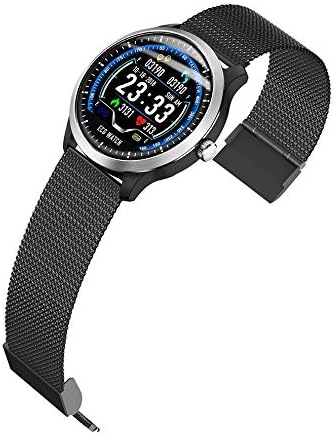
Image: Angled view of the muvit iO Luxe Electro Smartwatch, highlighting the watch case and the magnetic clasp of the mesh strap.

Image: A black silicone watch strap with a silver buckle, provided as an alternative to the mesh strap.
Setup
1. Charging the Smartwatch
Before initial use, fully charge your smartwatch. Connect the charging cable to the charging port on the back of the watch and plug the USB end into a compatible power source (AC/DC adapter or computer USB port). The watch display will indicate charging status. A full charge typically takes approximately 2 hours.
2. Strap Installation
Your smartwatch comes with two interchangeable straps: an aluminum mesh strap and a silicone strap. To attach a strap, align the spring bar pins with the lug holes on the watch case and slide the pin into place. Ensure both ends of the spring bar are securely seated.
3. Pairing with Your Device
- Download the official muvit iO application from your smartphone's app store.
- Ensure Bluetooth is enabled on your smartphone.
- Open the muvit iO app and follow the on-screen instructions to create an account or log in.
- Select 'Add Device' or a similar option within the app and choose your smartwatch from the list of available devices.
- Confirm the pairing request on both your smartphone and the smartwatch if prompted.
Operating Instructions
Basic Navigation
The smartwatch features a digital display and a side button for interaction. Swipe left, right, up, or down on the screen to navigate through different functions and menus. Press the side button to return to the main watch face or to power on/off the device (long press).
Activity Tracking
The smartwatch automatically tracks your daily steps, distance traveled, and calories burned. Access the activity tracking interface on the watch or through the connected app to view your progress and historical data.
Health Monitoring
- Heart Rate: The watch continuously monitors your heart rate. View real-time data on the watch or detailed graphs in the app.
- ECG (Electrocardiogram): The smartwatch supports ECG measurements. Follow the instructions on the watch screen to take an ECG reading. Ensure proper contact with your skin for accurate results.
Notifications
Once paired with your smartphone, the smartwatch can display notifications for incoming calls, messages, and app alerts. Configure notification settings within the muvit iO application.
Alarm Function
Set alarms directly on the smartwatch or through the companion app. The watch will vibrate to alert you at the set time.
Water Resistance
The muvit iO Luxe Electro Smartwatch is water-resistant. It is suitable for daily use and can withstand splashes, rain, and brief immersion. However, it is not recommended for swimming, diving, or exposure to hot water or steam.
Maintenance
Cleaning
Regularly clean your smartwatch and straps. Use a soft, damp cloth to wipe the watch face and case. For the straps, use mild soap and water if necessary, then rinse thoroughly and dry completely before reattaching. Avoid harsh chemicals or abrasive materials.
Battery Care
To prolong battery life, avoid fully discharging the battery frequently. Charge the device when the battery level is low. Store the watch in a cool, dry place if not used for extended periods, ensuring it has at least a 50% charge.
Storage
When not in use, store the smartwatch in a safe place away from direct sunlight, extreme temperatures, and moisture. Keep it out of reach of children and pets.
Troubleshooting
- Watch not turning on: Ensure the watch is fully charged. Connect it to the charger for at least 30 minutes.
- Cannot pair with smartphone: Check if Bluetooth is enabled on your phone and the watch. Restart both devices and try pairing again. Ensure the muvit iO app is updated to the latest version.
- Inaccurate readings: Ensure the watch is worn snugly on your wrist, not too tight or too loose. Clean the sensors on the back of the watch.
- Notifications not appearing: Verify notification permissions are granted to the muvit iO app in your phone's settings. Check app settings for specific notification preferences.
Specifications
| Brand | muvit iO |
| Model Number | 8426801154872 |
| Product Name | muvit iO Luxe Electro Smartwatch |
| Dimensions | 10 x 10 x 10 cm |
| Weight | 2 kg |
| Battery Type | 1 Lithium Ion (required) |
| Battery Composition | Lithium |
| Display Type | Digital |
| Power Source | AC/DC |
| Special Features | Alarm clock, Water resistant |
| Compatible Devices | Laptop (Note: Primary compatibility is with smartphones via app) |
| Country of Origin | China |
Warranty Information
The muvit iO Luxe Electro Smartwatch is covered by a manufacturer's warranty against defects in materials and workmanship. The specific terms and duration of the warranty may vary by region. Please refer to the warranty card included in your package or contact muvit iO customer support for detailed information.
Customer Support
For further assistance, technical support, or inquiries regarding your muvit iO Luxe Electro Smartwatch, please visit the official muvit iO website or contact their customer service department. Contact details can typically be found on the product packaging or the official brand website.