
UGREEN 60561
Contents
UGREEN SATA III to USB 3.0 Adapter Cable User Manual
Model: 60561 | Brand: UGREEN
1. Introduction
This user manual provides detailed instructions for the UGREEN SATA III to USB 3.0 Adapter Cable. This adapter is designed to connect 2.5-inch and 3.5-inch SATA hard drives (HDD) and solid-state drives (SSD) to your computer via a USB 3.0 port, enabling quick and convenient data access, backup, and transfer. It supports the UASP (USB Attached SCSI Protocol) for enhanced performance with compatible systems.
2. Key Features
- High-Speed Data Transfer: Supports USB 3.0 with UASP, offering transfer speeds up to 5 Gbps, which is significantly faster than traditional USB 3.0 when paired with a UASP-enabled host controller.
- Wide Compatibility: Compatible with both 2.5-inch and 3.5-inch SATA I/II/III HDDs and SSDs.
- Plug & Play: Driver-less installation for Windows, macOS, Linux, and Chrome OS.
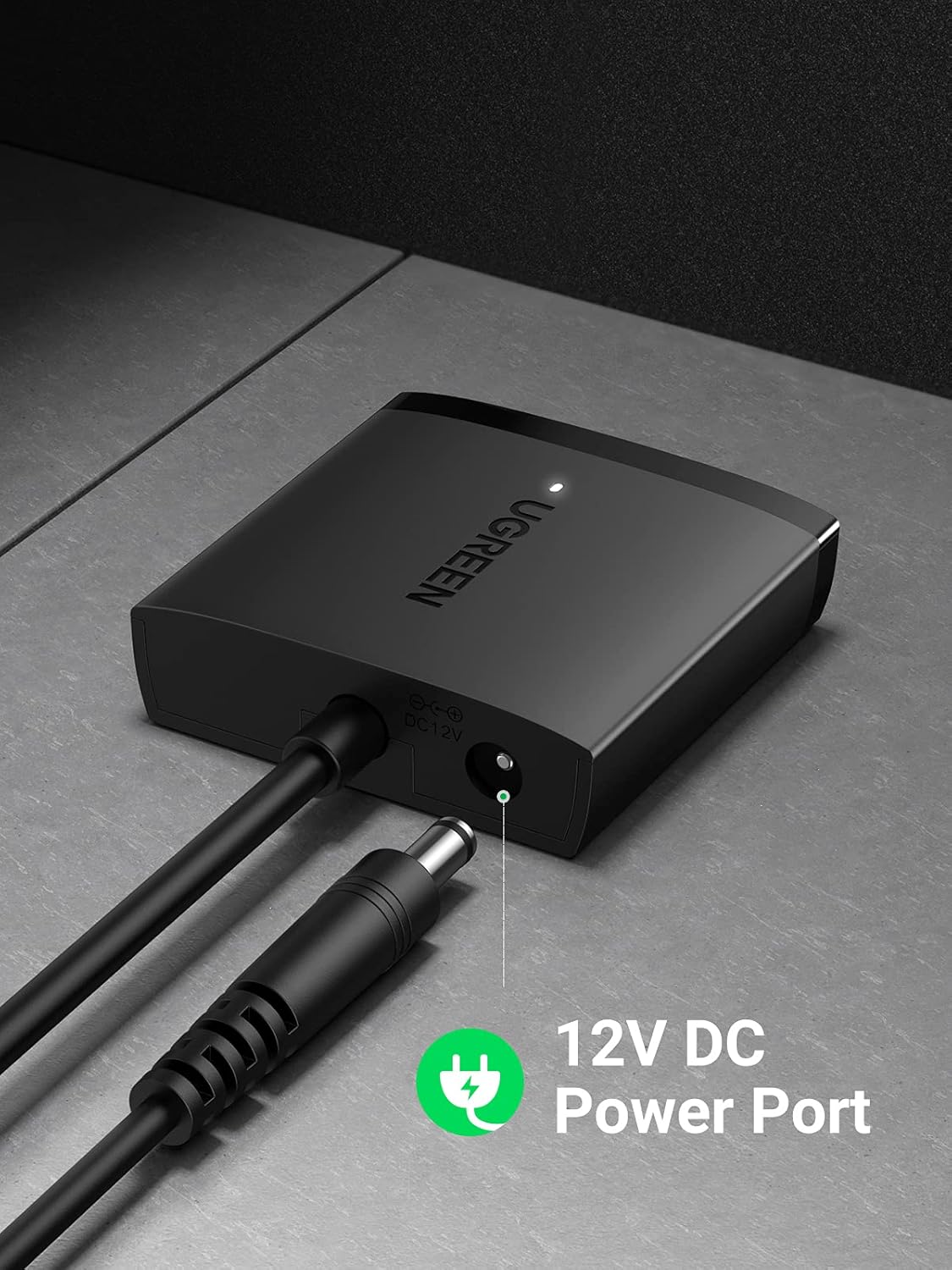
- External Power Support: Features a 12V DC power port for connecting a power adapter (not included) to ensure stable operation with 3.5-inch HDDs.
- Auto Sleep Mode: Designed to save power and extend the lifespan of your hard drives.
- Large Capacity Support: Supports hard drives up to 12TB.

The adapter supports 5Gbps fast transfer speed, significantly improving data transfer efficiency.

This adapter is compatible with both 2.5-inch and 3.5-inch SATA HDDs/SSDs, supporting capacities up to 12TB.

The auto sleep mode helps conserve power and prolong the lifespan of your connected drives.
3. Setup Guide
Connecting a 2.5-inch HDD/SSD:
- Connect the SATA connector of the UGREEN adapter to your 2.5-inch SATA HDD or SSD. Ensure a firm connection.
- Plug the USB 3.0 connector of the adapter into an available USB 3.0 port on your computer.
- The drive should be automatically detected by your operating system.
Connecting a 3.5-inch HDD:
For 3.5-inch SATA HDDs, an external 12V/2A power adapter (with center positive polarity) is required to provide sufficient power. This power adapter is not included with the UGREEN SATA adapter.
- Connect the SATA connector of the UGREEN adapter to your 3.5-inch SATA HDD.
- Connect a 12V/2A DC power adapter (not included) to the 12V DC power port on the UGREEN adapter.
- Plug the USB 3.0 connector of the adapter into an available USB 3.0 port on your computer.
- The drive should now be detected by your operating system.

The UGREEN SATA to USB 3.0 adapter cable, ready for connection.

Locate the 12V DC power port on the adapter for connecting an external power supply, essential for 3.5-inch HDDs.
4. Operating Instructions
Once connected, the UGREEN SATA III to USB 3.0 Adapter Cable operates on a plug-and-play basis. Your operating system will typically recognize the connected drive as an external storage device.
- Accessing Data: Navigate to 'This PC' (Windows) or 'Finder' (macOS) to locate the newly connected drive. You can then access, copy, or move files as you would with any other external storage.
- Formatting Drives: If connecting a new or unformatted drive, you may need to initialize and format it using your operating system's Disk Management utility (Windows) or Disk Utility (macOS) before it appears in File Explorer/Finder.
- Safe Removal: Always safely eject the drive from your operating system before physically disconnecting the adapter cable to prevent data corruption or loss.
The adapter offers broad compatibility with various operating systems, including Windows, macOS, Linux, and Chrome OS, ensuring plug-and-play functionality.
5. Maintenance
- Keep the adapter in a dry environment and away from direct sunlight or extreme temperatures.
- Avoid bending or twisting the cable excessively to prevent internal damage.
- Clean the adapter with a soft, dry cloth. Do not use liquid cleaners or aerosols.
- Store the adapter properly when not in use to prevent physical damage to the connectors.
6. Troubleshooting
Drive Not Detected:
- Check Connections: Ensure all connections (SATA, USB, and 12V DC power for 3.5" drives) are secure and fully inserted.
- Power for 3.5" HDDs: Verify that a 12V/2A external power adapter is connected and functioning correctly if you are using a 3.5-inch HDD. Without it, 3.5-inch drives will not power on.
- USB Port: Try connecting to a different USB port on your computer. Ensure it's a USB 3.0 port for optimal performance.
- Disk Management: Open Disk Management (Windows) or Disk Utility (macOS). The drive might appear there but needs to be initialized, partitioned, or formatted before it can be accessed in File Explorer/Finder.
- Drive Health: Test the HDD/SSD directly in a computer or another enclosure to rule out a faulty drive.
Slow Transfer Speeds:
- USB 3.0 Port: Ensure the adapter is connected to a USB 3.0 port on your computer. USB 2.0 ports will limit speeds significantly.
- UASP Support: For maximum speed, ensure your operating system (Windows 8/10/11, macOS 8 or above) and computer's USB controller support UASP.
- Drive Speed: The actual transfer speed is also limited by the speed of the connected HDD/SSD itself.
- Other USB Devices: Disconnect other high-bandwidth USB devices that might be competing for bandwidth.
7. Specifications
| Attribute | Value |
|---|---|
| Brand | UGREEN |
| Model Number | 60561 |
| Connector Type | USB Type A |
| Cable Type | USB |
| Compatible Devices | 2.5"/3.5" SATA HDD/SSD |
| Color | Black |
| Data Transfer Rate | 5 Gigabits Per Second (USB 3.0) |
| Item Weight | 80 g |
| Product Dimensions | 1.9 x 11 x 11.1 cm |
| Country of Origin | China |
| Included Components | Cable |
8. Warranty and Support
UGREEN products typically come with a standard manufacturer's warranty. For specific warranty details, registration, or technical support, please refer to the warranty card included with your product or visit the official UGREEN website. You may also contact UGREEN customer service directly for assistance with product issues or inquiries.
Contact Information: Please refer to the packaging or official UGREEN website for the most up-to-date contact details for customer support.
Ask a question about this manual
Ask about setup, troubleshooting, compatibility, parts, safety, or missing instructions. Manuals+ will review the question and use this page’s manual context to help answer it.