1. Important Safety Instructions
Read all instructions before operating the TV. Keep these instructions for future reference. Follow all warnings and instructions marked on the product. Do not block any ventilation openings. Install in accordance with the manufacturer's instructions. Do not install near any heat sources such as radiators, heat registers, stoves, or other apparatus (including amplifiers) that produce heat. Protect the power cord from being walked on or pinched, particularly at plugs, convenience receptacles, and the point where they exit from the apparatus. Only use attachments/accessories specified by the manufacturer. Unplug this apparatus during lightning storms or when unused for long periods of time.
2. Product Overview
The Westinghouse 32-inch LED HD DVD Combo TV (Model WD32HKB1001) combines a high-definition LED television with an integrated DVD player, offering a compact entertainment solution. It features multiple connectivity options including HDMI, USB, and VGA inputs.

Image: Front view of the Westinghouse 32-inch LED HD DVD Combo TV, showcasing its design and display.
3. Setup
3.1 Unpacking
Carefully remove the TV and all accessories from the packaging. Ensure all components listed in the packing list are present. Retain the packaging for potential future transport or service needs.
3.2 Attaching the Stand
Place the TV screen-down on a soft, flat surface to prevent scratches. Align the TV stand with the mounting holes on the bottom of the TV. Secure the stand using the provided screws. Ensure the stand is firmly attached before placing the TV upright.
3.3 Connecting External Devices
The TV offers various ports for connecting external devices:
- HDMI Ports: Connect high-definition devices such as cable boxes, Blu-ray players, or gaming consoles.
- USB Port: Connect USB storage devices for media playback.
- VGA Port: Connect a computer for use as a monitor.
- Antenna/Cable Input: Connect an antenna or cable TV feed for broadcast channels.

Image: Rear view of the TV, illustrating the location of various input and output ports for connecting external devices.
3.4 Power Connection
Plug the power cord into the TV's power input, then plug the other end into a standard electrical outlet. The TV will enter standby mode, indicated by a red power light.
4. Operating Instructions
4.1 Power On/Off
Press the POWER button on the remote control or on the TV panel to turn the TV on or off. The power indicator light will change from red (standby) to blue (on).
4.2 Initial Setup Wizard
Upon first power-on, the TV will guide you through an initial setup wizard. This includes language selection, time zone, and channel scanning. Follow the on-screen prompts to complete the setup.
4.3 Basic TV Functions
- Channel Selection: Use the CH+/- buttons or the number pad on the remote.
- Volume Control: Use the VOL+/- buttons.
- Input Source: Press the INPUT button to cycle through available input sources (TV, HDMI1, HDMI2, USB, VGA, DVD).
- Menu Navigation: Use the MENU button to access settings, and the arrow keys to navigate.
4.4 DVD Player Operation
The integrated DVD player is located on the side or back of the TV.
- Loading a Disc: Gently insert a DVD disc into the disc slot with the label side facing up. The player will automatically pull the disc in.
- Ejecting a Disc: Press the EJECT button on the remote control or the TV panel.
- Playback Controls: Use the PLAY, PAUSE, STOP, FF (Fast Forward), and REW (Rewind) buttons on the remote for DVD playback.
- Switching to DVD Input: Select the 'DVD' input source using the INPUT button.
5. Maintenance
5.1 Cleaning the Screen
Gently wipe the screen with a soft, lint-free cloth. For stubborn marks, lightly dampen the cloth with water or a specialized screen cleaner. Do not use harsh chemicals or abrasive materials.
5.2 General Care
Keep the TV in a well-ventilated area. Avoid exposing the TV to direct sunlight, extreme temperatures, or high humidity. Do not place heavy objects on the TV. Regularly dust the TV and its vents to prevent overheating.
6. Troubleshooting
If you encounter issues with your TV, refer to the following common solutions:
- No Power: Ensure the power cord is securely plugged into both the TV and the electrical outlet. Try a different outlet.
- No Picture, But Has Sound: Check the input source. Ensure external devices are properly connected and powered on.
- No Sound, But Has Picture: Check the volume level and ensure mute is not activated. Verify audio cables for external devices.
- DVD Not Playing: Ensure the disc is inserted correctly and is clean and free of scratches. Select the 'DVD' input source.
- Remote Control Not Working: Replace the batteries. Ensure there are no obstructions between the remote and the TV's IR sensor.
For persistent issues, contact Westinghouse customer support.
7. Specifications
| Feature | Specification |
|---|---|
| Brand | Westinghouse |
| Model Number | WD32HKB1001 |
| Screen Size | 31.5 Inches |
| Display Technology | LED |
| Resolution | 720p |
| Refresh Rate | 60 Hz |
| Connectivity Technology | HDMI, USB, VGA |
| Aspect Ratio | 16:9 |
| Item Weight | 11.4 Pounds |
| Product Dimensions | 32 x 8.2 x 18.9 inches |
| Output Wattage | 50 Watts |
| Included Components | TV, Stand |
7.1 Energy Efficiency
This product is designed with energy efficiency in mind. Refer to the Energy Guide label for estimated yearly energy cost and consumption details.
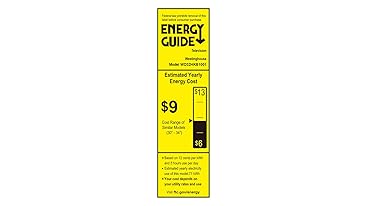
Image: Energy Guide label for the Westinghouse Model WD32HKB1001, detailing estimated yearly energy cost and consumption.
8. Warranty and Support
This Westinghouse product comes with a limited warranty. Please refer to the warranty card included in your product packaging for specific terms, conditions, and duration. Keep your proof of purchase for warranty claims.
For technical support, service, or warranty inquiries, please visit the official Westinghouse support website or contact their customer service department. Contact information can typically be found in the product packaging or on the Westinghouse brand website.


