
1. Introduction
Thank you for choosing the MOTORHEAD 24-Inch Smart Digital Level. This precision tool is designed to provide accurate angle measurements for various applications, from construction to home improvement. Featuring a large LCD display, audible alerts, and a durable aluminum construction, this digital level ensures reliable and consistent results. Please read this manual thoroughly before use to ensure proper operation and to maximize the lifespan of your tool.
2. What's in the Box
Carefully unpack your MOTORHEAD Smart Digital Level and ensure all items are present:

Image: Contents of the product box, including the digital level, carrying case, and batteries.
- MOTORHEAD 24-Inch Smart Digital Level
- Heavy-Duty Padded Carrying Bag/Sleeve with Shoulder Strap and Handles
- 2 x AAA Batteries
- Quick Start Guide (this manual)
3. Product Overview
Key Features and Components

Image: Detailed view of the digital level's control panel and display.
- Large LCD Display: Provides exact angle readings in degrees, percent slope, and inches/feet.
- On/Off Button: Powers the unit on or off.
- Toggle Readings Button (∠ In/ft %): Cycles through angle, percent slope, and inches/feet display modes.
- Hold/Record Button: Freezes the current reading on the display.
- Angle Finder Function / Reference Button: Sets the current position as a 0° reference point for relative measurements.
- Calibrate Button: Initiates the recalibration process for the level.
- Backlight On/Off & Audible Alert On/Off Button: Controls the display backlight and the audible alerts.

Image: Examples of angle, inches/feet, and percentage readings on the LCD screen.
Durable Construction
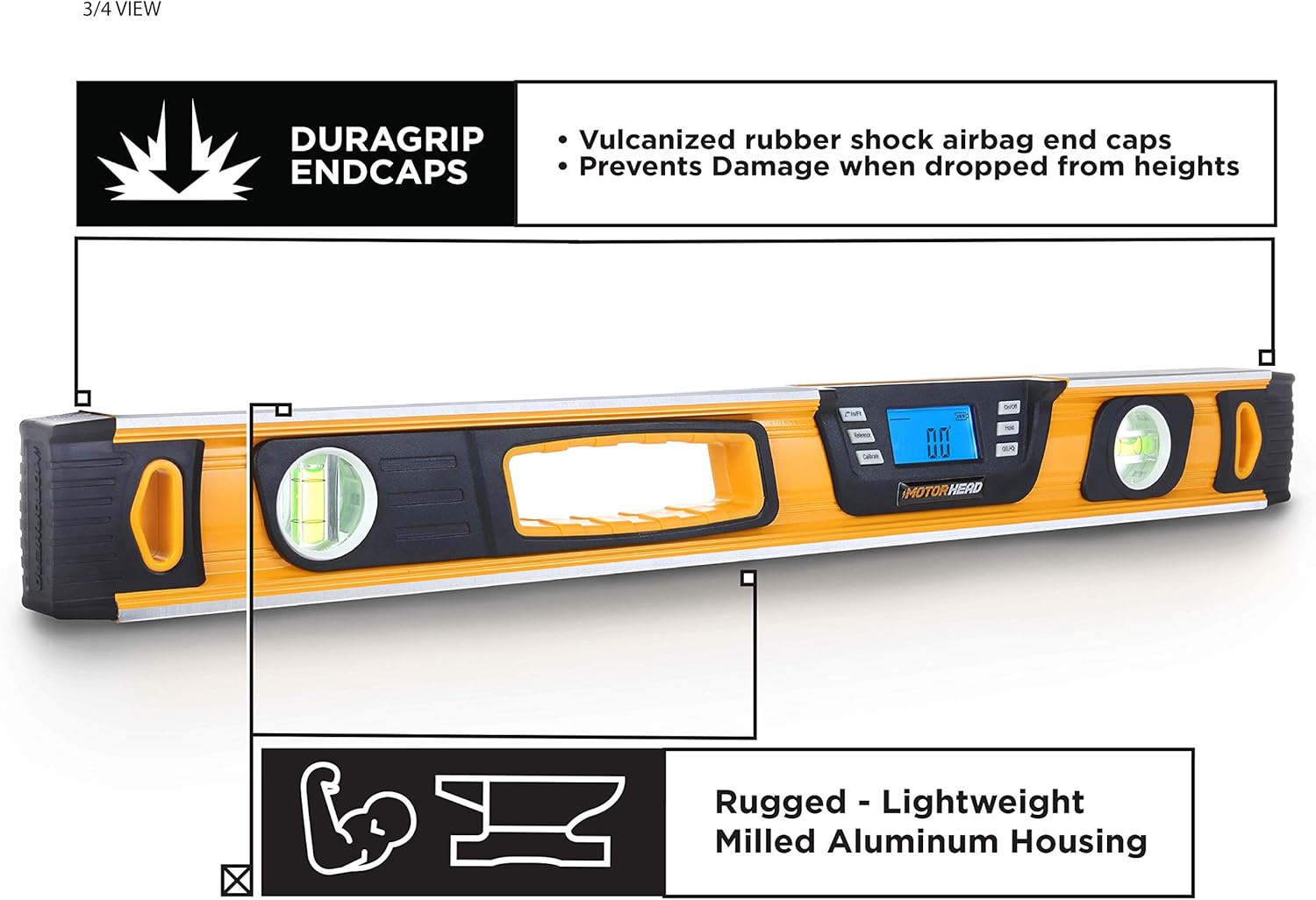
Image: View showcasing the robust construction of the digital level.
- Solid Milled Aluminum Construction: Rigorously CNC-machined from solid aluminum blocks for precision and durability.
- DURAGRIP Endcaps: Integrated vulcanized rubber shock-absorbing endcaps prevent damage from accidental drops and falls.
- High-Visibility Finish: Bright paint job makes the level easy to spot on job sites.
Additional Features

Image: Underside and side view of the digital level, detailing its magnetic base and battery compartment.
- Magnetic Bottom: Allows for easy and secure attachment to metal surfaces for hands-free operation.
- 0° and 90° Vials: Traditional bubble vials provide quick visual checks for level and plumb.
- Handle Grip: Ergonomically designed for comfortable and secure handling.
- Hook Attachment: For convenient storage or hanging.
4. Setup
Battery Installation
The MOTORHEAD Smart Digital Level requires 2 AAA batteries (included).
Image: Location of the battery compartment.
- Locate the battery compartment cover on the side of the level.
- Slide or unclip the cover to open the compartment.
- Insert two AAA batteries, ensuring the correct polarity (+/-) as indicated inside the compartment.
- Replace the battery compartment cover securely.
5. Operating Instructions
Basic Operation
- Power On/Off: Press the On/Off button to turn the level on. Press and hold the On/Off button to turn it off.
- Select Measurement Mode: Press the ∠ In/ft % button to cycle through the display modes: degrees (°), percent slope (%), and inches/feet (in/ft).
- Hold/Record Reading: Press the Hold/Record button to freeze the current measurement on the display. Press it again to release.
- Backlight & Audible Alert: Press the Backlight/Audible Alert button to toggle the display backlight. Press and hold this button to turn the audible alerts on or off. Audible alerts sound at 0°, 45°, and 90°.
Calibration
For optimal accuracy, it is recommended to calibrate the level periodically or if you suspect inaccurate readings.
- Place the level on a flat, stable surface.
- Press the Calibrate button. The display will show 'CAL 1'.
- Rotate the level 180 degrees on the same surface, keeping it in the same position.
- Press the Calibrate button again. The display will show 'CAL 2'.
- The level is now calibrated.
Angle Finder Function (Relative Measurement)
This function allows you to set a custom 0° reference point for measuring relative angles.
- Place the level on the surface you wish to use as your reference (e.g., an existing slope).
- Press the Reference button. The display will show 0.0° and a small 'REF' indicator.
- Move the level to the new surface. The display will now show the angle relative to your set reference point.
- To exit reference mode, press the Reference button again.
6. Maintenance
- Cleaning: Wipe the level with a soft, damp cloth. Do not use abrasive cleaners or solvents.
- Storage: Store the level in its padded carrying bag in a dry, cool place when not in use. Remove batteries if storing for extended periods to prevent leakage.
- Battery Replacement: Replace batteries when the low battery indicator appears on the LCD display.
7. Troubleshooting
| Issue | Possible Cause | Solution |
|---|---|---|
| Display not turning on | Dead or incorrectly installed batteries | Check battery polarity. Replace batteries. |
| Inaccurate readings | Needs calibration | Perform the calibration procedure as described in Section 5. |
| Audible alert not working | Audible alert is turned off | Press and hold the Backlight/Audible Alert button to turn it on. |
| Display is dim | Low battery or backlight off | Replace batteries. Press the Backlight/Audible Alert button to turn on the backlight. |
8. Specifications
| Feature | Detail |
|---|---|
| Brand | MOTORHEAD |
| Model Number | MH-02-DL-B1-24-1 |
| Material | Aluminum |
| Product Dimensions | 24"L x 24"W (Note: This seems to be a typo in source data, likely 24"L x ~2"W) |
| Style | Digital Level |
| Item Weight | 2.29 pounds (1.04 Kilograms) |
| Operation Mode | Manual |
| Batteries Required | 2 AAA batteries (included) |
| Battery Cell Type | Alkaline |
| Display Type | LCD |
| Audible Alerts | At 0°, 45°, and 90° |
| Special Features | Magnetic bottom, DURAGRIP endcaps, High-visibility finish |
9. Warranty and Support
The MOTORHEAD 24-Inch Smart Digital Level is protected by a 2-Year Warranty. An extended warranty may also be available. For warranty claims, technical assistance, or any product-related inquiries, please contact MOTORHEAD USA-Based support. Refer to the contact information provided with your product packaging or visit the official MOTORHEAD website for details.
10. Product Videos
Product Overview Video
This video provides a comprehensive overview of the MOTORHEAD 10-Inch Smart Digital Level, demonstrating its key features, display modes, and durable construction. It highlights the LCD screen, audible alerts, solid-milled aluminum body, and magnetic bottom, along with the included carrying bag.
