
1. Introduction
This manual provides detailed instructions for the safe and proper installation, operation, and maintenance of your SHOPPINGALL SA-GM224U+D15 Dual Monitor and Laptop Mount. Please read this manual thoroughly before installation and retain it for future reference.
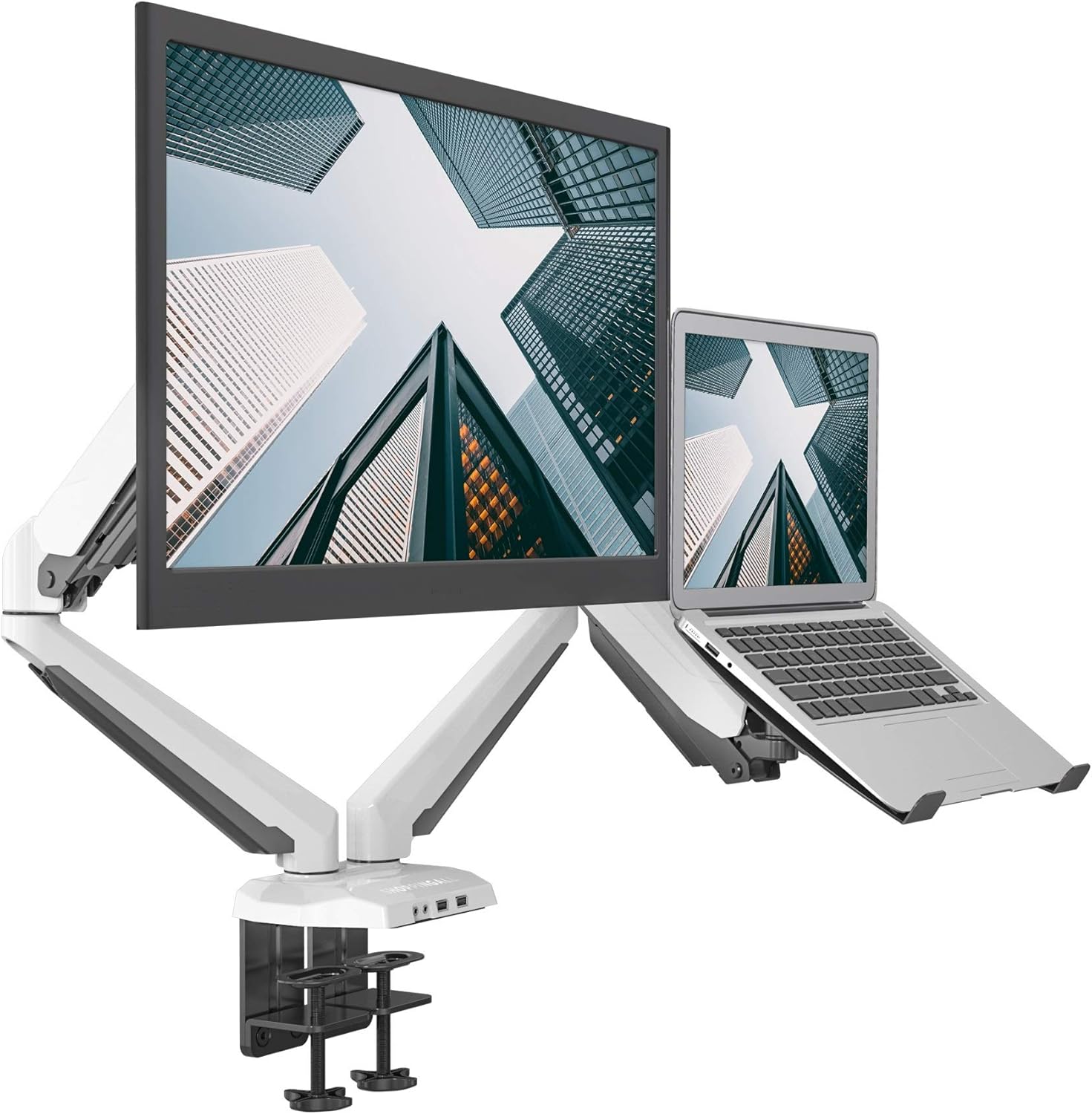
Figure 1: SHOPPINGALL SA-GM224U+D15 Dual Monitor and Laptop Mount in White.
2. Safety Information
Please ensure all instructions are read and understood before installation and use. If you have any questions, contact customer support. Improper assembly or use may result in damage or serious injury.
- Do not exceed the weight capacity of 17.6 lbs (8 kg) per arm.
- Ensure the mounting surface can safely support the combined weight of the mount and attached equipment.
- Use only the provided hardware. If any parts are missing or defective, contact customer support.
- This product is intended for indoor use only.
- Keep children away from moving parts.
3. Package Contents
Verify that all components are present and undamaged. If any parts are missing or damaged, please contact customer support.
- Main Pole and Base Assembly
- Gas Spring Monitor Arms (x2)
- Laptop Tray (x1)
- VESA Plates (x2)
- C-Clamp Mounting Hardware
- Grommet Mounting Hardware
- Cable Management Clips
- Allen Keys and Screws (various sizes)
- User Manual

Figure 2: Overview of package contents and compatibility specifications.
4. Setup and Installation
This mount offers two installation options: C-clamp or Grommet. Choose the method suitable for your desk.
4.1. Base Installation
4.1.1. C-Clamp Installation
- Attach the pole to the C-clamp base by screwing the pole into the base.
- Secure the pole by tightening the small screw at the back of the base using a 3mm Hex Key.
- Mount the C-clamp base to the edge of your desk. Ensure the desk thickness is between 0.4" and 3.35" (10-85mm).
- Tighten the clamp screw until the base is firmly secured to the desk.

Figure 3: C-clamp mounting option, suitable for desk thicknesses up to 3.35 inches (85mm).
4.1.2. Grommet Installation
- Attach the pole to the grommet base by screwing the pole into the base.
- Secure the pole by tightening the small screw at the back of the base using a 3mm Hex Key.
- Insert the grommet bolt through the desk hole. Ensure the desk thickness is between 0.4" and 2.36" (10-60mm) and the hole diameter is 0.4"-2.36" (10-60mm).
- Tighten the nut from underneath the desk until the base is firmly secured.
Figure 4: Grommet mounting option, suitable for desk thicknesses up to 2.36 inches (60mm).
4.2. Arm Installation
- Slide the extension arms onto the main pole at your desired heights. Secure them using the provided clamps.
- Install the gas spring arms onto the extension arms. Tighten the screw from the bottom of the joints to secure them.
4.3. Monitor and Laptop Attachment
The mount supports VESA 75x75mm and 100x100mm patterns.
- Attach the VESA plate to the back of your monitor using the appropriate screws. Ensure the screws are tightened securely.
- Slide the monitor (with attached VESA plate) onto the VESA head of one gas spring arm. Ensure it clicks into place.
- For the laptop tray, attach the VESA plate to the underside of the laptop tray. Tighten the nut from the back of the VESA plate.
- Slide the laptop tray (with attached VESA plate) onto the VESA head of the second gas spring arm. Ensure it clicks into place.
- Place your laptop onto the tray. The tray includes adjustable arms to secure the laptop.

Figure 5: Dual monitor and laptop setup with gas spring arms.
4.4. Cable Management
Route your cables neatly through the integrated cable management clips on the arms and pole to maintain a clean workspace.

Figure 6: Cables routed through the integrated management clips.
4.5. Installation Videos
For visual guidance, please refer to the following installation videos from SHOPPINGALL Inc.:
LH08 Installation Video
Video 1: Installation guide for a similar dual monitor mount (LH08 model). Steps may vary slightly for SA-GM224U+D15.
Dual Mount GE62+D15
Video 2: Demonstrates the dual monitor and laptop setup for model GE62+D15, which shares the D15 laptop tray component.
5. Operating Instructions
The gas spring arms allow for versatile positioning of your monitor and laptop.
5.1. Adjusting Height and Extension
The gas spring arms provide smooth vertical and horizontal movement. Gently push or pull the monitor/laptop to adjust its position. The maximum height is approximately 17.7 inches, and maximum extension is 22.3 inches.

Figure 7: Illustrates the tilt, swivel, rotation, height, and extension capabilities.
5.2. Tilt, Swivel, and Rotation
- Tilt: The monitor and laptop tray can tilt from +90° to -85°.
- Swivel: The arms can swivel ±90° at the base and ±135° at the elbow joints. The VESA plate can swivel ±180°.
- Rotation: The VESA plate allows for 360° rotation, enabling easy switching between landscape and portrait orientations.

Figure 8: Demonstrates the full range of motion, including tilt, swivel, and rotation.
6. Maintenance
Regular maintenance ensures the longevity and optimal performance of your mount.
- Cleaning: Wipe down the mount with a soft, damp cloth. Avoid abrasive cleaners.
- Tightness Check: Periodically check all screws and connections to ensure they are tight. Re-tighten if necessary.
- Gas Spring Adjustment: Adjust the gas spring tension as needed to accommodate changes in monitor or laptop weight, or if the arm is not holding its position correctly.
7. Troubleshooting
7.1. Arm is Dropping or Raising
If the monitor arm is dropping down, increase the gas spring tension by turning the bolt counter-clockwise until your monitor stays in position. If the monitor arm is raising up, decrease the gas spring tension by turning the bolt clockwise until your monitor stays in position. Make the same adjustment for the laptop side with the laptop installed on the arm.

Figure 9: Gas spring tension adjustment screw location.
7.2. Monitor is Tilting Down or is Too Stiff to Tilt
If the monitor is tilting down, tighten the tilt mechanism screw on the side of the VESA head until your monitor stays at the desired angle. If the monitor is too stiff to tilt, loosen the tilt mechanism screw on the side of the VESA head.
7.3. Arm Maneuverability
Adjust the screw located at the back of the gas spring arm to fine-tune the maneuverability of the arm. This controls the friction in the arm joints.
8. Specifications
- Model: SA-GM224U+D15
- Brand: SHOPPINGALL
- Material: Metal
- Monitor Size Compatibility: 15"-32"
- Laptop Size Compatibility: 12"-17"
- Weight Capacity (per arm): 17.6 lbs (8 kg)
- VESA Compatibility: 75x75mm, 100x100mm
- Tilt Range: +90° to -85°
- Swivel Range: ±90° (base), ±135° (elbow), ±180° (VESA plate)
- Rotation: 360°
- Mounting Options: C-Clamp (max 3.35"/85mm desk thickness), Grommet (max 2.36"/60mm desk thickness)
- Connectivity: 2x USB 3.0 ports, Audio ports
- Product Dimensions: 78.5 x 25 x 14.7 cm; 8 kg

Figure 10: Key dimensions and specifications of the mount.
9. Warranty and Support
SHOPPINGALL Inc. provides a warranty for this product. For specific warranty details, please refer to the documentation included with your purchase or contact customer support. Our 24/7 contact email and toll-free phone number can be found on the product box and user manual.
Contact Information:
Email: Support@ShoppingAll.com
Toll Free: +1(855)266-9166
