
UpStart Components AP-303373K-2PK-DL107
Instruction Manual: Drum Support Roller Kit Replacement
For Maytag MDE8000AYW Dryer
Brand: UpStart Components
1. Introduction
This instruction manual provides essential information for the installation and maintenance of the UpStart Components 12001541 Drum Support Roller Kit. This kit is designed as a direct replacement for worn or damaged drum support rollers in compatible Maytag dryers, helping to restore smooth and quiet operation and extend the lifespan of your appliance.
Each kit contains two (2) drum support rollers and associated hardware, ensuring you have the necessary components for a complete replacement.
2. Product Compatibility
This drum support roller kit is compatible with the following dryer model and part numbers:
- Dryer Model: Maytag MDE8000AYW Dryer
- Compatible Part Numbers:
- 12001541
- 303373
- AP4008534
- 12001541VP
- 3-3373
- 400518
- AH1570070
- DE693
- EA1570070
- K35-248
- PS1570070
- W10116741
- Y303373
Please verify your dryer's model number and the part number of the existing rollers to ensure proper fitment before proceeding with installation.
3. Safety Information
WARNING: Before attempting any repair or maintenance on your dryer, always disconnect the appliance from its power source by unplugging it or turning off the circuit breaker. Failure to do so can result in serious injury or electrical shock.
- Wear appropriate personal protective equipment, such as work gloves, to protect your hands from sharp edges or pinch points.
- Ensure the work area is well-lit and clear of obstructions.
- If you are unsure about any step of the installation process, it is recommended to consult a qualified appliance technician.
- Keep all small parts and tools away from children and pets.
4. Installation Guide
This section outlines the general steps for replacing dryer drum support rollers. Specific disassembly procedures may vary slightly depending on your exact dryer model. Refer to your dryer's service manual or an online repair guide for detailed instructions specific to your appliance.
4.1. Tools Required
- Screwdrivers (Phillips and/or Flathead)
- Nut drivers or socket set
- Pliers
- Work gloves
4.2. Disassembly Steps
- Disconnect Power: Unplug the dryer from the electrical outlet or turn off the circuit breaker supplying power to the dryer.
- Access the Drum: Depending on your dryer model, you may need to remove the top panel, front panel, or both to gain access to the dryer drum and its internal components. This typically involves removing screws located along the back, top, or inside the door frame.
- Remove the Belt: Carefully remove the drive belt from around the dryer drum and idler pulley. This will allow the drum to be lifted.
- Lift and Remove Drum: With the belt off, carefully lift the front of the dryer drum and slide it out of the cabinet. This will expose the drum support rollers.
- Locate Old Rollers: The drum support rollers are typically located at the front and/or rear of the dryer cabinet, supporting the drum. There are usually two or four rollers in total.
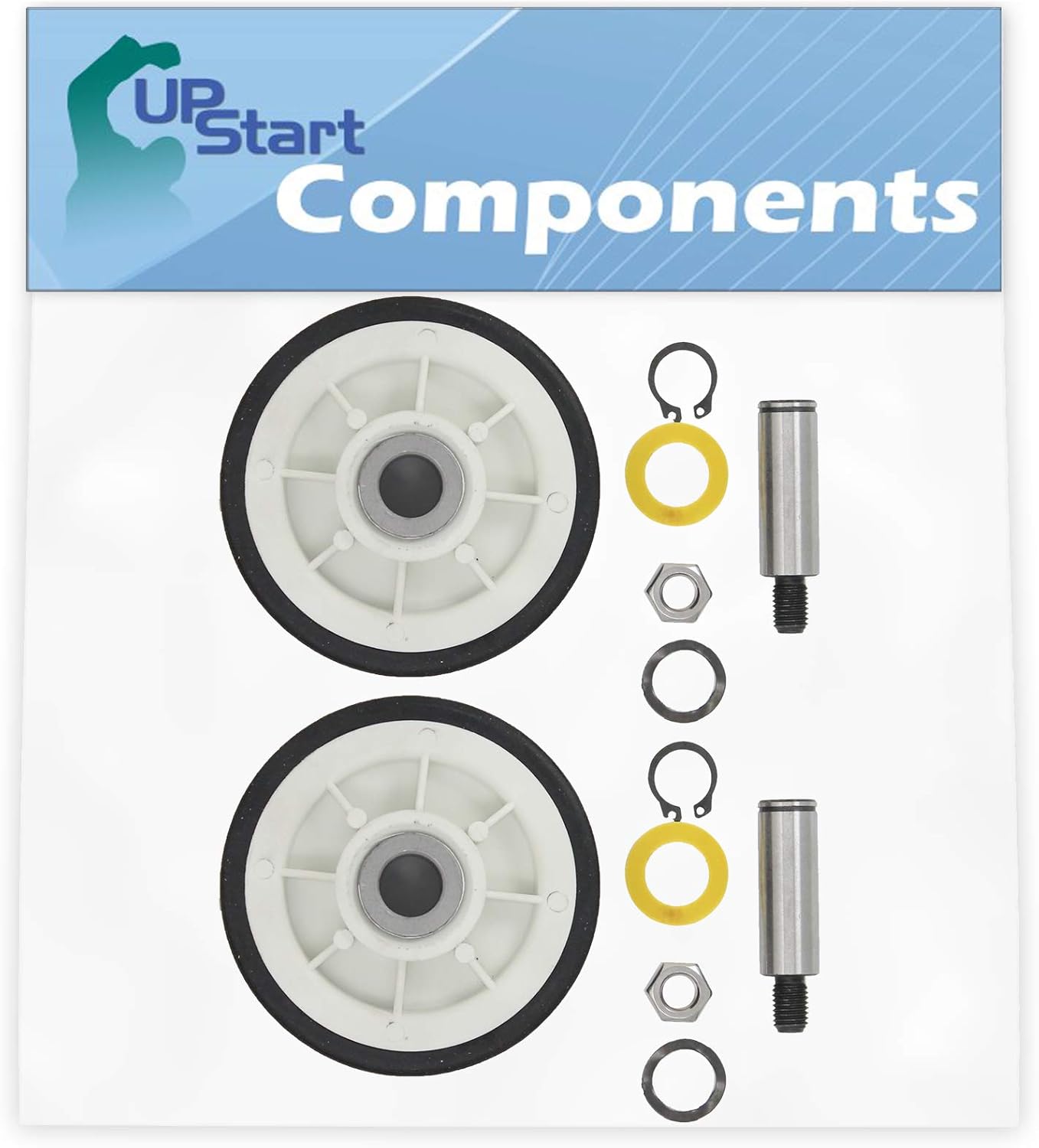
Figure 1: The complete UpStart Components Drum Support Roller Kit, including two rollers and all necessary hardware.
4.3. Roller Replacement Steps
- Remove Old Rollers: Each roller is typically held in place by a shaft and a retaining clip or nut. Carefully remove the retaining clip/nut and slide the old roller off its shaft. Note the orientation of any washers or spacers.
- Clean Area: While the drum is out, take the opportunity to clean any lint or debris from the dryer cabinet, especially around the roller mounting points.
- Install New Rollers: Place the new UpStart Components drum support rollers onto the shafts. Ensure all washers and spacers are reinstalled in their correct positions. Secure the new rollers with the provided retaining clips or nuts.

Figure 2: A single drum support roller and its accompanying hardware from the kit.
4.4. Reassembly Steps
- Reinstall Drum: Carefully slide the dryer drum back into the cabinet, ensuring it rests properly on the newly installed support rollers.
- Reinstall Belt: Route the drive belt back around the dryer drum and over the idler pulley and motor pulley. Ensure the belt is properly tensioned and aligned.
- Reattach Panels: Reattach the front and/or top panels of the dryer, securing all screws that were removed during disassembly.
- Test Operation: Plug the dryer back into the electrical outlet or restore power at the circuit breaker. Run a short cycle to ensure the drum rotates smoothly and quietly. Listen for any unusual noises.
If you encounter any difficulties or the dryer does not operate correctly after installation, refer to the Troubleshooting section or seek professional assistance.
5. Maintenance
The UpStart Components drum support rollers are designed for durability and long-lasting performance. While regular maintenance of the rollers themselves is minimal, periodic inspection is recommended:
- Annual Inspection: During routine dryer cleaning or maintenance (e.g., cleaning the exhaust vent), it is advisable to inspect the drum support rollers for signs of wear, such as flat spots, cracks in the rubber, or excessive noise during rotation.
- Lint Removal: Ensure that lint and debris do not accumulate around the roller shafts, as this can impede their smooth operation and lead to premature wear.
Replacing rollers at the first sign of significant wear can prevent further damage to your dryer and maintain optimal performance.
6. Troubleshooting
If you experience issues after installing the new drum support rollers, consider the following common troubleshooting steps:
- Drum Not Turning or Squealing:
- Ensure the drive belt is correctly routed and tensioned around the drum and pulleys.
- Verify that the new rollers are properly seated on their shafts and rotate freely.
- Check for any obstructions inside the dryer cabinet that might be preventing the drum from turning.
- Confirm that all panels are securely reattached and not interfering with drum movement.
- Unusual Noises (Grinding, Thumping):
- Re-check the installation of the rollers to ensure they are not loose or misaligned.
- Inspect other dryer components (e.g., idler pulley, motor, blower wheel) for wear or damage, as these can also cause noise.
- Ensure no tools or foreign objects were left inside the dryer during reassembly.
If the problem persists after checking these points, it is advisable to consult a professional appliance repair technician.
7. Specifications
| Attribute | Detail |
|---|---|
| Product Name | Drum Support Roller Kit Replacement |
| Brand | UpStart Components |
| Model Number | AP-303373K-2PK-DL107 |
| Quantity | 2 Rollers per kit |
| Material | Plastic (with rubber tire) |
| Compatible Appliance | Maytag MDE8000AYW Dryer |
8. Warranty and Support
Warranty: Any warranties for this product are offered solely by UpStart Components. This product is not affiliated with any original equipment manufacturer (OEM) brands and is not covered under any warranties offered by the original manufacturers of the appliances it is compatible with.
For specific warranty details or to inquire about product support, please contact UpStart Components directly through their official channels. Contact information can typically be found on the product packaging or their official website.
Ask a question about this manual
Ask about setup, troubleshooting, compatibility, parts, safety, or missing instructions. Manuals+ will review the question and use this page’s manual context to help answer it.