
SteelSeries Arctis 1 (Model 61427)
SteelSeries Arctis 1 Wired Gaming Headset - Instruction Manual
Your guide to setup, operation, and maintenance for optimal gaming audio.
Product Overview
The SteelSeries Arctis 1 is a versatile wired gaming headset designed for universal compatibility across multiple platforms. It features the acclaimed Arctis sound quality, a detachable ClearCast microphone, and a lightweight, steel-reinforced headband for comfort and durability.

Figure 1: The SteelSeries Arctis 1 Wired Gaming Headset, showcasing its sleek black design and detachable microphone.

Figure 2: The Arctis 1 headset displayed alongside various compatible devices, including a PC, Nintendo Switch, PlayStation controller, Xbox controller, and a mobile phone, highlighting its universal connectivity.
Setup Guide
The Arctis 1 headset is designed for plug-and-play functionality across a wide range of devices. Follow these steps to connect your headset.
Connecting to PC, PlayStation, Xbox, Nintendo Switch, and Mobile Devices
The headset connects via a standard 3.5mm audio jack. Ensure your device has a compatible 3.5mm port. For devices with separate audio and microphone jacks, use the included dual 3.5mm adapter cable.
- PC/Laptop: Plug the 3.5mm cable directly into the combined audio jack, or use the included splitter for separate headphone and microphone ports.
- PlayStation (PS4/PS5): Plug the 3.5mm cable into the controller's headset jack.
- Xbox: Plug the 3.5mm cable into the controller's headset jack.
- Nintendo Switch/Switch Lite: Plug the 3.5mm cable directly into the console's audio jack.
- Mobile Devices: Plug the 3.5mm cable directly into your mobile device's audio jack.
Microphone Connection
The ClearCast microphone is detachable for convenience. To attach, align the microphone's 3.5mm plug with the port on the left earcup and push firmly until it clicks into place.

Figure 3: The Arctis 1 headset with its detachable ClearCast microphone removed, illustrating its versatility for both gaming and on-the-go use.

Figure 4: A close-up view of the Arctis 1 headset with the microphone detached, emphasizing the clean, low-profile design for non-gaming occasions.
Official Setup Videos
Video 1: Official SteelSeries guide on setting up the Arctis 1 Wired Gaming Headset for PC. This video demonstrates the connection process and initial configuration for computer users.
Video 2: Official SteelSeries guide for setting up SteelSeries headsets with the PlayStation 5. This video covers the steps to connect and configure your headset for use with the PS5 console.
Operating Instructions
The Arctis 1 headset features intuitive on-earcup controls for easy access to essential functions during gameplay or media consumption.
Volume Control
Adjust the audio volume using the scroll wheel located on the left earcup. Scroll up to increase volume and down to decrease it.
Microphone Mute
Toggle the microphone mute switch on the left earcup to quickly mute or unmute your microphone. A visual indicator (if present) or an audible cue will confirm the mute status.
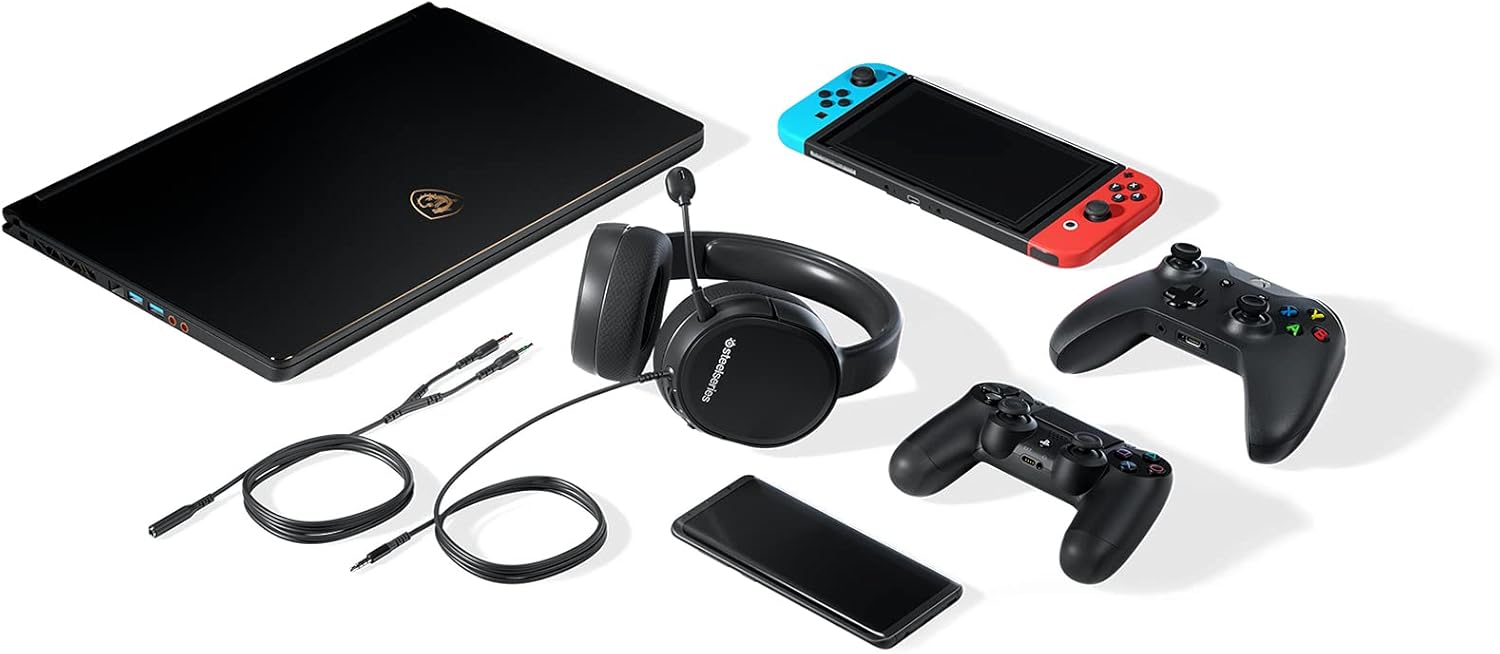
Figure 5: A detailed view of the left earcup of the Arctis 1 headset, highlighting the integrated volume scroll wheel and microphone mute switch for convenient control.
Maintenance
Proper care and maintenance will extend the lifespan of your SteelSeries Arctis 1 headset.
- Cleaning: Use a soft, dry cloth to wipe down the earcups and headband. For deeper cleaning of the ear cushions, gently remove them and hand wash with mild soap and water, then air dry completely before reattaching.
- Storage: Store the headset in a cool, dry place away from direct sunlight and extreme temperatures. Avoid placing heavy objects on the headset.
- Cable Care: Avoid sharp bends or kinks in the cable. When not in use, coil the cable loosely to prevent damage.
- Microphone Care: When detaching the microphone, pull from the base of the plug, not the cable. Store the microphone safely when not in use.
Troubleshooting
If you encounter issues with your Arctis 1 headset, try the following solutions:
| Problem | Solution |
|---|---|
| No audio/low volume |
|
| Microphone not working |
|
| Poor audio quality/static |
|
Specifications
| Feature | Detail |
|---|---|
| Model Name | Arctis 1 |
| Item Model Number | 61427 |
| Connectivity Technology | Wired (3.5 mm Jack) |
| Headphone Frequency Response | 20-20000 Hz |
| Impedance | 32 Ohm |
| Ear Placement | Over Ear |
| Microphone | Detachable ClearCast Bidirectional |
| Cable Length | 3m / 10ft |
| Item Weight | 181 Grams (6.4 ounces) |
| Color | Black |
| Compatible Devices | Gaming Consoles, Laptops, Desktops, Mobile Devices |
What's in the Box
- SteelSeries Arctis 1 Headset
- Detachable ClearCast Microphone
- Main Headset Cable (3.5mm)
- Dual 3.5mm Extension Cable (for PC with separate audio/mic ports)
- User Manual (this document)
Warranty Information
SteelSeries products are covered by a limited warranty. For specific warranty terms and conditions, please refer to the warranty card included with your product or visit the official SteelSeries website.
Support
For further assistance, technical support, or frequently asked questions, please visit the official SteelSeries support page:
Related documentsArctis 1 (Model 61427)


Ask a question about this manual
Ask about setup, troubleshooting, compatibility, parts, safety, or missing instructions. Manuals+ will review the question and use this page’s manual context to help answer it.