1. Product Overview
The Nevadent Cordless Electric Dental Irrigator is designed for effective oral hygiene, safely cleaning areas that a toothbrush cannot reach. It features adjustable water jet intensity and a convenient, easy-to-fill water reservoir.
- For effective oral hygiene.
- Safely cleans where a toothbrush cannot reach.
- Two nozzles with colored indicator rings for multiple users.
- Adjustable water jet intensity with 3 levels:
- Soft – for stimulating gum massage.
- Normal – for daily cleaning and thorough plaque removal.
- Jet – eliminates stubborn food residues.
- Easy-to-fill water reservoir integrated into the handle.

Figure 1: Nevadent Cordless Electric Dental Irrigator with charging base.
2. Package Contents
Please check that all items are present and in good condition:
- Nevadent Cordless Electric Dental Irrigator Handheld Unit
- Charging Station
- 2 x Nozzles with colored indicator rings
- Wall mounting material (if applicable)
- User Manual (this document)

Figure 2: Main unit and charging base separated, showing included nozzles.
3. Technical Specifications
| Feature | Specification |
|---|---|
| Brand | Nevadent |
| Item Model Number | RT256 |
| Power Source | Battery Powered (Li-ion) |
| Battery Power | Approx. 3.7 V, 800 mAh |
| Voltage | Approx. 100-240 V 50/60 Hz |
| Jet Pressure (Jet Mode) | Approx. 2.6 bar |
| Jet Pressure (Normal Mode) | Approx. 1.4 bar |
| Jet Pressure (Soft Mode) | Approx. 0.8 bar |
| Pump Frequency | 1330 pulses / minute |
| First Charge Time | Approx. 15 hours |
| Reservoir Volume | Approx. 130 ml |
| Handheld Unit Dimensions (without nozzle) | Approx. 7.55 x 5.8 x 19.72 cm |
| Charging Station Dimensions | Approx. 9.11 x 8.54 x 3.85 cm |
| Nozzle Dimensions | Approx. 8.9 x 1.74 cm |
| Handheld Unit Weight (without nozzle) | Approx. 249 g |
| Charging Station Weight | Approx. 165 g |
| Nozzle Weight | Approx. 3 g |
| Color | White/Silver |
| Material | Plastic |
| Recommended Uses | Dental Cleaner |
| Product Benefits | Prevents cavities and plaque, deep cleans and massages gums |
4. Initial Setup
4.1 Charging the Device
Before first use, fully charge the dental irrigator. This may take approximately 15 hours.
- Place the handheld unit onto the charging station.
- Connect the charging station to a power outlet (100-240V, 50/60Hz).
- The charge indicator light on the device will illuminate to show it is charging.
- Once fully charged, the indicator light may change or turn off (refer to device specific indicator behavior).
4.2 Attaching the Nozzle
Select one of the provided nozzles. Insert the nozzle into the opening at the top of the handheld unit until it clicks securely into place.
5. Operation
5.1 Filling the Water Reservoir
The water reservoir is integrated into the handle for easy filling.
- Open the reservoir cap located on the handle.
- Fill the reservoir with lukewarm water. Do not use hot water.
- Close the reservoir cap securely to prevent leaks.
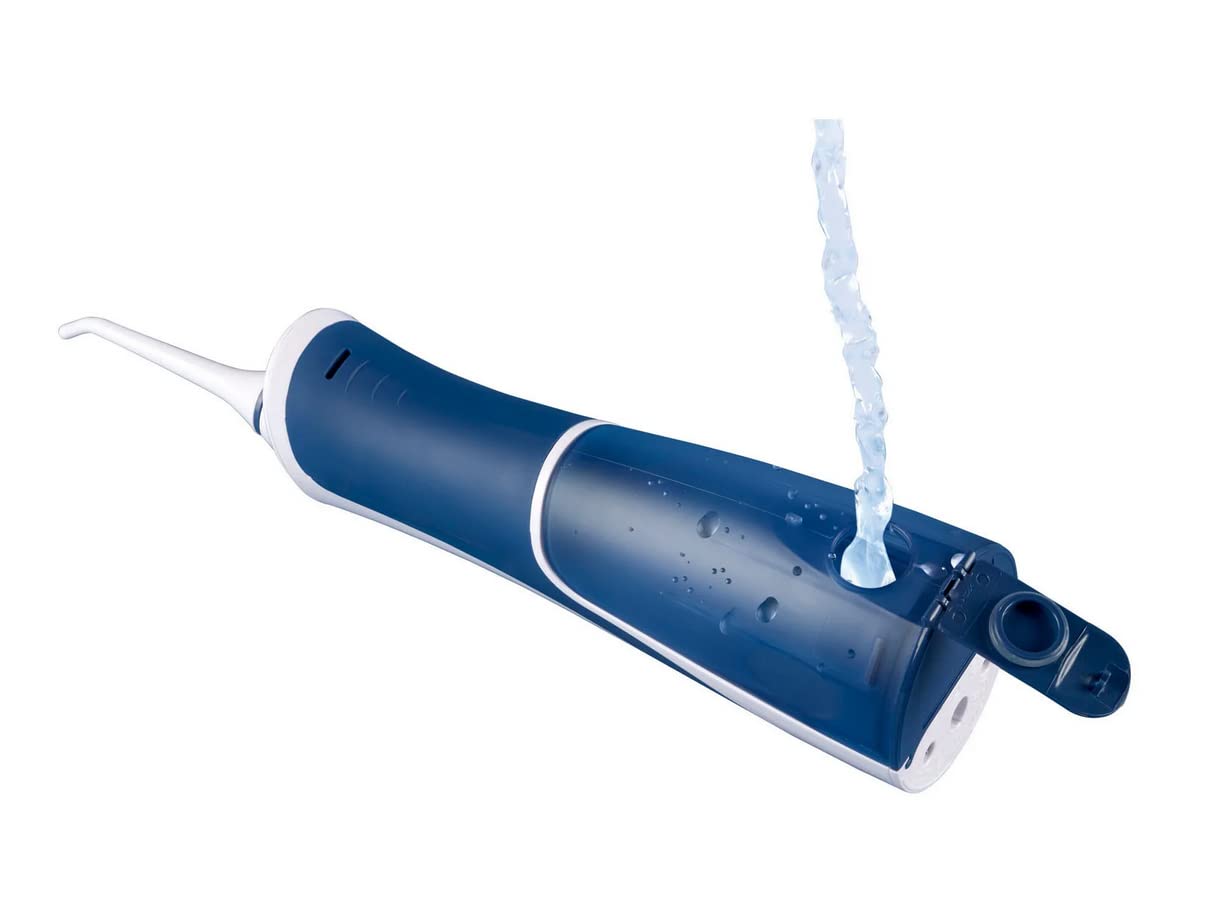
Figure 3: Filling the water reservoir.
5.2 Using the Dental Irrigator
Follow these steps for effective cleaning:
- Point the nozzle towards your teeth and gums, keeping your mouth slightly open to allow water to flow out.
- Press the power button to turn on the device.
- Select your desired water jet intensity (Soft, Normal, or Jet) using the mode button. Start with 'Soft' if you are new to dental irrigators.
- Guide the water jet along your gumline and between your teeth.
- After use, press the power button again to turn off the device.
- Empty any remaining water from the reservoir.
6. Cleaning and Maintenance
Regular cleaning ensures optimal performance and hygiene.
- After Each Use: Empty the water reservoir and rinse it thoroughly with clean water.
- Cleaning the Handheld Unit: Wipe the exterior of the unit with a soft, damp cloth. Do not immerse the unit in water.
- Cleaning Nozzles: Remove the nozzle and rinse it under running water. For deeper cleaning, nozzles can be soaked in a denture cleaning solution or a mixture of water and white vinegar.
- Storage: Store the device in a dry place when not in use. Ensure the reservoir is empty.
7. Safety Instructions
Please read and adhere to the following safety warnings to prevent injury or damage to the device:
- Keep Dry: Always keep the device dry when not in use.
- Inspect for Damage: Do not use the device if it is damaged in any way. Contact customer support for assistance.
- Water and Electricity: Keep the device away from water sources (sinks, bathtubs) when it is turned on or charging.
- Children and Pets: Do not leave the device unattended near children or pets when it is turned on or charging.
- Intended Use: Use this device only for its intended purpose of oral hygiene.
- Water Temperature: Do not fill the reservoir with water hotter than 40°C (104°F).
- Medical Conditions: Consult your dentist or doctor before using this device if you have any oral health concerns or medical conditions.
8. Troubleshooting
If you encounter issues with your Nevadent Dental Irrigator, please refer to the common problems and solutions below:
| Problem | Possible Cause | Solution |
|---|---|---|
| Device does not turn on. | Battery is low or depleted. | Charge the device for at least 15 hours for the first charge, or until fully charged. |
| Weak water jet. | Reservoir is low on water; Nozzle is clogged; Incorrect mode selected. | Refill the water reservoir; Clean the nozzle; Select a higher intensity mode (Normal or Jet). |
| Water leaks from reservoir. | Reservoir cap not closed properly. | Ensure the reservoir cap is securely closed after filling. |
| Nozzle falls off during use. | Nozzle not securely attached. | Ensure the nozzle clicks firmly into place when attaching. |
If the problem persists after trying these solutions, please contact customer support.
9. Warranty and Customer Support
Nevadent products are manufactured to high quality standards. This product comes with a standard manufacturer's warranty, typically covering defects in materials and workmanship for a period of 1 year from the date of purchase. Please retain your proof of purchase for warranty claims.
For technical support, warranty claims, or general inquiries, please refer to the contact information provided on the product packaging or the official Nevadent website. Do not attempt to repair the device yourself, as this may void the warranty.