1. Introduction and Overview
The KATBO KTB-BC1801 is a fully automatic, smart battery charger and maintainer designed for 6V and 12V lead-acid batteries. This includes AGM, GEL, SLA, and Flooded battery types commonly found in cars, trucks, SUVs, motorcycles, lawnmowers, boats, and marine vehicles. It features a 6-Amp charging capacity for 12V batteries (with a 2A slow mode option) and a 2-Amp capacity for 6V motorcycle batteries. The charger incorporates an 8-stage charging program and a repair mode to help restore old or idle batteries.
Note: This charger is not suitable for lithium batteries.

Image: The KATBO KTB-BC1801 Smart Battery Charger connected to a car battery, displaying charging information. The charger is red and black with an LCD screen.
2. Safety Information
- Always wear eye protection and protective clothing when working with batteries.
- Ensure adequate ventilation during charging to prevent the accumulation of explosive gases.
- Do not charge frozen batteries. Allow them to warm up to room temperature first.
- Never attempt to charge non-rechargeable batteries.
- This charger is designed for lead-acid batteries only. DO NOT use with lithium batteries.
- Ensure the charger is disconnected from the AC power outlet before making or breaking connections to the battery.
- Avoid sparks or flames near the battery.
- Keep out of reach of children.
3. Product Features
- Fully Automatic Smart Charging: Detects battery voltage (6V or 12V) and adjusts charging current automatically.
- Multi-Voltage & Current Output: Provides 12V-6A/2A (fast/slow) for car batteries and 6V-2A for motorcycle batteries.
- 8-Stage Charging Program: Optimizes charging process for battery health and longevity.
- Battery Repair Mode: Utilizes high-frequency and low-frequency pulse technology to help recover old or idle batteries.
- Backlit LCD Display: Clearly shows charging status, battery voltage, current, and percentage.
- Comprehensive Protection: Includes overcurrent, overvoltage, overheat, reverse polarity, and short-circuit protection.
- Intelligent Mute Fan: Automatically starts and stops based on charging temperature to prevent overheating.

Image: Visual representation of the charger's microprocessor-controlled protection features, including self-stop overvoltage, reverse protection, safe fast charging, high temperature protection, conductive protection, and overcurrent protection.
4. Setup
- Prepare the Battery: Ensure the battery terminals are clean and free of corrosion. If charging an in-vehicle battery, ensure the vehicle is turned off and in a well-ventilated area.
- Connect the Red Clamp: Attach the red (+) positive clamp of the charger to the positive (+) terminal of the battery.
- Connect the Black Clamp: Attach the black (-) negative clamp of the charger to the negative (-) terminal of the battery.
- Connect to Power: Plug the charger's AC power cord into a standard wall outlet. The charger will automatically detect the battery type (6V or 12V) and begin the charging process.

Image: A diagram showing the correct connection of the KATBO battery charger to a lead-acid battery. The red clamp connects to the positive terminal, and the black clamp connects to the negative terminal, followed by plugging the charger into a power outlet.
Video: This video demonstrates the process of connecting the KATBO 6 Amp Battery Charger to a car battery and plugging it into a power source, showing the initial display readings.
5. Operating Instructions
- Initial Detection: After connecting to the battery and power, the charger will start detecting battery data. It will display "On" for approximately 10 minutes, then show the voltage and power.
- Charging Modes: The charger automatically selects the appropriate charging mode (6V or 12V). For 12V batteries, you can use the 'SWITCH' button to toggle between 6A (fast) and 2A (slow) modes if desired.
- Monitoring Display: The backlit LCD screen provides real-time information:
- Current: Displays the charging current in Amperes (e.g., 6.0A).
- Voltage: Shows the battery voltage in Volts (e.g., 14.6V).
- Level: Indicates the battery charge level as a percentage (e.g., 98%).
- Full: Displays "100% FULL" when charging is complete.
- Repair Mode: If the charger cannot charge a battery, it may indicate a need for repair. Press the 'SWITCH' button to activate the repair mode. This mode uses pulse technology to attempt to restore old or idle batteries. Note that it cannot activate completely dead batteries or repair physically damaged ones.
- Completion: Once the battery is fully charged (display shows "100% FULL"), the charger will automatically switch to maintenance (float) mode to prevent overcharging.
- Disconnection: First, unplug the charger from the AC power outlet. Then, disconnect the black (-) negative clamp, followed by the red (+) positive clamp from the battery.

Image: A visual guide to the various display codes on the KATBO charger's LCD screen, including current, voltage, charge level, activation status, full charge, and error codes for reversed polarity, bad battery, and faulty battery.
Video: This video demonstrates the KATBO 12V car battery charger in operation, showing the connection process and the display indicating charging status and voltage.
6. Maintenance
- Cleaning: Keep the charger clean and dry. Wipe the casing with a soft, damp cloth. Do not use solvents or abrasive cleaners.
- Cable Care: Regularly inspect the charging cables and clamps for any damage, fraying, or corrosion. Replace if necessary.
- Storage: Store the charger in a cool, dry place when not in use. Ensure cables are neatly coiled and not under tension.
- Battery Health: The charger's built-in maintenance mode helps extend battery life by preventing overcharge and providing a float charge. For long-term storage of batteries, connect the charger to maintain optimal charge.
7. Troubleshooting
Refer to the table below for common error codes and their solutions:
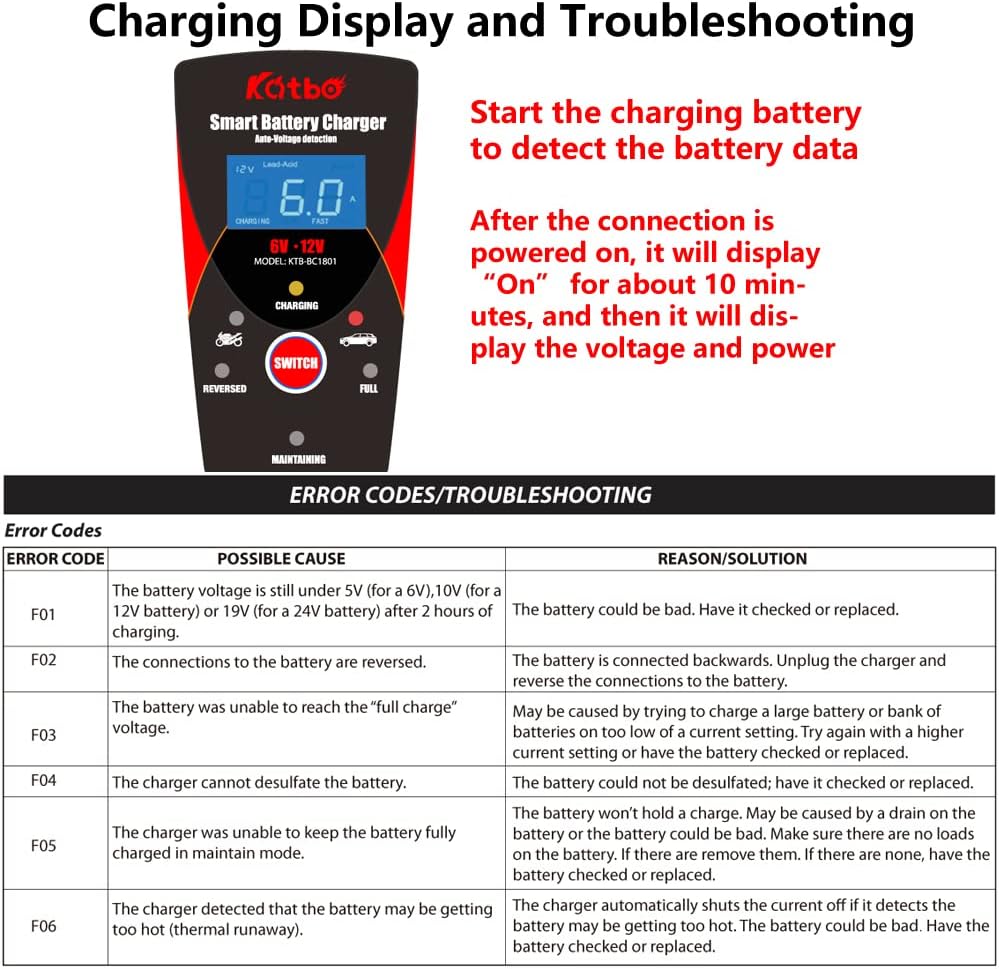
Image: A detailed table outlining error codes, possible causes, and recommended solutions for the KATBO Smart Battery Charger.
| Error Code | Possible Cause | Reason/Solution |
|---|---|---|
| F01 | The battery voltage is still under 5V (for a 6V), 10V (for a 12V battery) or 19V (for a 24V battery) after 2 hours of charging. | The battery could be bad. Have it checked or replaced. |
| F02 | The connections to the battery are reversed. | The battery is connected backwards. Unplug the charger and reverse the connections to the battery. |
| F03 | The battery was unable to reach the "full charge" voltage. | May be caused by trying to charge a large battery or bank of batteries on too low of a current setting. Try again with a higher current setting or have the battery checked or replaced. |
| F04 | The charger cannot desulfate the battery. | The battery could not be desulfated; have it checked or replaced. |
| F05 | The charger was unable to keep the battery fully charged in maintain mode. | The battery won't hold a charge. May be caused by a drain on the battery or the battery could be bad. Make sure there are no loads on the battery. If there are none, have the battery checked or replaced. |
| F06 | The charger detected that the battery may be getting too hot (thermal runaway). | The charger automatically shuts the current off if it detects the battery may be getting too hot. The battery could be bad. Have the battery checked or replaced. |
8. Specifications
- Brand: KATBO
- Model: KTB-BC1801
- Input Voltage: 100-240V AC, 50/60Hz (Standard)
- Output Voltage: 6V DC, 12V DC
- Output Current: 6A (12V Fast Mode), 2A (12V Slow Mode), 2A (6V Mode)
- Battery Types: All types of 6V and 12V lead-acid batteries (AGM, GEL, SLA, Flooded)
- Product Dimensions: Approximately 6.5 x 2.17 x 3.54 inches (16.5 x 5.5 x 9 cm)
- Item Weight: Approximately 15 ounces (425 grams)
- Manufacturer: KATBO
9. Warranty and Support
For warranty information and technical support, please refer to the documentation included with your product packaging or contact KATBO customer service directly. Specific warranty terms may vary by region and purchase date.


