Introduction
Thank you for purchasing the Artlii Stone Full HD 1080P Projector. This manual provides essential information for setting up, operating, and maintaining your projector to ensure optimal performance and longevity. Please read this manual thoroughly before using the product and keep it for future reference.
The Artlii Stone projector delivers a native 1080P resolution, supporting 4K content, with 7200L brightness and an 8000:1 contrast ratio. It features a 75%-100% zooming function, a 300-inch projection screen capability, and a HIFI level built-in speaker. Connectivity options include dual HDMI, VGA, and USB inputs, making it versatile for various home theater and presentation needs.
Safety Information
To prevent fire or electric shock, do not expose this appliance to rain or moisture. To avoid electric shock, do not open the cabinet. Refer servicing to qualified personnel only.
- Do not look directly into the projector lens when the lamp is on.
- Ensure proper ventilation around the projector. Do not block ventilation openings.
- Use only the power adapter supplied with the projector.
- Keep the projector away from water or any liquids.
- Unplug the projector from the power outlet during lightning storms or when unused for long periods.
- Do not attempt to repair this product yourself. Contact qualified service personnel for assistance.
Package Contents
Verify that all items are included in your package:

The image displays the Artlii Stone projector along with its standard accessories. These include the projector unit, a remote control (batteries not included), a power cable, an AV cable, an HDMI cable, and the instruction manual.
- Artlii Stone Projector
- Power Cable
- Remote Control (Batteries not included)
- AV Cable
- HDMI Cable
- Instructions Manual
Product Overview
Familiarize yourself with the main components and ports of your Artlii Stone projector.

This image shows the front and top view of the Artlii Stone projector, highlighting its sleek design, the main projection lens, and the focus/keystone adjustment dials located on the top surface.

The rear panel of the Artlii Stone projector is displayed, detailing the various connectivity ports. These include an SD Card slot, two HDMI ports, a USB port, and a VGA port, along with an audio output jack.
Key Components:
- Projection Lens: Emits the image onto the screen.
- Focus Ring: Adjusts the clarity of the projected image.
- Keystone Correction: Corrects trapezoidal distortion of the image.
- Control Panel: Buttons for basic navigation and settings.
- Input Ports: HDMI (x2), USB, VGA, Audio Output, Micro SD.
- Ventilation Openings: For heat dissipation.
- Built-in Speaker: Provides audio output.
Setup
1. Placement and Projection Size
Position the projector on a stable, flat surface. The distance from the projector to the screen will determine the size of the projected image. Refer to the diagram below for recommended projection distances and corresponding screen sizes.

This diagram illustrates the relationship between projection distance and screen size. For example, a distance of 1.7m yields a 50-inch screen, 2.6m for an 80-inch screen, and up to 9.2m for a 300-inch screen.
- Minimum Projection Distance: 2 meters (approx. 50 inches)
- Maximum Projection Distance: 9 meters (approx. 300 inches)
2. Power Connection
Connect the supplied power cable to the projector's power input port and then plug the other end into a wall outlet (AC 90-240V, 50-60Hz).
3. Connecting Input Devices
The Artlii Stone projector supports various input sources. Choose the appropriate cable and port for your device.

This image illustrates the wide range of devices compatible with the Artlii Stone projector. It shows connections for game consoles, Blu-ray/DVD players, home cinema systems, TV boxes, iPads/Tablets, streaming devices (like Roku, Chromecast), USB drives, and SD cards.
- HDMI: Connect Blu-ray players, game consoles, laptops, TV sticks, etc., using an HDMI cable. The projector has two HDMI ports.
- USB: Insert a USB flash drive to play media files directly.
- VGA: Connect older computers or laptops using a VGA cable.
- Micro SD: Insert a Micro SD card to play media files.
- AV: Use the supplied AV cable to connect devices with RCA outputs.
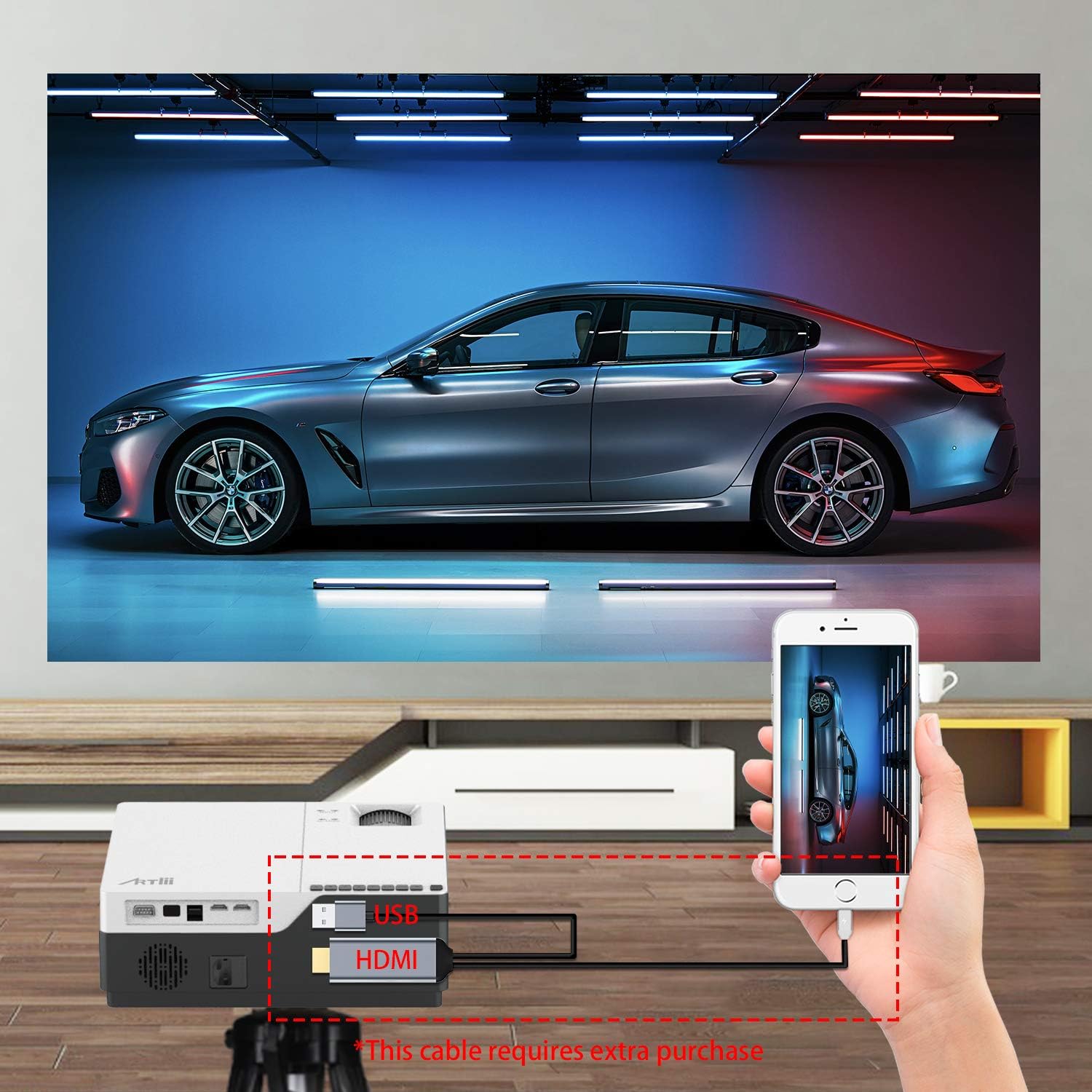
This image demonstrates connecting a smartphone to the projector. Note that an additional cable (not included) may be required for smartphone connectivity, typically an MHL to HDMI adapter or a USB-C to HDMI adapter, depending on the phone model.
4. Focus and Keystone Adjustment
After powering on and selecting an input source, adjust the image for clarity and shape.
- Focus: Rotate the focus ring on the projector lens until the image appears sharp and clear.
- Keystone Correction: If the projected image appears trapezoidal (wider at the top or bottom), use the keystone correction dial to adjust it into a perfect rectangle. The projector supports ±15 degrees keystone correction.
Operating
1. Power On/Off
- Power On: Press the power button on the projector or the remote control.
- Power Off: Press the power button again. The projector will go into standby mode.
2. Menu Navigation
Use the buttons on the projector's control panel or the remote control to navigate the on-screen menu. Select input sources, adjust picture settings (brightness, contrast, color), and sound settings.
3. Zoom Function
The Artlii Stone projector features a digital zoom function, allowing you to adjust the screen size without moving the projector.

This image illustrates the projector's zoom capability, allowing the user to reduce the screen size from 100% down to 75% using the remote control, providing flexibility in screen fitting without physical repositioning.
- Access the zoom setting through the projector's menu.
- Adjust the zoom factor between 75% and 100% to fit your screen or wall.
4. Audio Output
The projector has a built-in HIFI level speaker. For external audio, connect speakers or a sound system to the Audio Output port.
Maintenance
- Lens Cleaning: Use a soft, lint-free cloth specifically designed for optical lenses to gently wipe the projector lens. Do not use abrasive cleaners or cloths.
- Dust Removal: Regularly clean the projector's exterior with a soft, dry cloth. Use a small brush or compressed air to clear dust from ventilation openings.
- Storage: When not in use for extended periods, store the projector in a cool, dry place, protected from dust and extreme temperatures.
Troubleshooting
| Problem | Possible Cause | Solution |
|---|---|---|
| No image on screen | Power cable loose; Incorrect input source; Device not connected properly. | Check power connection; Select correct input source (HDMI, USB, VGA); Ensure device is connected securely. |
| Image is blurry | Focus not adjusted; Projector too close/far from screen. | Adjust the focus ring; Adjust projection distance. |
| Image is trapezoidal | Keystone not adjusted. | Adjust the keystone correction dial. |
| No sound | Volume too low; Muted; External speakers not connected/powered. | Increase volume; Unmute; Check external speaker connections and power. |
| Remote control not working | Batteries dead/incorrectly inserted; Obstruction between remote and projector. | Replace batteries; Ensure clear line of sight to IR receiver. |
Specifications
| Feature | Detail |
|---|---|
| Operation System | Linux |
| Projection Technology | TFT LCD |
| Projection Distance | 2-9m |
| Projection Size | 50-300 Inch |
| Native Resolution | 1920x1080 pixels (Full HD) |
| Lamp Type | LED |
| LED Lamp Life | 55,000 hours |
| Throw Ratio | 1.35 |
| Contrast Ratio | 8000:1 |
| Zoom Factor | 75%-100% |
| Keystone Correction | ±15 degrees |
| Projection Mode | Front projection, Rear projection, Lifting |
| Material | Metal + ABS |
| Built-in Speaker | Yes |
| Input Voltage | AC 90-240V, 50-60Hz |
| Connectors | HDMI x2, USB, Audio Output, Micro SD |
| Weight | 5.7 lb (2.59 kg) |
| Dimension (L x W x H) | 9.1 x 12.1 x 4.1 inch (23.1 x 30.7 x 10.4 cm) |
Note: Specifications are subject to change without notice.
Warranty and Support
The Artlii Stone Projector comes with a comprehensive warranty and support:
- Money Back Policy: 1-month 100% Money Back Policy.
- Factory Policy: 1-year factory policy.
- Certifications: FCC, RoHS, and CE certified.
- Local Maintenance: Artlii provides a local maintenance center with professional engineers to assist you.
For any inquiries or technical assistance, please refer to the contact information provided on the Artlii official website or your purchase documentation.