
1. Introduction
The RockSeed RS305P is a high-precision, single-output programmable DC power supply designed for various applications including laboratory testing, electronic maintenance, and educational purposes. It features a micro-MPU control system, allowing for simultaneous display of voltage, current, and power. This unit offers continuous adjustability, 6 sets of preset output parameters, encoder key step adjustment, and comprehensive protection functions to ensure safe and efficient operation.
2. Safety Information
Please read all safety instructions carefully before operating the device.
- Ensure the power supply is connected to a grounded outlet to prevent electric shock.
- Do not operate the device in wet or damp conditions.
- Avoid blocking ventilation openings to prevent overheating.
- Do not open the casing; there are no user-serviceable parts inside. Refer all servicing to qualified personnel.
- Always disconnect the power cord before cleaning or moving the unit.
- Verify the input voltage matches your local power grid specifications.
- Do not exceed the maximum output voltage and current ratings of the device.
3. Product Overview
The RockSeed RS305P DC Power Supply is designed for ease of use and reliability. Key features include:
- Adjustable output: 0-30 Volts and 0-5 Amps.
- High-resolution 4-digit LED display for voltage, current, and power.
- 6 sets of programmable output parameters (M1-M6).
- USB interface for computer program control, allowing up to 999 sets of data.
- Unique one-key ON/OFF switch for output.
- Keyboard lock function to prevent accidental changes.
- Comprehensive protection functions: Over Voltage Protection (OVP), Over Current Protection (OCP), Over Power Protection (OPP), Over Temperature Protection (OTP), and Short Circuit Protection.
- High-quality pure copper toroidal transformer for improved power efficiency and lifespan.
Front Panel Controls and Indicators
The front panel provides all necessary controls and displays for operating the power supply.
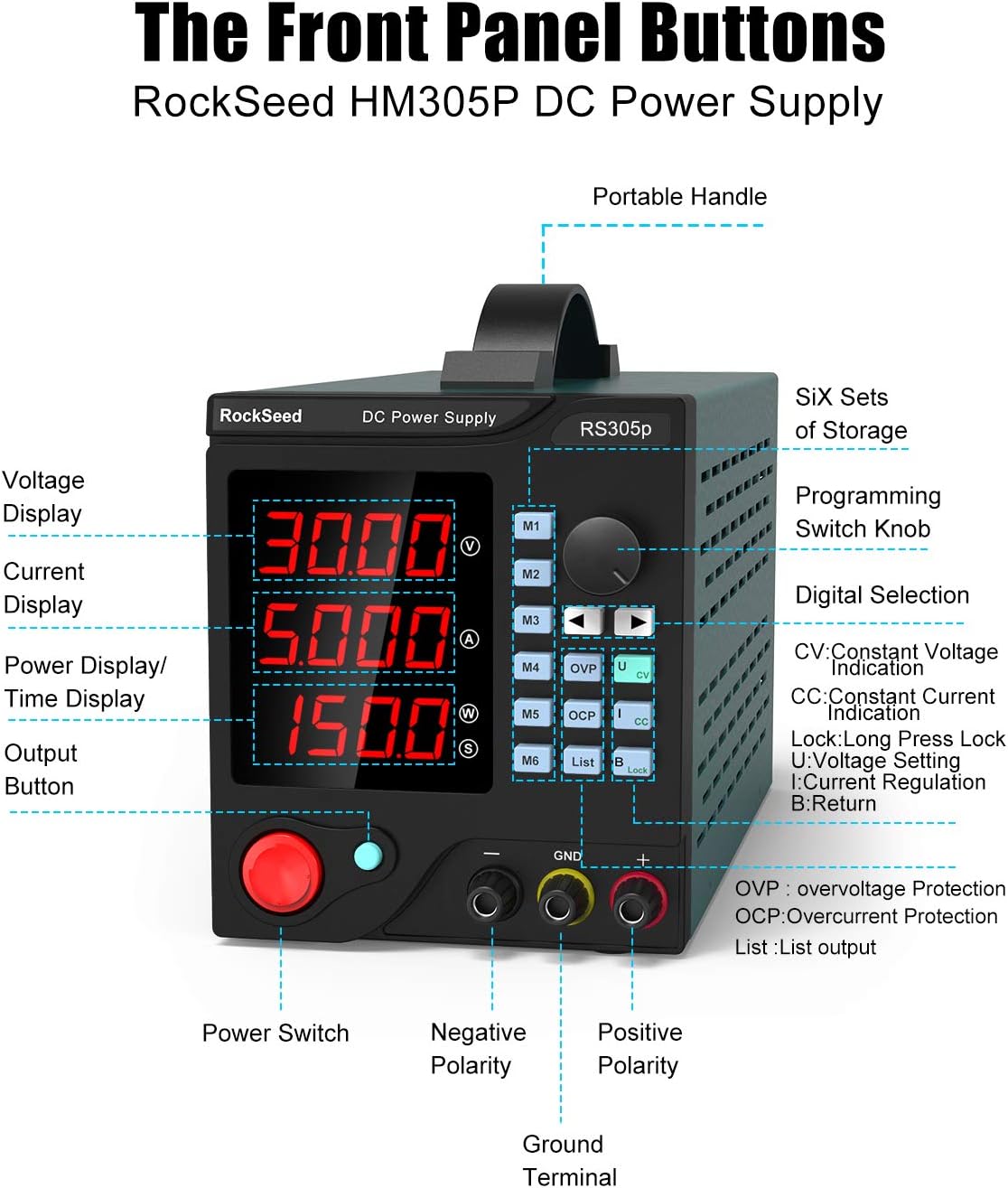
Image 3.1: Front panel layout of the RS305P, showing the digital display, control knobs, function buttons, and output terminals.
- Voltage Display (V): Shows the output voltage.
- Current Display (A): Shows the output current.
- Power Display (W) / Time Display (S): Shows output power or programmed time.
- Output Button: Toggles the power output ON/OFF.
- Power Switch: Main power ON/OFF for the unit.
- Negative Polarity Terminal (-): Black terminal for negative connection.
- Positive Polarity Terminal (+): Red terminal for positive connection.
- Ground Terminal (GND): Green terminal for ground connection.
- M1-M6 Buttons: For storing and recalling preset output parameters.
- Digital Knob: Used to adjust voltage, current, and other parameters.
- Programming Switch Knob: For navigating programming menus.
- OVP (Over Voltage Protection): Indicator and setting button.
- OCP (Over Current Protection): Indicator and setting button.
- CV (Constant Voltage) / CC (Constant Current): Indicators for operating mode.
- List: Accesses the list of programmed outputs.
- Lock: Long press to lock/unlock the keyboard.
- B (Return): Button to go back in menus.
Product Dimensions and Portability

Image 3.2: The RS305P power supply showing its compact dimensions and integrated elastic handle for portability.
4. Setup
4.1 Unpacking
Carefully remove the power supply and all accessories from the packaging. Inspect the unit for any signs of damage. Retain the packaging for future transport or storage.

Image 4.1: Standard accessories included with the RS305P power supply.
4.2 Power Connection
- Ensure the main power switch on the front panel is in the OFF position.
- Connect the provided power cord to the AC input socket on the rear of the unit.
- Plug the other end of the power cord into a grounded electrical outlet.
4.3 Load Connection
- Ensure the power output is OFF (check the Output button indicator).
- Connect the positive (+) terminal of your load to the red (+) output terminal of the power supply using appropriate test leads.
- Connect the negative (-) terminal of your load to the black (-) output terminal of the power supply.
- If grounding is required for your application, connect the ground terminal of your load to the green (GND) terminal of the power supply.
4.4 Software Installation (for PC Control)
The RS305P supports PC control via its USB interface. To enable this feature:
- Connect the power supply to your computer using the provided USB cable.
- Install the control software from the included CD or download it from the official website: https://bit.ly/3v4fI0a.
- Follow the on-screen instructions to complete the installation. The software is compatible with Windows XP, 7, and 10.
5. Operating Instructions
5.1 Basic Operation
- Turn on the main power switch on the front panel. The LED display will illuminate.
- The unit will typically power on with the output OFF. Press the Output button to enable or disable the output.
- To adjust voltage or current, press the Digital Knob to select the parameter you wish to change (voltage or current). The selected digit will blink.
- Rotate the Digital Knob clockwise to increase the value and counter-clockwise to decrease it. Press the knob again to move to the next digit or confirm the setting.
- Observe the CV/CC indicators. CV (Constant Voltage) indicates the output voltage is stable at the set value. CC (Constant Current) indicates the output current is stable at the set value, typically when the load resistance is too low for the set voltage.
5.2 Keyboard Lock Function
To prevent accidental changes to settings, you can lock the keyboard:
- Long press the Lock button for approximately 3 seconds. The lock indicator will appear on the display.
- To unlock, long press the Lock button again.
6. Programming Features
6.1 Storing and Recalling Presets (M1-M6)
The RS305P allows you to store up to 6 sets of frequently used voltage and current settings for quick recall.
- Set the desired voltage and current using the Digital Knob.
- Long press one of the M1-M6 buttons (e.g., M1) for approximately 3 seconds until the display indicates the setting has been saved.
- To recall a saved setting, simply short press the corresponding M1-M6 button. The stored voltage and current will be applied to the output (if enabled).
6.2 Computer Control via USB
For advanced programming and automated testing, connect the RS305P to a PC via USB and use the provided software.
- The software allows you to set up to 999 groups of output parameters and time sequences (1-9999 seconds).
- This feature is ideal for aging tests, electronic maintenance, and educational experiments requiring complex power profiles.
- Refer to the software's user guide for detailed instructions on creating and executing programming lists.
7. Protection Functions
The RS305P is equipped with multiple self-protection features to safeguard both the device and the connected load:
- Over Voltage Protection (OVP): Prevents the output voltage from exceeding a preset safe limit. If activated, the output will shut down.
- Over Current Protection (OCP): Limits the output current to a preset maximum. If the load draws more current than the OCP setting, the output will shut down.
- Over Power Protection (OPP): Protects the unit from excessive output power.
- Over Temperature Protection (OTP): Shuts down the unit if its internal temperature exceeds safe operating limits, preventing damage from overheating.
- Short Circuit Protection: Automatically cuts off output in case of a short circuit, preventing damage to the power supply and the load. The unit is designed to withstand prolonged full load and short circuit conditions without burning.

Image 7.1: Visual representation of the RS305P's key features and protection mechanisms.
8. Maintenance
8.1 Cleaning
- Always disconnect the power supply from the AC outlet before cleaning.
- Use a soft, dry cloth to wipe the exterior of the unit.
- Do not use abrasive cleaners, solvents, or harsh chemicals.
8.2 Ventilation
The power supply uses a fan for temperature control. Ensure that the ventilation openings on the sides and rear of the unit are clear of obstructions to allow for proper airflow.

Image 8.1: Rear view of the RS305P showing the cooling fan for temperature control and the USB port for PC connectivity.
8.3 Storage
When not in use for extended periods, store the power supply in a cool, dry place, away from direct sunlight and extreme temperatures. It is recommended to use the original packaging for storage.
9. Troubleshooting
If you encounter issues with your RS305P power supply, refer to the following common problems and solutions:
| Problem | Possible Cause | Solution |
|---|---|---|
| No power display | Power cord not connected, main switch off, or power outlet issue. | Check power cord connection, ensure main switch is ON, test power outlet. |
| No output voltage/current | Output button OFF, OVP/OCP activated, or short circuit. | Press the Output button to turn ON. Check OVP/OCP settings. Disconnect load and check for short circuit. |
| Output voltage/current unstable | Poor load connection, faulty test leads, or unstable AC input. | Ensure secure load connections. Replace test leads if damaged. Check AC input stability. |
| Unit overheats | Blocked ventilation, excessive load, or high ambient temperature. | Ensure ventilation openings are clear. Reduce load. Operate in a cooler environment. |
| PC software not connecting | USB cable issue, driver not installed, or incorrect software settings. | Check USB cable. Reinstall software and drivers. Verify COM port settings in software. |
If the problem persists after trying these solutions, please contact customer support.
10. Specifications
| Feature | Specification |
|---|---|
| Model Number | RS305P (HM305P) |
| Output Voltage | 0-30V DC |
| Output Current | 0-5A |
| Output Power | 300W |
| Display Type | 4-digit LED |
| Input Voltage (Max) | 240V |
| Cooling Method | Air (Fan) |
| Fan Size | 120 mm |
| Number of Fans | 1 |
| Item Weight | 2.63 Kilograms |
| Package Dimensions | 35.8 x 21.6 x 17.7 cm |
| Compatible Devices | PC (Windows XP, 7, 10) |
11. Warranty and Support
The RockSeed RS305P Programmable DC Power Supply comes with a 30-day money-back guarantee and a 12-month limited warranty.
For technical support, warranty claims, or software assistance, please refer to the contact information provided with your purchase or visit the official RockSeed website.
Software download link: https://bit.ly/3v4fI0a