
1. Introduction
This manual provides essential information for the safe and effective operation, setup, and maintenance of your KERN DB 50-2 Digital Torque Meter. Please read this manual thoroughly before using the device and keep it for future reference.
The KERN DB 50-2 is designed for precise torque testing of various tools, including torque wrenches, electric manual screwdrivers, and cordless screwdrivers. It features a robust metal housing suitable for demanding industrial environments.
2. Safety Information
Always observe the following safety precautions to prevent injury and damage to the device:
- Ensure the device is placed on a stable, level surface during operation.
- Do not exceed the maximum measuring range of 50 Nm.
- Avoid exposing the device to extreme temperatures, humidity, or corrosive substances.
- Do not attempt to disassemble or repair the device yourself. Refer to qualified service personnel.
- Keep the device clean and free from dust and debris.
3. Product Overview
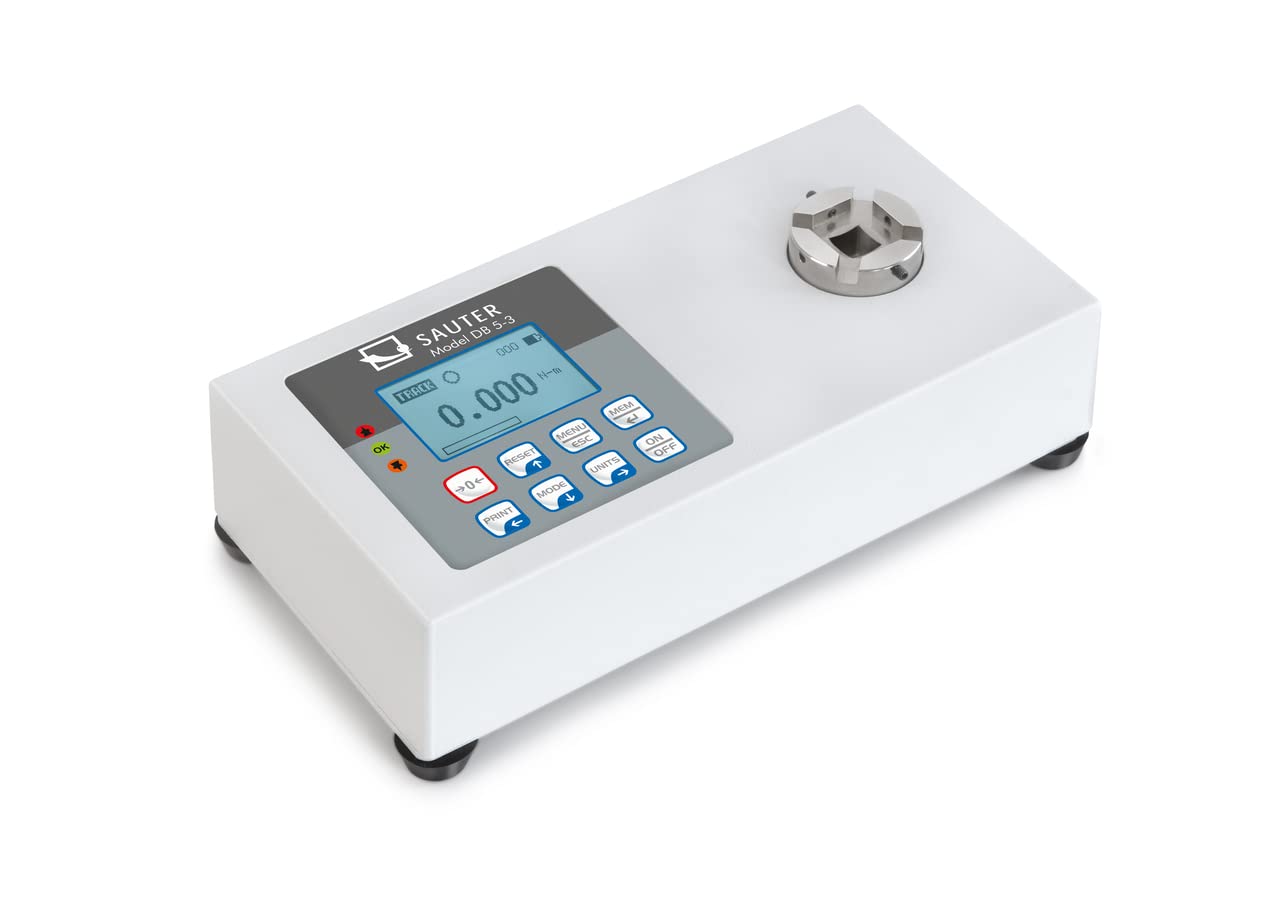
The KERN DB 50-2 Digital Torque Meter is equipped with several features to ensure accurate and convenient torque measurement:
- Rotary Transducer System: Enables dynamic testing of electric screwdrivers.
- Metal Housing: Provides durability for rugged environmental conditions.
- Capacity Display: A visual strip indicates the remaining measurement range.
- Backlit Graphic LCD Display: Ensures clear readability in various lighting conditions.
- Anti-slip Rubber Feet: Provides stability during use.
- Sturdy Mounting Plate: For solid mounting.
- Data Interfaces: USB and RS-232 are included for data transfer.
- Internal Data Memory: Stores up to 500 measurement data points.
- Peak Hold Function: Captures and displays the maximum torque value.
- Track Function: Provides continuous measurement display.
- Bi-directional Measurement: Can be used in both clockwise and counter-clockwise directions.
- Tolerance Range (Limit Function): Allows programming of upper and lower limit values with acoustic and optical signals for measurement process support.
- Auto-off Function: Conserves battery life.
4. Setup
- Unpacking: Carefully remove the torque meter and all accessories from the packaging. Inspect for any signs of damage.
- Placement: Place the device on a stable, vibration-free surface. Ensure adequate space for operation and connection of tools.
- Power Connection: Connect the appropriate power adapter (if applicable) or ensure batteries are correctly installed.
- Mounting (Optional): If using the sturdy mounting plate, secure the device firmly to a workbench or designated testing station.
- Initial Power On: Press the ON/OFF button to power on the device. The display should illuminate and show the initial measurement screen.
5. Operation
5.1 Basic Measurement
- Power On: Press the ON/OFF button.
- Zeroing: Ensure no load is applied to the transducer and press the RESET button to zero the display.
- Select Unit: Press the UNITS button to cycle through available measurement units (e.g., N-m, lbf-ft).
- Apply Torque: Carefully apply torque to the transducer using the tool to be tested. The display will show the real-time torque value.
- Read Measurement: For peak hold, the maximum value will be displayed. For track mode, the value updates continuously.
5.2 Peak Hold and Track Function
The device supports both Peak Hold and Track functions. Use the MODE button to switch between these modes.
- Peak Hold: Displays and holds the maximum torque value reached during a measurement cycle.
- Track: Displays the torque value in real-time as it is applied.
5.3 Tolerance Range (Limit Function)
To set upper and lower tolerance limits:
- Enter the menu by pressing MENU/ESC.
- Navigate to the "Limits" or "Tolerance" setting using the arrow buttons.
- Set the desired upper and lower torque values.
- Confirm settings. During measurement, an acoustic and optical signal will indicate if the applied torque is within, above, or below the set limits.
5.4 Data Storage and Transfer
The device can store up to 500 measurement data points internally. To access and transfer data:
- Press the MEM button to review stored data.
- Connect the device to a PC using the provided USB or RS-232 interface cable.
- Use optional software (not included) to transfer the memory content to the PC for analysis and archiving.
6. Maintenance
- Cleaning: Wipe the device with a soft, damp cloth. Do not use abrasive cleaners or solvents.
- Storage: When not in use, store the torque meter in its robust carrying case in a dry, dust-free environment.
- Calibration: Regular calibration by authorized service personnel is recommended to maintain measurement accuracy. Refer to the manufacturer's guidelines for calibration intervals.
- Battery Replacement: If the device uses batteries, replace them as indicated by the low battery warning on the display. Ensure correct polarity.
7. Troubleshooting
This section addresses common issues you might encounter. For problems not listed here, contact customer support.
| Problem | Possible Cause | Solution |
|---|---|---|
| Device does not power on. | No power, dead batteries, or faulty power adapter. | Check power connection, replace batteries, or try a different power source. |
| Inaccurate readings. | Device not zeroed, overload, or needs calibration. | Press RESET button, ensure load is within range, or schedule calibration. |
| Display shows error message. | Overload, internal fault, or incorrect operation. | Refer to specific error codes in a more detailed manual (if available) or contact support. Remove load and restart. |
8. Specifications
- Model: KERN DB 50-2
- Measuring Range: 50 Nm
- Product Dimensions: 3.94 x 7.87 x 1.97 inches
- Product Weight: 7.39 Pounds
- Manufacturer: KERN & SOHN GmbH
- Data Interfaces: USB, RS-232
- Internal Memory: Up to 500 measurement data points
9. Box Contents
Upon unpacking, you should find the following items:
- KERN DB 50-2 Digital Torque Meter (Torque Gauge)
- Rotary Transducer
- Robust Carrying Case
- Mounting Plate
- USB Cable
- RS-232 Cable
- User Manual (this document)
10. Warranty and Support
For warranty information, technical support, or service inquiries, please contact KERN & SOHN GmbH directly or your authorized dealer. Keep your purchase receipt as proof of purchase.
Manufacturer: KERN & SOHN GmbH
For the most up-to-date support information, please visit the official KERN website.


