
CATA UC-10
Cata UC-10 Bathroom Fan User Manual
Model: UC-10 (1255000) | Brand: CATA
1. Introduction
This manual provides essential information for the safe and efficient operation, installation, and maintenance of your Cata UC-10 Bathroom Fan. Please read this manual thoroughly before installation and use, and keep it for future reference.
The Cata UC-10 is a high-performance bathroom fan designed for efficient ventilation with very low energy consumption and quiet operation. Its silver-grey finish offers a discreet aesthetic suitable for various interiors, particularly bathrooms and WCs.
2. Safety Information
Important Safety Instructions:
- Always disconnect the power supply before performing any installation, maintenance, or cleaning.
- Installation must be carried out by a qualified electrician in accordance with local wiring regulations.
- This appliance is not intended for use by persons (including children) with reduced physical, sensory or mental capabilities, or lack of experience and knowledge, unless they have been given supervision or instruction concerning use of the appliance by a person responsible for their safety.
- Children should be supervised to ensure that they do not play with the appliance.
- The device features double insulation and must not be earthed.
- Ensure the fan is installed in a location where it is protected from direct water spray. The fan has an IP44 protection rating, offering protection against water splashes from all sides.
- Do not block the air inlets or outlets of the fan.
- The maximum ambient temperature for operation is 40 °C.
3. Package Contents
Verify that all components are present and undamaged:
- Cata UC-10 Bathroom Fan Unit
- Installation Screws and Wall Plugs (typically included)
- Instruction Manual (this document)

Figure 3.1: Front view of the Cata UC-10 Bathroom Fan, showing the silver-grey casing and the central fan grille.
4. Setup and Installation
The Cata UC-10 fan is designed for wall or ceiling mounting and can be installed in 100 mm (NW 100) diameter tubes or bays. It features a specially designed back valve to prevent backdraught.
4.1. Pre-Installation Checks
- Ensure the power supply is disconnected at the main circuit breaker.
- Confirm the mounting surface is flat and stable.
- Verify the ducting diameter is compatible (100 mm).
4.2. Mounting Instructions
- Prepare the Mounting Location: Mark the drilling points on the wall or ceiling using the fan's mounting holes as a template. Ensure the location allows for proper air circulation and access for wiring.
- Drill Holes: Drill holes at the marked points suitable for the provided wall plugs and screws.
- Secure the Fan Casing: Attach the fan casing to the wall or ceiling using the screws. Ensure it is firmly secured.
- Connect Wiring: Connect the electrical wiring to the fan's terminal block. Refer to the wiring diagram (if provided in physical manual) for correct connections. The fan operates on 240 Volts and features double insulation, meaning it does not require an earth connection.
- Install Ducting: Connect the 100 mm ducting to the fan's outlet. Ensure a tight seal to prevent air leakage.
- Final Assembly: Secure any covers or grilles.

Figure 4.1: Rear view of the fan, illustrating the duct connection point for 100mm pipes.
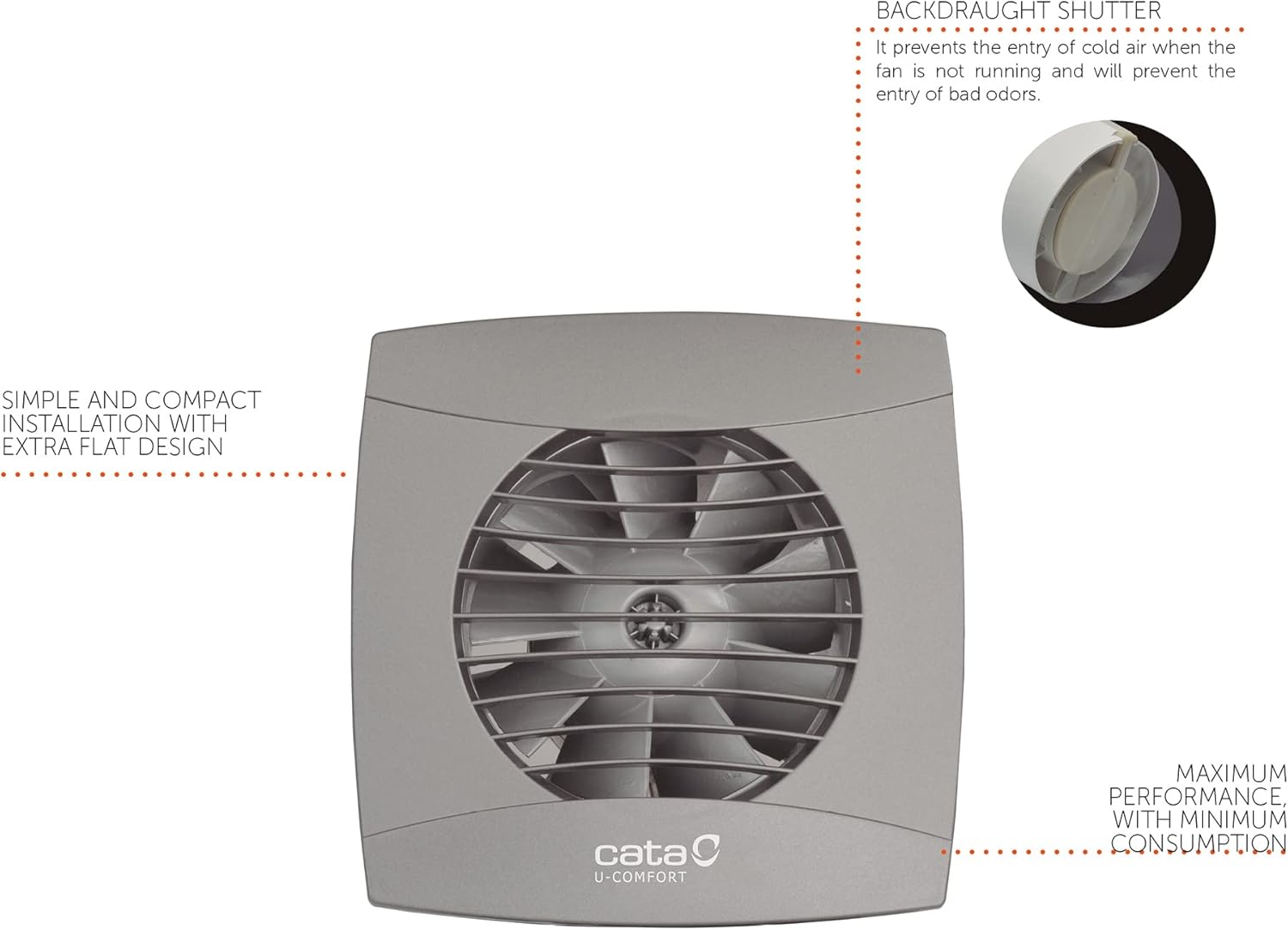
Figure 4.2: Diagram highlighting the backdraught shutter, which prevents cold air entry and odors when the fan is off, and the simple, compact installation design.

Figure 4.3: Example of the Cata UC-10 fan installed on a wall in a bathroom setting, demonstrating its discreet appearance.
5. Operating Instructions
The Cata UC-10 fan is controlled via a button (external switch, not part of the fan unit itself). Once installed and wired, its operation is straightforward.
5.1. Basic Operation
- Turning On: Activate the external switch connected to the fan. The fan will begin to operate, extracting air from the room.
- Turning Off: Deactivate the external switch. The fan will stop, and the integrated back valve will close to prevent backdraught.
5.2. Features
- High Performance Turbine: Ensures efficient air extraction.
- Low Noise Level: Operates at a quiet 26 dB.
- Low Power Consumption: Only 8 Watts.
- Back Valve: Prevents cold air and odors from entering when the fan is not running.
- IP44 Protection: Protected against water splashes, suitable for bathroom environments.

Figure 5.1: Visual representation of key features: extra flat design, very quiet operation (26 dB), high energy efficiency (8 W), and included backflow damper.
6. Maintenance
Regular maintenance ensures the longevity and optimal performance of your Cata UC-10 fan.
6.1. Cleaning
- Frequency: Clean the fan grille and exterior periodically, depending on usage and environmental conditions.
- Procedure:
- Disconnect Power: Always turn off the power supply to the fan at the main circuit breaker before cleaning.
- Clean Exterior: Use a soft, damp cloth with mild detergent to wipe down the exterior casing and grille. Do not use abrasive cleaners or solvents.
- Clean Interior (if accessible): If dust has accumulated inside the fan, carefully remove the front grille (if detachable) and gently clean the fan blades with a soft brush or vacuum cleaner. Do not use water directly on internal components.
- Reassemble: Ensure all parts are dry before reassembling and restoring power.
6.2. General Care
- Do not attempt to lubricate the motor or bearings; they are designed for maintenance-free operation.
- Regularly check for any unusual noises or vibrations, which may indicate a problem.
7. Troubleshooting
If you encounter issues with your Cata UC-10 fan, refer to the following table for common problems and solutions.
| Problem | Possible Cause | Solution |
|---|---|---|
| Fan does not turn on. | No power supply. Faulty wiring connection. External switch issue. | Check circuit breaker and power outlet. Verify wiring connections (consult a qualified electrician). Test the external switch. |
| Fan is noisy. | Obstruction in fan blades. Loose mounting. Damaged bearings. | Disconnect power and check for obstructions. Clean blades if necessary. Ensure fan is securely mounted. Contact customer support if bearings are suspected to be damaged. |
| Poor air extraction. | Blocked ducting. Fan blades are dirty. Back valve stuck. | Check ducting for blockages. Clean fan blades. Inspect back valve for proper operation. |
| Fan vibrates excessively. | Improper mounting. Unbalanced fan blades. | Re-secure the fan to the mounting surface. Check for debris on blades; if blades are bent or damaged, contact support. |
If the problem persists after attempting these solutions, please contact CATA customer support.
8. Specifications
| Attribute | Value |
|---|---|
| Brand | CATA |
| Model Number | 1255000 (UC-10 STD Silver Standard) |
| Dimensions (L x W x H) | 15 x 7.75 x 15 cm |
| Weight | 650 grams |
| Color | Silver |
| Material | Plastic (ABS) |
| Voltage | 240 Volts |
| Power Consumption | 8 Watts |
| Noise Level | 26 dB |
| Airflow Capacity | 110 m³/h |
| Protection Rating | IP44 (Protection against water splashes) |
| Mounting Type | Wall or Ceiling Mount |
| Duct Diameter | 100 mm |
| Max. Ambient Temperature | 40 °C |
| Insulation | Double Insulation (No earthing required) |

Figure 8.1: Technical dimensions of the fan, showing a square face of 150mm x 150mm and a depth of 77.5mm for the duct, with an overall depth including the front grille of 18.5mm.
9. Warranty and Support
CATA ELECTRODOMÉSTICOS, S.L. is committed to providing high-quality products. For warranty information and technical support, please refer to the official CATA website or contact your local distributor.
Contact Information:
- For specific warranty terms, please consult the documentation provided at the time of purchase or visit the manufacturer's official website.
- For technical assistance or spare parts inquiries, contact CATA customer service. Information regarding spare parts availability is not provided in this document.
Note: Product specifications are subject to change without prior notice for product improvement.
Related documentsUC-10


Ask a question about this manual
Ask about setup, troubleshooting, compatibility, parts, safety, or missing instructions. Manuals+ will review the question and use this page’s manual context to help answer it.