
Introduction
Thank you for choosing the Aetertek AT-919C Remote Training Collar. This device is designed to assist in effective dog training, offering various modes to correct undesirable behaviors such as excessive barking, digging, jumping, or running away. The AT-919C features a waterproof receiver and a long-range transmitter, making it suitable for both home and field use. Please read this manual thoroughly before operating the device to ensure safe and proper use.
Product Overview
Components
- Transmitter (Remote Control)
- Collar Receiver with built-in rechargeable battery
- Charger with US plug
- Adjustable PU dog collar
- Test bulb and metal prongs (pre-screwed on receiver)
Key Features
- Can be used as a 1-dog or 2-dog training system (additional collar required for 2 dogs).
- Vibration, sound, and corrective shock functions can be used independently.
- Integrated Auto Anti-Bark function (can be turned ON/OFF).
- Magnetic induction power switch for enhanced reliability.
- LCD display on transmitter shows correction levels and dog mode/channel.
- 10 levels of progressive shock intensity and duration.
- Strong level vibration mode.
- 10 levels of adjustable sound (number of beeps).
- Transmitter includes a flashlight feature and belt clip.
- Receiver is 100% waterproof and submersible (new sealed mold design).
- Operating range of up to 1100 yards (approx. 1000 meters), with signal penetration through obstacles.
- Suitable for medium to large dog breeds.

Image: The Aetertek AT-919C remote transmitter and collar receiver, shown alongside a Doberman Pinscher. This illustrates the compact size of the remote and the general use case of the collar.

Image: The AT-919C remote transmitter and the collar receiver displayed together, highlighting their individual designs and components.
Setup
Charging the Devices
- Connect the charger to a power outlet.
- Plug the charger into the charging ports of both the transmitter and the receiver. Ensure a secure connection.
- Allow both devices to charge fully before first use. An indicator light will typically change color or turn off when charging is complete.
Attaching the Collar Receiver
- Thread the adjustable PU dog collar through the slots on the receiver unit.
- Ensure the metal prongs are securely screwed onto the receiver. These prongs should make contact with your dog's skin for effective static correction.
- Fit the collar snugly around your dog's neck. It should be tight enough for the prongs to make consistent contact, but loose enough to allow two fingers to fit comfortably between the strap and your dog's neck.
- Trim any excess collar strap if necessary.

Image: A close-up view of a Doberman Pinscher wearing the Aetertek AT-919C training collar, demonstrating proper placement on the dog's neck.
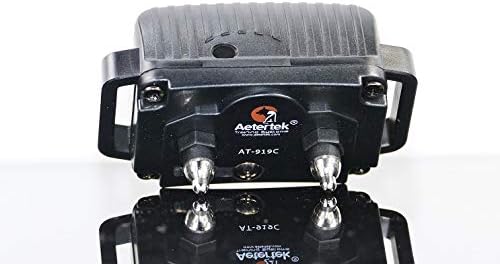
Image: A detailed view of the Aetertek AT-919C collar receiver, showing the contact points and the overall waterproof design.
Operating Instructions
Turning On/Off
- Transmitter: Press and hold the power button until the LCD screen illuminates. To turn off, press and hold the power button again until the screen goes blank.
- Receiver: The receiver features a magnetic induction power switch. To turn on or off, align the magnetic area of the transmitter (usually indicated) with the corresponding area on the receiver. The receiver will beep to confirm power status change.
Selecting Dog Mode/Channel
If training multiple dogs, use the dedicated button on the transmitter to switch between dog channels (Dog 1 or Dog 2). The selected channel will be displayed on the LCD screen.
Using Correction Modes
The AT-919C offers three correction modes: Vibration, Sound, and Static Correction. Each can be activated independently.
- Vibration: Press the vibration button on the transmitter to deliver a strong vibration to the collar.
- Sound: Press the sound button to emit an audible tone from the collar.
- Static Correction: Press the static correction button. The intensity level (1-10) can be adjusted using the up/down buttons on the transmitter. Start with the lowest effective level and increase gradually if needed.
Auto Anti-Bark Function
The receiver has an integrated auto anti-bark function. This can be toggled ON or OFF. When ON, the collar will automatically deliver a correction (typically sound or vibration, followed by static if barking persists) when it detects excessive barking. Refer to the specific instructions for enabling/disabling this feature, usually involving a sequence of button presses or magnetic activation.
Testing the Static Correction
Use the provided test bulb to verify the static correction function. Place the test bulb over the metal prongs of the receiver. Activate the static correction from the transmitter; the bulb should light up, indicating the function is working.


