
VONROC S3_CD502DC
Contents
VONROC 12V Cordless Drill Driver User Manual
Model: S3_CD502DC
1. Introduction
Thank you for choosing the VONROC 12V Cordless Drill Driver. This manual provides essential information for the safe operation, maintenance, and troubleshooting of your new tool. Please read this manual thoroughly before first use and keep it for future reference.
2. Safety Instructions
Always observe basic safety precautions to reduce the risk of fire, electric shock, and personal injury.
- Work Area Safety: Keep your work area clean and well-lit. Cluttered or dark areas invite accidents. Do not operate power tools in explosive atmospheres, such as in the presence of flammable liquids, gases, or dust.
- Electrical Safety: Avoid body contact with earthed or grounded surfaces (e.g., pipes, radiators, ranges, refrigerators). Do not expose power tools to rain or wet conditions.
- Personal Safety: Always wear eye protection. Use hearing protection when operating for extended periods. Dress properly; avoid loose clothing or jewelry. Secure long hair.
- Tool Use and Care: Do not force the power tool. Use the correct power tool for your application. Disconnect the plug from the power source and/or the battery pack from the power tool before making any adjustments, changing accessories, or storing power tools.
- Battery Tool Use and Care: Recharge only with the charger specified by the manufacturer. Use power tools only with specifically designated battery packs.
3. Package Contents
Your VONROC 12V Cordless Drill Driver kit includes the following items:
- 1x VONROC 12V Cordless Drill Driver
- 2x 1.3 Ah Li-ion Batteries
- 1x Fast Charger
- 1x Robust Aluminum Case
- 46x Assorted Accessories (drill bits, screwdriver bits, bit holders)

Figure 1: The complete VONROC 12V Cordless Drill Driver kit, neatly organized within its durable aluminum carrying case. The case securely holds the drill, two batteries, charger, and a comprehensive set of 46 accessories, including various drill bits and screwdriver bits.

Figure 2: A detailed view of the 46 included accessories. This assortment features various sizes of drill bits for wood and metal, as well as a wide range of screwdriver bits (Phillips, flathead, Torx) and bit holders, providing versatility for different tasks.
4. Product Overview
Familiarize yourself with the main components of your drill driver:
- Keyless Chuck: For quick and easy bit changes. Accommodates bits up to 10mm shank diameter.
- Torque Adjustment Ring: Select from 17 different torque settings for precise screwdriving, plus a drill mode.
- Forward/Reverse Switch: Changes the rotation direction for driving or removing screws.
- Trigger Switch: Activates the drill and controls speed based on pressure.
- LED Work Light: Illuminates the work area for better visibility in dimly lit spaces.
- Softgrip Handle: Provides comfortable and secure handling during operation.
- Battery Pack: Detachable 12V Li-ion battery.

Figure 3: The VONROC 12V Cordless Drill Driver shown standing upright with a battery attached. This view highlights its compact design and the ergonomic softgrip handle.

Figure 4: A close-up view of the 10mm keyless chuck, demonstrating its robust construction and the ease with which drill bits and screwdriver bits can be inserted and secured.

Figure 5: A detailed shot of the trigger switch and the forward/reverse selector switch. The ergonomic placement allows for easy one-handed operation and quick changes in rotation direction.
5. Setup
5.1 Charging the Battery
- Connect the charger to a suitable power outlet.
- Slide the battery pack onto the charger until it clicks into place.
- The charging indicator light on the charger will show the charging status. Refer to the charger's specific instructions for light indications.
- Once fully charged, disconnect the battery from the charger and unplug the charger from the outlet.
5.2 Inserting and Removing the Battery
- To Insert: Align the battery pack with the base of the drill handle and slide it in until it clicks securely into place.
- To Remove: Press the battery release buttons (usually on the sides of the battery pack) and slide the battery out of the handle.
5.3 Attaching Drill Bits or Screwdriver Bits
- Ensure the drill is switched off and the forward/reverse switch is in the neutral (locked) position.
- Twist the front part of the keyless chuck counter-clockwise to open the jaws.
- Insert the desired drill bit or screwdriver bit into the chuck, ensuring it is seated as deeply as possible.
- Twist the front part of the chuck clockwise to tighten the jaws firmly around the bit. Hand-tighten only; do not use tools.
6. Operating Instructions
6.1 Selecting Rotation Direction
Use the forward/reverse switch located above the trigger to select the desired rotation direction:
- Push the switch to the left for forward rotation (for drilling and driving screws).
- Push the switch to the right for reverse rotation (for removing screws).
- When the switch is in the center position, the trigger is locked, preventing accidental startup.
6.2 Adjusting Torque Settings
The torque adjustment ring allows you to set the amount of rotational force. This is crucial for screwdriving to prevent over-tightening or stripping screw heads.
- Rotate the ring to select one of the 17 torque settings. Lower numbers are for smaller screws or softer materials; higher numbers are for larger screws or harder materials.
- For drilling, select the drill symbol setting (usually indicated by a drill bit icon) for maximum torque.
6.3 Starting and Stopping
- To Start: Squeeze the trigger switch. The speed is variable; press the trigger further for higher speeds.
- To Stop: Release the trigger switch.
6.4 Using the LED Work Light
The integrated LED work light automatically illuminates when the trigger is pressed, providing visibility to your work surface.

Figure 6: A user demonstrating the VONROC 12V Cordless Drill Driver in action, driving a screw into a wooden workpiece. This image highlights the tool's compact size and ease of handling during practical applications.
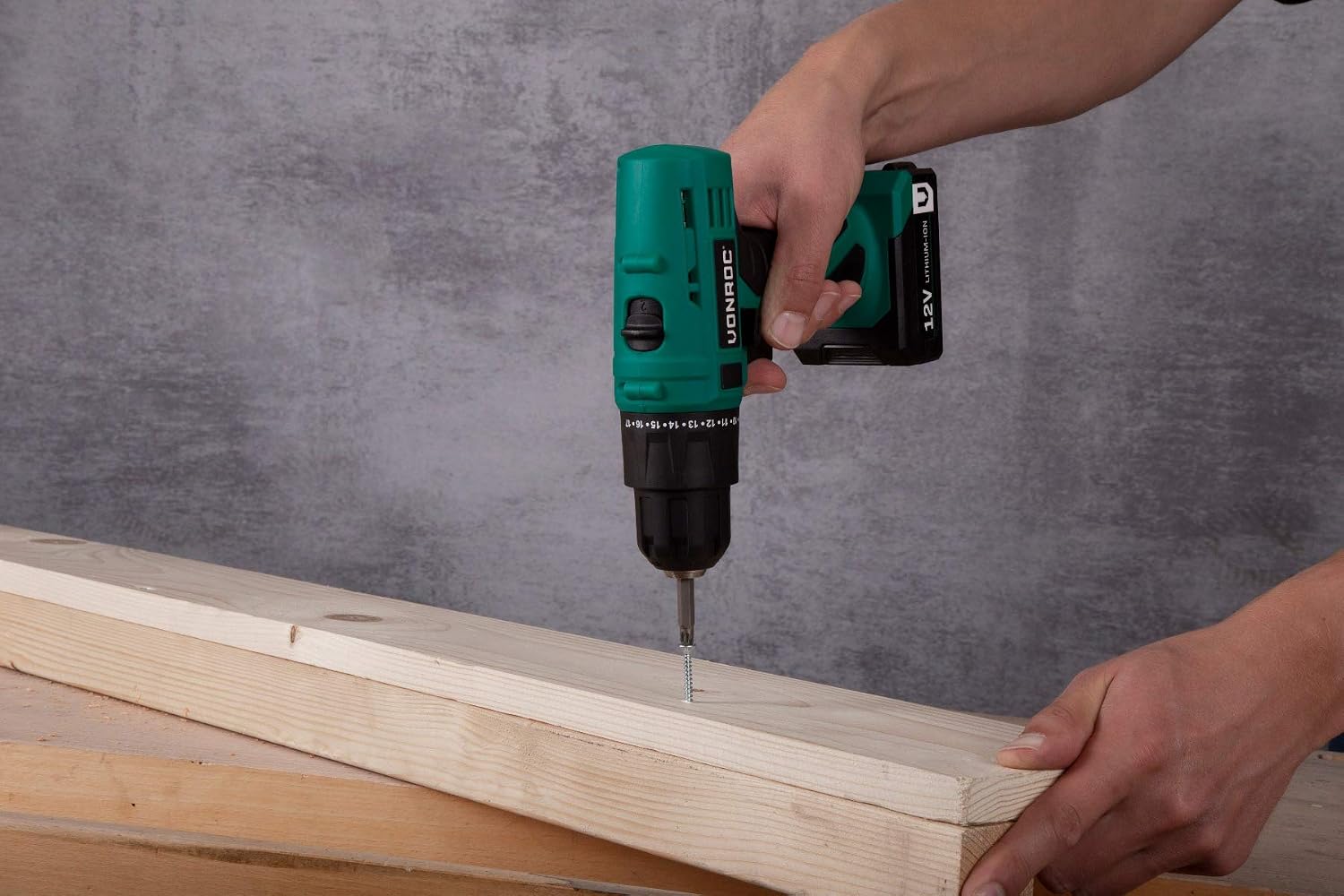
Figure 7: Another perspective of the drill being used to drive a screw into a wooden beam. This illustrates the tool's capability for common DIY and light construction tasks.
7. Maintenance
- Cleaning: Keep the ventilation slots of the tool clean to prevent overheating. Use a soft, damp cloth to clean the tool casing. Do not use abrasive cleaners or solvents.
- Battery Care: Store batteries in a cool, dry place away from direct sunlight. Do not store batteries in a discharged state for long periods. Recharge them periodically if not in use.
- Chuck Maintenance: Periodically clean the chuck jaws to ensure proper gripping of bits.
- Storage: Store the tool, batteries, and charger in the aluminum case in a dry, secure place, out of reach of children.
8. Troubleshooting
| Problem | Possible Cause | Solution |
|---|---|---|
| Drill does not start | Battery not charged; Battery not inserted correctly; Forward/reverse switch in neutral (locked) position. | Charge battery; Reinsert battery securely; Move switch to forward or reverse position. |
| Reduced power or speed | Battery low; Overload; Worn carbon brushes (less likely in modern brushless motors, but possible). | Recharge battery; Reduce pressure or use appropriate bit; Contact service if persistent. |
| Battery not charging | Charger not plugged in; Faulty battery or charger; Battery too hot/cold. | Check power connection; Try another battery/charger if available; Allow battery to reach room temperature. |
| Bit slips in chuck | Chuck not tightened sufficiently; Bit shank is dirty or damaged. | Tighten chuck firmly; Clean or replace bit. |
9. Specifications
| Feature | Specification |
|---|---|
| Model Number | S3_CD502DC |
| Voltage | 12V |
| Battery Type | Lithium-ion |
| Battery Capacity | 1.3 Ah |
| Max No-Load Speed | 1300 rpm |
| Max Torque | 20 Nm |
| Torque Settings | 17 + 1 Drill Mode |
| Chuck Size | 10 mm (Keyless) |
| Drilling Capacity (Wood) | 20 mm |
| Drilling Capacity (Metal) | 6 mm |
| Weight (with battery) | 1.26 kg |
| Dimensions (L x W x H) | 27 x 10 x 25 cm |
| Special Features | LED Work Light, Softgrip Handle, Forward/Reverse Function |
10. Warranty Information
VONROC products are manufactured to high-quality standards. For specific warranty terms and conditions, please refer to the warranty card included with your product or visit the official VONROC website. Keep your proof of purchase for any warranty claims.
11. Support
If you have any questions, require technical assistance, or need to order spare parts, please contact VONROC customer support. Contact details can typically be found on the VONROC website or in your product documentation.
Documents and downloads
Ask a question about this manual
Ask about setup, troubleshooting, compatibility, parts, safety, or missing instructions. Manuals+ will review the question and use this page’s manual context to help answer it.