
1. Introduction
Thank you for purchasing the Nedis 4-Way Speaker Control Box. This device allows you to connect a single stereo amplifier to up to four pairs of stereo speakers, providing flexible control over your audio setup. You can select individual speaker pairs or play all connected speakers simultaneously. Please read this manual carefully before installation and use to ensure proper operation and to prevent damage.
Safety Instructions
- Ensure all connections are secure and correct before powering on your amplifier.
- Do not exceed the maximum power handling capacity of 200W per channel.
- Maintain proper speaker impedance (4-16 Ohm) to prevent damage to your amplifier.
- Keep the device away from water, moisture, and extreme temperatures.
- Do not open the casing; there are no user-serviceable parts inside.
2. Package Contents
- Nedis 4-Way Speaker Control Box (ASWI2614BK)
- User Manual
Note: Speaker cables are not included and must be purchased separately.
3. Product Overview
The Nedis 4-Way Speaker Control Box features a durable aluminum design and allows for easy management of multiple speaker pairs. It is equipped with four individual toggle switches for speaker selection.

Figure 3.1: Top view of the speaker control box, highlighting the speaker selection switches.
Key Features:
- Switch between four pairs of speakers or play all simultaneously.
- Elegant metal finish for durability and aesthetic appeal.
- Four separate toggle switches for independent control of each speaker pair.
- Supports maximum cable length of 50 meters.
- Manual control method for straightforward operation.
4. Setup and Connections
Before making any connections, ensure your amplifier and all audio equipment are turned off and unplugged from the power outlet.
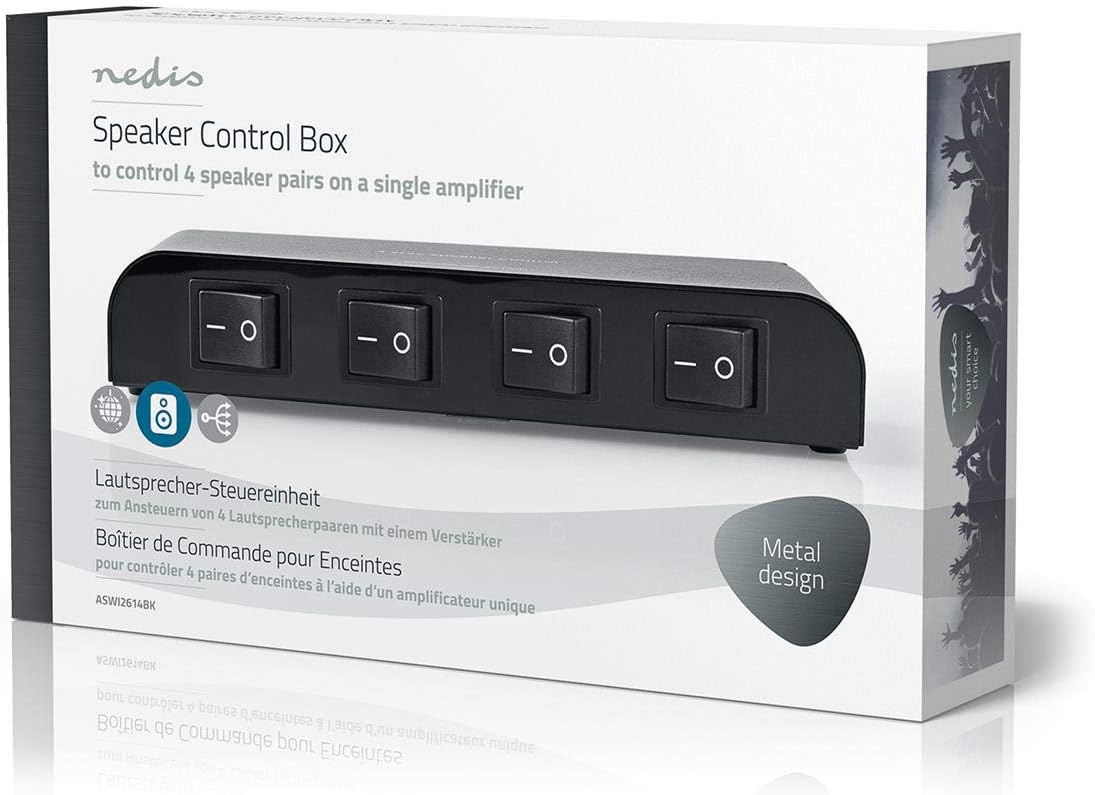
Figure 4.1: Rear panel connections for amplifier input and speaker outputs.
- Connect Amplifier: Connect the speaker output terminals of your stereo amplifier to the AMPLIFIER INPUT screw terminals on the rear of the control box. Ensure correct polarity (+ to + and - to -) for both Left and Right channels.
- Connect Speakers: Connect each pair of stereo speakers to the corresponding SPEAKER OUTPUT 1, SPEAKER OUTPUT 2, SPEAKER OUTPUT 3, and SPEAKER OUTPUT 4 screw terminals. Again, observe correct polarity for Left and Right channels for each speaker pair.
- Verify Connections: Double-check all connections to ensure they are secure and correctly wired. Loose connections can cause poor sound quality or damage.
- Power On: Once all connections are verified, you may plug in and power on your amplifier.
5. Operating Instructions
The Nedis 4-Way Speaker Control Box is operated manually using the four toggle switches on the front panel.
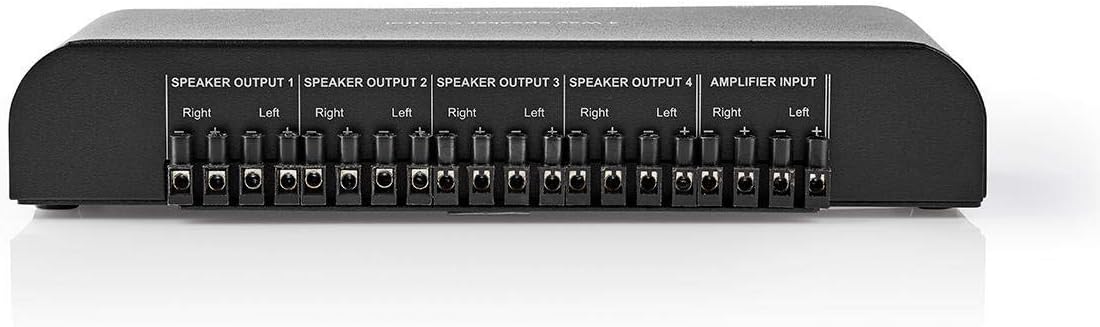
Figure 5.1: Front panel with four speaker selection switches.
- Each switch corresponds to a specific speaker output (Speaker Output 1, 2, 3, or 4).
- To activate a speaker pair, flip its corresponding switch to the ON position.
- To deactivate a speaker pair, flip its corresponding switch to the OFF position.
- You can select any combination of speaker pairs, from a single pair to all four pairs simultaneously.
- Ensure your amplifier can handle the combined impedance when multiple speaker pairs are active. Refer to your amplifier's manual for details.
6. Maintenance
The Nedis 4-Way Speaker Control Box requires minimal maintenance.
- Cleaning: Use a soft, dry cloth to wipe the exterior of the unit. Do not use abrasive cleaners, solvents, or chemical sprays.
- Storage: If storing the unit for an extended period, disconnect all cables and store it in a cool, dry place away from direct sunlight and extreme temperatures.
- Inspection: Periodically check all cable connections for tightness and signs of wear.
7. Troubleshooting
If you encounter issues with your speaker control box, please refer to the following common problems and solutions:
| Problem | Possible Cause | Solution |
|---|---|---|
| No sound from speakers. |
|
|
| Distorted or low sound. |
|
|
| Only one channel (Left/Right) plays. |
|
|
8. Specifications
| Model Number | ASWI2614BK |
| Brand | NEDIS |
| Material | Aluminium |
| Color | Black |
| Speaker Impedance | 4-16 Ohm |
| Max Load per Channel | 200 W |
| Number of Speaker Outputs | 4 (stereo pairs) |
| Control Method | Manual (Toggle Switches) |
| Connectivity Technology | Wired (Screw Terminals) |
| Dimensions (W x D x H) | Approx. 20 cm x 10 cm x 4 cm |
| Weight | 550 Grams |
| Country of Origin | China |
9. Warranty and Support
This Nedis product comes with a Limited Warranty. For specific warranty terms and conditions, please refer to the documentation provided with your purchase or contact your retailer.
Customer Support
If you have any questions, require technical assistance, or need to report a problem, please contact Nedis customer support through their official website or your local distributor. Please have your model number (ASWI2614BK) and purchase information ready when contacting support.
