
Dooya B07S2KVGW8
Dooya Motorized Electric Curtain Track User Manual
Model: B07S2KVGW8
1. Introduction
This user manual provides comprehensive instructions for the installation, operation, and maintenance of your Dooya Motorized Automatic Electric Curtain Track. This system is designed to provide convenient and automated control over your curtains in smart home or office environments. Please read this manual carefully before installation and use to ensure proper function and longevity of the product.
2. Important Safety Information
- Always disconnect power before performing any installation or maintenance.
- Ensure all components are securely fastened to prevent accidental detachment.
- Do not allow children to play with the curtain system or its controls.
- Use only Dooya approved motors and accessories with this track system.
- If any damage is observed, do not operate the system and contact qualified personnel for repair.
- This product is designed for indoor use only.
3. Package Contents
Please verify that all components listed below are present in your package:
- Dooya Electric Curtain Track (specified length)
- Runners / Gliders
- Ceiling Brackets (for ceiling mounted installation)
- Wall Brackets (if applicable for wall mounted installation)
- Drive Housing / Gearbox components
- Belt (High-strength synchronous belt)
- Installation Hardware (screws, anchors, etc.)
Note: The motor and remote control are sold separately and are not included with the track system.

Figure 3.1: Exploded view of Dooya curtain track components.

Figure 3.2: Detailed view of key track components.
4. Setup and Installation
This section guides you through the installation process for your Dooya electric curtain track. Ensure you have all necessary tools before beginning.
4.1 Tools Required
- Drill
- Measuring Tape
- Pencil
- Screwdriver Set
- Level
4.2 Installation Steps (Ceiling Mounted)
- Measure and Mark: Determine the desired position for your curtain track. Use a measuring tape and pencil to mark the drilling points for the ceiling brackets. Ensure the marks are level and evenly spaced along the track's length.
- Drill Holes: Drill pilot holes at the marked positions. Use appropriate drill bits for your ceiling material. Insert wall anchors if necessary.
- Attach Brackets: Securely fasten the ceiling brackets to the ceiling using the provided screws.
- Assemble Track: If your track comes in multiple sections, connect them using the provided connectors. Ensure the track is straight and rigid.
- Install Belt and Runners: Carefully thread the synchronous belt through the track and attach it to the drive housing. Insert the runners into the track.
- Mount Track: Carefully lift the assembled track and snap or slide it into place on the installed ceiling brackets. Ensure it is securely locked.
- Install Motor (Sold Separately): Attach your Dooya or Xiaomi compatible motor to the designated drive housing on the track. Follow the motor's specific installation instructions for wiring and setup.
- Test Operation: Once the motor is installed and powered, test the track's movement using the remote control or smart home system.

Figure 4.1: Complete track assembly with accessories for ceiling mounting.
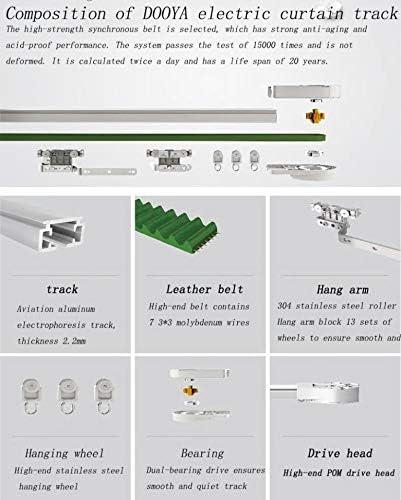
Figure 4.2: Internal composition and materials of the Dooya electric curtain track.
5. Operating Instructions
The Dooya Motorized Electric Curtain Track operates in conjunction with a compatible Dooya or Xiaomi motor and a remote control or smart home system (all sold separately).
5.1 Basic Operation
- Opening Curtains: Press the "Open" button on your remote control or activate the open command via your smart home app. The curtains will smoothly slide open to their fully open position.
- Closing Curtains: Press the "Close" button on your remote control or activate the close command via your smart home app. The curtains will smoothly slide closed to their fully closed position.
- Stopping Curtains: Press the "Stop" button (if available) on your remote control or app to halt the curtains at any desired intermediate position.

Figure 5.1: Overview of the motorized curtain system with motor and remote (sold separately).
5.2 Curtain Opening Configurations
The track supports different curtain opening configurations:
- Center Open: Curtains open from the center to both edges.
- One-Side Open: Curtains open from one side to the other.

Figure 5.2: Curtain opening configurations.
6. Maintenance
Regular maintenance ensures the smooth and long-lasting operation of your curtain track system.
- Cleaning: Periodically wipe the track and runners with a soft, dry cloth to remove dust and debris. Do not use abrasive cleaners or solvents.
- Lubrication: The track system is designed for smooth operation. Avoid applying excessive lubricants unless specifically recommended by Dooya, as this can attract dust.
- Inspection: Regularly inspect the track, belt, and runners for any signs of wear, damage, or obstruction. Ensure all mounting brackets are secure.
- Belt Tension: The high-strength synchronous belt is designed for durability. If you notice any slack or unusual noise, consult a qualified technician.
7. Troubleshooting
If you encounter issues with your Dooya Electric Curtain Track, refer to the following common problems and solutions:
| Problem | Possible Cause | Solution |
|---|---|---|
| Curtains not moving | No power to motor; Motor not properly installed; Remote control battery low; Obstruction in track. | Check power supply to motor; Re-install motor securely; Replace remote battery; Clear any obstructions from the track. |
| Curtains moving slowly or with difficulty | Track or runners are dirty; Belt tension incorrect; Damaged runners. | Clean track and runners; Consult technician for belt adjustment; Replace damaged runners. |
| Unusual noise during operation | Foreign object in track; Worn components; Motor issue. | Inspect and remove any foreign objects; Contact support if noise persists after cleaning. |
| Remote control not responding | Battery low/dead; Remote not paired with motor; Out of range. | Replace battery; Refer to motor manual for pairing instructions; Move closer to the motor. |
If the problem persists after attempting these solutions, please contact Dooya customer support or a qualified technician.
8. Specifications
| Feature | Detail |
|---|---|
| Brand | Dooya |
| Model | B07S2KVGW8 (3 Meter Track) |
| Material | Stainless Steel, Aluminum Alloy (Track) |
| Mounting Type | Ceiling Mounted |
| Compatibility | Dooya DT360/KT320/DT52 motors, Xiaomi motors |
| Belt Type | High-strength synchronous belt |
| Life Span (Belt) | Approx. 20 years (based on 15000 cycles) |
9. Warranty and Support
For warranty information and technical support, please refer to the documentation provided with your Dooya motor or visit the official Dooya website. Keep your purchase receipt as proof of purchase for any warranty claims.
For further assistance, you may contact the seller or Dooya customer service.
Ask a question about this manual
Ask about setup, troubleshooting, compatibility, parts, safety, or missing instructions. Manuals+ will review the question and use this page’s manual context to help answer it.