
1. Introduction
Thank you for choosing the AO Smith i1+ RO Water Purifier. This manual provides essential information for the safe and efficient operation, installation, and maintenance of your new water purification system. Please read this manual thoroughly before using the appliance and keep it for future reference.
The AO Smith i1+ is designed to provide purified drinking water using advanced filtration technologies, including a 6-stage purification process and MIN-TECH (Mineraliser Technology) to ensure balanced pH and natural-tasting water. It features a 5-liter storage capacity and a digital display for convenient monitoring.

Figure 1: Front view of the AO Smith i1+ RO Water Purifier.
2. Safety Information
Please observe the following safety precautions to prevent injury or damage to the appliance:
- Ensure the power supply voltage matches the specifications (150 - 300 volts).
- Do not operate the purifier with a damaged power cord or plug.
- Keep the appliance away from direct sunlight, heat sources, and flammable materials.
- Do not immerse the appliance in water or spray water directly onto it.
- Only use genuine AO Smith replacement filters and parts.
- Professional installation is recommended to ensure proper setup and prevent leaks.
- Unplug the purifier before performing any maintenance or cleaning.
3. Product Overview
The AO Smith i1+ RO Water Purifier incorporates several key features for effective water purification and user convenience:
- 6-Stage Purification Technology: Includes Sediment filter, SCB Filter (Fine Sediment + Carbon block), Side Stream RO Membrane, and SCM-TECH (Silver Activated Post Carbon + MIN-TECH) for comprehensive impurity removal.
- MIN-TECH (Mineraliser Technology): Adds essential minerals back to the purified water, ensuring a fresh, natural taste and balanced pH.
- Digital Display: Provides real-time information on power mode, tank full status, filter alerts, and auto flush operation.
- Storage Capacity: 5 liters of purified water storage.
- Power and Voltage: Operates at 48 watts with an operating voltage range of 150 - 300 volts.
- Dual Color Design: A sleek design with a dynamic dual-color finish.

Figure 2: Key features of the AO Smith i1+ RO Water Purifier.
4. Setup and Installation
The AO Smith i1+ RO Water Purifier comes with the main unit, manual, mounting screws, tubes, and connectors. Professional installation is highly recommended to ensure correct setup and optimal performance.
4.1 Unpacking
- Carefully remove all components from the packaging.
- Check for any damage during transit. Contact customer support immediately if any damage is found.
- Ensure all included components are present: Water Purifier unit, Manual, Mounting screws, Tubes, and Connectors.
4.2 Site Selection
- Choose a location near a water source, drain, and electrical outlet.
- Ensure the surface is flat and stable.
- Allow adequate space around the unit for ventilation and future maintenance.
- Avoid areas exposed to direct sunlight or extreme temperatures.

Figure 3: Example of the AO Smith i1+ RO Water Purifier installed in a kitchen environment.
4.3 Plumbing and Electrical Connections
- Connect the water inlet to a potable water supply.
- Connect the drain line to a suitable drainage point.
- Plug the power cord into a grounded electrical outlet.
- Ensure all connections are secure and leak-free.
5. Operating Instructions
5.1 Initial Start-up and Flushing
Before consuming water from the purifier for the first time, it is essential to flush the system:
- Ensure all connections are secure and the power cord is plugged in.
- Turn on the water supply to the purifier.
- The purifier will begin filling its storage tank. The digital display will show the 'Power ON' indicator.
- Once the tank is full (indicated by the 'Tank Full' light), dispense all the water from the tank. Discard this first tank of water.
- Repeat the filling and dispensing process 2-3 times to thoroughly flush the new filters and membrane.
5.2 Digital Display Indicators
The digital display provides important operational status information:
- Power ON Icon: Indicates the purifier is receiving power and is operational.
- Tank Full Indicator: Illuminates when the purified water storage tank is full. If an overflow occurs, this indicator may blink until the issue is resolved.
- Auto Flush Indicator: Shows when the automatic flushing mechanism is active, cleaning the RO membrane to extend its lifespan.
- Filter Change Indicator: Alerts you when the filters or RO membrane require replacement.

Figure 4: Explanation of the digital display indicators.
5.3 Dispensing Water
To dispense purified water, simply place a container under the faucet and operate the dispenser lever or button as per the unit's design.
6. Maintenance
Regular maintenance ensures the longevity and efficiency of your AO Smith i1+ RO Water Purifier.
6.1 Filter Replacement
- The digital display's 'Filter Change' indicator will alert you when filters or the RO membrane need replacement.
- Filter lifespan depends on water quality and usage. It is crucial to replace filters promptly to maintain water quality.
- Contact authorized service personnel for filter and RO membrane replacement. Using non-genuine parts may void your warranty and compromise water quality.
6.2 Cleaning the Exterior
- Unplug the purifier before cleaning.
- Wipe the exterior with a soft, damp cloth. Do not use abrasive cleaners, solvents, or harsh chemicals.
- Avoid spraying water directly onto the unit.
6.3 Auto Flush Function
The purifier is equipped with an automatic flushing mechanism that periodically cleans the RO membrane. This process is indicated by the 'Auto Flush' light on the digital display and helps to prevent scaling and prolong the membrane's life. No user intervention is required for this function.
7. Troubleshooting
If you encounter issues with your water purifier, refer to the following common problems and solutions. For complex issues, contact customer support.
| Problem | Possible Cause | Solution |
|---|---|---|
| No water dispensed | No power; Water supply off; Tank empty; Clogged filter/membrane | Check power connection; Turn on water supply; Wait for tank to fill; Check filter change indicator and replace if necessary. |
| Slow water flow | Low water pressure; Clogged filters/membrane | Check household water pressure; Replace filters/membrane if indicated. |
| Unusual taste/odor | Expired post-carbon filter; Contaminated tank | Replace post-carbon filter; Contact service for tank cleaning. |
| Leakage | Loose connections; Damaged components | Tighten connections; Contact service for inspection and repair. |
| Filter Change indicator on | Filters or RO membrane need replacement | Contact authorized service for filter/membrane replacement. |
8. Specifications
| Model Number | A.O.Smith i1+ |
| Brand | A. O. Smith |
| Power Consumption | 48 watts |
| Operating Voltage | 150 - 300 volts |
| Storage Capacity | 5 liters |
| Item Weight | 10 kg |
| Dimensions (LxWxH) | 26 x 38 x 46 Centimeters |
| Purification Stages | 6 (Sediment filter + SCB Filter + Side Stream RO Membrane + SCM-TECH) |
| Included Components | Water Purifier, Manual, Mounting screws, Tubes & Connectors |
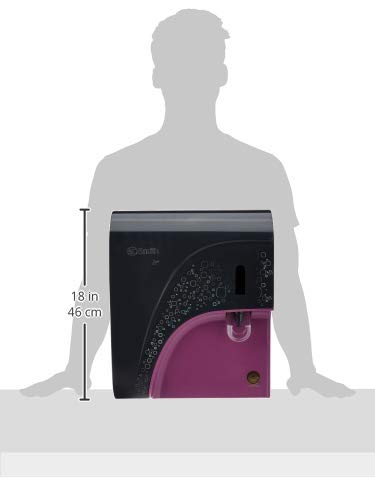
Figure 5: Dimensions of the AO Smith i1+ RO Water Purifier.
9. Warranty Information
The AO Smith i1+ RO Water Purifier comes with a comprehensive warranty:
- 6 Months Comprehensive Warranty: This warranty covers all filters and the RO membrane for a period of 6 months from the date of purchase.
- 1 Year Warranty on Electrical & Functional Parts: An introductory offer provides a 1-year warranty on electrical and functional components.
- Warranty Condition: Input water should have TDS (Total Dissolved Solids) less than 2000 ppm. If TDS exceeds this limit, please refer to the product manual for specific warranty details or contact customer support.

Figure 6: Warranty details for the AO Smith i1+ RO Water Purifier.
10. Customer Support
For any queries, service requests, or technical assistance, please contact AO Smith customer support:
- Toll-Free Number: 1800 103 2468
- Manufacturer Address: A.O. Smith India Water Products Pvt. Ltd. Plot No. 300, Phase - 2, KIADB Industrial Area, Harohalli, Karnataka 562112
Please have your product model number (i1+) and purchase details ready when contacting support.


