
1. Introduction
This manual provides essential information for the proper use and maintenance of your Easytry123 replacement remote control. This remote is designed to function with a range of Yamaha AV receivers. Please note that as a replacement unit, some advanced or specific functions of your original remote may not be fully supported. Refer to the original receiver's manual for comprehensive details on its features.
2. Safety Information
- Do not expose the remote control to direct sunlight, high temperatures, or high humidity.
- Avoid dropping the remote or subjecting it to strong impacts.
- Do not mix old and new batteries, or different types of batteries.
- Remove batteries if the remote will not be used for an extended period to prevent leakage.
- Keep batteries out of reach of children. If swallowed, seek immediate medical attention.
3. Product Overview
The Easytry123 replacement remote control features a standard layout for controlling Yamaha AV receivers. It includes dedicated buttons for power, input selection, volume control, and various other functions.

Figure 3.1: Front view of the Easytry123 replacement remote control, showing all buttons and the LCD screen.

Figure 3.2: Detailed view of the remote control highlighting the 'AMP/SOURCE' button for selecting components and the 'LEARN' button for programming functions.

Figure 3.3: Back view of the Easytry123 replacement remote control, showing the ergonomic design and battery compartment cover.
4. Setup
4.1. Installing Batteries
- Locate the battery compartment on the back of the remote control.
- Slide the battery compartment cover downwards or in the direction indicated by an arrow to open it.
- Insert two (2) AA batteries, ensuring the positive (+) and negative (-) terminals align with the markings inside the compartment.
- Replace the battery compartment cover by sliding it back into place until it clicks securely.
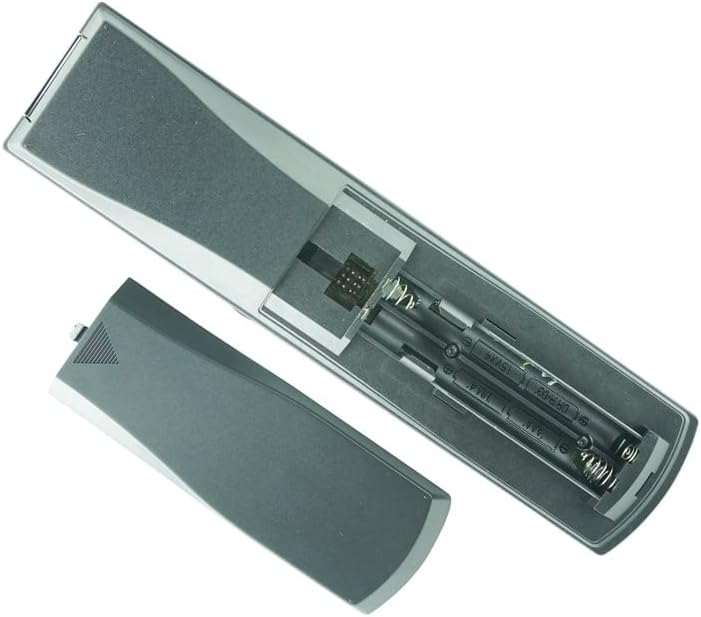
Figure 4.1: Open battery compartment showing the correct orientation for inserting two AA batteries.
4.2. Compatibility Note
This remote is a replacement unit. Before use, ensure that your Yamaha AV receiver model is listed in the product title (YHT-450, YHT-755, RX-V530, RX-V530RDS, YHT-700, WE45850US, HTR-5860BL, YHT-780). While designed for these models, some specific or advanced functions of your original remote may not be replicated. No programming is typically required for basic functions; the remote should work directly with compatible models once batteries are installed.
5. Operating Instructions
Point the remote control directly at the infrared sensor on your Yamaha AV receiver. Ensure there are no obstructions between the remote and the receiver.
5.1. Basic Functions
- POWER: Press to turn the receiver ON or OFF.
- AMP/SOURCE: Use this button to select the desired input source (e.g., TV, AV, Tuner, DVD, VCR, CD, MD/CD-R, DVR, PHONO).
- VOLUME +/-: Adjusts the master volume level of the receiver.
- MUTE: Temporarily silences the audio output. Press again to restore sound.
- Navigation Buttons (Up/Down/Left/Right/ENTER): Used to navigate menus and confirm selections on the receiver's display.
5.2. Advanced Functions (if applicable)
Some remotes may include a 'LEARN' function, allowing you to program specific commands from another remote. Refer to the original receiver's manual or experiment with the 'LEARN' button if present and desired. The remote's maximum effective range is approximately 10 meters (33 feet).
6. Maintenance
- Cleaning: Wipe the remote control with a soft, dry cloth. Do not use abrasive cleaners or solvents.
- Battery Replacement: Replace batteries when the remote's response becomes sluggish or stops working. Always replace both batteries at the same time.
- Storage: Store the remote in a cool, dry place away from direct sunlight when not in use for extended periods.
7. Troubleshooting
- Remote not responding:
- Check if the batteries are inserted correctly with the correct polarity.
- Replace old batteries with new ones.
- Ensure there are no obstructions between the remote and the receiver's infrared sensor.
- Make sure you are within the effective operating range (approx. 10 meters).
- Some functions do not work:
- As a replacement remote, it may not support all functions of the original unit. Verify if the specific function is listed as compatible for your receiver model.
- Ensure the remote is set to control the correct component (e.g., using the AMP/SOURCE button).
8. Specifications
| Feature | Specification |
|---|---|
| Brand | Easytry123 |
| Compatible Models | Yamaha YHT-450, YHT-755, RX-V530, RX-V530RDS, YHT-700, WE45850US, HTR-5860BL, YHT-780 AV Receivers |
| Connectivity Technology | Infrared (IR) |
| Controller Type | Button Control |
| Power Source | 2 x AA Batteries (not included) |
| Maximum Range | 10 Meters (approx. 33 feet) |
| Manufacturer | Easytry123 |
| Date First Available | May 21, 2019 |
9. Warranty and Support
For information regarding warranty, returns, or technical support, please contact the seller or manufacturer, Easytry123, directly through your purchase platform. Keep your purchase receipt or order details handy for any inquiries.