Introduction
Thank you for choosing the Joyroom JR-T05 Wireless Earbuds. This manual provides detailed instructions on how to set up, operate, and maintain your earbuds to ensure optimal performance and longevity. Please read this manual thoroughly before using the product.
Product Overview
The Joyroom JR-T05 earbuds feature a compact in-ear design with a portable charging case. They offer wireless connectivity via Bluetooth and include a built-in microphone with noise-canceling capabilities for clear communication.

Image 1: Joyroom JR-T05 Wireless Earbuds and Charging Case. This image displays both earbuds removed from the charging case, with the case open in the foreground.
Package Contents:
- Joyroom JR-T05 Wireless Earbuds (Left and Right)
- Portable Charging Case
- USB Charging Cable
- User Manual (this document)
Setup
1. Charging the Earbuds and Case
Before first use, fully charge the earbuds and the charging case. The charging case has a 1500mAh battery capacity, capable of charging the earbuds approximately 10 times.
- Place both earbuds into the charging case. Ensure they are correctly seated.
- Connect the charging case to a power source using a compatible USB cable.
- The indicator lights on the charging case will illuminate to show charging status. Once fully charged, the lights may change or turn off.
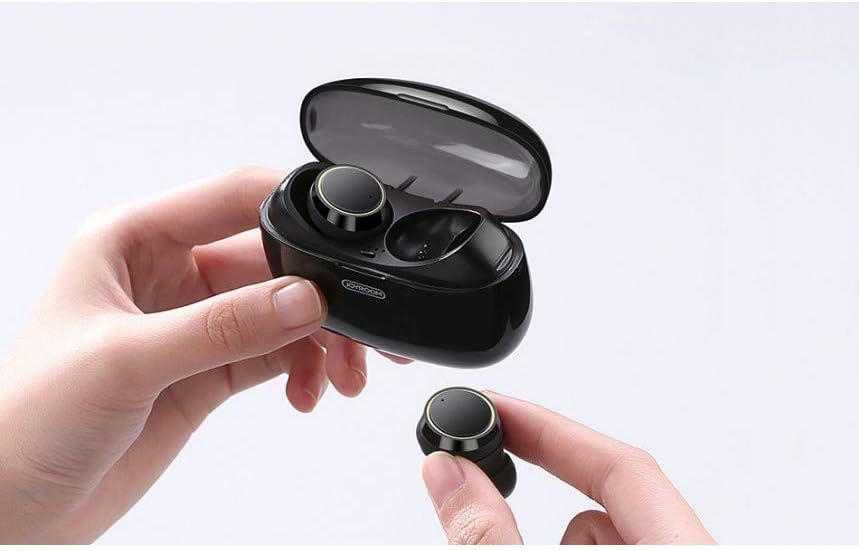
Image 2: Joyroom JR-T05 Earbuds inside their open charging case. This image shows the earbuds nestled in their charging slots within the case, with indicator lights visible.
2. Pairing with a Device
The JR-T05 earbuds use Bluetooth 4.2 for stable signal and automatic matching.
- Initial Pairing:
- Remove both earbuds from the charging case. They will automatically power on and enter pairing mode.
- On your mobile phone or Bluetooth-enabled device, go to the Bluetooth settings.
- Search for available devices and select "JR-T05" from the list.
- Once connected, you will hear a confirmation prompt, and the earbud indicator lights will change.
- Single Earbud Use:
- You can use either earbud independently. Simply remove one earbud from the case, and it will automatically connect to the last paired device.
- Reconnecting:
- After initial pairing, the earbuds will automatically connect to the last paired device when removed from the charging case.
Operating Instructions
Wearing the Earbuds
Insert the earbuds gently into your ear canal and rotate them slightly to find a comfortable and secure fit. The in-ear design ensures comfort and helps prevent them from falling out during activity.

Image 3: A person wearing one Joyroom JR-T05 earbud. This image demonstrates the proper fit of the earbud in the ear.
Touch Controls
The JR-T05 earbuds feature touch controls for various functions. Specific touch gestures may vary; refer to the quick start guide included with your product for precise commands.
- Play/Pause: Single tap on either earbud.
- Answer/End Call: Single tap on either earbud.
- Reject Call: Press and hold on either earbud.
- Next Track: Double tap on the right earbud.
- Previous Track: Double tap on the left earbud.
- Activate Voice Assistant: Triple tap on either earbud.
- Power On: Remove from case or press and hold the touch area for a few seconds.
- Power Off: Place back in case or press and hold the touch area for several seconds.
Maintenance
Cleaning
Regular cleaning helps maintain sound quality and hygiene.
- Use a soft, dry, lint-free cloth to wipe the earbuds and charging case.
- For stubborn dirt, slightly dampen the cloth with water or a mild, non-abrasive cleaner.
- Do not use harsh chemicals or abrasive materials.
- Ensure the charging contacts on both the earbuds and the case are clean and free of debris.
Storage
When not in use, store the earbuds in their charging case to protect them and keep them charged.
- Avoid exposing the earbuds to extreme temperatures, humidity, or direct sunlight.
- Keep out of reach of children and pets.
Troubleshooting
| Problem | Solution |
|---|---|
| Earbuds not pairing with device. |
|
| Only one earbud is working. |
|
| Earbuds not charging. |
|
| Poor sound quality or microphone performance. |
|
Specifications
| Feature | Detail |
|---|---|
| Model Number | JR-T05 |
| Connectivity | Wireless (Bluetooth 4.2) |
| Earbud Type | In-Ear |
| Microphone | Included, with Noise Cancelling Feature |
| Charging Case Battery | 1500mAh Polymer Lithium Battery |
| Earbud Charging Capacity | Approximately 10 full charges from case |
| Control Method | Touch |
| Dimensions (Product) | 2.8 x 2.5 x 1.8 cm |
| Weight (Product) | 150 g |
| Color | Black |
| Water Resistance | Not Water Resistant |
| Compatible Devices | Mobile Phones (Cellphones) |
Note: Specifications are subject to change without prior notice.
Safety Information
- Do not disassemble, repair, or modify the product.
- Avoid exposing the product to fire, high temperatures, or direct sunlight.
- Do not immerse the product in water or expose it to excessive moisture.
- Use only approved chargers and cables.
- Avoid listening at high volume levels for extended periods to prevent hearing damage.
- Keep the product away from medical devices to avoid interference.
Warranty and Support
Joyroom products are designed and manufactured to the highest quality standards. For warranty information or technical support, please refer to the warranty card included with your purchase or contact Joyroom customer service through their official website or your retailer.
Please retain your proof of purchase for warranty claims.