
1. Introduction
The ABLEWE RCA to HDMI Converter is designed to convert analog RCA composite (Yellow, White, Red) input into a digital HDMI 720P/1080P (60Hz) output. This allows older devices with RCA outputs, such as VCRs, DVD players, and classic gaming consoles, to be connected to modern HDTVs or monitors that primarily use HDMI inputs. The converter supports standard TV formats including PAL, NTSC3.58, NTSC4.43, SECAM, PAL/M, and PAL/N, providing advanced signal processing for improved precision, colors, resolutions, and detail.
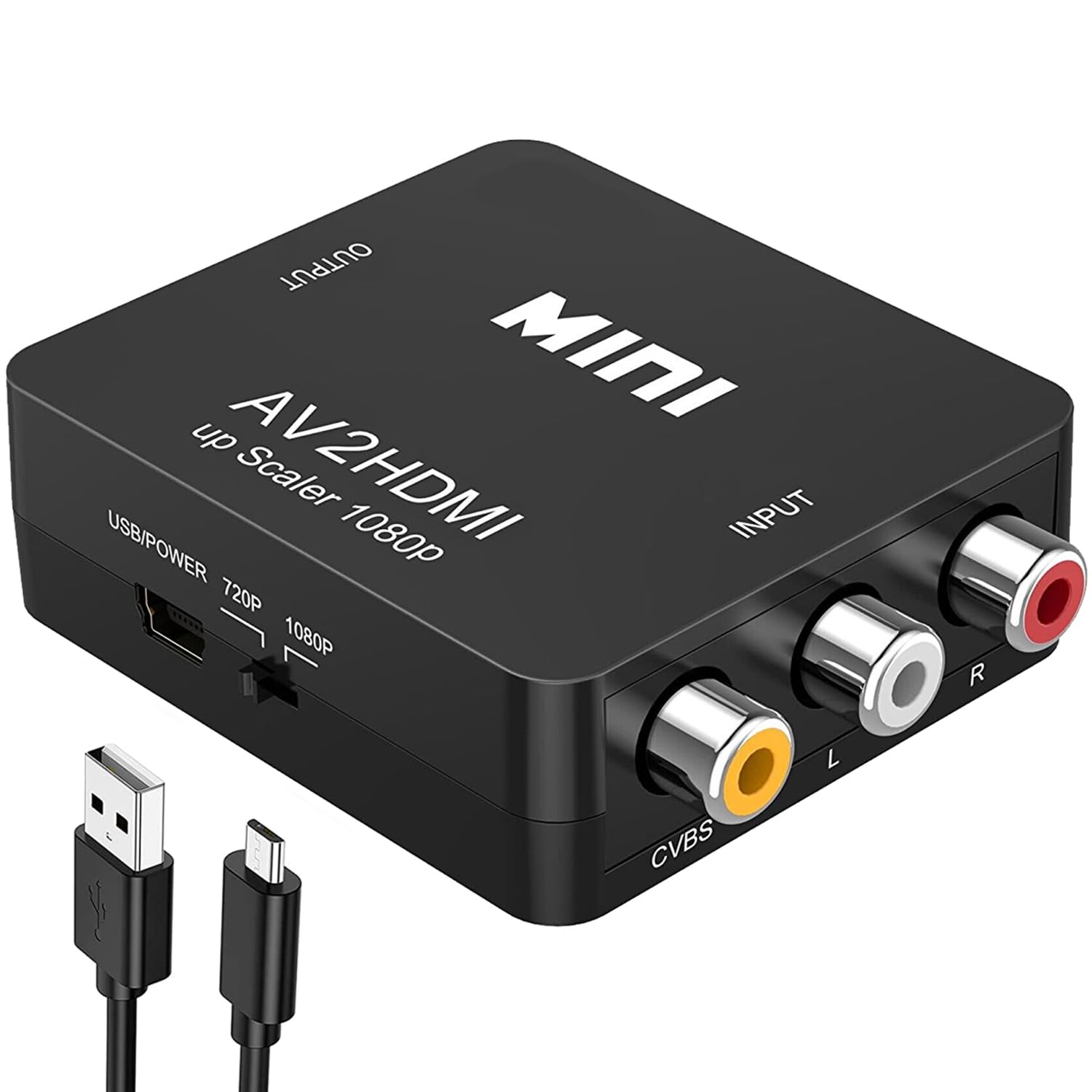
2. Package Contents
Please check the package before attempting to use the unit. Make sure the following items are all contained in the package:
- 1 x ABLEWE Mini AV to HDMI Converter (Main Unit)
- 1 x USB Power Cable (adapter not included)
- 1 x User Manual
3. Product Overview
The converter features clearly labeled input and output ports for easy connection. It is a compact and lightweight device designed for portability and flexible use.
3.1 Ports and Controls
- Input: RCA Composite (Yellow for video, White for left audio, Red for right audio)
- Output: HDMI
- Power: Micro-USB (5V)
- Resolution Switch: Toggle between 720P and 1080P output.


4. Setup Instructions
The ABLEWE RCA to HDMI Converter is plug-and-play, requiring no additional drivers. Follow these steps to connect your devices:
- Connect RCA Cables: Plug the Yellow (video), White (left audio), and Red (right audio) RCA cables from your source device (e.g., DVD player, game console) into the corresponding INPUT ports on the converter.
- Connect HDMI Cable: Connect an HDMI cable (not included) from the OUTPUT port of the converter to an HDMI input on your HDTV or monitor.
- Connect USB Power: Connect the included USB power cable to the converter's Micro-USB port and plug the other end into a 5V USB power source (e.g., a USB wall adapter, TV USB port, or power bank). Note: The converter requires external power to function.
- Select Output Resolution: Use the 720P/1080P switch on the converter to select your desired output resolution.
- Select Input on TV: Switch your TV or monitor's input source to the corresponding HDMI port where the converter is connected.

4.1 Compatibility
This converter is widely compatible with devices that have standard composite AV input, including:
- PS2, PS3, Xbox, N64, WII
- STB (Set-Top Box)
- VHS, VCR, DVD Players, Blue-Ray DVD Players
Output is compatible with HDTVs, monitors, projectors, and other HDMI-enabled displays.

5. Operating Instructions
Once all connections are made and your TV input is selected, the converter will automatically process the analog signal to HDMI. You can switch between 720P and 1080P output resolutions using the toggle switch on the device to best suit your display and content.

5.1 Video Demonstrations
Video 1: A user demonstrates the setup and functionality of the AV to HDMI Converter, showing how to connect an old DVD player to a modern TV. This video highlights the ease of use and the resulting picture quality.
Video 2: This video shows how to connect a Sega Genesis 2 using an AV cable and the RCA to HDMI converter, demonstrating the process and the resulting display on a modern television.
6. Troubleshooting
If you encounter issues with your ABLEWE RCA to HDMI Converter, please refer to the following common solutions:
- No Signal/Black Screen:
- Ensure the USB power cable is securely connected to a 5V power source. The converter requires external power to operate.
- Verify all RCA (Yellow, White, Red) and HDMI cables are firmly connected to their respective ports on both the converter and your devices.
- Check that your TV/monitor is set to the correct HDMI input source.
- Try switching the 720P/1080P resolution toggle on the converter. Some displays may prefer one resolution over the other initially.
- Ensure your source device (e.g., DVD player, game console) is powered on and outputting a signal.
- Distorted Image/No Color:
- Confirm that the Yellow RCA cable (video) is connected to the Yellow input on the converter. Incorrect audio/video cable connections can cause color issues.
- Check the source device's video output settings (PAL/NTSC). The converter automatically supports both, but ensuring the source is correctly configured can help.
- Test with different RCA or HDMI cables to rule out cable defects.
- No Audio:
- Ensure the White (left audio) and Red (right audio) RCA cables are correctly connected to the converter's audio input ports.
- Check your TV/monitor's audio settings and volume.
- Some older consoles (e.g., N64) might require the converter to be power cycled (turned off and on) to properly synchronize audio, as noted by some users.
- Compatibility with very old consoles: Some users have reported that the converter may not work with consoles older than PS2. If you experience issues with very old systems, ensure all connections are correct and try power cycling the converter and console.
7. Specifications
| Feature | Description |
|---|---|
| Product Dimensions | 2.68 x 2.09 x 0.79 inches |
| Item Weight | 1.41 ounces |
| Item Model Number | AV2-12HD |
| Input Ports | 1x RCA (Yellow, White, Red) |
| Output Ports | 1x HDMI |
| HDMI Output Resolution | 720P/1080P @ 60Hz (Switchable) |
| Supported Input Formats | PAL, NTSC3.58, NTSC4.43, SECAM, PAL/M, PAL/N |
| Power Supply | 5V Micro-USB (cable included, adapter not included) |
| Color | Black |
8. Warranty & Support
Warranty: We provide a 12-month warranty for this RCA to HDMI converter from the date of purchase.
Service: If you have any questions, need help, or experience any issues, please contact us via the email address provided in the accompanying customer support letter or through the buyer-seller message service on Amazon. Our friendly and professional customer service team is always here to assist you.