
1. Introduction
Thank you for choosing the Ghostek Rush Wireless Sport Earbuds. These in-ear headphones are designed for active lifestyles, offering high-definition audio, a secure fit, and water resistance. This manual provides instructions for setup, operation, and maintenance to ensure optimal performance and longevity of your device.
2. Package Contents
Please verify that all items are present in your package:
- Ghostek Rush Wireless Sport Earbuds
- Micro-USB Charging Cable
- Storage Pouch
- Smart Grip Ear Tips (various sizes)
- User Manual (this document)
3. Product Overview
Familiarize yourself with the components of your Ghostek Rush Wireless Sport Earbuds.

Image 3.1: Overview of Ghostek Rush Wireless Sport Earbuds, showing the earbuds, connecting cable, and inline control module.

Image 3.2: Detailed view of the inline control module, featuring volume up, multi-function, and volume down buttons.
Key Components:
- Earbuds: Left (L) and Right (R) earbuds with integrated ear hooks for a secure fit.
- Inline Control Module: Contains buttons for power, volume, track control, and call management.
- Microphone: Built into the inline control module for hands-free calls.
- Micro-USB Charging Port: Located on the inline control module.
4. Charging the Earbuds
Before first use, fully charge your Ghostek Rush Earbuds. A full charge takes approximately 1.5 hours.
- Locate the Micro-USB charging port on the inline control module.
- Connect the supplied Micro-USB cable to the charging port.
- Connect the other end of the USB cable to a USB power source (e.g., computer USB port, wall adapter).
- The LED indicator on the control module will illuminate during charging and change color or turn off when fully charged (refer to LED indicator section for details).
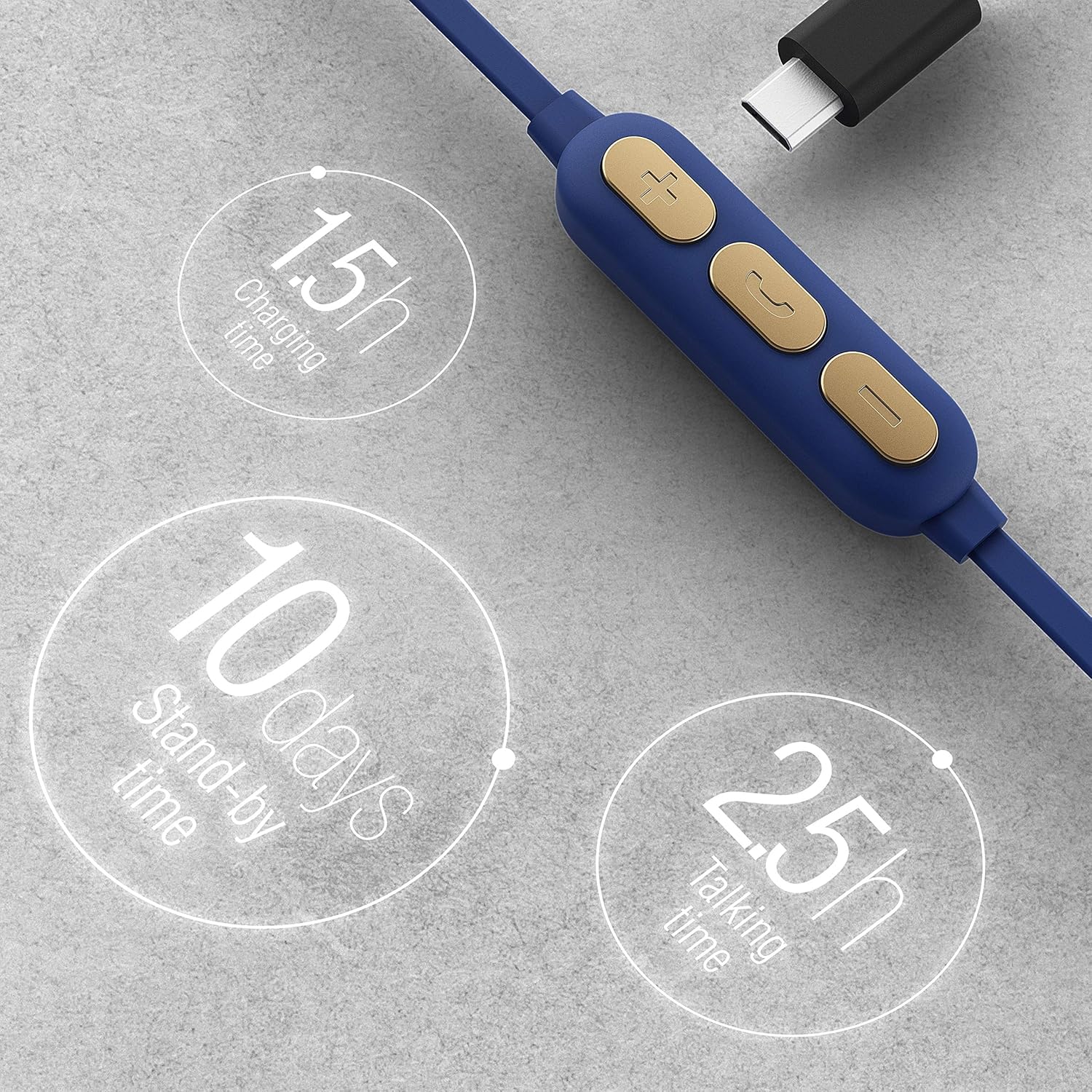
Image 4.1: Graphic illustrating charging time (1.5 hours), standby time (10 days), and talking/playing time (2.5 hours).
Note: The earbuds offer approximately 2.5 hours of playing/talking time and up to 10 days of standby time on a full charge.
5. Setup: Pairing with a Bluetooth Device
Follow these steps to pair your Ghostek Rush Earbuds with your smartphone or other Bluetooth-enabled device:
- Power On: Press and hold the multi-function button on the inline control module until the LED indicator flashes blue and red, indicating pairing mode.
- Activate Bluetooth: On your device, go to the Bluetooth settings and ensure Bluetooth is enabled.
- Select Device: In the list of available Bluetooth devices, select "Ghostek Rush" (or similar name).
- Confirm Pairing: Once connected, the LED indicator on the earbuds will typically flash blue slowly or turn solid blue. You will also hear an audible confirmation.
- Reconnect: After initial pairing, the earbuds will automatically attempt to reconnect to the last paired device when powered on.
6. Operation
6.1. Wearing the Earbuds
For optimal sound quality and a secure fit, choose the correct size of Smart Grip Ear Tips and position the earbuds as shown:

Image 6.1: Illustration of a Ghostek Rush Earbud properly inserted into the ear, demonstrating the secure fit provided by the ear hook design.
- Identify the Left (L) and Right (R) earbuds.
- Insert the earbud into your ear canal.
- Gently rotate the earbud until the ear hook rests comfortably and securely in your outer ear.
6.2. Controls
The inline control module allows you to manage music playback and calls:
| Button | Function (Short Press) | Function (Long Press) |
|---|---|---|
| Multi-function Button (Center) | Play/Pause music, Answer/End call | Power On/Off, Reject call, Activate voice assistant |
| Volume Up (+) | Increase volume | Next track |
| Volume Down (-) | Decrease volume | Previous track |
7. Maintenance and Care
To ensure the longevity and performance of your earbuds, follow these care guidelines:
- Cleaning: Gently wipe the earbuds and ear tips with a soft, dry, lint-free cloth. Do not use harsh chemicals or abrasive materials.
- Water Resistance: The earbuds are IPX4 water resistant, meaning they are protected against splashing water from any direction. They are suitable for workouts and light rain but should not be submerged in water.
- Storage: When not in use, store the earbuds in the provided storage pouch to protect them from dust and damage.
- Temperature: Avoid exposing the earbuds to extreme temperatures (hot or cold) or high humidity.

Image 7.1: Graphic indicating the IPX4 water resistance rating, highlighting the earbuds' protection against splashes.
8. Troubleshooting
If you encounter issues with your Ghostek Rush Earbuds, refer to the following common problems and solutions:
- No Power:
- Ensure the earbuds are fully charged.
- Press and hold the multi-function button for a few seconds to power on.
- Cannot Pair:
- Make sure the earbuds are in pairing mode (LED flashing blue and red).
- Ensure Bluetooth is enabled on your device and it is within range (approx. 10 meters).
- Forget "Ghostek Rush" from your device's Bluetooth list and attempt to pair again.
- Turn off other Bluetooth devices nearby to avoid interference.
- No Sound:
- Check the volume level on both the earbuds and your connected device.
- Ensure the earbuds are properly connected to your device.
- Try playing a different audio source.
- Poor Sound Quality:
- Ensure the earbuds are securely fitted in your ears.
- Move closer to your connected device to reduce interference.
- Clean the ear tips and speaker grilles.
9. Specifications
| Feature | Detail |
|---|---|
| Model Number | GHOHP037 |
| Brand | Ghostek |
| Connectivity | Wireless (Bluetooth) |
| Form Factor | In-Ear |
| Speaker Drivers | 9mm |
| Water Resistance | IPX4 (Sweatproof, Water Resistant) |
| Playing Time | Approx. 2.5 hours |
| Standby Time | Approx. 10 days |
| Charging Time | Approx. 1.5 hours |
| Microphone | Built-in |
| Product Dimensions | 20.32 x 10.16 x 2.54 cm |
| Weight | 68 g |
10. Safety Information
Please read and follow these safety guidelines to prevent damage to your device or injury to yourself:
- Do not disassemble, repair, or modify the earbuds.
- Keep the earbuds away from extreme temperatures, direct sunlight, and open flames.
- Avoid exposing the earbuds to excessive moisture or submerging them in water.
- Do not use abrasive cleaning agents or sharp objects to clean the earbuds.
- Listen at moderate volume levels to prevent hearing damage.
- Use caution when using earbuds in situations requiring awareness of your surroundings.
11. Warranty and Support
Ghostek products are designed for durability and performance. For warranty information or technical support, please refer to the official Ghostek website or contact their customer service. Keep your proof of purchase for warranty claims.