
Introduction
This manual provides detailed instructions for the operation and maintenance of your BOOMBOOST DAB-P7 Professional DAB FM Digital Radio. Please read this manual thoroughly before using the device to ensure proper function and to maximize your listening experience. Keep this manual for future reference.
Product Overview
The BOOMBOOST DAB-P7 is a compact, portable digital radio offering DAB/DAB+ and FM reception, Bluetooth connectivity, and an MP3 player function via TF card. It features a 1.8-inch LCD screen for easy navigation and a built-in rechargeable battery for on-the-go use.
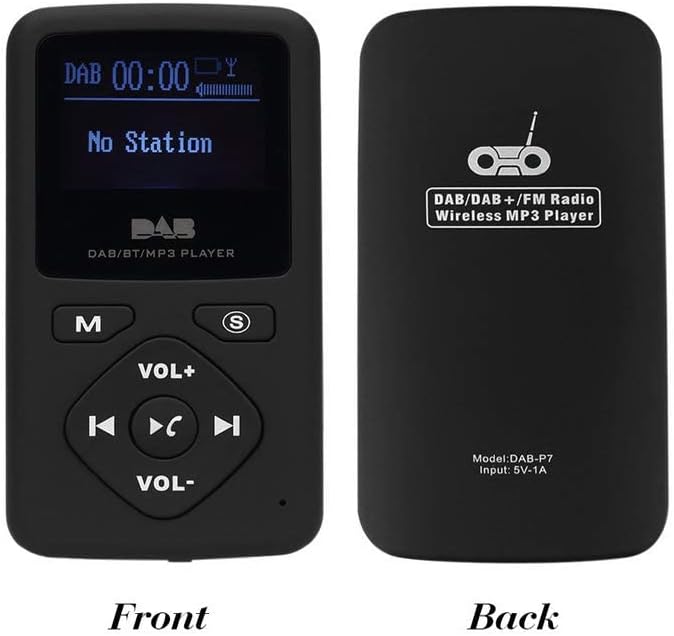
Image: Front and back view of the BOOMBOOST DAB-P7 radio. The front shows the LCD screen, 'M' (Mode) button, 'S' (Scan/Select) button, 'VOL+' and 'VOL-' buttons, and navigation/playback controls. The back displays "DAB/DAB+/FM Radio Wireless MP3 Player" and "Model: DAB-P7 Input: 5V-1A".

Image: The BOOMBOOST DAB-P7 radio shown with its included white wired earphones, highlighting its portable design.
Key Features
- DAB/DAB+ Digital Radio: Enjoy high-quality digital audio broadcasting.
- FM Stereo Radio: Access traditional FM radio stations (87.5 - 108 MHz).
- Bluetooth Player: Connect wirelessly to your mobile phone for audio playback and hands-free calls.
- MP3 Player (TF Card): Play MP3 music files directly from a TF card (up to 32GB, card not included).
- 1.8-inch LCD Display: Clear screen for station information, time, and menu navigation.
- Rechargeable Battery: Integrated 700mAh Li-polymer battery provides approximately 5 hours of playback.
- USB Charging: Convenient charging via USB port.
- Automatic Clock Setting: Clock automatically sets from DAB information.
Setup
1. Charging the Battery
Before first use, fully charge the device. Connect the supplied USB cable to the radio's USB charging port and the other end to a USB power adapter (not included) or a computer's USB port. The charging indicator will illuminate. Charging typically takes a few hours. A full charge provides approximately 5 hours of operation.
2. Power On/Off
To power on the device, press and hold the 'M' (Mode) button for a few seconds until the LCD screen illuminates. To power off, press and hold the 'M' button again until the screen turns off.
3. Initial DAB/FM Scan
Upon first power-on in DAB mode, the radio will automatically perform a full scan for available DAB stations. This may take a few minutes. Once complete, the first available station will begin playing. For FM mode, you may need to initiate a scan manually (see Operating Instructions).

Image: The radio's LCD screen showing "No Station" during or after a scan if no stations are found, or before a scan is initiated.
Operating Instructions
1. Mode Selection
Press the 'M' (Mode) button briefly to cycle through the available modes: DAB Radio, FM Radio, Bluetooth, and MP3 Player (if a TF card is inserted).
2. DAB Radio Mode
- Station Selection: Use the Previous Track (left arrow) and Next Track (right arrow) buttons to navigate through the list of available DAB stations.
- Full Scan: To perform a full scan for DAB stations, press and hold the 'S' (Scan/Select) button. The radio will scan and update the station list.
- Information Display: Briefly press the 'S' button to cycle through different information displays (e.g., program type, signal strength, time, date).
3. FM Radio Mode
- Auto Scan: In FM mode, press and hold the 'S' (Scan/Select) button to automatically scan for and save available FM stations.
- Manual Tuning: Briefly press the Previous Track (left arrow) or Next Track (right arrow) buttons to fine-tune the frequency.
- Preset Navigation: After an auto scan, use the Previous Track (left arrow) and Next Track (right arrow) buttons to cycle through saved preset stations.
4. Bluetooth Mode
- Pairing: Switch the radio to Bluetooth mode. The screen will display "Bluetooth Pairing" or similar. On your mobile device, search for Bluetooth devices and select "DAB-P7" to pair.
- Audio Playback: Once paired, you can play audio from your mobile device through the radio. Use the radio's Play/Pause (center button), Previous Track, and Next Track buttons to control playback.
- Hands-free Calls: When a call comes in, press the Play/Pause button to answer or end the call.
5. MP3 Player Mode (TF Card)
Insert a TF card (microSD card) with MP3 files into the designated slot on the side of the radio. Switch to MP3 Player mode using the 'M' button.

Image: A close-up of the BOOMBOOST DAB-P7 radio showing the TF card slot on the side, with a TF card partially inserted. A note indicates "TF Card is not included."
- Playback Control: Use the Play/Pause (center button), Previous Track, and Next Track buttons to control music playback.
- Resume Playback: The device will automatically resume playback from where it left off when powered on again in MP3 mode.
6. Volume Control
Adjust the listening volume using the VOL+ and VOL- buttons located on the front panel.
Maintenance
- Cleaning: Use a soft, dry cloth to clean the radio's surface. Do not use abrasive cleaners or solvents.
- Storage: Store the device in a cool, dry place away from direct sunlight and extreme temperatures.
- Battery Care: To prolong battery life, avoid fully discharging the battery frequently. Charge the device regularly, even if not in use for extended periods.
- Water Exposure: This device is not waterproof. Avoid exposure to water or high humidity.
Troubleshooting
| Problem | Solution |
|---|---|
| No Power / Device won't turn on. | Ensure the battery is charged. Connect the device to a power source using the USB cable. |
| No DAB stations found. | Perform a full DAB scan. Ensure you are in an area with DAB coverage. Try moving to a different location or adjusting the position of the device. |
| Poor DAB/FM reception. | Ensure the earphones are properly plugged in, as they act as the antenna. Move away from sources of interference (e.g., other electronic devices). Try a different location. |
| Bluetooth pairing failed. | Ensure the radio is in Bluetooth mode and discoverable. Make sure Bluetooth is enabled on your mobile device. Try restarting both devices. |
| MP3 files not playing from TF card. | Ensure the TF card is inserted correctly. Verify that the MP3 files are not corrupted and are in a supported format. Check if the card capacity exceeds 32GB. |
Specifications
- Model: DAB-P7
- Supported Radio Bands: DAB/DAB+ (Band III: 174-240 MHz), FM (87.5-108 MHz)
- Connectivity: Bluetooth, USB
- Display: 1.8-inch LCD
- Power Source: Built-in 700mAh Li-polymer rechargeable battery
- Battery Life: Approximately 5 hours (fully charged)
- Charging Port: USB
- MP3 Playback: Supports TF card up to 32GB
- Dimensions (L x H x P): 87 x 45 x 13 mm (approx.)
- Material: Plastic
- Color: Black
Warranty and Support
This product comes with a standard manufacturer's warranty. For specific warranty details, please refer to the documentation provided at the time of purchase or contact your retailer. For technical support or service inquiries, please contact the BOOMBOOST customer service department through their official website or the contact information provided with your purchase.