
Introduction
This manual provides detailed instructions for the CATIGA Scientific Calculator CS-121. It covers essential information regarding the calculator's setup, operation, functions, maintenance, and troubleshooting. Please read this manual thoroughly to ensure proper use and to maximize the functionality of your device.
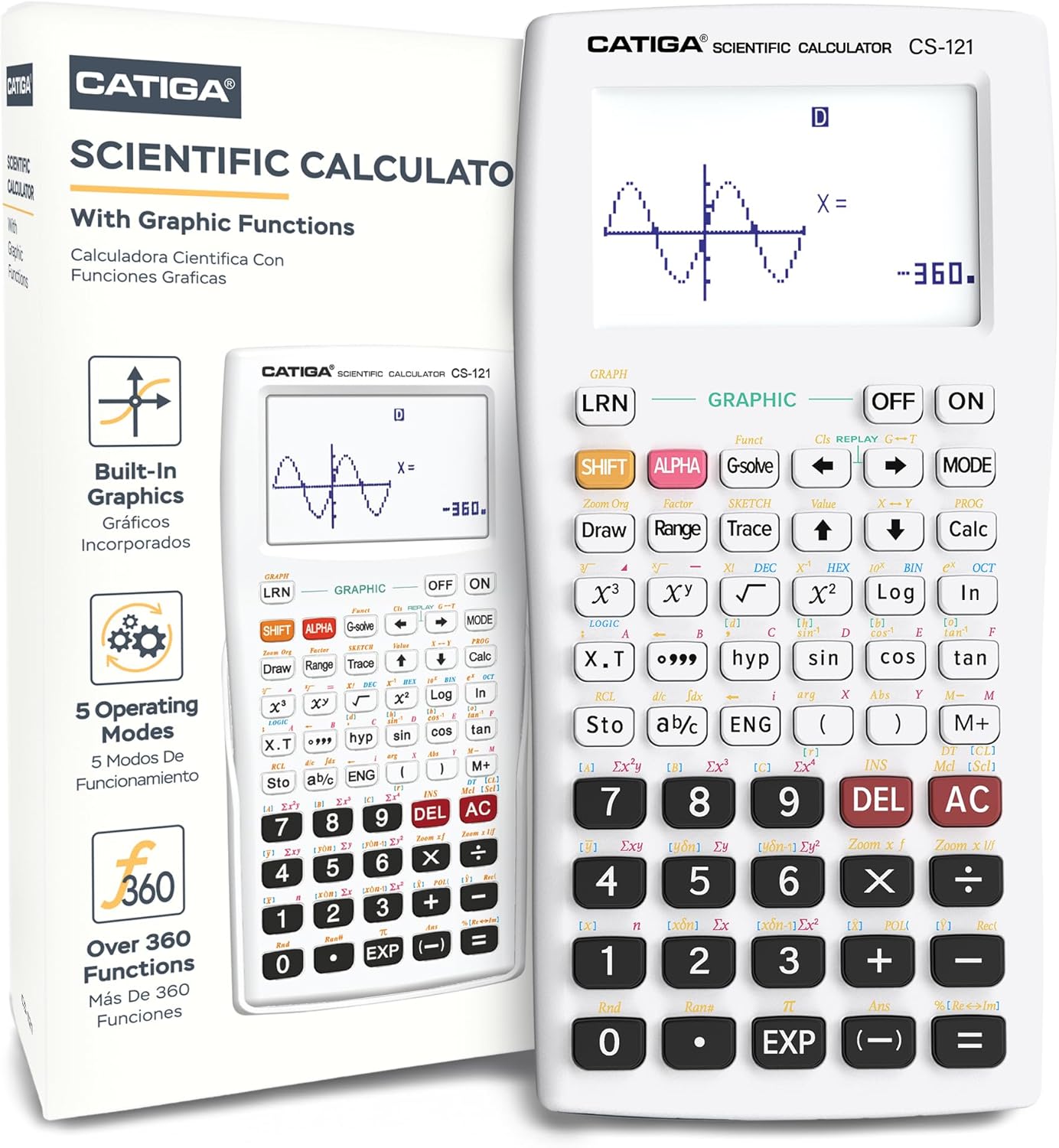
Image: The CATIGA Scientific Calculator CS-121, shown alongside its product packaging, highlighting its graphic display capabilities.
Setup
Battery Installation
The CATIGA Scientific Calculator CS-121 requires one LR44 battery, which is included with the product. To install or replace the battery:
- Locate the battery compartment cover on the back of the calculator.
- Use a small screwdriver to remove the screw securing the cover.
- Carefully remove the cover.
- Insert the LR44 battery, ensuring the correct polarity (+/-) as indicated inside the compartment.
- Replace the cover and secure it with the screw.
Initial Power On and Reset
After battery installation, press the [ON] button to power on the calculator. If the calculator does not turn on or behaves unexpectedly, press the reset button located on the back of the unit. This will restore the calculator to its default settings.
Operating Modes
The calculator features three primary operating modes to suit various calculation needs:

Image: A close-up of the calculator's display and keypad, highlighting the 'MODE' button and listing the three operating modes: Angular Measurement, Calculation, and Display.
- Angular Measurement Mode:
- Degrees: Standard angular unit.
- Radians: Used in advanced mathematics and physics.
- Grades: A less common angular unit.
- Calculation Mode:
- Computation: General arithmetic and function calculations.
- Complex: For calculations involving complex numbers.
- Standard Deviation: Statistical calculations for data analysis.
- Regression: For statistical regression analysis.
- Base-n: Calculations in different number bases (binary, octal, hexadecimal).
- Display Mode:
- Normal: Standard display format.
- Fixed Decimals: Sets a fixed number of decimal places.
- Significant Digits: Controls the number of significant figures displayed.
To switch between modes, press the [MODE] button and select the desired option from the menu.
Functions and Capabilities
The CATIGA Scientific Calculator CS-121 offers a wide range of functions, making it suitable for various academic and professional applications.

Image: A visual representation of the calculator's key features, including graphic function display, fraction calculation, instant replay, and statistical capabilities.
Graphic Functions
- Built-in Graphs: Access pre-programmed graphical representations.
- Graph Composition: Combine multiple graphs on the same display.
- Trace, Plot, Line Scroll: Navigate and analyze points on a graph.
- Zoom-In, Zoom-Out: Adjust the view of the graph for detailed analysis or broader perspective.
- Overwrite: Modify existing graphs.
- Statistical Graph: Visualize statistical data.
Mathematical Functions

Image: An overview of the calculator's versatile function capabilities, detailing utilities, basic functions, algebra, geometry, probability, and statistics.
- Utilities:
- Equation Solver.
- 9 Variable Memories for storing values.
- Basic Functions:
- Trigonometry Functions (sin, cos, tan).
- Hyperbolic and Inverse Hyperbolic Functions.
- Exponential / Logarithmic Functions.
- Power Functions.
- Fraction Calculations (displaying fractions, improper fractions, and decimal equivalents).
- Sexagesimal Functions.
- Algebra:
- Calculation with √/π Symbol.
- Simplifying Radicals.
- Simultaneous Equations.
- Polynomial Equations.
- Table Function.
- Complex Number Calculations.
- Geometry:
- Coordinate Conversion.
- Probability:
- Permutation and Combination.
- Statistics:
- Statistical Calculations (Standard Deviation).
- Statistical Calculations (Regression Analysis).
Instant Replay
The instant replay feature allows you to correct or re-evaluate previous calculations easily, saving time and reducing errors.
Display
The CATIGA Scientific Calculator CS-121 features a large, clear display designed for enhanced readability and functionality.

Image: A close-up of the calculator's large 3-inch display, showing a sine wave graph and numerical output, emphasizing its size and clarity.
- Screen Size: The calculator boasts a 3-inch display, which is approximately 3.25 times larger than standard scientific calculator screens.
- Simultaneous Display: The large screen allows for the simultaneous display of graphs and equations, enabling users to view calculations and make corrections with high detail.
Maintenance
Cleaning
To maintain the calculator's appearance and functionality, wipe the exterior with a soft, dry cloth. Avoid using abrasive cleaners, solvents, or harsh chemicals, as these can damage the casing and screen.
Protective Cover

Image: The CATIGA Scientific Calculator CS-121 shown with its included protective cover, designed to shield the device from damage.
The calculator comes with a protective cover. Always use this cover when the calculator is not in use or when transporting it to prevent scratches, impacts, and dust accumulation on the screen and keys.
Battery Replacement
Refer to the Setup section for instructions on how to replace the LR44 battery.
Troubleshooting
Calculator Does Not Turn On
- Ensure the battery is correctly installed with the proper polarity.
- Check if the battery needs replacement.
- Press the reset button on the back of the calculator.
Incorrect Calculation Results
- Verify that the correct operating mode (e.g., Degrees, Radians) is selected for your calculation.
- Check your input for any typographical errors.
- Ensure that the correct function syntax is used.
- If issues persist, perform a reset using the button on the back.
Specifications
| Feature | Specification |
|---|---|
| Model Number | CS-121 (Internal SKU: 7545882582) |
| Product Dimensions | 7.12 x 4.5 x 0.8 inches |
| Item Weight | 4.8 ounces |
| Batteries | 1 LR44 battery (included) |
| Screen Size | 3 Inches |
| Calculator Type | Engineering/Scientific with Graphic Functions |
| Power Source | Battery Powered |
| Manufacturer | Catiga |
Warranty and Support
The CATIGA Scientific Calculator CS-121 comes with a 365-day limited warranty from the date of purchase. This warranty covers manufacturing defects and malfunctions under normal use.

Image: A physical instruction manual for the CATIGA Scientific Calculator CS-121, demonstrating the availability of comprehensive guidance.
For warranty claims, technical assistance, or any other inquiries, please contact CATIGA customer support. Contact details are typically provided on the product packaging or the official CATIGA website. Please have your product model number (CS-121) and proof of purchase ready when contacting support.

