
1. Introduction
This manual provides detailed instructions for the installation, operation, maintenance, and troubleshooting of the Dwyer MS2-W103-LCD Differential Pressure Transmitter. This device is designed for accurate measurement of differential pressure in various applications, featuring a wall-mount design, LCD display, and bi-directional measurement capabilities.
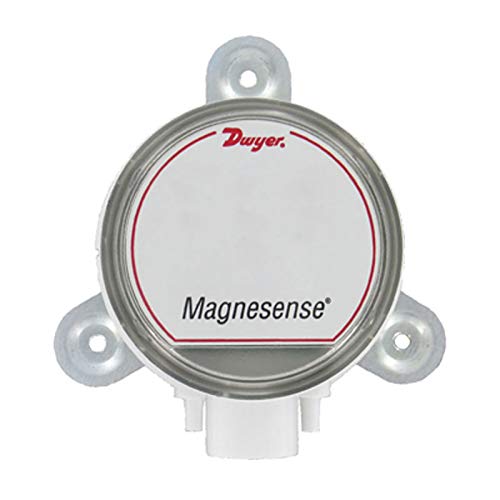
Figure 1: Dwyer MS2-W103-LCD Differential Pressure Transmitter. This image shows the circular, wall-mountable pressure transmitter with the "Dwyer" logo and "Magnesense" branding visible on its face. It has three mounting tabs and two pressure ports at the bottom.
2. Safety Information
Always observe the following safety precautions to prevent personal injury and damage to the product:
- Read and understand all instructions before installing or operating the device.
- Disconnect power before making any electrical connections or performing maintenance.
- Ensure proper grounding to prevent electrical shock.
- Do not exceed the specified pressure or temperature ratings.
- Installation and servicing should only be performed by qualified personnel.
3. Product Overview
The MS2-W103-LCD is a highly accurate differential pressure transmitter. Key features include:
- LCD Display: Provides clear, real-time pressure readings.
- Bi-Directional Measurement: Capable of measuring positive and negative differential pressures.
- Wall Mount Design: Facilitates easy installation in various environments.
- Robust Construction: Designed for long-term reliability.
Components:
- Pressure Ports (High and Low)
- Electrical Connection Terminal Block
- Mounting Tabs
- LCD Screen
4. Setup and Installation
Follow these steps for proper installation:
- Mounting:
- Select a suitable wall location, free from excessive vibration or temperature fluctuations.
- Use appropriate screws to secure the transmitter to the wall via its mounting tabs. Ensure it is level.
- Pressure Connections:
- Connect the high-pressure tubing to the 'High' port and the low-pressure tubing to the 'Low' port.
- Ensure all connections are secure and leak-free.
- Electrical Wiring:
- Refer to the wiring diagram provided with the product for specific connections (e.g., power supply, output signal).
- Ensure power is off before wiring. Connect power and signal wires to the terminal block.
- Verify correct polarity for DC power supplies.
- Power On:
- Once all connections are verified, apply power to the transmitter.
- The LCD should illuminate and display readings.
5. Operating Instructions
The MS2-W103-LCD is designed for straightforward operation. Once installed and powered, it continuously measures and displays differential pressure.
- Reading the Display: The LCD shows the current differential pressure value in the configured units (e.g., in.WC, Pa, mm.WC).
- Unit Configuration: (If applicable, refer to specific product documentation for button functions or software interface for unit changes.)
- Zeroing: For accurate readings, it may be necessary to zero the transmitter periodically. Consult the product's detailed technical manual for the zeroing procedure, typically involving a button press or software command when both pressure ports are at ambient pressure.
6. Maintenance
The Dwyer MS2-W103-LCD requires minimal maintenance to ensure long-term accuracy and performance.
- Cleaning: Wipe the exterior of the device with a soft, damp cloth. Do not use abrasive cleaners or solvents.
- Pressure Port Inspection: Periodically check pressure ports and tubing for blockages, kinks, or leaks.
- Recalibration: For critical applications, periodic recalibration by a qualified technician or a certified laboratory is recommended to maintain measurement accuracy. Refer to the calibration certificate for initial calibration details.
7. Troubleshooting
If you encounter issues with your differential pressure transmitter, refer to the following common problems and solutions:
| Problem | Possible Cause | Solution |
|---|---|---|
| No display/No power | Incorrect wiring, no power supply, faulty power supply. | Check wiring connections, verify power supply voltage, test power supply. |
| Inaccurate readings | Blocked pressure ports, leaks in tubing, need for zeroing, calibration drift. | Clear blockages, check for leaks, perform zeroing procedure, consider recalibration. |
| Fluctuating readings | Unstable pressure source, vibration, electrical interference. | Stabilize pressure source, mount away from vibration, check for EMI sources. |
If the problem persists, contact technical support.
8. Specifications
The following specifications apply to the Dwyer MS2-W103-LCD Differential Pressure Transmitter:
- Model: MS2-W103-LCD
- Brand: Dwyer
- Measurement Range: 10.0 to 28.0 in.WC, 2500 to 6975 Pa, 250 to 700 mm.WC
- Mounting: Wall Mount
- Display: LCD
- Directionality: Bi-Directional
- Manufacturer: Dwyer
- First Available: April 2, 2020
9. Warranty Information
This Dwyer product is covered by a standard manufacturer's warranty against defects in materials and workmanship. The warranty period typically begins from the date of purchase. For specific warranty terms, conditions, and duration, please refer to the warranty card included with your product or visit the official Dwyer website. Keep your proof of purchase for warranty claims.
10. Technical Support
For technical assistance, troubleshooting beyond this manual, or inquiries regarding your Dwyer MS2-W103-LCD Differential Pressure Transmitter, please contact Dwyer Instruments, Inc. customer support.
Website: www.dwyer-inst.com
Phone: Refer to the Dwyer website for regional contact numbers.
When contacting support, please have your product model number (MS2-W103-LCD) and serial number (if applicable) ready.