
1. Introduction
This manual provides comprehensive instructions for the ASHATA 12V ATX Power Supply, a 90W DC-ATX power module. This compact and efficient module is designed for various low-power computing systems, including mini computers, HTPC systems, POS machines, ITX boxes, network servers, advertising machines, and bank terminals.
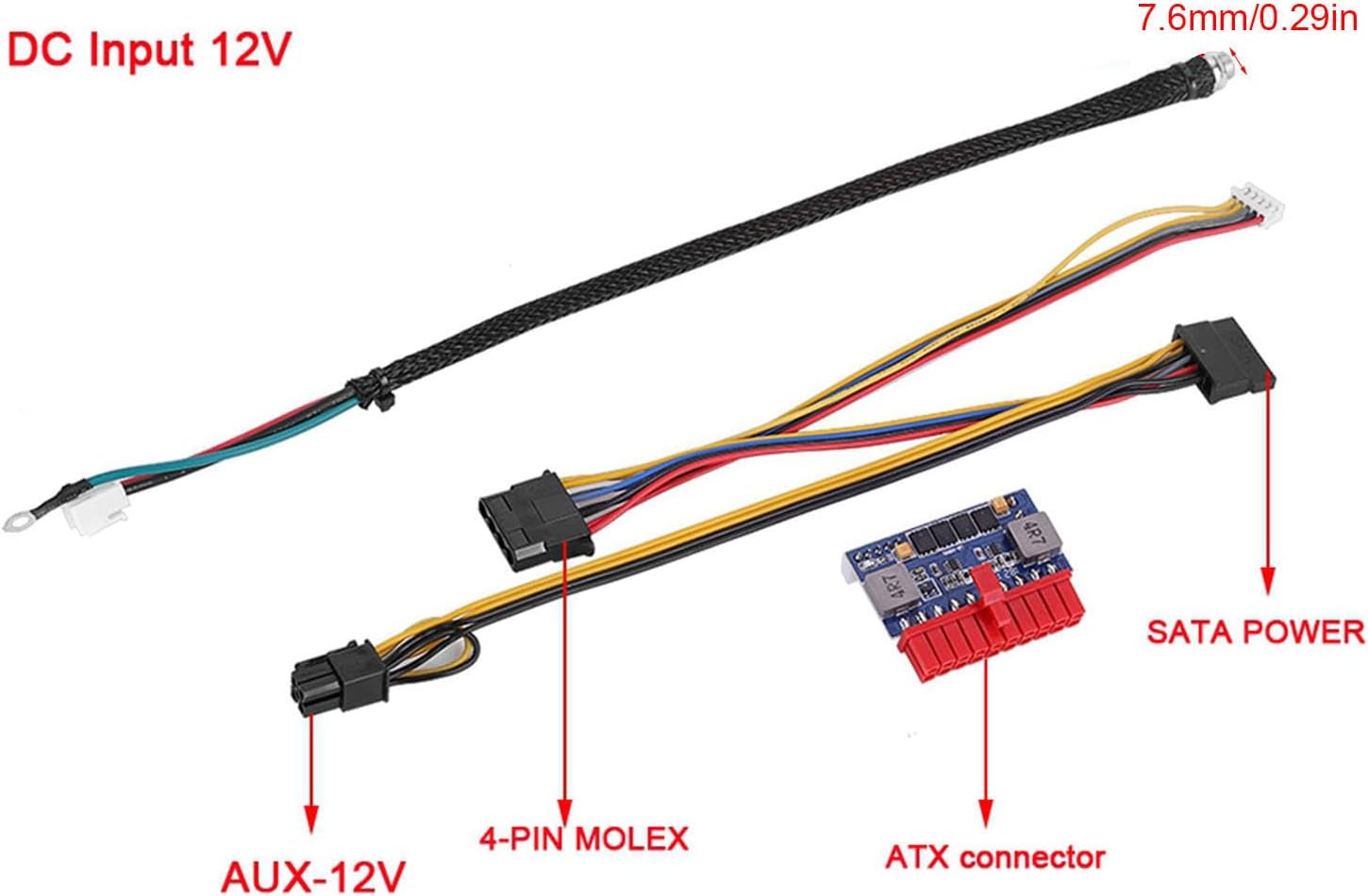
Image 1: ASHATA 90W DC-ATX Power Module suitable for various applications.
2. Safety Information
- Ensure the input voltage is within the specified range (12VDC ± 5%). Incorrect voltage can damage the device.
- Do not expose the power module to moisture or extreme temperatures.
- Avoid short-circuiting the output terminals.
- Disconnect power before making any connections or disconnections.
- This device is designed for internal use within a computer chassis.
3. Product Overview
3.1 Features
- Industrial Solid Capacitors: Designed for reliability and stability in demanding environments.
- High Performance: Features high heat-stand capabilities for enhanced durability.
- Fanless Operation: Ensures silent operation, ideal for noise-sensitive applications.
- Compact Design: Specifically engineered for mini-ITX and 1U cases, optimizing space.
- 90W Output: Provides up to 90W of power, requiring an external 12V power adapter (not included).

Image 2: The power module features high performance and heat-stand capabilities.

Image 3: Industrial solid capacitors ensure reliability in harsh environments.

Image 4: Compact design makes the module suitable for mini-ITX and 1U cases.
3.2 Package Contents
- 1 x ASHATA 90W DC-ATX Power Module
4. Specifications
| Feature | Specification |
|---|---|
| Model Number | ASHATAni8c7fy1wd |
| Input Voltage Range | 12VDC ± 5% |
| Output Power | 90W |
| Work Efficiency | ≥ 90% |
| Dimensions (L x W x H) | Approx. 35 x 47 x 12 mm (1.3 x 1.8 x 0.4 inches) |
| Item Weight | 2.39 ounces |
| Working Temperature/Humidity | 0°C to 55°C / 45% - 75% |
| Storage Temperature/Humidity | -40°C to +70°C / 10% - 90% |
| Compatible Devices | Personal Computer |
| Connector Type | ATX |
| Form Factor | ATX |
| Cooling Method | Air (Fanless) |
| Power Supply Design | Internal |
4.1 Output Characteristics
| Output Voltage | Minimum (V) | Maximum (V) | Ripple Wave (mV) | Standby Current Unloading | Maximum Load |
|---|---|---|---|---|---|
| +3.30V | +3.14 | +3.47 | 50MAX | 0 | 4.0 |
| +5.00VSB | +4.75 | +5.25 | 50MAX | 0.1 | 2.0 |
| +5.00V | +4.75 | +5.25 | 50MAX | 0 | 4.0 |
| +12.00V | +11.40 | +12.60 | 120MAX | 0 | 4.0 |
| -12.00V | -10.80 | -12.60 | 120MAX | 0 | 0.05 |
5. Setup and Installation
Follow these steps to properly install your ASHATA 90W DC-ATX Power Module:
- Prepare Your System: Ensure your computer system is powered off and disconnected from any power source.
- Mount the Module: Securely mount the ASHATA power module within your computer chassis, typically near the motherboard.
- Connect to Motherboard: Connect the main 20-pin ATX connector from the power module to the corresponding port on your motherboard.
- Connect Peripherals: Connect the 4-pin Molex and SATA power connectors to your storage drives (HDDs/SSDs) and other peripherals as required by your system.
- Connect AUX-12V: If your motherboard or specific components require it, connect the AUX-12V connector.
- Provide DC Input: Connect a stable 12V DC power source (external power adapter, not included) to the DC input port of the power module. Ensure the DC input cable is securely connected.
- Verify Connections: Double-check all connections to ensure they are firm and correctly seated.
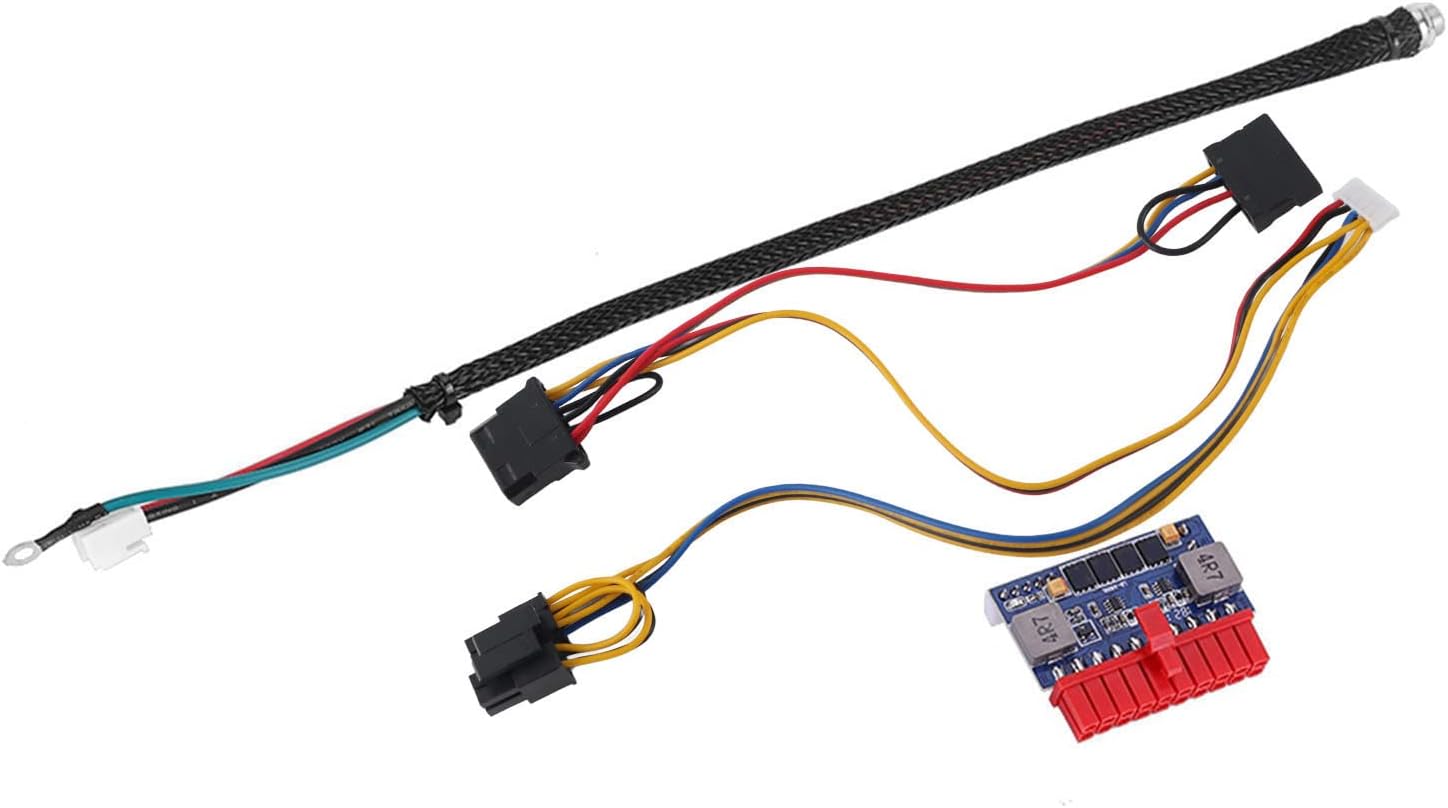
Image 5: Connection points on the ASHATA 90W DC-ATX Power Module.
6. Operating Instructions
Once the power module is correctly installed and all connections are secure:
- Connect your external 12V DC power adapter to a wall outlet.
- The system should power on automatically or can be powered on via the system's power button, depending on your motherboard's configuration.
- To power off the system, use the operating system's shutdown function or the system's power button.
7. Maintenance
The ASHATA 90W DC-ATX Power Module is designed for low maintenance. To ensure optimal performance and longevity:
- Keep Clean: Periodically inspect the module and surrounding area for dust accumulation. Use compressed air to gently remove dust.
- Ensure Airflow: Although fanless, adequate airflow within the chassis is important to dissipate heat. Ensure no obstructions block air circulation around the module.
- Avoid Overloading: Do not exceed the maximum 90W output power. Overloading can lead to instability or damage.
8. Troubleshooting
If you encounter issues with your power module, refer to the following troubleshooting tips:
- No Power to System:
- Verify that the external 12V DC power adapter is connected and receiving power from the wall outlet.
- Check all cable connections between the power module, motherboard, and peripherals for secure seating.
- Ensure the 12V DC input cable to the module is firmly connected.
- System Instability or Unexpected Shutdowns:
- Confirm that the total power consumption of your components does not exceed the module's 90W capacity.
- Check for proper ventilation within the chassis to prevent overheating.
- Verify that the input 12V DC power source is stable and provides sufficient current.
- Peripheral Devices Not Functioning:
- Ensure the 4-pin Molex and SATA power connectors are correctly attached to the respective devices.
- Check the power requirements of the peripheral devices.
9. Warranty and Support
For technical assistance, product support, or warranty inquiries regarding your ASHATA 90W DC-ATX Power Module, please contact ASHATA customer service through the retailer where the product was purchased or visit the official ASHATA website for contact information.