
Introduction
The DYNASONIC DY-65201 is a powerful portable audio system designed for versatile use. Featuring integrated LED lights and a karaoke function, this speaker offers multiple connectivity options including Bluetooth, USB, SD card playback, and FM radio. Its portable design with a convenient handle makes it suitable for both indoor and outdoor environments. The control panel allows for precise adjustment of sound settings such as bass, treble, and echo. This package includes a wireless microphone and a remote control for enhanced user experience.
Safety Information
- Do not expose the speaker to water or excessive moisture.
- Avoid placing the speaker near heat sources or in direct sunlight.
- Use only the provided charging cable. Do not use damaged cables or chargers.
- Keep the speaker away from children and pets.
- Do not attempt to disassemble or repair the unit yourself. Contact qualified service personnel.
- Ensure proper ventilation around the speaker during use.
Package Contents
Verify that all items are present in the package:
- DYNASONIC DY-65201 Wireless Bluetooth Speaker
- Wireless Microphone
- Remote Control
- USB Charging Cable (Note: Power adapter not included)
- 3.5mm Jack Cable (for Line-IN input)
Product Overview
Familiarize yourself with the speaker's components and controls.

Figure 1: Front view of the DYNASONIC DY-65201 speaker, showcasing its design and integrated LED lights.

Figure 2: The DY-65201 speaker alongside its wireless microphone and remote control, demonstrating included accessories.
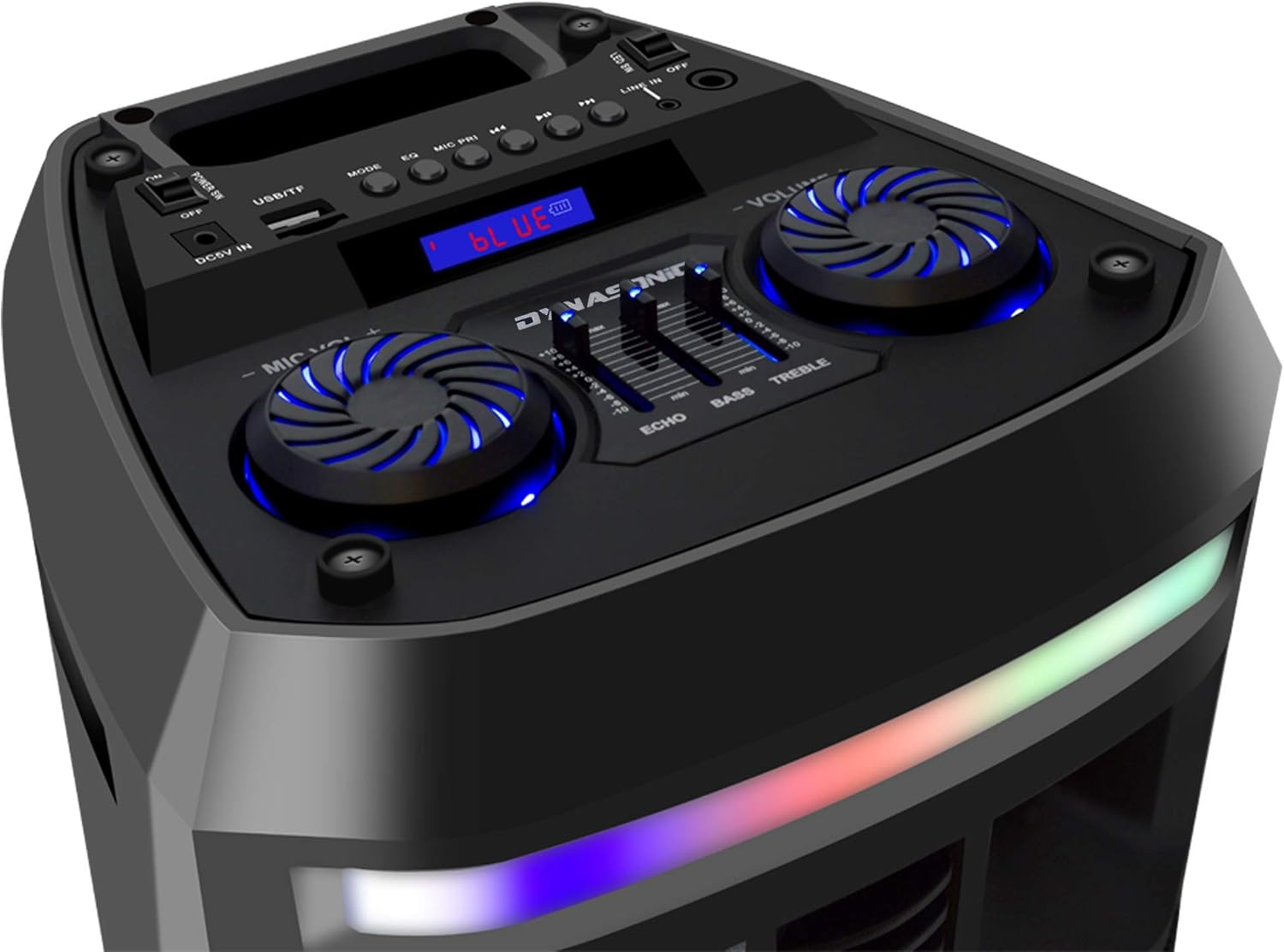
Figure 3: Detailed view of the speaker's top control panel, showing various buttons and ports.

Figure 4: An even closer look at the control panel, highlighting the microphone volume, master volume, echo, bass, and treble adjustment sliders.
Control Panel Functions:
- POWER IN / OFF: Main power switch.
- DC5V IN: Power input for charging.
- USB/TF: USB port and TF (Micro SD) card slot for media playback.
- MODE: Button to switch between Bluetooth, USB, SD, FM Radio, and Line-IN modes.
- EQ: Equalizer button (if applicable).
- MIC PRI: Microphone Priority function.
- Previous/Next Track: Buttons for navigating tracks.
- Play/Pause: Button for media playback control.
- FM: FM radio controls (Scan, Preset).
- LINE IN: 3.5mm auxiliary input jack.
- MIC IN: Wired microphone input jack.
- LED SW: Switch for controlling the LED lights.
- MIC VOL +/-: Rotary knob for adjusting microphone volume.
- VOLUME +/-: Rotary knob for adjusting master speaker volume.
- ECHO: Slider for adjusting microphone echo effect.
- BASS: Slider for adjusting bass levels.
- TREBLE: Slider for adjusting treble levels.
Setup
1. Charging the Speaker
- Connect the provided USB charging cable to the DC5V IN port on the speaker.
- Connect the other end of the USB cable to a standard USB power adapter (not included) or a powered USB port.
- The charging indicator light will illuminate. Allow the speaker to fully charge before first use (typically 4-6 hours). The indicator light may change or turn off when fully charged.
2. Powering On/Off
- To power on the speaker, toggle the POWER IN / OFF switch to the 'ON' position.
- To power off, toggle the switch to the 'OFF' position.
3. Microphone Setup
- Wireless Microphone: Insert two AA batteries (not included) into the wireless microphone. Turn on the microphone. It should automatically connect to the speaker.
- Wired Microphone: Connect a wired microphone (not included) to the MIC IN jack.
- Adjust the microphone volume using the MIC VOL +/- knob and the echo effect with the ECHO slider.
Operating Instructions
1. Bluetooth Pairing
- Turn on the speaker. The display will show 'BLUE' or 'Bluetooth Mode'. If not, press the MODE button until Bluetooth mode is selected.
- Enable Bluetooth on your mobile device (smartphone, tablet, etc.).
- Search for available Bluetooth devices. Select 'DYNASONIC DY-65201' from the list.
- Once paired, the speaker will emit a confirmation sound. You can now play audio from your device through the speaker.
2. USB/SD Card Playback
- Insert a USB flash drive or an SD card (with MP3 audio files) into the respective USB port or TF card slot.
- The speaker will automatically switch to USB/SD mode and begin playing audio. If not, press the MODE button to select the correct input.
- Use the Previous/Next Track and Play/Pause buttons to control playback.
3. FM Radio
- Press the MODE button repeatedly until 'FM' mode is selected.
- Press and hold the Play/Pause button to automatically scan and save available FM radio stations.
- Use the Previous/Next Track buttons to navigate between saved stations.
4. Line-IN (AUX) Mode
- Connect one end of the 3.5mm jack cable to the LINE IN port on the speaker.
- Connect the other end to the audio output of your external device (e.g., MP3 player, computer).
- Press the MODE button until 'LINE' or 'AUX' mode is selected. Audio will now play from your connected device.
5. Karaoke Function
- Ensure a microphone is connected and powered on (refer to 'Microphone Setup').
- Play music via Bluetooth, USB, SD, or Line-IN.
- Adjust the MIC VOL +/- knob for microphone volume and the ECHO slider for the desired echo effect.
- Use the MIC PRI button to prioritize microphone audio over music if available.
6. LED Lights Control
- Toggle the LED SW switch on the control panel to turn the multi-colored LED lights on or off.
7. Remote Control Usage
- The included remote control allows for convenient operation from a distance.
- Functions typically include Power, Mode selection, Volume control, Track navigation, Play/Pause, EQ settings, and Mute.
- Ensure the remote control has working batteries (3x AAA, not included) and is pointed towards the speaker's sensor.
Maintenance
- Cleaning: Use a soft, dry cloth to clean the speaker's exterior. Do not use abrasive cleaners or solvents.
- Storage: Store the speaker in a cool, dry place away from direct sunlight and extreme temperatures when not in use for extended periods.
- Battery Care: To prolong battery life, fully charge the speaker before storing it for long periods and recharge it every few months.
Troubleshooting
| Problem | Possible Cause | Solution |
|---|---|---|
| Speaker does not power on. | Battery is depleted. Power switch is off. | Charge the speaker. Ensure the power switch is in the 'ON' position. |
| No sound. | Volume is too low. Incorrect mode selected. Device not connected properly. | Increase the master volume. Press the MODE button to select the correct input. Reconnect your device. |
| Bluetooth pairing fails. | Speaker is not in pairing mode. Device Bluetooth is off. Speaker is too far from device. | Ensure speaker is in Bluetooth mode. Turn on Bluetooth on your device. Move device closer to speaker (within 10 meters). |
| Microphone not working. | Microphone is off. Batteries are low (wireless). Volume is low. | Turn on the microphone. Replace batteries. Increase MIC VOL. |
| Remote control not responding. | Batteries are low or inserted incorrectly. Obstruction between remote and speaker. | Replace remote batteries (AAA). Ensure clear line of sight to speaker's sensor. |
| FM radio reception is poor. | Weak signal. Interference. | Reposition the speaker. Extend any external antenna if available. |
Specifications
- Brand: DYNASONIC
- Model Number: DY-65201
- Connectivity Technology: Bluetooth, USB
- Special Features: Bluetooth, Integrated LED Lights, Karaoke Function
- Connections: USB, TF (Micro SD), 3.5mm Line-IN, Microphone Input
- Power Output: RMS 12 W
- Battery: 1 Lithium-polymer (included), Rechargeable
- Item Weight: 4 Kilograms
- Item Dimensions (L x W x H): 27 x 25 x 59 centimeters
- Audio Input: Microphone, USB, AUX
- Number of Channels: 1
- Color: Black
- Mounting Type: Table Mount
- Power Source: Battery Powered
- Recommended Uses: Music Playback, Karaoke, Outdoor/Indoor Events
Warranty and Support
This product comes with a standard manufacturer's warranty. Please refer to the warranty card included in your product packaging for specific terms and conditions, including warranty period and coverage details.
For technical support, troubleshooting assistance beyond this manual, or warranty claims, please contact DYNASONIC customer service through their official website or the contact information provided with your purchase. Keep your proof of purchase for warranty validation.