
1. Product Overview
The TUREWELL Water Flosser is designed to provide effective oral hygiene by reaching areas that traditional brushing and flossing may miss. It utilizes a powerful water jet to remove food debris and plaque, promoting healthier gums and fresher breath.
Key Features:
- Effective Cleaning: Equipped with a 1250-1700 times/min electric motor and 30-125 psi pressure, it deeply cleans hidden areas, removing 99.99% of food residues and massaging gums.
- 10 Adjustable Water Pressure Settings: Offers a range from 30 to 125 psi, with 10 levels to suit various tooth and gum conditions. Settings 1-3 (30-50 psi) are for sensitive teeth, children, and beginners; 4-6 (50-80 psi) for most users; and 7-10 (80-125 psi) for experienced users.
- 8 Nozzles for Family Use: Includes 3 standard high-pressure tips in different colors and 5 specialized water jet tips, allowing for shared use among family members. The 360-degree rotating nozzles ensure comprehensive cleaning.
- High Volume Reservoir: Features a 22-ounce (600 ml) water capacity, providing 90 seconds of continuous water flow without needing refills.
- Integrated Nozzle Storage: A compartment on top of the unit keeps nozzles hygienic and prevents loss.
- 3-Minute Timer: Automatically shuts off after 3 minutes to ensure appropriate cleaning duration and extend device lifespan.
- Leak-Proof Design: The reservoir features double-sealed rings for reliable leak prevention.
- Stable Placement: Base suction cups provide stable placement on smooth surfaces.

Image: Benefits of using the TUREWELL Water Flosser, including deep cleaning, whitening teeth, and improving gum health.
2. Safety Information
Please read all safety instructions before first use and keep this manual for future reference.
- This device is not suitable for children. Keep out of reach of children.
- Avoid swallowing water during use.
- Consult a dental professional for appropriate usage guidance, especially if you have pre-existing dental conditions or concerns.
- Do not immerse the main unit in water.
- Do not use if the power cord or plug is damaged.
- Only use the provided power adapter.
- Unplug the device before cleaning or when not in use for extended periods.
- Do not use abrasive cleaners or harsh chemicals on the device.
3. Package Contents
Your TUREWELL Water Flosser package includes the following items:
- TUREWELL Water Flosser Main Unit
- Water Reservoir (600ml capacity)
- Standard Jet Tips (3 pieces, different colors)
- Specialized Nozzles (5 pieces, including Orthodontic Tip, Toothbrush Tip, Tongue Cleaner Tip, Periodontal Tip, Dental Plaque Tip)
- User Manual (this document)

Image: The 8 included nozzles with their specific functions.
4. Setup Instructions
Follow these steps to set up your TUREWELL Water Flosser for first use:
- Unpack the Device: Carefully remove the water flosser and all accessories from the packaging.
- Clean Removable Parts: Before initial use, clean the water reservoir and all nozzles with warm, soapy water. Rinse thoroughly.
- Assemble the Irrigator: Insert the desired nozzle into the handle until it clicks into place. Ensure it is securely attached.
- Fill the Water Reservoir: Lift the lid of the water reservoir. Fill the reservoir with lukewarm water. You may also use mouthwash, but ensure to rinse the unit with plain water after each use to prevent clogging. Close the lid securely.
- Place the Unit: Position the water flosser on a smooth, flat surface. The suction cups on the base will help secure it.
- Connect to Power: Plug the power cord into an electrical outlet.
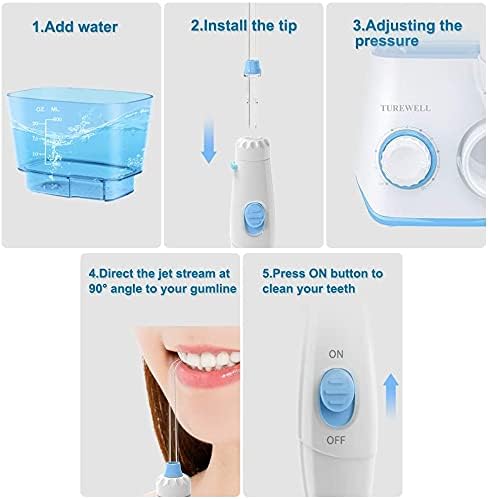
Image: Visual guide for adding water, installing a tip, and adjusting pressure.

Image: The water tank lid design, featuring tip storage and easy filling.
5. Operating Instructions
To use your TUREWELL Water Flosser:
- Select Pressure Setting: Turn the pressure dial on the front of the unit to your desired intensity. Start with a low setting (1-3) and gradually increase as you become accustomed to the water jet.
- Position Yourself: Lean over a sink. Place the nozzle tip into your mouth, aiming it towards your teeth and gumline.
- Turn On the Device: Slide the ON/OFF switch on the handle to the 'ON' position to start the water flow.
- Floss Your Teeth: Guide the water jet along your gumline, pausing briefly between teeth. Allow the water to flow into the sink. Ensure the water stream is directed at a 90-degree angle to your gumline for optimal cleaning.
- Clean All Areas: Use the 360-degree rotating nozzle to easily reach all areas of your mouth, including the back teeth and around orthodontic appliances.
- Automatic Shut-off: The device will automatically turn off after 3 minutes of continuous use.
- Turn Off the Device: Once finished, slide the ON/OFF switch on the handle to the 'OFF' position.

Image: The 10 pressure settings dial and recommended levels.

Image: The 360-degree rotating nozzle for easy access to all oral areas.
6. Maintenance
Regular cleaning and maintenance will ensure the longevity and optimal performance of your water flosser.
- After Each Use:
- Empty any remaining water from the reservoir.
- If using mouthwash, rinse the reservoir and flush the unit with a full reservoir of plain water to prevent mineral buildup and clogging.
- Remove the nozzle and rinse it under running water. Store it in the designated storage compartment.
- Wipe the exterior of the unit with a soft, damp cloth.
- Weekly Cleaning:
- For a deeper clean, fill the reservoir with 1 part white vinegar and 2 parts warm water.
- Run half of the solution through the unit into the sink.
- Pause the unit and let the remaining solution sit for 20 minutes.
- Run the rest of the solution through the unit until the reservoir is empty.
- Rinse the unit by running a full reservoir of plain water through it.
- Nozzle Replacement: Nozzles should be replaced every 3-6 months, or sooner if they become damaged or worn.

Image: The 600ml large water tank with clear volume markings.

Image: The integrated nozzle storage compartment.
7. Troubleshooting
If you encounter any issues with your TUREWELL Water Flosser, refer to the following common problems and solutions:
| Problem | Possible Cause | Solution |
|---|---|---|
| Device does not turn on | Not plugged in; Power outlet not working; Device switch is OFF. | Ensure power cord is securely plugged in. Test the outlet with another device. Slide the ON/OFF switch on the handle to 'ON'. |
| Weak water pressure | Pressure setting is too low; Nozzle is clogged; Water reservoir is low. | Increase the pressure setting. Remove and clean the nozzle. Refill the water reservoir. |
| No water flow | Water reservoir is empty; Nozzle is not properly installed or clogged; Hose is kinked. | Fill the water reservoir. Reinstall or clean the nozzle. Check the hose for kinks. |
| Water leakage from the unit | Reservoir lid not closed properly; Reservoir not seated correctly; Damaged hose or seals. | Ensure the reservoir lid is securely closed. Re-seat the reservoir firmly onto the base. If leakage persists, inspect the hose and seals for damage. (Note: A customer review mentioned a leak issue, which could indicate a manufacturing defect or wear over time. If the unit is new and leaking, contact customer support.) |
| Device is noisy | Normal operation sound; Air in the pump. | Some noise is normal during operation. If excessively loud, ensure the unit is on a stable surface. Run water through the unit to clear any trapped air. |
8. Specifications
| Feature | Specification |
|---|---|
| Model Number | FC165 |
| Brand | TUREWELL |
| Water Tank Capacity | 600 ml (22 ounces) |
| Water Pressure Range | 30-125 psi |
| Pulse Frequency | 1250-1700 pulses/minute |
| Pressure Settings | 10 levels |
| Nozzles Included | 8 (3 Standard, 5 Specialized) |
| Waterproof Rating | IPX7 |
| Automatic Timer | 3 minutes |
| Product Dimensions (L x W x H) | 14.48 x 12.45 x 20.5 cm (5.7 x 4.9 x 8.1 inches) |
| Net Product Weight | 773 grams |
| Power Source | Corded Electric |
| Color | White |
| Country of Origin | China |

Image: Product dimensions for reference.
9. Warranty and Support
TUREWELL products are manufactured to high-quality standards. For warranty information, technical support, or customer service inquiries, please refer to the contact information provided with your purchase or visit the official TUREWELL website.
Please retain your proof of purchase for any warranty claims.


