
1. Introduction
This manual provides detailed instructions for the setup, operation, and maintenance of your Denon AVR-X3600H 9.2 Channel AV Receiver. Please read this manual thoroughly to ensure proper use and to maximize your home theater experience. Keep this manual for future reference.
2. Product Overview
The Denon AVR-X3600H is a high-performance 9.2 channel AV receiver designed to deliver an immersive audio and video experience. It features advanced technologies for both sound and picture quality, along with extensive connectivity options.
Key Features:
- Powerful 9-Channel Amplification: Delivers 105 watts per channel (8 ohms, 20Hz-20kHz, THD .08%, 2 ch driven) with capability for 11.2 channel processing.
- Multi-Dimensional Audio: Supports Dolby Atmos, DTS:X, DTS Virtual:X, Dolby Atmos Height Virtualization Technology, and IMAX Enhanced for a truly immersive 3D soundstage.
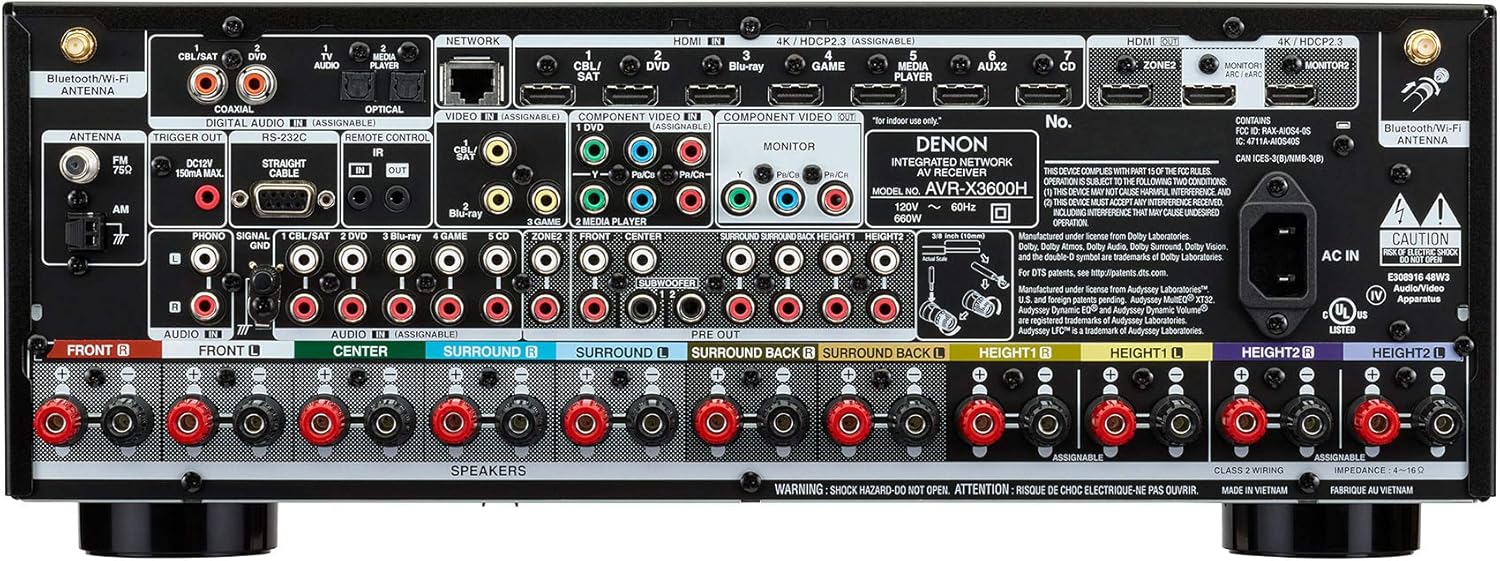
- Advanced HDMI Section: Features 8 HDMI inputs and 3 outputs with eARC, full HDCP 2.3 support, 4K Ultra HD video, 4:4:4 Pure Color sub-sampling, Dolby Vision, HDR10, HLG, 3D, and BT.2020. Includes 4K video upscaling and ALLM.
- Wireless Streaming: Integrated HEOS Built-in technology, Bluetooth, Apple AirPlay 2, and Wi-Fi for streaming popular music services like Spotify, Pandora, Tidal, and Deezer.
- Voice Control: Compatible with Amazon Alexa, Google Assistant, and Apple Siri for hands-free control.
- Audyssey Room Correction: Premium MultEQ XT32 room calibration technology automatically measures and optimizes the AV receiver to your unique listening environment.
- Front-Panel USB: Convenient audio playback of MP3 and Hi-Res audio formats (WAV, FLAC, ALAC, DSD 2.8/5.6MHz files).

3. Setup
3.1 Initial Setup
The Denon Setup Assistant provides a guided, step-by-step process to connect your TV, speakers, and source devices. Follow the on-screen instructions when you first power on the receiver.
3.2 Speaker Connection
Connect your speakers to the corresponding terminals on the rear panel of the AVR-X3600H. Ensure correct polarity (positive to positive, negative to negative) for optimal sound performance. The terminals are color-coded for easy identification.
3.3 Room Calibration (Audyssey MultEQ XT32)
After connecting your speakers, use the supplied Audyssey microphone and follow the on-screen instructions to perform room calibration. This process measures the acoustics of your room and automatically optimizes the receiver's audio settings for the best possible sound quality.
4. Operating Instructions
4.1 Basic Operation
- Power On/Off: Press the Power button on the front panel or the remote control.
- Input Selection: Use the Source Select knob on the front panel or the input buttons on the remote control to choose your desired audio/video source (e.g., Blu-ray, Game, TV Audio).
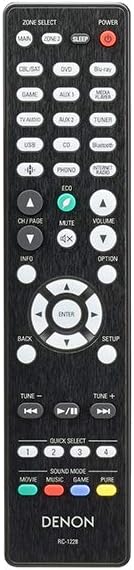
- Volume Control: Adjust the Master Volume knob on the front panel or the Volume +/- buttons on the remote control.
4.2 Audio Modes
The receiver supports various audio modes, including Dolby Atmos, DTS:X, and stereo. Use the 'Sound Mode' buttons on the remote control to select the appropriate mode for your content. The receiver can also upmix stereo content to multi-channel surround sound.
4.3 Video Features
The AVR-X3600H supports the latest video technologies. Ensure your display and source devices are connected via HDMI for optimal 4K/8K, HDR (Dolby Vision, HDR10, HLG), and eARC functionality. The receiver can also upscale lower resolution video to 4K.
4.4 Network and Streaming
Connect your receiver to your home network via Wi-Fi or Ethernet. Utilize HEOS Built-in for multi-room audio, or stream music directly via Bluetooth or Apple AirPlay 2 from compatible devices. Access integrated music services like Spotify, Pandora, Tidal, and Deezer.
4.5 Voice Control
Control your Denon AVR-X3600H using voice commands through Amazon Alexa, Google Assistant, or Apple Siri. Link your receiver to the respective voice assistant app and use commands to adjust volume, switch inputs, or play music.
Video 4.1: Official product video for the Denon AVR-X3600H, highlighting its features and capabilities.
5. Maintenance
- Cleaning: Use a soft, dry cloth to clean the exterior of the receiver. Do not use liquid or aerosol cleaners.
- Ventilation: Ensure adequate ventilation around the receiver to prevent overheating. Do not block ventilation openings.
- Power Cord: Disconnect the power cord from the wall outlet if the unit will not be used for an extended period.
6. Troubleshooting
If you encounter issues with your Denon AVR-X3600H, refer to the following common troubleshooting steps:
- No Power: Check if the power cord is securely connected and the power outlet is functional.
- No Sound: Verify all speaker connections, input selections, and volume levels. Ensure mute is not activated.
- No Video: Confirm HDMI cable connections between the source, receiver, and TV. Check input selections on both the receiver and TV.
- Network Connection Issues: Restart your router and modem. Re-run the network setup on the receiver.
- Overheating: Ensure proper ventilation. If the unit shuts down due to heat, allow it to cool down before restarting.
For more detailed troubleshooting, consult the full online manual or Denon customer support.
7. Specifications
| Feature | Detail |
|---|---|
| Product Dimensions | 15.4 x 17.1 x 6.6 inches |
| Item Weight | 23.8 pounds |
| Surround Sound Channel Configuration | 9.2 |
| Power Output | 105W per channel (8 ohms, 20Hz-20kHz, THD .08%, 2 ch driven) |
| Total HDMI Ports | 8 In / 3 Out |
| Connectivity Technology | Bluetooth, HDMI, USB, Wi-Fi, Ethernet |
| Controller Type | Amazon Alexa, Apple HomeKit, Vera, Google Assistant |
| Audio Encoding | Dolby Atmos, DTS:X, DTS Virtual:X, IMAX Enhanced |
| Audio Output Mode | Stereo, Surround |
| Special Features | Pandora, Tidal, eARC, 4K/8K Upscaling, ALLM, VRR |
8. Warranty & Support
8.1 Warranty Information
The Denon AVR-X3600H typically comes with a 2-year limited warranty. Please refer to the warranty card included with your product or visit the official Denon website for complete warranty terms and conditions.
8.2 Customer Support
For technical assistance, product registration, or service inquiries, please visit the official Denon support website or contact their customer service hotline. Contact information can be found on the Denon website or in your product packaging.


