
1. Important Safety Instructions
Please read all instructions carefully before using the Orbegozo MHP 3500 Automatic Bread Maker. Keep this manual for future reference. Improper use may result in electric shock, fire, or injury.
- Ensure the voltage rating on the appliance matches your local power supply before connecting.
- Do not immerse the appliance, cord, or plug in water or any other liquid.
- Always unplug the bread maker from the outlet when not in use, before assembling or disassembling parts, and before cleaning.
- Do not operate any appliance with a damaged cord or plug, or after the appliance malfunctions or has been damaged in any manner.
- Keep children away from the appliance during operation, as surfaces can become very hot.
- Do not touch hot surfaces. Use oven mitts when handling hot parts, such as the bread pan or hot bread.
- Do not place the appliance on or near a hot gas or electric burner, or in a heated oven.
- Use only accessories recommended by the manufacturer.
2. Product Overview and Components
The Orbegozo MHP 3500 is an automatic bread maker designed for ease of use and consistent results. It features a durable non-stick bread pan and an intuitive LCD display.
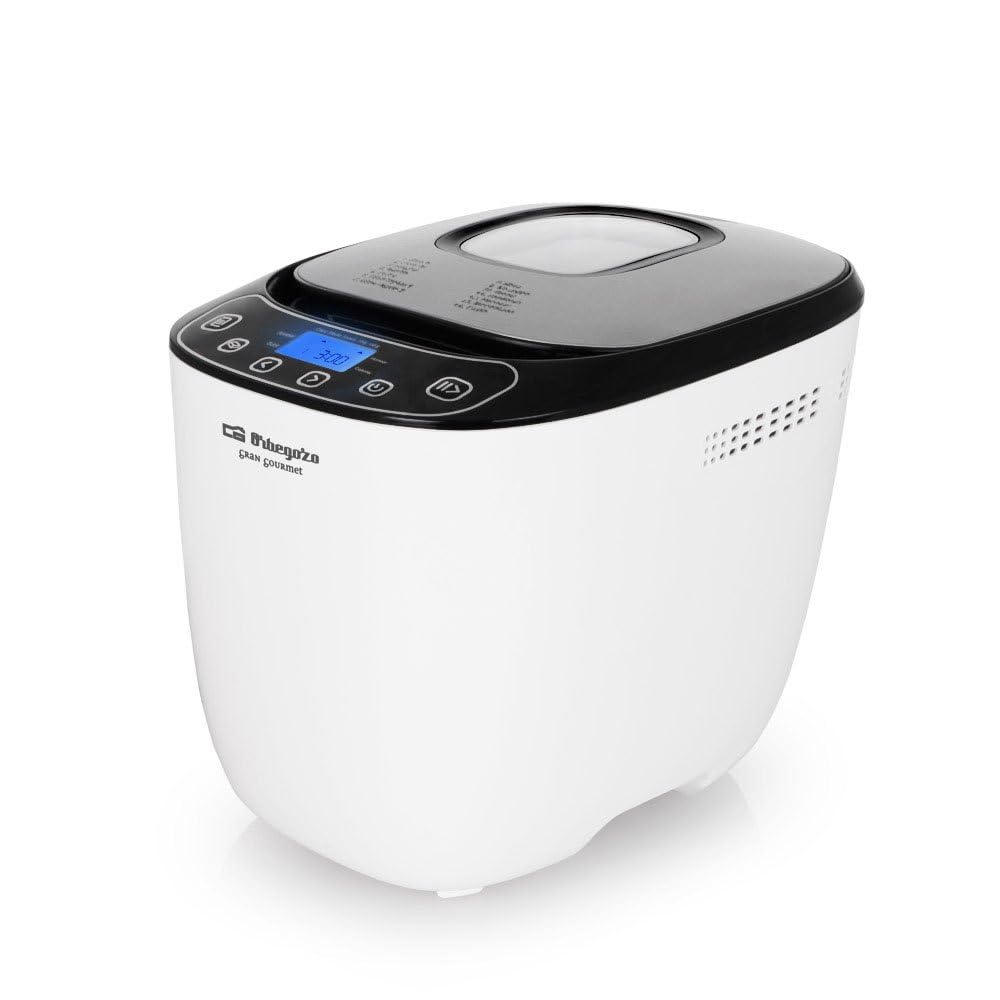
Image 1: Control panel and program list. This image displays the bread maker's top view, showing the LCD screen, control buttons, and a list of programs printed on the lid in Spanish.

Image 2: Included accessories. This image shows the measuring cup, measuring spoon, kneading blade, and a hook for removing the blade.
Main Components:
- Main Unit: Houses the motor, heating element, and control panel.
- Bread Pan: Removable non-stick container for baking.
- Kneading Blade: Attaches to the shaft in the bread pan for mixing and kneading.
- LCD Display: Shows program selection, time, and status.
- Control Buttons: For program selection, timer, start/stop, and crust color.
- Measuring Cup: For precise liquid measurements.
- Measuring Spoon: For precise dry ingredient measurements (e.g., yeast, salt).
- Hook: For safely removing the kneading blade from the baked bread.
3. Setup and First Use
3.1 Unpacking
- Carefully remove the bread maker and all accessories from the packaging.
- Remove any packaging materials, stickers, or promotional labels.
3.2 Initial Cleaning
- Wash the bread pan and kneading blade with warm, soapy water. Rinse thoroughly and dry completely.
- Wipe the exterior of the bread maker with a damp cloth. Do not use abrasive cleaners.
- Ensure all parts are dry before use.
3.3 Placement
- Place the bread maker on a stable, flat, heat-resistant surface, away from direct sunlight and heat sources.
- Ensure there is adequate ventilation around the appliance.
3.4 Assembling the Bread Pan
- Insert the kneading blade onto the shaft inside the bread pan. Ensure it is securely seated.
- Place the assembled bread pan into the bread maker's main unit. Press down firmly until it clicks into place.
4. Operating Instructions
4.1 Adding Ingredients
Always add ingredients in the order specified in your recipe, typically liquids first, then dry ingredients, and finally yeast on top.
- Add water or other liquids to the bread pan.
- Add salt, sugar, oil, and other dry ingredients.
- Add flour, ensuring it covers the liquids.
- Make a small indentation in the center of the flour (do not reach the liquid) and add the yeast.
4.2 Selecting a Program
The Orbegozo MHP 3500 offers 14 pre-programmed settings for various bread types and doughs. Refer to Image 1 for a visual guide to the control panel.
- Plug in the bread maker. The LCD display will light up, showing the default program (usually 'Basic') and time.
- Press the 'Menu' button (often represented by an icon resembling a list or book) repeatedly to cycle through the available programs until your desired program number is displayed.
- Use the 'Color' button to select your preferred crust color (Light, Medium, Dark).
- Use the 'Loaf Size' button (if available, or indicated by weight) to select the desired loaf size (e.g., 700g, 1000g).
4.3 Using the Delay Timer
The delay timer allows you to set the bread maker to finish baking at a later time, up to 13 hours.
- After selecting your program, crust color, and loaf size, press the '+' or '-' buttons (often labeled with arrows) to adjust the delay time. The displayed time includes the baking time.
- Press the 'Start/Stop' button to activate the delay timer. The timer will count down, and the bread maker will begin operation when the set time is reached.
4.4 Starting and Stopping Operation
- To Start: After selecting your desired settings, press the 'Start/Stop' button (often represented by a play/pause icon). The bread maker will begin its cycle.
- To Stop/Cancel: Press and hold the 'Start/Stop' button for a few seconds until the bread maker resets or stops. This will cancel the current program.
4.5 Keep Warm Function
After the baking cycle is complete, the bread maker will automatically switch to a 'Keep Warm' function for 60 minutes to maintain the bread's temperature.
5. Program Descriptions
The Orbegozo MHP 3500 features 14 versatile programs to cater to various baking needs. The program names are listed on the appliance's lid (refer to Image 1).
- Basic (Básico): For white and mixed breads, mainly using wheat flour.
- French (Francés): For light breads made from fine flour, typically with a crispier crust.
- Whole Wheat (Integral): For breads made with whole wheat flour, which requires a longer kneading and rising time.
- Rapid (Rápido): For quick baking of basic bread, often using fast-acting yeast.
- Sweet (Dulce): For breads with high sugar, fats, or proteins, such as brioche or sweet rolls.
- Ultra Fast 1 (Ultra rápido 1): For very quick bread baking, typically for smaller loaves.
- Ultra Fast 2 (Ultra rápido 2): Another ultra-fast setting, potentially for larger loaves or different ingredient ratios.
- Dough (Masa): For preparing doughs for pizzas, rolls, or pastries without baking.
- Gluten-Free (Sin gluten): Specifically designed for gluten-free flours, which have different kneading and rising properties.
- Cake (Pastel): For mixing and baking cakes, often using baking powder or soda instead of yeast.
- Sandwich (Sandwich): For baking light, fluffy bread ideal for sandwiches.
- Bake (Hornear): A baking-only cycle, useful for additional baking or browning.
- Jam (Mermelada): For making homemade jams and marmalades.
- Pasta (Pasta): For kneading pasta dough.
6. Maintenance and Cleaning
Regular cleaning ensures the longevity and optimal performance of your bread maker.
6.1 Cleaning the Bread Pan and Kneading Blade
- After use, allow the bread pan and kneading blade to cool completely.
- Remove the bread pan from the unit. If the kneading blade is stuck in the bread, use the provided hook to carefully remove it.
- Fill the bread pan with warm, soapy water and let it soak for about 10-15 minutes to loosen any stuck-on dough.
- Clean the bread pan and kneading blade with a soft sponge or cloth. Do not use metal scouring pads or abrasive cleaners, as these can damage the non-stick coating.
- Rinse thoroughly and dry completely before storing or next use.
6.2 Cleaning the Exterior and Interior
- Wipe the exterior of the bread maker with a soft, damp cloth.
- Clean the interior of the baking chamber with a damp cloth to remove any crumbs or spills.
- Never immerse the main unit in water or any other liquid.
6.3 Storage
Store the bread maker in a clean, dry place when not in use. Ensure the bread pan and kneading blade are clean and dry before storage.
7. Troubleshooting
If you encounter issues with your Orbegozo MHP 3500, refer to the following common problems and solutions:
| Problem | Possible Cause | Solution |
|---|---|---|
| Bread does not rise | Expired or inactive yeast; incorrect water temperature; too much salt or sugar. | Check yeast expiry date; use lukewarm water (38-43°C); ensure correct ingredient measurements. |
| Bread is too dense | Too much flour; not enough liquid; insufficient kneading. | Measure ingredients precisely; ensure correct program selection for flour type. |
| Bread collapses in the middle | Too much liquid; too much yeast; high humidity. | Reduce liquid slightly; reduce yeast slightly; ensure proper ventilation. |
| Kneading blade stuck in bread | Normal occurrence. | Use the provided hook to carefully remove the blade after the bread has cooled. |
| Uneven baking/crust | Incorrect program; uneven heat distribution. | Ensure correct program for recipe; avoid opening lid during baking cycle. |
If the problem persists, please contact customer support.
8. Specifications
Technical details for the Orbegozo MHP 3500 Automatic Bread Maker:
- Model: MHP 3500
- Power: 550 Watts
- Voltage: 220V
- Capacity: 1 Liter
- Programs: 14 Preconfigured Programs
- Timer: Up to 13 hours delay timer
- Keep Warm Function: 60 minutes automatic
- Noise Level: 44 Decibels
- Material: Glas Acryl (housing)
- Product Dimensions: 37 x 25 x 29 cm (Length x Width x Height)
- Item Weight: 4.38 kg

Image 3: Product dimensions. This image illustrates the height, width, and depth of the Orbegozo MHP 3500 bread maker.
9. Warranty and Support
Your Orbegozo MHP 3500 Automatic Bread Maker is covered by a manufacturer's warranty. Please refer to the warranty card included with your purchase for specific terms and conditions.
Customer Support:
For technical assistance, troubleshooting beyond this manual, or warranty claims, please contact Orbegozo customer service. Contact details can typically be found on the official Orbegozo website or on your product packaging.
