
Introduction
This manual provides detailed instructions for the setup, operation, and maintenance of your JENSEN JTA-230R 3-Speed Stereo Turntable with Built-in Speakers. Please read this manual thoroughly before using the product to ensure proper function and longevity.
Key Features
- Belt-driven 3-speed stereo turntable: Supports 33-1/3, 45, and 78 RPM records.
- USB port with included cable and software: Enables recording, editing, and converting vinyl records to digital MP3 format.
- Auxiliary input: Allows connection of external audio devices such as iPods, MP3 players, or other digital audio players.
- Stereo headphone output: For private listening.
- RCA line outputs: For connecting the turntable to an external home music system or amplifier.
- Built-in stereo speakers: Provides integrated audio playback.
- Front-mounted pitch control: For fine-tuning record speed.
- Tone control: For adjusting sound quality.
Setup
- Unpacking: Carefully remove the turntable from its packaging. Retain all packing materials for future transport or storage.
- Placement: Place the turntable on a stable, level surface away from direct sunlight, heat sources, and excessive dust or vibration.
- Dust Cover: The unit includes a clear dust cover to protect the platter and tonearm when not in use. Ensure it is properly hinged.
- Power Connection: Connect the AC power adapter to the DC input jack on the rear of the unit, then plug the adapter into a standard wall outlet.
- Stylus Protection: Remove the clear plastic stylus protector from the needle before first use.

Operating Instructions
Playing a Vinyl Record
- Power On: Turn the POWER/VOLUME knob clockwise to power on the unit. The power indicator light will illuminate.
- Select Function: Set the FUNCTION switch to 'PHONO'.
- Place Record: Open the dust cover and carefully place a vinyl record on the turntable platter.
- Select Speed: Set the SPEED SELECTOR switch (33/45/78) to match the playback speed of your record. For 45 RPM records, place the included 45 RPM adapter on the center spindle.
- Lift Tonearm: Gently lift the tonearm using the cueing lever.
- Position Tonearm: Move the tonearm over the desired track of the record.
- Lower Tonearm: Slowly lower the tonearm onto the record using the cueing lever. The record will begin to play.
- Adjust Volume: Adjust the volume using the POWER/VOLUME knob.
- Auto Stop: The AUTO STOP switch can be set to ON or OFF. When ON, the turntable will automatically stop spinning when the record finishes. When OFF, the turntable will continue to spin.
- End Playback: At the end of the record, lift the tonearm, return it to the tonearm rest, and lower the cueing lever. Turn the POWER/VOLUME knob counter-clockwise to power off the unit.

Using the Radio
- Power On: Turn the POWER/VOLUME knob clockwise.
- Select Function: Set the FUNCTION switch to 'AM' or 'FM' for radio playback.
- Tune Station: Rotate the TUNING knob to select your desired radio station.
- Adjust Volume: Adjust the volume using the POWER/VOLUME knob.
Connecting External Devices (AUX Input)
- Connect Device: Use an audio cable (not included) to connect your external audio device (e.g., MP3 player, smartphone) to the AUX IN jack on the front of the turntable.
- Select Function: Set the FUNCTION switch to 'AUX'.
- Play Audio: Start playback on your external device. The audio will play through the turntable's built-in speakers.
- Adjust Volume: Adjust the volume using the POWER/VOLUME knob on the turntable and/or the volume control on your external device.
Using Headphones
Plug your headphones into the HEADPHONE jack on the front of the unit for private listening. The built-in speakers will be muted when headphones are connected.
Connecting to an External Audio System (RCA Line Out)
Use RCA cables (not included) to connect the RCA LINE OUT jacks on the rear of the turntable to an available audio input on your home stereo system or powered speakers. This allows you to play vinyl records through a larger sound system.
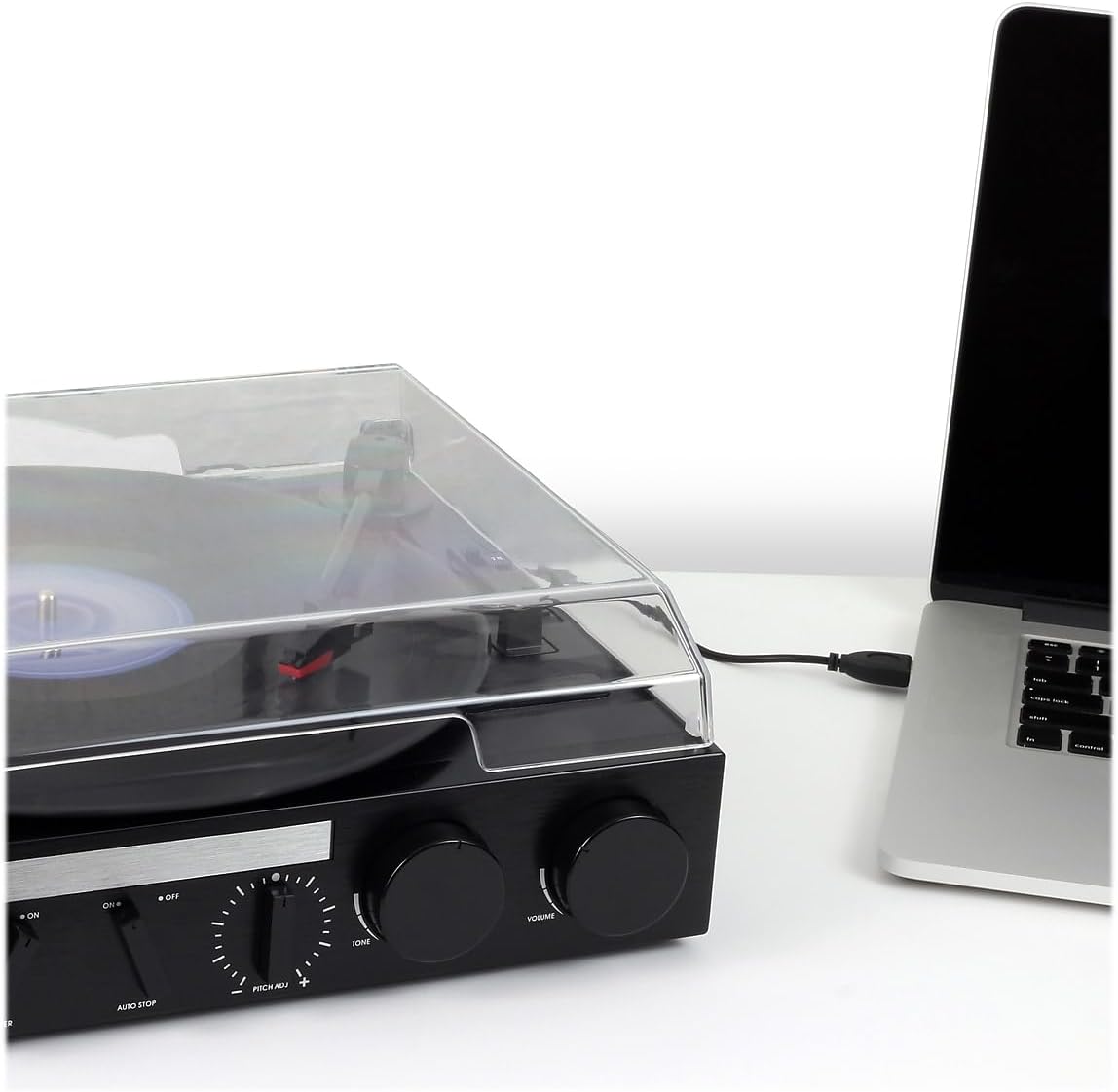
Converting Vinyl to MP3 (USB Recording)
The JTA-230R includes a USB port and software for converting your vinyl records to digital MP3 files. Follow these steps:
- Install Software: Install the provided software (e.g., Audacity) onto your computer.
- Connect USB: Connect the turntable to your computer using the supplied USB cable.
- Prepare for Recording: Open the software on your computer and follow its instructions to prepare for recording.
- Play Record: Start playing your vinyl record on the turntable as described in the 'Playing a Vinyl Record' section.
- Record and Save: Use the software to record the audio. Once recorded, you can edit and save the tracks as MP3 files on your computer for playback on digital devices.
Maintenance
Cleaning the Unit
- Wipe the exterior of the unit with a soft, damp cloth. Do not use abrasive cleaners or solvents.
- Keep the dust cover closed when not in use to prevent dust accumulation on the platter and stylus.
Stylus Care
- The stylus (needle) is a delicate component. Handle it with care.
- Clean the stylus periodically using a soft brush, brushing gently from back to front.
- A worn or damaged stylus can harm your records and degrade sound quality. Replace the stylus if it appears bent, chipped, or if sound quality diminishes significantly.
Troubleshooting
| Problem | Possible Cause | Solution |
|---|---|---|
| No power | Power cord not connected; Power outlet not active; Unit not turned on. | Ensure power cord is securely plugged in; Check power outlet; Turn POWER/VOLUME knob clockwise. |
| No sound from speakers | Volume too low; Function switch incorrect; Headphones connected. | Increase volume; Set FUNCTION switch to 'PHONO', 'AM', 'FM', or 'AUX' as appropriate; Disconnect headphones. |
| Distorted sound | Dirty record; Worn stylus; Incorrect speed; Tone control setting. | Clean record; Replace stylus; Verify correct speed (33/45/78 RPM); Adjust TONE control. |
| Record speed too fast or too slow | Incorrect speed selector setting; Pitch control adjustment. | Set SPEED SELECTOR to match record (33-1/3, 45, or 78 RPM); Adjust PITCH ADJ. knob for fine-tuning. |
| Record skipping | Dirty or scratched record; Turntable not level; Stylus worn or damaged. | Clean record; Ensure turntable is on a stable, level surface; Replace stylus. |
Specifications
- Model Number: JTA-230R
- Product Dimensions: 11.34 x 12 x 4.96 inches
- Item Weight: 1 pounds (454 Grams)
- Brand: Jensen
- Maximum Rotational Speed: 78 RPM
- Material: Plastic
- Color: Black
- Special Feature: Portable
- Compatible Devices: Headphone, MP3 Player, Speaker, Tablet
- Included Components: Product, Manual
Warranty and Support
Information regarding product warranty and customer support is not available in the provided data. Please refer to the product packaging or manufacturer's website for details.


