Introduction
The Gigaset AS690A is a reliable DECT cordless phone designed for daily communication. It offers ease of use and a range of useful functions, including excellent audio quality, especially in hands-free mode. The integrated answering machine ensures you never miss important calls, with up to 30 minutes of recording time. This analog phone connects to a standard telephone jack and is not suitable for ISDN or router telephony.
This manual provides detailed instructions for setting up, operating, and maintaining your Gigaset AS690A phone.
Package Contents
Before you begin, please ensure all items are present in the package:
- 1 Gigaset AS690A Base Station with integrated answering machine
- 1 Gigaset AS690 Handset
- 1 Power Adapter
- 1 Telephone Connection Cable
- 2 AAA NiMH Rechargeable Batteries
- 1 Battery Cover
- 1 User Manual
Setup
Setting up your Gigaset AS690A is quick and easy. Follow these steps to get your phone ready for use:
- Connect the Power Adapter: Plug the power adapter into the base station and then into a wall outlet.
- Connect the Telephone Cable: Connect the telephone cable to the base station and then to your telephone wall jack.
- Insert Batteries into the Handset: Open the battery compartment on the back of the handset. Insert the two AAA NiMH rechargeable batteries, ensuring correct polarity. Close the battery cover securely.
- Place Handset on Base Station: Place the handset on the base station. The handset will begin charging. Allow it to charge for several hours before first use to ensure optimal battery performance.
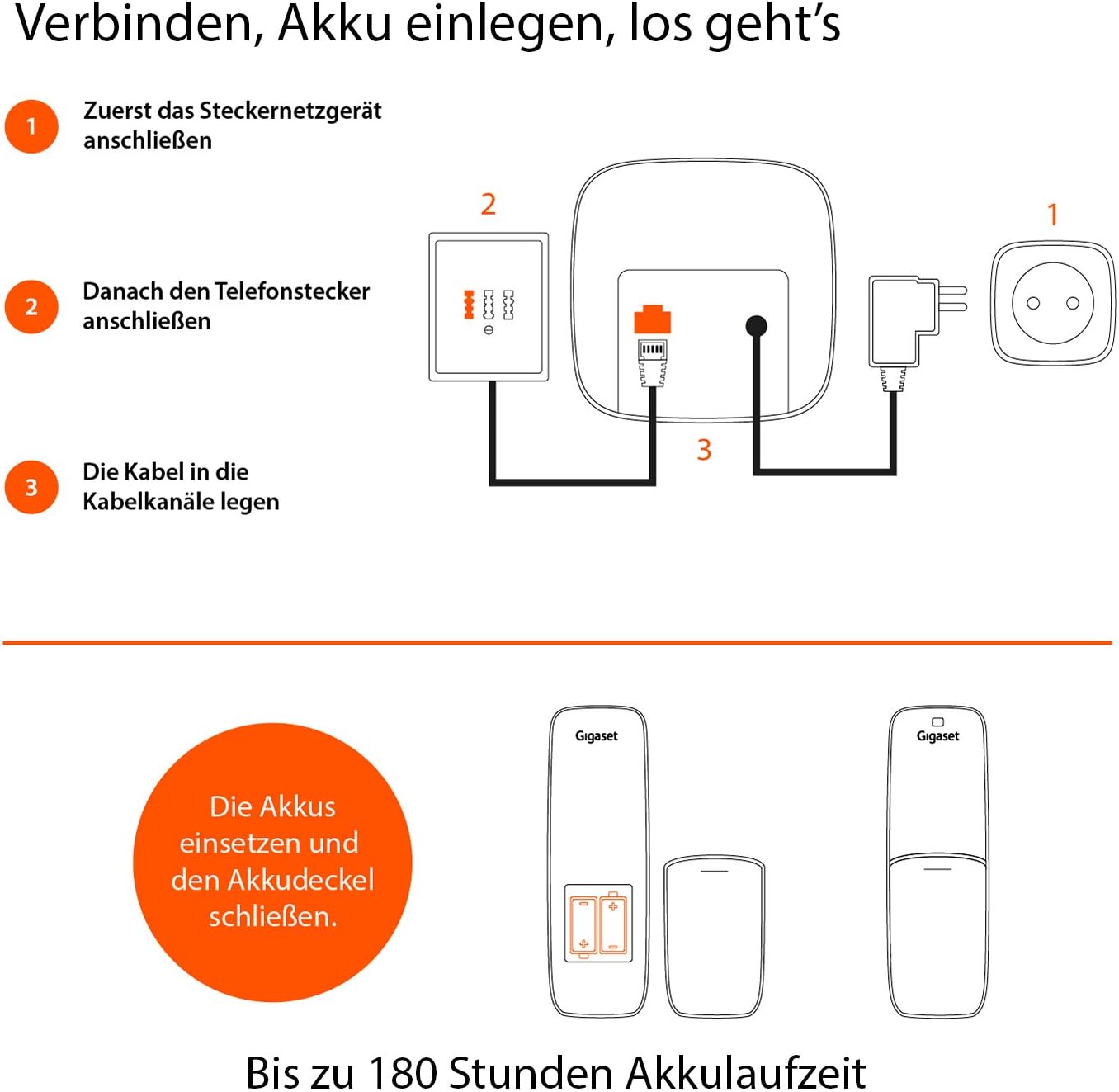
Figure 1: Connection Diagram. This image illustrates the steps for connecting the power adapter and telephone cable to the base station, and the proper way to insert the batteries into the handset.
Operating Instructions
Basic Functions
- Making Calls: Enter the phone number and press the green call button.
- Answering Calls: Press the green call button when the phone rings.
- Ending Calls: Press the red end call button.
- Hands-Free Calling: During a call, press the hands-free button to activate speakerphone mode. The Gigaset AS690A offers brilliant sound quality even in hands-free mode.

Figure 2: Brilliant Sound Quality. This image emphasizes the phone's excellent audio performance, particularly during hands-free conversations.
Advanced Features
- Answering Machine: The integrated answering machine has up to 30 minutes of recording time. You can play messages, record an outgoing message, and manage settings directly from the base station or handset.
- Call Protection: Block up to 32 unwanted phone numbers to prevent nuisance calls. Refer to the menu options for managing the block list.
- Volume Adjustment: Adjust the handset and hands-free volume with 5 different levels.
- Phonebook: Store up to 100 contacts in the phonebook for quick dialing.
- Display and Readability: The large, high-contrast display ensures better readability, with extra-large number display in dialing mode.
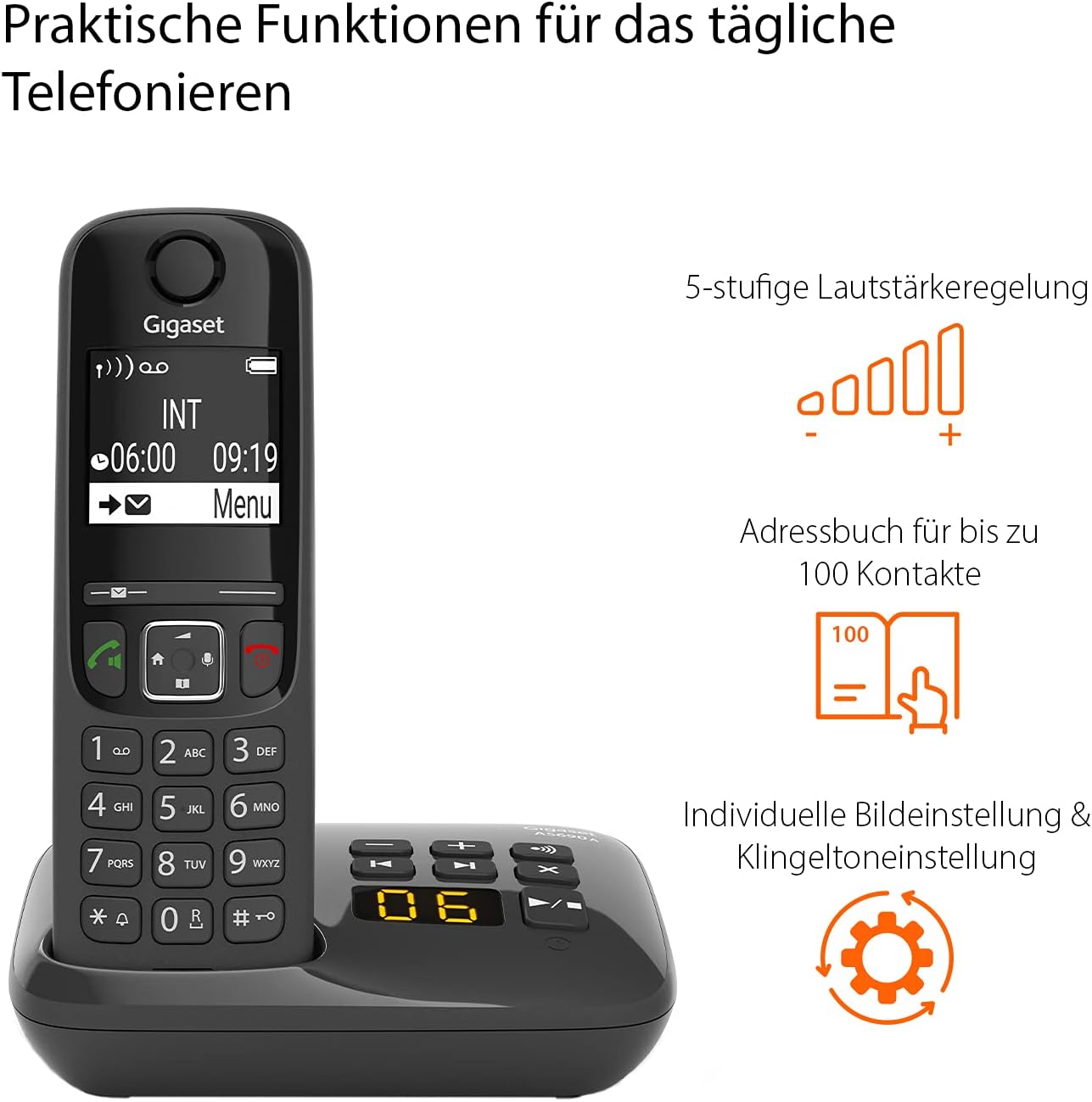
Figure 3: Practical Functions. This image highlights key features such as adjustable volume, a large contact directory, and customization options.
Maintenance
To ensure the longevity and optimal performance of your Gigaset AS690A, follow these maintenance guidelines:
- Cleaning: Use a soft, damp cloth to clean the handset and base station. Do not use abrasive cleaners or solvents.
- Battery Care: Use only the recommended NiMH rechargeable batteries. If the phone will not be used for an extended period, remove the batteries to prevent leakage.
- Placement: Place the base station in a central location to maximize range. Avoid placing it near other electronic devices that may cause interference.
Troubleshooting
If you encounter any issues with your Gigaset AS690A, try the following troubleshooting steps:
| Problem | Possible Cause / Solution |
|---|---|
| No dial tone / Cannot make calls |
|
| Handset display is blank |
|
| Poor sound quality / Static |
|
| Answering machine not recording |
|
Specifications
| Feature | Detail |
|---|---|
| Brand | Gigaset |
| Model Number | AS690A |
| Product Type | Cordless Phone |
| Color | Black |
| Answering Machine Recording Time | Up to 30 minutes |
| Call Blocking Capacity | Up to 32 numbers |
| Phonebook Capacity | Up to 100 contacts |
| Display | Large, high-contrast display |
| Volume Levels | 5-level adjustable |
| Battery Type | 2 x AAA NiMH (included) |
| Standby Time | Up to 180 hours |
| Dimensions (Handset) | 11.5 x 4.9 x 2.8 cm (L x W x H) |
| Weight (Handset) | 119 Grams |
| ECO DECT Technology | Yes, for reduced energy consumption |
| Made In | Germany |

Figure 4: ECO DECT Technology. This image highlights the phone's energy-saving features and its German manufacturing origin.
Warranty and Support
Manufacturer's Warranty: Your Gigaset AS690A comes with a 2-year manufacturer's warranty.
Customer Service: For any questions regarding this product, please contact Gigaset customer service at 02871-912 912 (standard landline rates apply).
You can also visit the official Gigaset website for more information and support resources.


