
1. Introduction
Welcome to Tom Clancy's Ghost Recon Breakpoint on Xbox One. This manual provides essential information to help you set up, play, maintain, and troubleshoot your game. Immerse yourself in a vast open world as an Elite US Special Operations soldier, fighting against former comrades who have turned hostile.
Key features include:
- Explore a massive open world as a Spec Ops soldier stranded behind enemy lines.
- Customize your playstyle with a wide variety of classes, weapons, and equipment.
- Seamlessly transition between solo, co-op, and PvP modes while retaining all progress and rewards.
2. Setup
2.1. Installation
- For Physical Disc: Insert the Tom Clancy's Ghost Recon Breakpoint game disc into your Xbox One console. The installation process should begin automatically. Follow any on-screen prompts.
- For Digital Download: Purchase and download the game from the Xbox Store. Once the download is complete, the game will be available in your library.
2.2. System Requirements
- Xbox One console (including Xbox One S, Xbox One X).
- Stable internet connection (required for initial setup, updates, and online features).
- Up to 45 GB of available storage space on your console.
- Xbox Live account.

Figure 2.1: Back of the game case detailing system requirements and game features.
3. Operating the Game
3.1. Starting the Game
Once installed, launch Tom Clancy's Ghost Recon Breakpoint from your Xbox One dashboard. You may be prompted to download additional updates before playing.
3.2. Gameplay Overview
As a Ghost, you will navigate the hostile island of Auroa. The game offers a tactical shooter experience with elements of survival and exploration. You can choose to play solo, or team up with up to three other players in co-op mode. Player versus Player (PvP) modes are also available.

Figure 3.1: Discover a diverse open world, from snowy peaks to dense jungles.

Figure 3.2: Team up with four-player co-op for tactical engagements.
3.3. Controls
Refer to the in-game tutorial and control settings for detailed information on character movement, combat, vehicle operation, and menu navigation. Controls are fully customizable to suit your playstyle.
3.4. Saving Progress
The game features an automatic save system. Your progress is saved periodically during gameplay and at key moments. Ensure you do not turn off your console during a save operation to prevent data loss.
3.5. Game Editions and Content
Tom Clancy's Ghost Recon Breakpoint is available in various editions, each offering different content. The base game provides the core experience, while other editions may include additional items such as the Year 1 Pass, Off-Road Pack, Bonus Mission, Survivor Pack, and Steelbook.
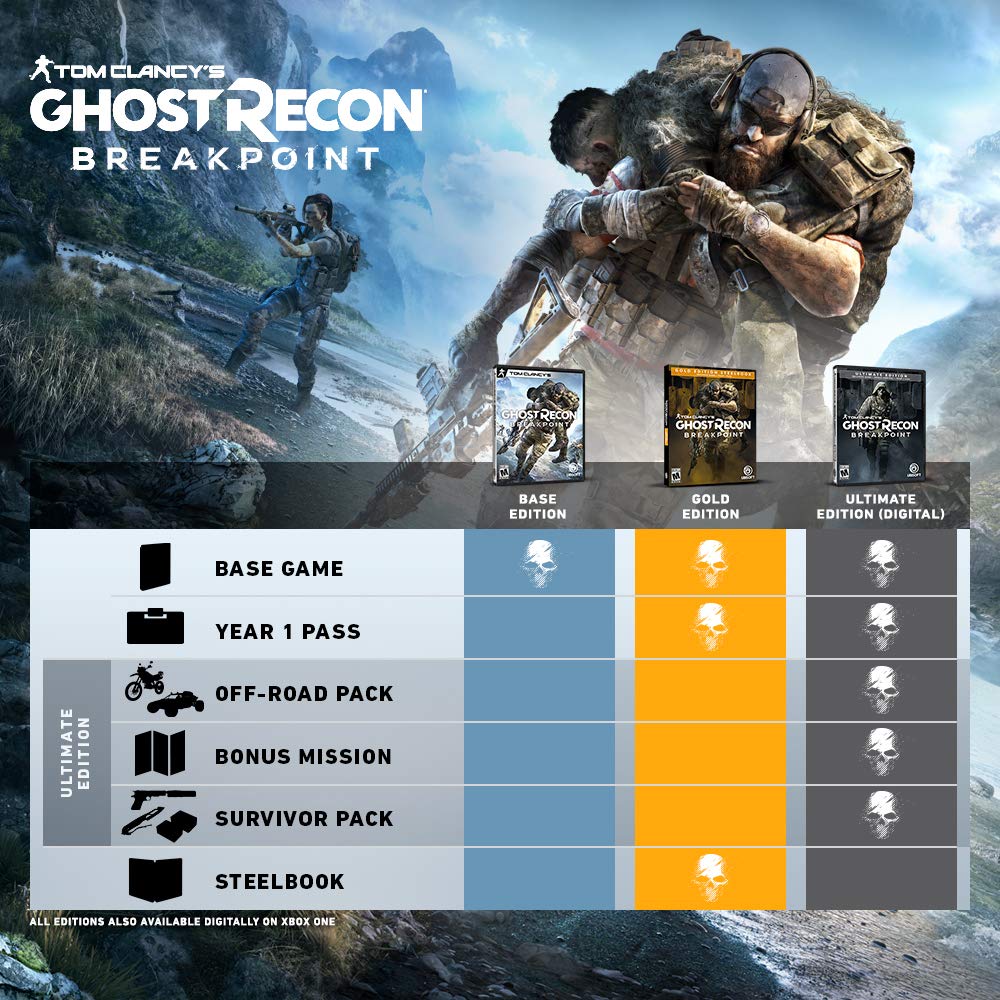
Figure 3.3: Overview of game editions and their included content.
3.6. First Raid: Project Titan
The game features raids, such as Project Titan, which offer challenging cooperative experiences. These raids typically require a certain Gear Score (e.g., 150+) for access.

Figure 3.4: Challenge yourself in the first raid, Project Titan.
Video 3.1: Official trailer for the Project Titan raid, showcasing intense gameplay and environments. This video is provided by a Merchant Video creator.
Video 3.2: A 60-second montage of gameplay from Tom Clancy's Ghost Recon Breakpoint, highlighting various action sequences. This video is provided by a Merchant Video creator.
Video 3.3: The 'Pledge' trailer for Tom Clancy's Ghost Recon Breakpoint, featuring narrative elements and gameplay. This video is provided by a Merchant Video creator.
4. Maintenance
To ensure optimal performance and longevity of your game and console, follow these maintenance guidelines:
- Software Updates: Regularly check for and install game updates and Xbox One system software updates. These updates often include performance improvements, bug fixes, and new content.
- Storage Management: Monitor your console's storage space. Delete old games or media files if necessary to free up space for new content and game updates.
- Disc Care (for physical copies): Keep your game disc clean and free from scratches. Store it in its original case when not in use.
- Console Ventilation: Ensure your Xbox One console has adequate ventilation to prevent overheating, which can affect game performance.
5. Troubleshooting
If you encounter issues while playing Tom Clancy's Ghost Recon Breakpoint, consider the following troubleshooting steps:
5.1. Common Issues and Solutions
- Game Not Launching/Crashing:
- Ensure your game and console software are fully updated.
- Restart your Xbox One console.
- Clear the console's cache (consult Xbox support for instructions).
- If using a physical disc, check the disc for scratches or dirt.
- Connectivity Problems:
- Verify your internet connection is active and stable.
- Restart your router/modem.
- Check Xbox Live service status for any outages.
- Installation Errors:
- Ensure you have sufficient storage space (at least 45 GB).
- Try pausing and resuming the download/installation.
- If the issue persists, delete the game and attempt a fresh installation.
- Graphics/Performance Issues:
- Ensure your console is well-ventilated.
- Adjust in-game graphics settings if available.
- Photosensitive Seizure Warning:
- A small percentage of individuals may experience epileptic seizures when exposed to certain light patterns or backgrounds on a television screen. If you or any of your relatives have an epileptic condition, consult your physician prior to playing.
6. Specifications
| Feature | Detail |
|---|---|
| Product Title | Tom Clancy's Ghost Recon Breakpoint - Xbox One |
| Brand | Ubisoft |
| Model Number | UBP50402225 |
| UPC | 887256090531, 887256090524 |
| Platform | Xbox One |
| Compatible Consoles | Microsoft Xbox One, Microsoft Xbox One S, Microsoft Xbox One X |
| Release Date | October 4, 2019 |
| ESRB Rating | Mature (M) |
| Item Weight | 2.4 ounces |
| Product Dimensions | 0.5 x 6.77 x 5.35 inches |
| Language | English |
| Manufacturer | Ubisoft |
7. Warranty and Support
For warranty information, technical support, or further assistance with Tom Clancy's Ghost Recon Breakpoint, please visit the official Ubisoft support website or contact their customer service. Specific warranty terms may vary by region and retailer.
Ubisoft Support: https://www.ubisoft.com/en-us/help