
1. Introduction
This manual provides essential information for the safe and effective installation, operation, and maintenance of the ABB SACE T1N 100 Circuit Breaker. Please read this manual thoroughly before attempting any procedures to ensure proper handling and to prevent potential hazards.

Figure 1: Front-side view of the ABB SACE T1N 100 Circuit Breaker.
2. Safety Information
Always adhere to local and national electrical codes and safety regulations. Installation and maintenance should only be performed by qualified and authorized personnel.
- Disconnect Power: Ensure all power sources are disconnected and locked out before installing, servicing, or inspecting the circuit breaker.
- Personal Protective Equipment (PPE): Always wear appropriate PPE, including safety glasses, insulated gloves, and arc-flash protection, when working with electrical equipment.
- Proper Tools: Use only insulated tools designed for electrical work.
- Environmental Conditions: Do not install or operate the circuit breaker in environments exceeding its specified operating conditions (e.g., temperature, humidity).
- Proposition 65 Warning: This product may expose you to chemicals known to the State of California to cause cancer and birth defects or other reproductive harm. For more information, go to www.P65Warnings.ca.gov.
3. Setup and Installation
3.1 Mounting
The ABB SACE T1N 100 Circuit Breaker is designed for plug-in mounting. Ensure the mounting surface is stable and capable of supporting the device's weight. For proper heat dissipation and electrical isolation, the installation of an insulating barrier between the circuit breaker and the base plate is required if mounted on a flat non-insulated metal surface.
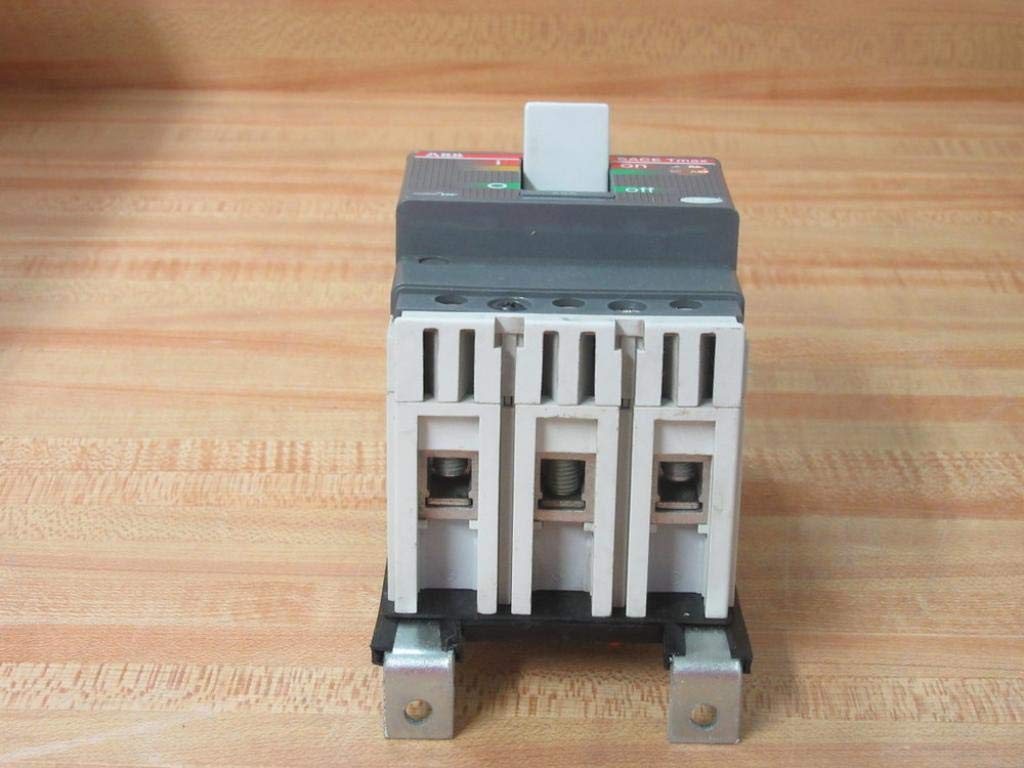
Figure 2: Side view illustrating the mounting points of the circuit breaker.
3.2 Wiring
Connect the circuit breaker to the electrical system according to the wiring diagrams and specifications provided on the product label and in relevant electrical codes. This is a 3-pole unit. Ensure correct polarity and phase connections.
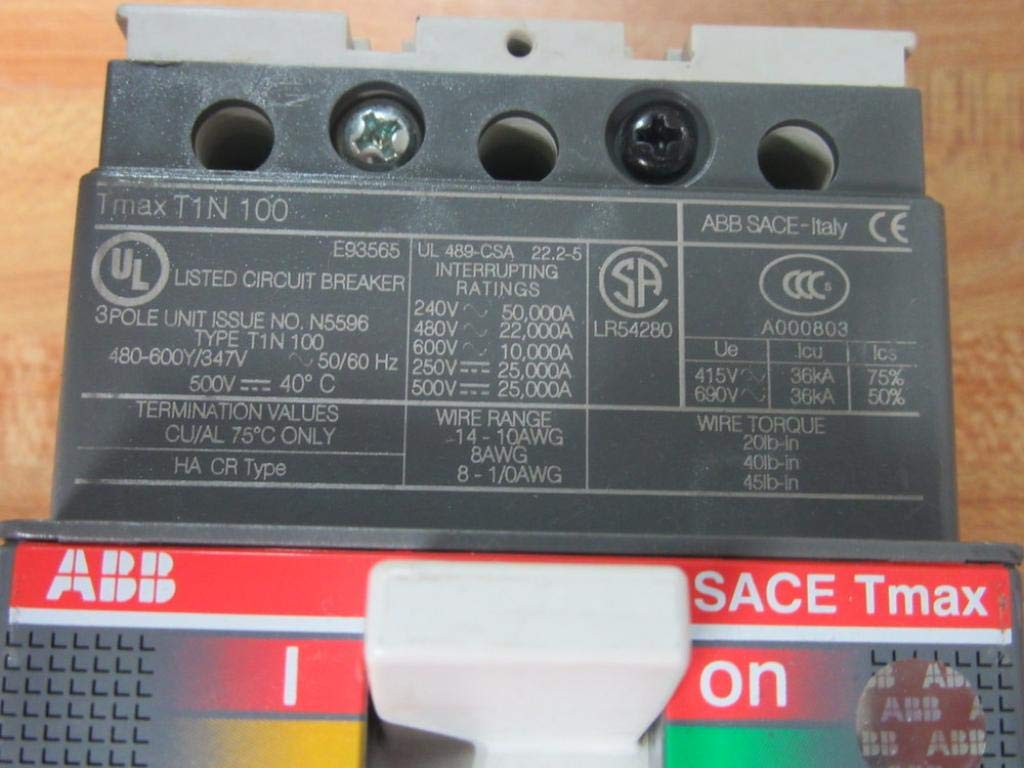
Figure 3: Product label detailing wiring specifications, including wire range and torque values.
- Wire Range: 14-1/0 AWG (for 62 lb-in torque).
- Wire Torque: 62 lb-in.
- Termination Values: CU/AL 75°C only.
Refer to the product label for specific DC wiring diagrams. For instance, the label indicates configurations for 2 poles 250VDC and 3 poles 251 to 600VDC ungrounded systems. The reference number BE91081356 is also present on the label for documentation purposes.
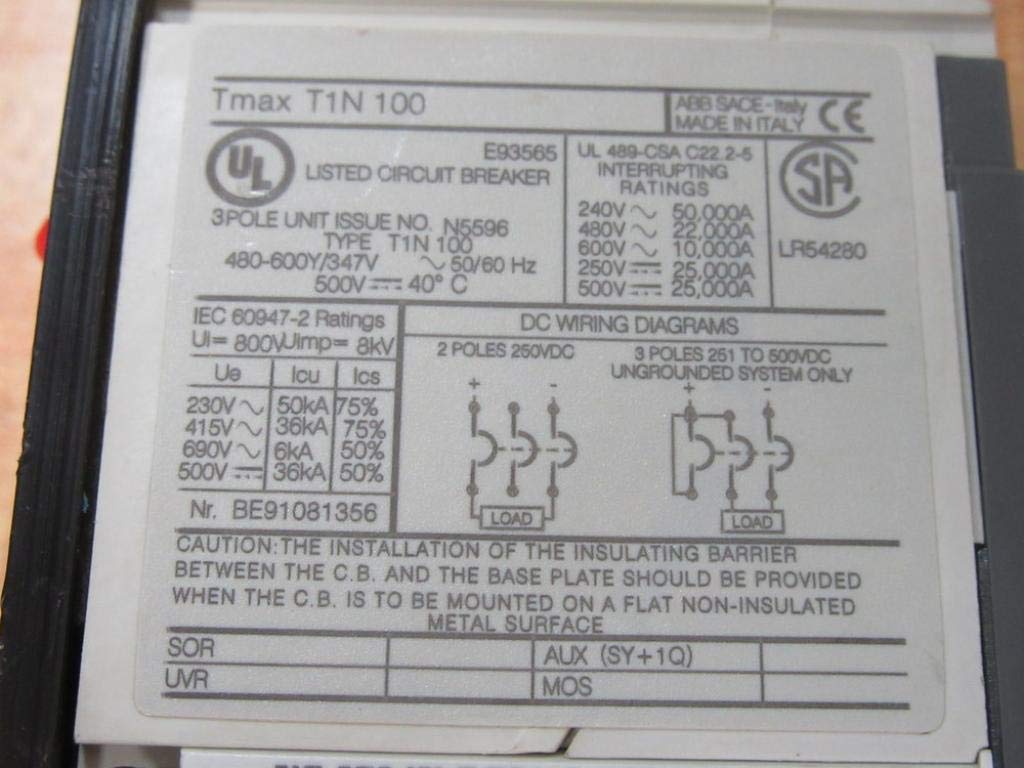
Figure 4: Product label displaying DC wiring diagrams and additional technical data.
4. Operating Instructions
4.1 Basic Operation
The circuit breaker features a toggle switch for manual operation. To turn the circuit breaker ON, push the toggle switch to the 'ON' position. To turn it OFF, push the toggle switch to the 'OFF' position. In the event of an overload or short circuit, the breaker will trip automatically, moving the toggle to an intermediate position.

Figure 5: Front view of the circuit breaker with the toggle switch in the 'ON' position.
4.2 Testing
Some models may include a 'TEST' button. If present, pressing this button simulates an overload condition to verify the tripping mechanism. Always follow manufacturer guidelines for testing frequency and procedures.
5. Maintenance
Regular inspection and maintenance are crucial for the longevity and reliable operation of the circuit breaker. Perform visual inspections periodically to check for any signs of damage, discoloration, or loose connections.
- Cleaning: Keep the circuit breaker free from dust, dirt, and moisture. Use a dry, lint-free cloth for cleaning. Do not use solvents or abrasive cleaners.
- Connection Checks: Periodically check terminal connections for tightness. Loose connections can lead to overheating and potential failure.
- Environmental Control: Ensure the operating environment remains within specified temperature and humidity ranges.

Figure 6: Bottom view of the circuit breaker, illustrating terminal access for wiring and inspection.
6. Troubleshooting
If the circuit breaker trips frequently or fails to operate correctly, consider the following:
- Frequent Tripping: This may indicate an overload or a short circuit in the protected circuit. Investigate the connected load and wiring for faults.
- Failure to Reset: If the breaker does not reset after tripping, ensure the fault condition has been cleared. If the issue persists, the breaker may be damaged and require replacement.
- Overheating: Check for loose connections, incorrect wire gauge, or excessive load.
For complex issues, consult a qualified electrician or contact ABB technical support.
7. Technical Specifications
The following table outlines the key technical specifications for the ABB SACE T1N 100 Circuit Breaker:
| Specification | Value |
|---|---|
| Model Number | SACE T1N 100 |
| Poles | 3 |
| Type | T1N 100 |
| Rated Insulation Voltage (Ui) | 800V |
| Rated Impulse Withstand Voltage (Uimp) | 8kV |
| DC Voltage (VDC) | 500V @ 40°C |
| AC Voltage (Volts) | 480-600Y/347V~ 50/60Hz |
| Wire Leads | 5 |
| Wire Range | 14-1/0 AWG |
| Wire Torque | 62 lb-in |
| Product Dimensions | 5 x 4 x 3 inches |
| Weight | 2.31 Pounds |
| Current Rating | 30 Amps (as per product specifications, note: T1N 100 indicates 100A frame size) |
| Circuit Breaker Type | Standard |
| Mounting Type | Plug-In Mount |
Note: Interruption ratings (e.g., 240V~ 50,000A, 480V~ 22,000A, 600V~ 10,000A) are detailed on the product label. Always refer to the physical product label for the most accurate and up-to-date specifications.
8. Warranty and Support
For information regarding product warranty, technical support, or service, please contact ABB directly or refer to the official ABB website. Keep your purchase receipt and product model number handy when seeking support.
Visit the official ABB store for additional product information and resources: ABB Store on Amazon.


